Hello! Welcome to the final lesson in our module on integrating the Gemini API.
In our last session, you learned how to reliably parse the structured response from the Gemini API, moving beyond the simple .text attribute. This was a crucial step in making our application more robust.
Today, we will build on that foundation by focusing on implementing basic error handling for common API issues like invalid keys or rate limits. So far, we've assumed our API calls will always succeed. But in the real world, things can go wrong. The network could fail, your API key might be incorrect, or you might send too many requests too quickly. A resilient application must anticipate these problems and handle them gracefully instead of crashing.
This lesson will equip you with the tools to catch these specific errors, provide helpful feedback to your server logs, and send clear, user-friendly messages back to the frontend.
Why Errors Happen and Why We Must Handle Them
When your Flask backend communicates with an external service like the Gemini API, it's like having a conversation. Sometimes, the message doesn't get through, or the receiver doesn't understand it. Here are a few common issues:
- Authentication Errors: The API key is invalid, expired, or doesn't have the necessary permissions. This is like having the wrong password.
- Rate Limit Errors: You've sent too many requests in a short period. The API service does this to ensure fair usage for everyone.
- Invalid Requests: The data you sent (like the prompt) was malformed or unacceptable to the API.
- Server Errors: The problem is on Google's end; their servers might be temporarily down or overloaded.
If we don't handle these errors, our Python script will crash, and the user will see a broken page. By "catching" these errors, we can keep our server running and inform the user about what went wrong.
The try...except Block: Your Safety Net
You've already seen try...except blocks in our previous lessons for handling potential parsing errors. Now, let's solidify your understanding of how they work, as they are the fundamental tool for all error handling in Python.
This video from Corey Schafer provides an excellent and clear explanation of the try...except syntax, including how to catch specific types of errors.
Python Tutorial: Using Try/Except Blocks for Error Handling
This video, 'Python Tutorial: Using Try/Except Blocks for Error Handling', will give you a solid foundation in how to manage exceptions in Python. It's a core programming concept we will use extensively.
Please watch the first 5 minutes and 39 seconds of the video (from 00:00 to 05:39). Focus on: Why we need try...except to prevent crashes. The difference between catching a general Exception and catching a specific error like FileNotFoundError. The importance of catching specific errors first before general ones.
As the video explained, the key is to move from catching a vague, general Exception to catching the specific errors you anticipate. This lets you handle each problem differently.
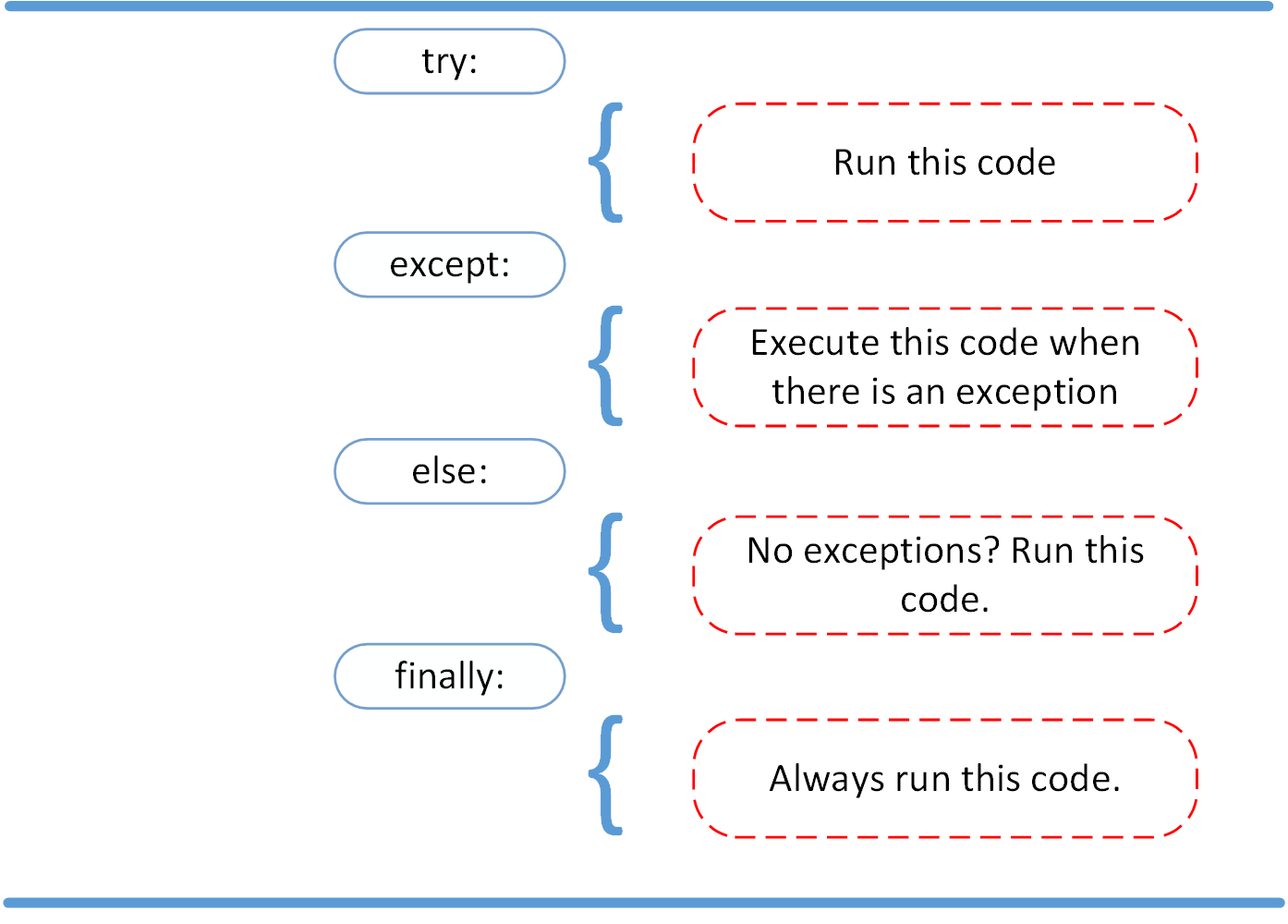
Common Errors with the Gemini API
Now, let's apply this to our Gemini API calls. What specific errors can the google-genai library raise?
This resource provides a great overview of common issues and the errors associated with them.
A Beginner's Guide to the Google Gen AI SDK for Python
The article 'A Beginner's Guide to the Google Gen AI SDK for Python' contains a fantastic troubleshooting section that lists the exact errors we need to handle.
Read the section '7. Troubleshooting Common Issues' and pay close attention to the paragraphs on 'API key errors', 'rate limits', and 'interpreting error messages'. Also, review the table at the end of the section. Focus on these errors: PERMISSION_DENIED (403): This indicates a problem with your API key. RESOURCE_EXHAUSTED (429): This means you've hit the rate limit. INVALID_ARGUMENT (400): Your request was malformed. INTERNAL (500): A problem on Google's side.
The resource highlights the most critical errors you'll face. The google-genai Python library translates these API errors into specific Python exceptions that we can catch in an except block. For instance:
PERMISSION_DENIEDbecomesgoogle.api_core.exceptions.PermissionDenied.RESOURCE_EXHAUSTEDbecomesgoogle.api_core.exceptions.ResourceExhausted.INVALID_ARGUMENTbecomesgoogle.api_core.exceptions.InvalidArgument.
Implementing Error Handling in Our Flask App
Let's update our summarize_endpoint to handle these specific errors. We will expand the try...except block to catch each of these cases and return a meaningful JSON error message with the appropriate HTTP status code. This is exactly what a professional web application does.
Here is the revised summarize_endpoint in your app.py:
# At the top of your app.py, add this import
import google.api_core.exceptions

# ... (your other imports and app setup) ...

@app.route('/api/summarize', methods=['POST'])
def summarize_endpoint():
    # ... (code to get user_text and create full_prompt) ...
    # This part remains the same from the previous lesson
    user_text = request.json.get('text')
    if not user_text:
        return jsonify({'error': 'No text provided'}), 400

    full_prompt = f"""
    Act as an expert text analyst. Your task is to provide a concise,
    neutral summary of the following text. The summary should be about 3-4 sentences long
    and capture the main points of the article.

    Text to summarize:
    ---
    {user_text}
    ---
    """

    # --- NEW ERROR HANDLING LOGIC ---
    try:
        # 1. Initialize the model and generate content
        model = genai.GenerativeModel('gemini-pro')
        response = model.generate_content(full_prompt)

        # 2. Parse the response (as learned in the previous lesson)
        summary = response.candidates[0].content.parts[0].text

        # 3. Return the successful response
        return jsonify({'summary': summary})

    except google.api_core.exceptions.PermissionDenied as e:
        print(f"API Key Error: {e}")
        return jsonify({'error': 'Authentication failed. Please check your API key.'}), 403

    except google.api_core.exceptions.ResourceExhausted as e:
        print(f"Rate Limit Error: {e}")
        return jsonify({'error': 'The service is busy. Please try again in a few moments.'}), 429

    except google.api_core.exceptions.InvalidArgument as e:
        # This can happen if the prompt is blocked for safety reasons before a response is even generated.
        print(f"Invalid Argument Error: {e}")
        return jsonify({'error': 'The request was rejected. The content may be inappropriate.'}), 400

    except (KeyError, IndexError, AttributeError):
        # This handles cases where the response was generated but is empty or structured differently
        # (e.g., content was blocked by safety filters after generation).
        # We access `prompt_feedback` to see why.
        print(f"Error parsing response. Feedback: {response.prompt_feedback}")
        return jsonify({'error': 'Failed to get a summary. The content may have been blocked for safety reasons.'}), 500

    except Exception as e:
        # A general catch-all for any other unexpected errors.
        print(f"An unexpected error occurred: {e}")
        return jsonify({'error': 'An unexpected server error occurred.'}), 500
Let's break down this new structure:
- Single
tryBlock: We've wrapped both the API call and the response parsing in onetryblock. This is cleaner because we can handle all potential errors in one place. - Specific
exceptBlocks First: We catch the most specific errors first (PermissionDenied,ResourceExhausted). This allows us to give tailored feedback. If your API key is wrong, the user should know the problem is authentication, not that the server is just "busy." - Parsing Error: The
except (KeyError, IndexError, AttributeError)block from our last lesson is still here. It catches errors if the API call succeeds but the response object doesn't have the text we expect (e.g., content was blocked). - General
exceptBlock Last: Finally,except Exception as e:acts as a safety net to catch any other errors we didn't anticipate, preventing our app from crashing.
Test your understanding!
What would happen if you put the except Exception as e: block at the very top of the except chain, before except google.api_core.exceptions.PermissionDenied:?
Show answer
The except Exception as e: block would catch all errors, including PermissionDenied, because PermissionDenied is a type of Exception. The more specific except blocks below it would never be reached. This is why you always order your except blocks from most specific to most general.
Conclusion
Congratulations on completing this crucial lesson! You now have a robust backend endpoint that not only communicates with an advanced AI but also handles the most common communication failures gracefully. This is a significant step toward building a professional, reliable application.
Key Takeaways:
- Real-world applications must handle errors to avoid crashing and provide a good user experience.
- The
try...exceptblock is Python's primary tool for error handling. - It's best practice to catch specific exceptions (like
PermissionDeniedorResourceExhausted) before catching a generalException. - For each type of error, you should log the technical details for yourself (
print()) and return a user-friendly JSON message and the correct HTTP status code to the frontend.
You have now completed the module on integrating the Gemini API! You have all the backend pieces in place: an endpoint that takes user input, calls the AI, parses the response, and handles errors.
In our next module, Implementing Core Application Features, we'll start putting this powerful backend to use. We'll begin by creating a new Flask endpoint to perform some basic, non-AI text analysis, like word and character counts. This will add more functionality to your application and give you more practice with building Flask APIs.