Hello! Welcome to Module 11, the final and most exciting module of our course: Deploying the Web Application. You've done an incredible job building and testing your AI Writing Assistant. Now it's time to prepare it for the world to see.
In the last module, we put the finishing touches on your project. You performed tests, created a requirements.txt file to list the project's dependencies, and wrote a README.md file to explain what your project does and how to run it. Your application is now complete, robust, and well-documented.
Our first step towards deployment is a conceptual one, but it's one of the most important in all of software development. Today, we'll focus on the learning outcome: Explain the difference between a development and a production environment. Understanding this distinction is crucial for launching a stable, secure, and professional web application.
1. The Two Worlds of Software
In web development, we don't just have one place where our application lives. Instead, we work in at least two separate "worlds" or environments. Each one has a distinct purpose. To get a quick overview of these environments, let's start with a short article.
Difference Between Development, Stage, And Production
This article from DEV Community, 'Difference Between Development, Stage, And Production', provides clear and simple definitions for the main environments you'll encounter. It's a great starting point.
Please read the sections titled 'Development' and 'Production'. You can skip the 'Stage' section for now; we'll touch on that later.
As the article explains, these two core environments are Development and Production. Let's explore each one in more detail.
2. The Development Environment: Your Private Workshop
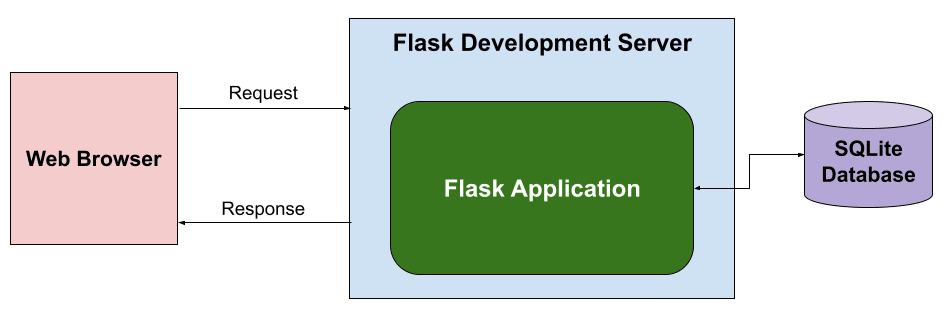
The development environment (often called "dev") is where you've been working this entire time. Think of it as your private workshop or sandbox.
- It runs on your local computer. When you run the
flask runcommand and access your app athttp://127.0.0.1:5000, you are running it in a development environment. - Only you can see it. No one else on the internet can access the version of the app running on your machine.
- It's for building, experimenting, and fixing. This is the safe space where you write code, test new ideas, and fix bugs. If something breaks, it only affects you. There's no pressure because no real users are depending on it.
The setup you've been using with the Flask development server is a perfect example.
3. The Production Environment: The Live Stage
The production environment (often called "prod") is the finish line. It's the live, public version of your application that your users interact with.
- It runs on a public server. Instead of your personal computer, the code is placed on a powerful computer (a server) that is connected to the internet 24/7.
- Anyone can access it. This is the version of your app at a public URL, like
www.my-ai-writer.com. - It must be stable and reliable. In production, the priority is to provide a smooth, error-free experience for your users. Downtime or bugs can frustrate users and damage the app's reputation.
This video gives a great explanation of the production environment and why it's treated with so much care.
Understanding Deployment Environments: Dev, Test, Staging & Production Explained!
This clip from 'Understanding Deployment Environments' by Super SQA explains what a production environment is and why it's so critical to get it right.
Watch these two short segments: Defining Production (1:41 - 2:14): This part defines the production environment as the final, public-facing version of a site, using examples like facebook.com. The Dangers of 'Prod' (4:33 - 5:04): This part hilariously but accurately describes why you must be extremely careful with the production environment.
As the video emphasizes, you don't mess around in production! All the hard work and testing you do in the development environment is to ensure that what you release to production is as perfect as possible.
4. Key Differences at a Glance
Now that we've defined both environments, let's look at a more detailed comparison. Separating them is a fundamental best practice that ensures safety and quality.
Production vs Development Environment: Key Differences ...
The article 'Production vs Development Environment: Key Differences Explained' provides an excellent, in-depth comparison. It breaks down why these environments are so different.
Please read the sections 'The Importance of Separating Production and Development Environments' and 'Key Differences Between Production and Development Environments'. Pay close attention to the comparisons based on 'Functionality,' 'Stability,' and 'User Interaction.'
To summarize the key points from the article, here is a simple table comparing the two environments:
| Feature | Development Environment | Production Environment |
|---|---|---|
| Purpose | Build, test, and debug code | Serve the finished application to end-users |
| Audience | You (the developer) and your team | The public / End-users |
| Location | Your local computer | A remote, public web server |
| Main Priority | Flexibility and speed of experimentation | Stability, performance, and security |
| Risk Tolerance | High: It's a safe place to make mistakes and break things. | Very Low: Errors and downtime have real consequences. |
| Configuration | Uses tools like Flask's built-in server with debug mode on. | Uses a robust, secure server with debug mode off. |
Test your understanding!
An end-user reports a bug on your live website. In which environment would you first try to replicate and fix the bug? Why?
Show answer
You would first try to replicate and fix the bug in the development environment. This is because it's a safe, isolated space where your work won't affect any live users. Once you've fixed the bug and tested it, you can then deploy the fix to the production environment.
5. The Bigger Picture: From Code to Customer
The separation of environments creates a clear and safe workflow for getting your code from your computer to your users. While Dev and Prod are the two most important environments, larger teams often use additional ones like Testing or Staging as an intermediate step.
A staging environment is an almost exact replica of the production environment. It's a final checkpoint to test the code on a live-like server before pushing it to actual users.
This workflow can be visualized as a simple progression:

This structured process is what allows developers to build complex applications reliably without constantly breaking the live product.
Conclusion
In this lesson, you've learned one of the most fundamental concepts of professional software development: the difference between your local workspace and the live application.
Key Takeaways:
- The Development environment is your private workshop on your local machine, designed for building and testing with high flexibility and risk tolerance.
- The Production environment is the live, public application running on a server, designed for stability, performance, and reliability with very low risk tolerance.
- Separating these environments is essential for safety, security, and quality control. It prevents you from accidentally showing broken or unfinished work to your users.
- The process of moving code from development to production is called deployment, and it's the focus of this entire module.
Now that you understand what these environments are and why they're separate, our next step is to take our Flask app and prepare it for its journey to production.
In the next lesson, "Configure the Flask application for a production environment," we'll make some specific changes to our code—like disabling debug mode—to make it safe and efficient enough to run on a public server.