Hello! Welcome to your next lesson in the "3D Math Fundamentals" module.
Introduction
In our last lesson, we saw how to combine individual scaling, rotation, and translation matrices into a single "model" matrix. We established a standard order of operations (Translate * Rotate * Scale) to correctly place objects in a scene.
Throughout that process, we took for granted that we were using 4x4 matrices and 4-component vectors. We briefly mentioned that this was necessary to make translation work with matrix multiplication, but we didn't explore why. This lesson fills that gap.
Today's learning outcome is to use homogeneous coordinates to uniformly represent 3D transformations with 4x4 matrices. We will explore:
- The fundamental limitation of 3x3 matrices that prevents them from handling translation.
- How adding a fourth dimension—introducing homogeneous coordinates—solves this problem mathematically.
- The elegant geometric intuition behind this "4D hack."
- The practical benefit of this system: representing all affine transformations in a single, unified format.
This concept is the bedrock of modern 3D graphics, enabling the efficient and flexible manipulation of objects, cameras, and entire scenes.
The Problem with Translation
As we've seen, scaling and rotation are linear transformations. They can be fully described by a 3x3 matrix. A key property of any linear transformation represented by a matrix is that the origin (0, 0, 0) always maps to itself. No matter what 3x3 matrix you multiply it by, the result is still (0, 0, 0).
Translation, however, is different. It's an affine transformation. Its goal is precisely to move the origin and every other point along with it. A translation is fundamentally an addition operation (new_position = old_position + offset), not a multiplication. You simply cannot represent an addition operation using only a 3x3 matrix multiplication.
Math for Game Developers: Why do we use 4x4 Matrices in 3D Graphics?
To start, let's watch a short video that clearly frames this problem. The video 'Why do we use 4x4 Matrices in 3D Graphics?' from the pikuma channel does an excellent job of explaining why translation is the 'odd one out'.
Watch the first 2 minutes and 20 seconds (00:00 - 02:20). Focus on the core argument: why scaling and rotation work fine with 3x3 matrices, but translation poses a unique challenge.
The Mathematical Solution: Homogeneous Coordinates
To solve this, mathematicians came up with a clever trick. Instead of representing our 3D points as (x, y, z), we add a fourth component, w, making them (x, y, z, w). These are called homogeneous coordinates.
For representing a 3D position, we set w = 1. So, our 3D point (x, y, z) becomes the 4D vector (x, y, z, 1).
This extra dimension allows us to construct a 4x4 matrix that, through multiplication, effectively performs an addition. Let's see how.
Math for Game Developers: Why do we use 4x4 Matrices in 3D Graphics?
The same pikuma video provides a clear walkthrough of the matrix multiplication that makes translation possible.
Now, continue watching from 02:20 to 07:19. The instructor will build the 4x4 translation matrix and multiply it by a 4D vector step-by-step. Follow the math to see how the translation values tx, ty, and tz get added to the x, y, and z components.
As the video demonstrated, the 4x4 translation matrix looks like this:
When we multiply this by our homogeneous point [x, y, z, 1]ᵀ:
And there it is: we've achieved translation via matrix multiplication. This is the core reason we use 4x4 matrices.
The Geometric Intuition: Translation as a Shear
The math works, but why does it work? There's a beautiful geometric interpretation.
A translation in an N-dimensional space can be visualized as a shear transformation in an (N+1)-dimensional space.
- A 2D translation is a 3D shear.
- A 3D translation is a 4D shear.
This is a non-trivial concept to visualize, but a couple of videos do a great job of building the intuition.
Homogeneous Coordinates: The 4D Hack for 3D Animations
First, let's watch 'Homogeneous Coordinates: The 4D Hack for 3D Animations' by Math The World. It uses a great analogy with a stack of cards to show how a shear in 3D looks like a translation in 2D.
Watch from 02:55 to 04:30. Pay close attention to the card stack analogy. Notice how shearing the 3D stack results in the top card (our 2D object) being translated.
Math for Game Developers: Why do we use 4x4 Matrices in 3D Graphics?
The pikuma video you watched earlier also explains this concept, directly applying it from 3D to 4D.
Watch from 08:25 to 17:35. This section provides a detailed geometric explanation, connecting the idea of linear transformations to the problem and presenting the shear in a higher dimension as the solution. This ties the math and the geometry together.
The takeaway from this is that by "lifting" our 3D world into a 4D space (by adding the w=1 coordinate), we turn the non-linear translation operation into a linear shear operation, which can be represented by a matrix multiplication.
The Ultimate Benefit: A Unified System
By moving to 4x4 matrices, we can now represent scaling, rotation, AND translation in the same format. This means we can combine them all into a single matrix, just as we did in the last lesson. We can pre-calculate the final Model = Translate * Rotate * Scale matrix once, and then apply that one matrix to all vertices of an object. This is immensely more efficient than applying three separate operations.
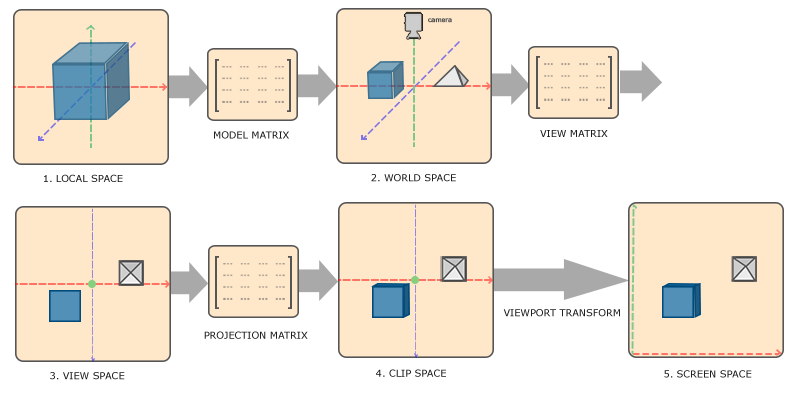
What is 'w' Really?
So far, we've only seen w=1. But what does the w component actually represent, and what happens when it's not 1?
Formally, a point with homogeneous coordinates [x, y, z, w] corresponds to the 3D Cartesian point [x/w, y/w, z/w]. This division by w is often called the perspective divide.
Explaining Homogeneous Coordinates & Projective Geometry
The article 'Explaining Homogeneous Coordinates & Projective Geometry' by Tom Dalling provides a great analogy to understand the role of 'w'.
Read the sections 'An Analogy in 2D', 'Applying it to 3D', 'When W=1', and 'The Math'. The projector analogy is a very intuitive way to think of 'w' as a scaling factor related to distance.
For the affine transformations we have covered (scale, rotate, translate), w starts at 1 and the transformed point also has w=1. So, the division x/w has no effect.
However, this changes when we talk about projection matrices, which are used to create the illusion of perspective (objects further away appear smaller).
The Perspective and Orthographic Projection Matrix
The Scratchapixel article on projection matrices has a fantastic section that contrasts affine transformation matrices with projection matrices. This is key to understanding the full power of the 'w' coordinate.
First, read the text under the heading 'Homogeneous Coordinates' that explains the math of converting back to Cartesian coordinates. Then, skip down to the end of the page and carefully read the two sections titled 'Affine Transform Matrix' and 'Projection Matrix (perspective or orthographic)'. Focus on how the final 'w' coordinate (w') is calculated in both cases. Note that for affine matrices, w' is always 1, but for projection matrices, it is not.
As you read, you saw that a projection matrix is constructed in such a way that the w coordinate of a transformed vertex ends up storing a value proportional to its distance from the camera. The final division by w (the perspective divide), which is automatically done by the GPU, is what scales the vertices to create the illusion of depth. We will build this matrix ourselves in a later module.
Conclusion
This lesson unpacked one of the most fundamental "tricks" in 3D graphics. You now have a much deeper understanding of the 4D math that powers every modern game engine.
Key Takeaways:
- 3x3 matrix multiplication cannot represent translation because it's an additive operation, and linear transformations preserve the origin.
- By adding a 4th component (
w=1), we move to homogeneous coordinates. This allows us to express translation as a 4x4 matrix multiplication. - This trick has a geometric interpretation: a 3D translation is equivalent to a 4D shear.
- The primary benefit is uniformity: all affine transformations (Scale, Rotate, Translate) become 4x4 matrices and can be combined into one.
- The
wcoordinate is crucial for perspective. While it remains 1 for affine transformations, projection matrices manipulatewto encode depth, and the final division bywcreates the 3D perspective effect.
In our next and final lesson of this module, we will apply everything we've learned about transformations to construct a view matrix, which defines the position and orientation of the camera in our 3D world.