Introduction
Hello! In our last lesson, we successfully parsed an OBJ file and transformed its data into two clean arrays in your computer's memory: a vertices array holding unique vertex data (position, normal, texcoord) and an indices array defining the triangles. This was a huge step, but that data is still just sitting in RAM.
Today, we will build the bridge to get that model onto the screen. Our goal is to create a Mesh struct to encapsulate the VAO, VBO, EBO, and vertex count for a model. Think of this as creating a self-contained "package" for a renderable object. Instead of juggling loose variables for every model's buffers, we'll create a tidy Mesh object that knows everything it needs to draw itself. This is a fundamental organizational step in building any game engine, moving us from scattered data to a structured scene.
1. The Need for Abstraction
So far, our examples have focused on rendering a single object. What happens when you want to render a player, several enemies, and a collection of props for the environment? If we store the VAO, VBO, and EBO for each object in separate global variables, our code will quickly become a tangled mess.
We need a way to group the data for a single drawable object together. This is a classic case for abstraction.
OpenGL [Episode 35] Starting Application and Mesh Abstraction Refactor
To start, let's watch a short clip from a video by Mike Shah. He explains exactly why we need to move away from global variables and start creating abstractions for our 3D objects.
Watch the first 41 seconds of the video. The key idea is that to have multiple objects, we need to abstract our OpenGL code to manage separate vertex buffers and vertex array objects for each one.
2. Designing the Mesh Struct
The solution, as the video suggests, is to create a structure that holds all the information needed to render one mesh. In C, we'll use a struct. What information does this Mesh need to contain?
- A Vertex Array Object (VAO): An
unsigned inthandle that acts as a "container" for the mesh's render state. - A Vertex Buffer Object (VBO): An
unsigned inthandle for the buffer on the GPU that stores ourverticesarray. - An Element Buffer Object (EBO): An
unsigned inthandle for the buffer on the GPU that stores ourindicesarray. - An Index Count: An
intto tell OpenGL how many vertices to draw using the EBO.
Here is what that looks like in C:
// In a header file, e.g., "mesh.h"
typedef struct {
    unsigned int vao; // Handle for the Vertex Array Object
    unsigned int vbo; // Handle for the Vertex Buffer Object
    unsigned int ebo; // Handle for the Element Buffer Object

    int index_count;  // Number of indices to render
} Mesh;
This Mesh struct doesn't contain the actual vertex data itself—that data will live on the GPU. Instead, the struct holds the handles or ID numbers that OpenGL gives us to refer to those GPU resources.
The diagram below perfectly illustrates what we are encapsulating. Our Mesh struct will hold the ID for a VAO, which in turn knows about the correct VBO and EBO for that specific object.
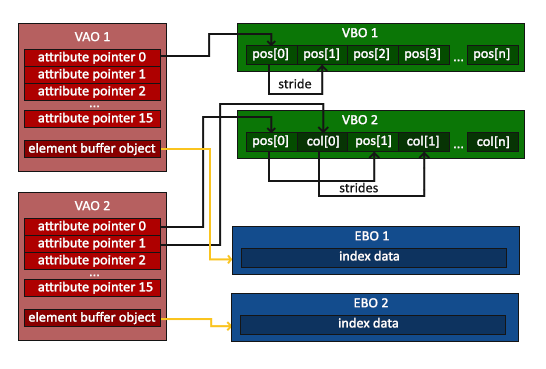
3. Creating and Populating the Mesh
Now that we have a blueprint for our Mesh, we need a function to construct it. This function will take the vertex and index data we generated in the last lesson, upload it to the GPU, and package the resulting handles into our Mesh struct.
The LearnOpenGL article on this topic provides an excellent walkthrough, though it uses C++. We will adapt its logic for C.
The LearnOpenGL article titled "Mesh" details how to create a class that manages all the necessary buffers and rendering calls. We'll use its setupMesh function as a guide for our C implementation.
First, read the introductory part of the article, down to the definition of the Mesh class. Notice how its private members VAO, VBO, EBO are exactly what we put in our struct. Then, skip to the section titled "Initialization" and read about the setupMesh() function. Pay close attention to: How glGen* and glBind* are used to create and set up the buffers. How glBufferData is used to send the vertices and indices data to the GPU. The use of glVertexAttribPointer to describe the layout of our Vertex struct (position, normals, etc.). The use of offsetof to calculate the memory offset of members within a struct. This is a very useful C macro.
Let's translate the setupMesh logic into a C function, create_mesh. This function will take our raw data and return a fully initialized Mesh object.
// In "mesh.c", assuming you have included your "vertex.h" and "mesh.h"
// You'll also need to include your OpenGL loading library (e.g., GLAD).


#include <stddef.h> // Required for offsetof

Mesh create_mesh(Vertex* vertices, int num_vertices, unsigned int* indices, int num_indices) {
    Mesh mesh;
    mesh.index_count = num_indices;

    // 1. Generate VAO, VBO, and EBO
    glGenVertexArrays(1, &mesh.vao);
    glGenBuffers(1, &mesh.vbo);
    glGenBuffers(1, &mesh.ebo);

    // 2. Bind the VAO to start recording state
    glBindVertexArray(mesh.vao);

    // 3. Bind and fill the VBO
    glBindBuffer(GL_ARRAY_BUFFER, mesh.vbo);
    glBufferData(GL_ARRAY_BUFFER, num_vertices * sizeof(Vertex), vertices, GL_STATIC_DRAW);

    // 4. Bind and fill the EBO
    glBindBuffer(GL_ELEMENT_ARRAY_BUFFER, mesh.ebo);
    glBufferData(GL_ELEMENT_ARRAY_BUFFER, num_indices * sizeof(unsigned int), indices, GL_STATIC_DRAW);

    // 5. Set up vertex attribute pointers
    // Vertex Positions
    glEnableVertexAttribArray(0);
    glVertexAttribPointer(0, 3, GL_FLOAT, GL_FALSE, sizeof(Vertex), (void*)offsetof(Vertex, position));

    // Vertex Texture Coords
    glEnableVertexAttribArray(1);
    glVertexAttribPointer(1, 2, GL_FLOAT, GL_FALSE, sizeof(Vertex), (void*)offsetof(Vertex, texcoord));

    // Vertex Normals
    glEnableVertexAttribArray(2);
    glVertexAttribPointer(2, 3, GL_FLOAT, GL_FALSE, sizeof(Vertex), (void*)offsetof(Vertex, normal));

    // 6. Unbind VAO to prevent accidental changes
    glBindVertexArray(0);

    return mesh;
}
The offsetof(Vertex, position) macro is a standard C tool that calculates the number of bytes from the beginning of the Vertex struct to the position member. It's the perfect way to tell OpenGL where each attribute begins within our interleaved vertex buffer, just as the article described.
4. Drawing and Destroying the Mesh
With our create_mesh function, we can now easily generate Mesh objects. To make them useful, we also need functions to draw them and to clean up their GPU resources when we're done.
Drawing the Mesh
A draw_mesh function is very simple. It just needs to bind the mesh's personal VAO and issue a draw call.
// In "mesh.c"
void draw_mesh(Mesh* mesh) {
    glBindVertexArray(mesh->vao);
    glDrawElements(GL_TRIANGLES, mesh->index_count, GL_UNSIGNED_INT, 0);
    glBindVertexArray(0);
}
Destroying the Mesh
It's crucial to free the GPU memory we allocated. The destroy_mesh function will delete the OpenGL objects.
// In "mesh.c"
void destroy_mesh(Mesh* mesh) {
    glDeleteVertexArrays(1, &mesh->vao);
    glDeleteBuffers(1, &mesh->vbo);
    glDeleteBuffers(1, &mesh->ebo);

    // Optional: zero out the handles to prevent accidental use
    mesh->vao = 0;
    mesh->vbo = 0;
    mesh->ebo = 0;
    mesh->index_count = 0;
}
5. Putting It All Together
Let's see how this new, cleaner structure fits into our main application.
// In your main.c file


#include "model_loader.h" // Your OBJ loader from last lesson
#include "mesh.h"         // Our new mesh functions

int main() {
    // ... window and OpenGL initialization ...

    // 1. Load data from an OBJ file
    model_data my_model;
    if (!load_obj("assets/models/cube.obj", &my_model)) {
        // Handle error
        return -1;
    }

    // 2. Create a GPU-ready mesh from the loaded data
    Mesh cube_mesh = create_mesh(my_model.vertices, my_model.n_vertices,
                                 my_model.indices, my_model.n_indices);

    // 3. The original data is now on the GPU, so we can free the CPU memory
    free(my_model.vertices);
    free(my_model.indices);
    // (And the temp arrays inside the model_data struct if you allocated them)

    // ... create shader program ...

    // Main Game Loop
    while (!glfwWindowShouldClose(window)) {
        // ... input handling, clearing the screen ...

        glUseProgram(shader_program);

        // ... set model, view, projection uniforms ...

        // 4. Draw the mesh with a single, clean function call
        draw_mesh(&cube_mesh);

        // ... swap buffers, poll events ...
    }

    // 5. Clean up GPU resources before exiting
    destroy_mesh(&cube_mesh);

    // ... terminate GLFW, etc. ...
    return 0;
}
As you can see, the main loop is now much cleaner. All the complexity of VAO/VBO/EBO binding is hidden away in our mesh.c file. To draw a cube, we just call draw_mesh. To draw a different model, we'd simply call draw_mesh with a different Mesh object.
Conclusion
In this lesson, you created a powerful and essential abstraction for your game engine. By encapsulating all the necessary OpenGL state and handles into a single Mesh struct, you've made your rendering code cleaner, more scalable, and easier to manage.
Key Takeaways:
- A
Meshstruct is a fundamental abstraction that bundles all the necessary data and GPU resource handles (VAO, VBO, EBO) to render a 3D object. - The struct holds the integer IDs for the OpenGL objects, not the raw vertex data itself, which resides on the GPU.
- Helper functions like
create_mesh,draw_mesh, anddestroy_meshprovide a clean interface to manage the lifecycle of a mesh. - The
offsetofmacro is a powerful tool for specifying vertex attribute layouts in C when using interleaved data in a struct. - This abstraction makes your main rendering loop significantly simpler and allows you to easily manage multiple objects in a scene.
Preview of the Next Lesson:
We can now create a Mesh from a single file. But what if we want to use the same model multiple times in our game? Loading the OBJ file and creating a new Mesh for every single instance would be incredibly inefficient. In the next lesson, we will implement a simple resource manager to load and store models, preventing duplicate loads. This manager will ensure that we only parse and upload each model to the GPU once, no matter how many times we use it in our world.