Introduction
Hello! In our last lesson, we took a major step forward by creating the Mesh struct. This allowed us to neatly package all the GPU resource handles (VAO, VBO, EBO) for a single 3D model, making our rendering code much cleaner. We can now load an OBJ file and draw it with a simple draw_mesh(&my_mesh) call.
However, consider a game scene with ten identical trees. Our current approach would force us to load the tree.obj file ten times, parse its text ten times, and upload the same vertex data to the GPU ten times. This is incredibly inefficient, wasting both CPU cycles and precious GPU memory.
Today, we will solve this problem by learning how to implement a simple resource manager to load and store models, preventing duplicate loads. This manager will act as a central cache for our 3D models. When we ask for a model, it will check if it's already in memory. If so, it will return the existing one instantly. If not, it will load it once, store it, and then return it. This is a foundational pattern used in every game engine.
1. The Problem of Redundant Loading
Before we build the solution, it's important to fully appreciate the problem we're solving. Loading from disk is one of the slowest operations a computer performs. Doing it unnecessarily can lead to long loading screens and performance stutters.
[Ep. 26] Building a Resource Manager to efficiently and more quickly load assets | Intro to SDL2
To visualize this inefficiency, let's watch a segment from a video by Mike Shah. Although he's using C++ and SDL to load 2D images, the principle is identical to us loading 3D models in C. He clearly demonstrates the wasted work of loading the same file multiple times.
Watch from 01:57 to 06:15. Focus on: The performance cost of repeatedly accessing the disk and loading the same data (01:57 - 04:40). The conceptual diagram of how a resource manager intercepts requests, checks for the resource, and either returns the existing copy or loads it from disk (04:40 - 06:15).
As the video explains, the solution is a centralized Resource Manager. Its job is to be the single point of entry for accessing resources.
2. The Key Data Structure: The Hash Map
Our resource manager needs a way to store and quickly retrieve loaded models. We need a data structure that maps a unique key to a value. In our case:
- Key: The file path of the model (e.g.,
"assets/models/cube.obj"), which is a string. - Value: The fully initialized
Meshstruct.
The perfect data structure for this task is a hash map (also known as a hash table). A hash map uses a special hash function to convert a key (like our file path string) into an index for an array, allowing for extremely fast lookups—on average, it takes the same amount of time to find an item whether you have 10 models or 10,000!
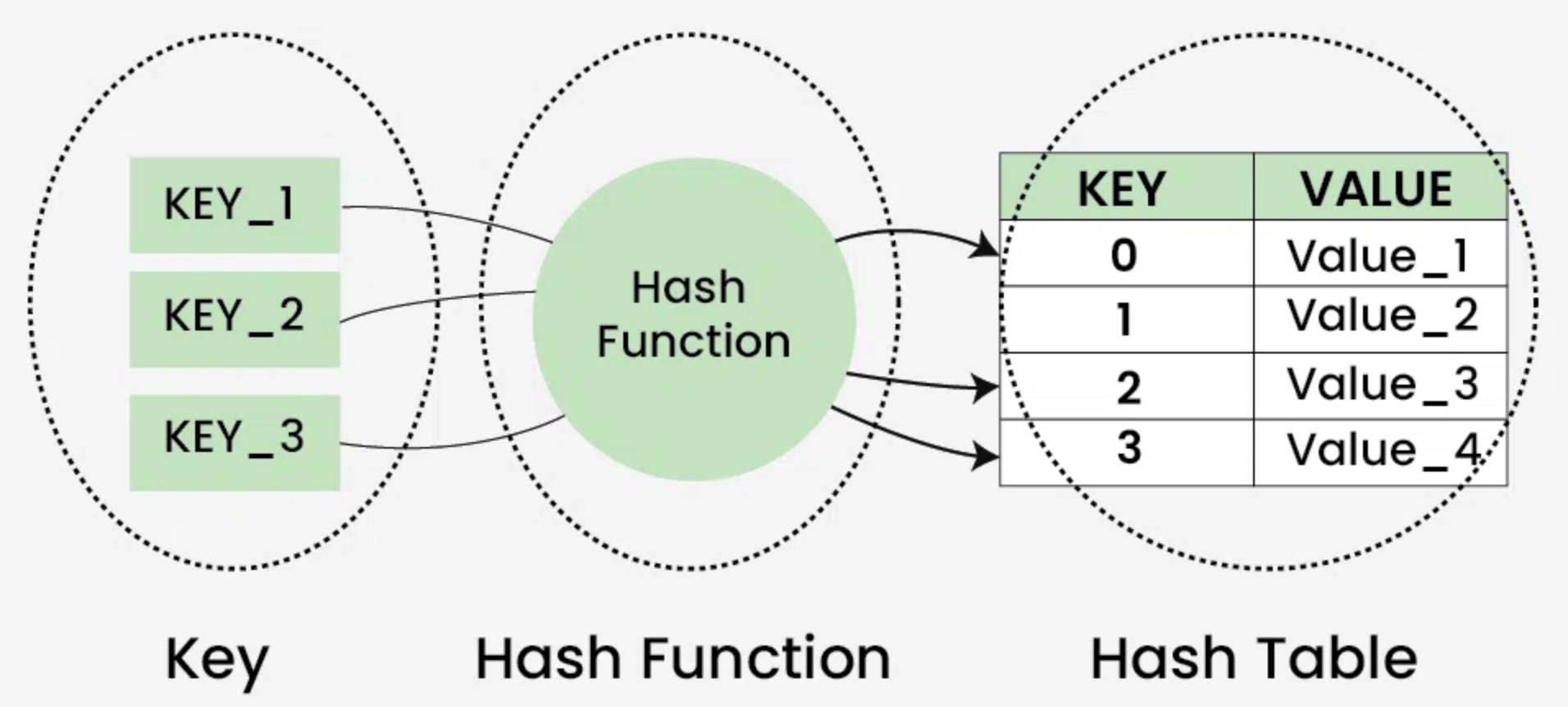
Sometimes, two different keys can produce the same index after hashing. This is called a "collision." A common way to handle this is to store a linked list of items at that index, a technique called "chaining".

While implementing a full-featured hash map in C is a great exercise, it's beyond the scope of this lesson. To keep our focus on the resource management logic, we will implement our cache using a simple dynamic array. This has slower lookups (we have to check every element), but the core "check-then-load" logic remains the same. You can always replace the array with a proper hash map later to improve performance.
3. Implementing a Simple Model Manager in C
Let's design our manager. We'll need a few new structs and functions. It's good practice to place these in their own resource_manager.h and resource_manager.c files.
3.1. Data Structures
First, we need a struct to represent one entry in our cache: a key-value pair.
// In resource_manager.h


#include "mesh.h" // We need the Mesh definition

typedef struct {
    char* key;      // The file path
    Mesh value;     // The loaded mesh
} CacheEntry;
Next, our main resource manager struct will hold a dynamic array of these entries.
// In resource_manager.h
typedef struct {
    CacheEntry* entries;
    int count;
    int capacity;
} ResourceManager;
3.2. Core Functions
Now, let's define the functions to operate on our ResourceManager.
Initialization: This function sets up an empty manager.
// In resource_manager.c


#include <stdlib.h>
#include <string.h>
#include "resource_manager.h"

void resource_manager_init(ResourceManager* manager) {
    manager->count = 0;
    manager->capacity = 8; // Start with some initial capacity
    manager->entries = malloc(manager->capacity * sizeof(CacheEntry));
}
Shutdown: This function is crucial for cleanup. It must iterate through all cached meshes, destroy their GPU resources, and free all allocated memory.
// In resource_manager.c
void resource_manager_shutdown(ResourceManager* manager) {
    for (int i = 0; i < manager->count; i++) {
        // Free the string key we allocated
        free(manager->entries[i].key);
        // Destroy the OpenGL objects for the mesh
        destroy_mesh(&manager->entries[i].value);
    }
    // Free the entries array itself
    free(manager->entries);
    manager->count = 0;
    manager->capacity = 0;
}
Get or Load: This is the heart of the manager. It first searches for the requested model. If found, it returns a pointer to it. If not, it loads, creates, and caches the model before returning it.
// In resource_manager.c
// (You'll need to include your model_loader.h)


#include "model_loader.h"

Mesh* resource_manager_get_model(ResourceManager* manager, const char* filepath) {
    // 1. Search for an existing model
    for (int i = 0; i < manager->count; i++) {
        if (strcmp(manager->entries[i].key, filepath) == 0) {
            // Found it! Return a pointer to the existing mesh.
            return &manager->entries[i].value;
        }
    }

    // 2. If not found, load it
    printf("Loading model for the first time: %s\n", filepath);
    model_data data;
    if (!load_obj(filepath, &data)) {
        fprintf(stderr, "Failed to load model: %s\n", filepath);
        return NULL; // Failed to load
    }

    // Create the GPU mesh
    Mesh new_mesh = create_mesh(data.vertices, data.n_vertices, data.indices, data.n_indices);

    // Free the CPU-side data, it's now on the GPU
    free(data.vertices);
    free(data.indices);

    // 3. Add the new mesh to our cache
    // Check if we need to resize the entries array
    if (manager->count >= manager->capacity) {
        manager->capacity *= 2;
        manager->entries = realloc(manager->entries, manager->capacity * sizeof(CacheEntry));
    }

    CacheEntry* new_entry = &manager->entries[manager->count++];
    new_entry->key = strdup(filepath); // strdup allocates and copies the string
    new_entry->value = new_mesh;

    return &new_entry->value;
}
Note: strdup is a common but non-standard function. If your compiler doesn't support it, you can easily write your own: char* new_key = malloc(strlen(filepath) + 1); strcpy(new_key, filepath);.
4. Integrating the Resource Manager
With our manager built, using it is simple. We initialize it once at the start of our program, use it to get all our models, and shut it down once at the very end.
// In your main.c


#include "resource_manager.h"

int main() {
    // ... window and OpenGL initialization ...

    // 1. Initialize the resource manager
    ResourceManager model_manager;
    resource_manager_init(&model_manager);

    // ... create shader program ...

    // 2. Load models using the manager
    Mesh* cube_mesh1 = resource_manager_get_model(&model_manager, "assets/models/cube.obj");
    Mesh* cube_mesh2 = resource_manager_get_model(&model_manager, "assets/models/cube.obj"); // Will be instant!
    Mesh* monkey_mesh = resource_manager_get_model(&model_manager, "assets/models/suzanne.obj");

    // Main Game Loop
    while (!glfwWindowShouldClose(window)) {
        // ...
        glUseProgram(shader_program);

        // ... set view/projection uniforms ...

        // Draw the first cube
        // set_model_uniform(mat4_translate(-1.5f, 0.0f, 0.0f));
        draw_mesh(cube_mesh1);

        // Draw the second cube at a different position
        // set_model_uniform(mat4_translate(1.5f, 0.0f, 0.0f));
        draw_mesh(cube_mesh2);

        // Draw the monkey
        // set_model_uniform(mat4_translate(0.0f, 1.0f, 0.5f));
        draw_mesh(monkey_mesh);

        // ... swap buffers, poll events ...
    }

    // 5. Clean up ALL cached resources with one call
    resource_manager_shutdown(&model_manager);

    // ... terminate GLFW, etc. ...
    return 0;
}
Notice how much cleaner this is. We request models by name, and the manager handles the loading and caching. When you run this, you should see a console message Loading model for the first time... once for cube.obj and once for suzanne.obj, but not for the second cube. We are now efficiently rendering multiple instances of the same model!
5. Beyond the Basics: Reference Counting
Our current manager is great, but it has one limitation: once a model is loaded, it stays in memory until the program shuts down. What if you have a game with many levels, and a model is only used in Level 1? It would be better to unload it from memory when it's no longer needed.
This is typically solved with reference counting.
A Resource Manager for Game Assets
The article 'A Resource Manager for Game Assets' on Gamedev.net describes a more advanced C++ resource manager that uses reference counting. While the code is C++, the concepts of the Load and Unload functions are directly applicable to our C design.
Read the 'Introduction' to understand the motivation behind reference counting. Then, read the section 'The Resource Manager'. Focus on the logic inside the Load and Unload functions. You don't need to understand the C++ syntax perfectly, just grasp the flow: Load: If the resource exists, increment its reference count. If it doesn't, load it and set its count to 1. Unload: Decrement the reference count. If the count reaches 0, free the resource from memory.
The key idea is that the resource manager tracks how many objects in the game are currently "using" a resource. When an object is destroyed, it tells the manager it's done with the resource, and the manager decrements a counter. When that counter hits zero, the resource is safe to unload.
Another advanced technique is the handle-based system, where instead of returning a direct pointer like Mesh*, the manager returns a simple, safe ID (a "handle"). This decouples the game code from the manager's internal memory layout, providing more flexibility and safety. The article "Engine Resources Management: a handle approach" (LINK) is an excellent read on this topic if you become interested in more professional engine architectures in the future.
Conclusion
You have now implemented one of the most fundamental systems in any game engine. By creating a resource manager, you've made your engine more efficient, scalable, and robust.
Key Takeaways:
- Loading the same resource multiple times from disk is highly inefficient and should be avoided.
- A resource manager acts as a central cache to ensure each resource is loaded only once.
- A hash map is the ideal data structure for mapping resource keys (like file paths) to their loaded data, providing fast lookups.
- The core logic of a resource manager is to "check if the resource exists, return it if so, otherwise load it, cache it, and then return it."
- A manager simplifies resource lifecycle management by providing a central place for initialization (
resource_manager_init) and cleanup (resource_manager_shutdown). - Advanced techniques like reference counting can be used to unload resources from memory when they are no longer needed during runtime.
Preview of the Next Lesson:
So far, we've focused on getting static models from files onto the screen. Our rendered objects are just visual props. The next step in building a game is to make them interact. In our next module, we will dive into Collision Detection, starting with how to implement an Axis-Aligned Bounding Box (AABB) intersection test to determine if two objects are overlapping in the game world.