Introduction
Hello! In our previous module, we successfully built a complete camera system. You can now freely navigate a 3D scene using keyboard and mouse input, with frame-rate independent movement.
Our scene, however, is still quite barren, containing only simple, hard-coded shapes. To build a real game, we need to load complex 3D models created in external software like Blender. This module, "Resource Management and Model Loading," is all about that process.
Before we can load a model, we need to understand the format in which its data is stored. Today, we'll focus on one of the most common and straightforward formats. Your learning outcome for this lesson is to describe the structure of the Wavefront OBJ 3D model format.
We will cover:
- The basic purpose and layout of an OBJ file.
- The key data types: vertex positions, texture coordinates, and normals.
- How faces are defined to connect vertices and form a mesh.
- How data is organized into groups and linked to materials.
This foundational knowledge will be essential for our next lesson, where we will write a C program to parse these files.
1. What is a Wavefront OBJ File?
The Wavefront OBJ format is a simple, text-based file format for representing 3D geometry. Because it's plain text, you can open and edit an OBJ file with any text editor. This transparency makes it an excellent starting point for learning about 3D model data.
At its core, an OBJ file is a list of data points (vertices) and a set of instructions (faces) that describe how to connect those points to create a surface.
Let's start with a clear, high-level overview.
The OBJ File Format - Scratchapixel
The following article from Scratchapixel provides a great introduction to the OBJ format, placing it in the context of other industry standards and explaining its primary purpose.
Read the section titled "What is the OBJ File Format?". This will give you a solid understanding of why we use OBJ and what its main strengths and limitations are. Don't worry about the other formats mentioned like glTF or FBX for now; just focus on the description of OBJ.
As the article mentions, OBJ files are popular due to their simplicity. The image below perfectly illustrates the relationship between the text file and the resulting 3D object.
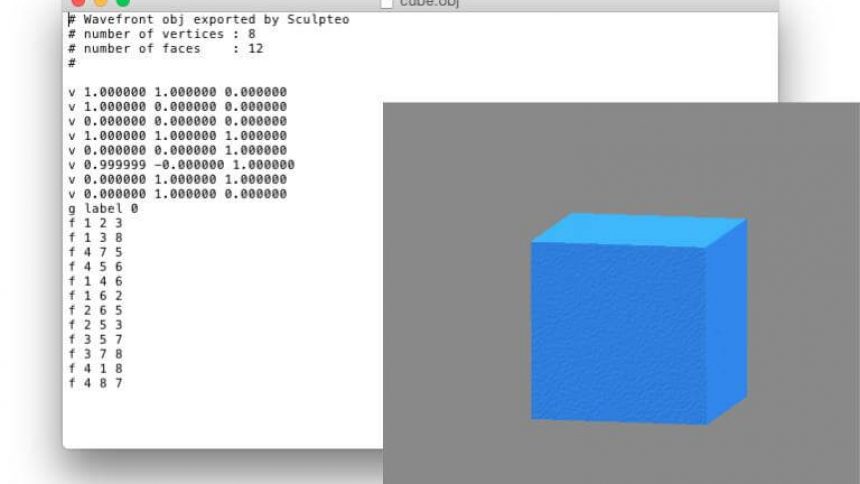
2. The Core Components: Vertex Data
An OBJ file primarily consists of lists of data. Each line in the file starts with a keyword or "tag" that identifies the type of data on that line. Lines starting with a hash symbol (#) are comments and are ignored.
The three most important data types for defining the shape and appearance of a model are:
v: A geometric vertex, representing a single point in 3D space with x, y, and z coordinates. These form the skeleton of the model.vt: A texture coordinate (often called a UV coordinate), representing a 2D point on a texture image with u and v coordinates. These are used to map a 2D image onto the 3D surface.vn: A vertex normal, representing a vector that is perpendicular to the surface at a vertex. Normals are crucial for calculating how light interacts with the model.
Let's watch a short video that clearly explains and visualizes each of these components.
Understanding the Wavefront OBJ File Format
The video "Understanding the Wavefront OBJ File Format" by Dr. Andrew Garcia provides an excellent, visual breakdown of a simple crate.obj file.
Watch the segments from 02:11 to 04:31. The presenter will walk you through: Vertex positions (v) (02:11 - 02:37) Vertex normals (vn) (02:37 - 03:21) Texture coordinates (vt) (03:21 - 04:31) Pay attention to how each data type corresponds to a visual element of the 3D model.
To summarize, an OBJ file begins by defining three distinct pools of data: all the positions, all the texture coordinates, and all the normals that will be used to build the model.
3. Defining Surfaces: Faces (f)
Having lists of vertices, normals, and texture coordinates is not enough; we need to connect them to form surfaces. This is the job of the f (face) tag.
A face is a polygon (most commonly a triangle or a quad) defined by a list of indices. These indices refer back to the data in the v, vt, and vn lists.
A Crucial Detail: 1-Based Indexing
Unlike C and many other programming languages that use 0-based indexing (where the first element is at index 0), OBJ files use 1-based indexing. The first vertex defined in the file is vertex 1, the second is 2, and so on. When we write our parser, we will need to remember to subtract 1 from every index we read.
Face Format
The format for a face line can vary depending on what data it references. The indices for position, texture, and normal are grouped for each vertex of the face and separated by slashes (/).
The OBJ File Format - Scratchapixel
The Scratchapixel article we looked at earlier has a concise section explaining the different syntaxes for a face definition.
Read the part of the "The OBJ File Format" section that starts with "f is a bit more involved.". It clearly lists the four common variations for face definitions. We'll explore the most complex one in the next video.
The four patterns you just read about are:
f v1 v2 v3: Vertex indices only.f v1/vt1 v2/vt2 v3/vt3: Vertex and texture coordinate indices.f v1//vn1 v2//vn2 v3//vn3: Vertex and normal indices (notice the double slash).f v1/vt1/vn1 v2/vt2/vn2 v3/vt3: Vertex, texture, and normal indices.
This last format is the most complete and is very common. Let's see it in action.
Understanding the Wavefront OBJ File Format
Let's return to Dr. Garcia's video, where he explains how face data ties everything together.
Watch from 04:31 to 08:00. The presenter breaks down a face line like f 5/1/1 1/2/1 2/3/1. Focus on understanding that each v/vt/vn triplet defines one corner of the triangle, specifying its position, its texture mapping, and its normal direction.
As the video explains, each face is essentially a "recipe" for building one polygon. For a single triangle, the f line provides three sets of indices, one for each of the triangle's three corners.
4. Organization and Materials
In addition to the core geometry, OBJ files have keywords for organization and appearance.
g [group_name]: Places subsequent faces into a named group. This is often used to separate a model into logical parts (e.g.,g wheels,g bodyfor a car model). However, as you'll find when you start parsing files from different sources, the usage of thegtag can be inconsistent.mtllib [filename.mtl]: Specifies the name of an external material library file (.mtl). This file contains definitions for colors, shininess, and transparency.usemtl [material_name]: Applies a specific material from the loaded library to the faces that follow. All subsequentflines will be rendered with this material until a newusemtlcommand is encountered.
For our initial parser, we will focus on v, vt, vn, and f, but it's important to know that these other keywords exist.
The following resource provides a quick reference for all the keywords we've discussed.
Alias/Wavefront OBJ File Format
This document from Clemson University provides a very convenient summary of the main keywords in an OBJ file.
First, review the list of keywords under the "Vertex data", "Elements", and "Grouping" categories to reinforce what you've learned. Then, read the section that starts with "OBJ files do not contain color definitions for faces..." to understand the roles of mtllib and usemtl.
Conclusion
You now have a solid theoretical understanding of the Wavefront OBJ file format. You know how it uses simple text commands to build complex 3D geometry from lists of positions, normals, and texture coordinates.
Key Takeaways:
- The OBJ format is a human-readable text file that describes 3D geometry.
- The primary keywords are
v(vertex position),vt(texture coordinate),vn(vertex normal), andf(face). - Lines starting with
#are comments. - Faces connect the data points using 1-based indices.
- The format for a face vertex is a triplet of indices:
vertex_index/texture_index/normal_index. gis used for grouping parts of a model, andmtllib/usemtlare for applying materials.
Preview of the Next Lesson:
Now that we can read and understand an OBJ file, our next logical step is to teach our program to do the same. In the next lesson, "Write a parser to load vertex positions, normals, and texture coordinates from an OBJ file," we will dive into C code. We'll open an OBJ file, read it line by line, and parse the v, vt, vn, and f data into structs that our game engine can use.