Hello! Welcome back to our course.
In the last lesson, we covered the fundamental syntax of C, translating concepts you knew from Python and C# like variables, loops, and functions. We established that when you declare a variable, say int x = 10;, the computer sets aside a piece of memory to store the value 10.
Today, we'll explore one of C's most powerful features: pointers. This lesson is all about learning how to work not just with the values of variables, but with their memory addresses. Mastering pointers is absolutely essential for high-performance programming, which is the bedrock of game engine development. You'll use them for everything from managing game objects efficiently to loading 3D models and textures.
Our goal is to understand what pointers are, how to use them to reference memory addresses, and how to perform pointer arithmetic to navigate through data, especially arrays.
What is a Pointer?
At its core, a pointer is simply a variable that holds a memory address as its value. Think of it like a street address for a house. The address itself isn't the house, but it tells you exactly where to find it. In C, a pointer doesn't hold the data (the house), but it holds the location of the data in memory (the address).
This video provides an excellent introduction using this very analogy.
Master Pointers in C: 10X Your C Coding!
Watch the first part of this video from Dave's Garage to get a clear, intuitive understanding of what a pointer is and why it's useful.
Watch from the beginning of the analogy at 00:58 to 02:26. Focus on how a pointer is compared to a house address—it's a reference to a location, not the object itself.
Declaring, Initializing, and Using Pointers
To work with pointers, you need to know about two fundamental operators:
- The Address-Of Operator (
&): When placed before a variable name (&my_var), it gives you the memory address of that variable. - The Dereference Operator (
*): When placed before a pointer variable name (*my_ptr), it gives you the value stored at the address the pointer is holding.
Here's how you declare a pointer: you specify the type of data it will point to, followed by an asterisk (*).
int x = 42; // A regular integer variable
int *ptr;   // A pointer that can hold the address of an integer

ptr = &x;   // Assign the address of 'x' to 'ptr'
Now, ptr holds the address of x. If you want to see the value of x through the pointer, you dereference it:
printf("Value of x is: %d\n", *ptr); // This will print "Value of x is: 42"
You can also use a dereferenced pointer to change the original variable's value:
*ptr = 100; // Go to the address stored in ptr, and change the value there to 100
printf("New value of x is: %d\n", x); // This will print "New value of x is: 100"
To solidify these core mechanics, please read the following sections from the article "Understanding Pointers in C".
Understanding Pointers in C: A Deep Dive into Memory and Control
This article provides a clear, written explanation of the concepts we just introduced. It will formally define pointers and cover the syntax for declaration, initialization, and dereferencing.
Read the sections '2. Memory and Addressing Basics' and '3. What Is a Pointer?'. Pay close attention to the roles of the & and * operators, the importance of pointer types, and the concept of a NULL pointer.
One of the most important uses for pointers is passing them to functions. In the last lesson, we wrote functions that took integer arguments. When you pass a variable like that, the function receives a copy. For large data structures, like one representing a complex game object, making copies is very inefficient. By passing a pointer, you're just passing a small memory address, allowing the function to work on the original data directly.
Pointer Arithmetic: Navigating Memory
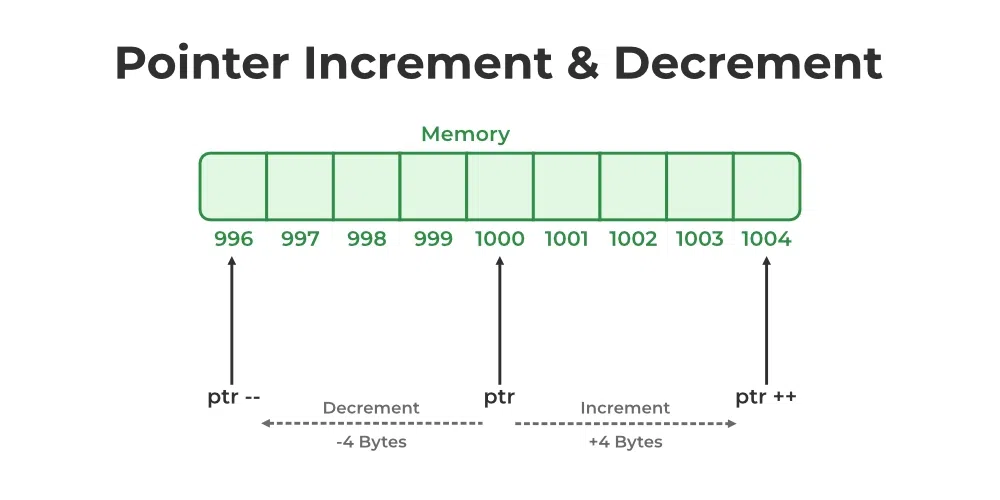
This is where pointers become truly powerful for working with collections of data. When you perform arithmetic on a pointer, you aren't just adding or subtracting bytes. The compiler is smart: it moves the pointer by a multiple of the size of the data type it points to.
For example, if an int takes up 4 bytes of memory:
- An
intpointerpis at address1000. p + 1will result in the address1004(the location of the next integer).p + 2will result in the address1008.
This behavior makes pointers perfect for working with arrays, which are, by definition, a contiguous block of elements of the same type. The name of an array in C can be used as a pointer to its very first element.
This means that for an array int arr[10], the following two expressions are equivalent:
arr[i](Standard array indexing)*(arr + i)(Pointer arithmetic: "start atarr, moveielements forward, and get the value there")
The next video provides a focused guide on how this works in practice.
Master Pointer Arithmetic In 10 Minutes (The Ultimate Guide For C Programmers).
This video from HuwsTube focuses specifically on pointer arithmetic. It clearly demonstrates how to navigate an array of integers using pointer addition.
Watch the segment from 01:00 to 05:41. Notice how incrementing the pointer moves it from one array element to the next and how array indexing a[4] is just another way of writing the pointer expression *(a + 4).
This intimate relationship between pointers and arrays is a cornerstone of C programming.

To tie this all together, let's read a final excerpt that reinforces the connection between pointer arithmetic and arrays.
Understanding Pointers in C: A Deep Dive into Memory and Control
This text will expand on the relationship between pointers and arrays, clarifying how array names 'decay' into pointers and how you can use pointer arithmetic to iterate through them.
Read section '5. Pointer Arithmetic' and '6. Pointers and Arrays: The Subtle Connection'. Focus on understanding why arr[i] and *(arr + i) are equivalent and how to use a pointer in a loop to traverse an array.
Practice Exercise
Let's apply what you've learned. Your task is to write a function that calculates the length of a string using pointer arithmetic. In C, a string is just an array of characters that ends with a special "null terminator" character, written as '\0'.
Task:
- In your
mainfunction, declare a string:char my_string[] = "Hello, world!"; - Write a function
int string_length(char *s)that takes a character pointer as an argument. - Inside
string_length, use awhileloop that continues as long as the character the pointer points to is not the null terminator ('\0'). - In the loop, you'll need a counter variable and you must increment the pointer to move to the next character.
- The function should return the final count.
- Call this function from
mainand print the result.
Hint: You can dereference the pointer s to get the current character (*s) and check if it's '\0'. To move to the next character, you just need to do s++.
This exercise directly tests your ability to use pointers to navigate a fundamental data structure in C.
Conclusion
Pointers are a deep topic, but you've covered the most critical ground today. They can be challenging at first, but they are an indispensable tool, especially for the low-level, high-performance code required in game engine development.
Key Takeaways:
- A pointer is a variable that stores a memory address.
- The address-of operator (
&) gets a variable's address. - The dereference operator (
*) gets the value at a pointer's address. - Pointers are typed (
int*,char*, etc.), which tells the compiler how to interpret the data they point to. - Pointer arithmetic moves a pointer in steps equal to the size of the data type it points to.
- Arrays and pointers are closely linked; an array name can be used as a pointer to its first element, allowing
*(arr + i)as an alternative toarr[i].
In our next lesson, we will build directly on this knowledge to tackle dynamic memory allocation. You'll learn how to use malloc() and free() to request memory from the operating system at runtime, a skill that is absolutely necessary for creating game objects, loading levels, and managing resources without knowing their size at compile time.