Hello! Welcome to your first lesson in the course "3D Game Development from the Ground Up." I'm excited to get started with you on this journey.
Given your background in Python and C#, you already have a solid grasp of programming logic. Our goal today is to bridge that knowledge to the C language. We'll focus on translating the fundamental concepts you already know—variables, control flow, and functions—into C syntax. This is the first essential step on our path to building a complete 3D game engine.
Let's begin by understanding the most significant difference between C and languages like Python.
The C Mindset: A Compiled Language
In your experience with Python, you've likely worked with an interpreter, which reads and executes your code line by line. C#, while also compiled, often uses a virtual machine (like the .NET CLR) which adds a layer of abstraction.
C, by contrast, is a compiled language in a more direct sense. You write your source code in a .c file, and then you use a compiler (like GCC or Clang) to translate that human-readable code directly into a machine-code executable file that the CPU can run. This process gives C its renowned performance, a critical factor for game development.
To understand this crucial distinction, please read the following brief explanation.
[PDF] C for Python Programmers
This document, 'C for Python Programmers', begins by explaining the core difference between compiled and interpreted languages. It will clarify the two-step process of creating and running a C program.
Please read from the beginning of the PDF up to the section titled 'The Programming Process in C'. Focus on the descriptions of interpreters versus compilers and the gcc my_program.c and ./a.out commands.
This compile-then-run workflow is a fundamental shift from the immediate feedback of an interpreted language, but it's central to how C operates.
The Anatomy of a Basic C Program
Now, let's look at the syntax. While Python uses indentation to define code blocks and newlines to separate statements, C uses punctuation. This gives you more formatting freedom, but also requires more discipline.
Let's break down the core components you'll see in almost every C file.
- Preprocessor Directives: Lines starting with
#, like#include <stdio.h>, are instructions for the compiler that run before compilation.#includeis used to bring in code from other files, known as header files (ending in.h).stdio.his the "standard input/output" library, which gives us access to functions likeprintf. - The
mainFunction: Every C program must have a function namedmain. This is the entry point where the operating system starts executing your code. - Statements and Semicolons: Every statement in C must end with a semicolon (
;). This is how the compiler knows where one instruction ends and the next begins. - Blocks and Curly Braces: Code blocks (like the body of a function or a loop) are enclosed in curly braces (
{ ... }). - Variable Declarations: Unlike Python's dynamic typing, C is statically typed. You must declare the type of every variable before you use it, and that type cannot be changed.
The article below provides an excellent side-by-side comparison of C and Python syntax.
The 'C for Python Programmers' guide from Real Python clearly illustrates the key syntactic differences you'll encounter. Pay close attention to how C handles comments, statement termination, and variable declarations.
Read the 'Basic C Syntax for Python Programmers' section, focusing on the 'General' subsection. This covers semicolons, curly braces, variable declarations, and comments, with a helpful C code example.
Here is a simple "Hello, World!" program in C that puts these pieces together:
// Include the Standard Input/Output library for the printf function


#include <stdio.h>

/*
  This is the main function.
  Execution of the program begins here.
*/
int main() {
    // Declare a variable 'x' of type integer and initialize it to 5
    int x = 5;

    // Call the printf function to print a string to the console
    printf("Hello, World!\n");
    printf("The value of x is: %d\n", x);

    // Return 0 to indicate that the program executed successfully
    return 0;
}
Notice the printf function. The %d is a format specifier that tells printf to substitute that spot with the value of the integer variable x. Other common specifiers include %f for floats and %c for characters.
Translating Control Flow
Your knowledge of if statements and loops from Python and C# will translate directly, but the syntax is different.
if / else if / else
The logic is identical, but C requires parentheses () around the condition and uses curly braces {} for the blocks.
Python:
if x > 10:
    print("Greater")
elif x < 10:
    print("Less")
else:
    print("Equal")
C:
if (x > 10) {
    printf("Greater\n");
} else if (x < 10) {
    printf("Less\n");
} else {
    printf("Equal\n");
}
C also has a switch statement, which is a useful alternative to long if-else if chains when checking a variable against multiple constant values. It's similar to the switch statement in C#.
Loops (while and for)
A while loop in C is very similar to its Python counterpart, again just using parentheses and braces. The C for loop, however, is structured very differently from Python's for-each loop and is one of the most common constructs in the language.
A C for loop has three parts inside the parentheses, separated by semicolons:for (initialization; condition; increment)
- Initialization: Runs once at the very beginning. (e.g.,
int i = 0;) - Condition: Checked before each iteration. The loop continues as long as this is true. (e.g.,
i < 10;) - Increment: Runs at the end of each iteration. (e.g.,
i++)
The following video gives a very quick visual tour of C's control flow structures.
Learn C Language In 10 Minutes!! C Language Tutorial
This short video provides a rapid overview of C's syntax. Focus on the sections covering conditional statements and loops to see them in action.
Watch the segment on conditional statements (03:01 - 04:35) and the segment on loops (04:35 - 06:15). Observe the syntax for if-else, switch, while, do-while, and for loops.
Translating Functions
In C, as in Python and C#, functions are blocks of reusable code. The key difference in C is the strict requirement to declare the return type and the type of each parameter.
Python:
def add(a, b):
    return a + b
C:
// Function signature: return type, name, and parameter types
int add(int a, int b) {
    // Function body
    return a + b;
}
A crucial concept in C is the distinction between a function declaration (also called a prototype) and a function definition.
- Definition: The full function, including its body (the code it executes).
- Declaration: Just the function's signature, ending in a semicolon. It tells the compiler "a function with this name, return type, and parameters exists somewhere."
This is necessary because the C compiler reads files from top to bottom. If you call a function before the compiler has seen its definition or declaration, it will produce an error.
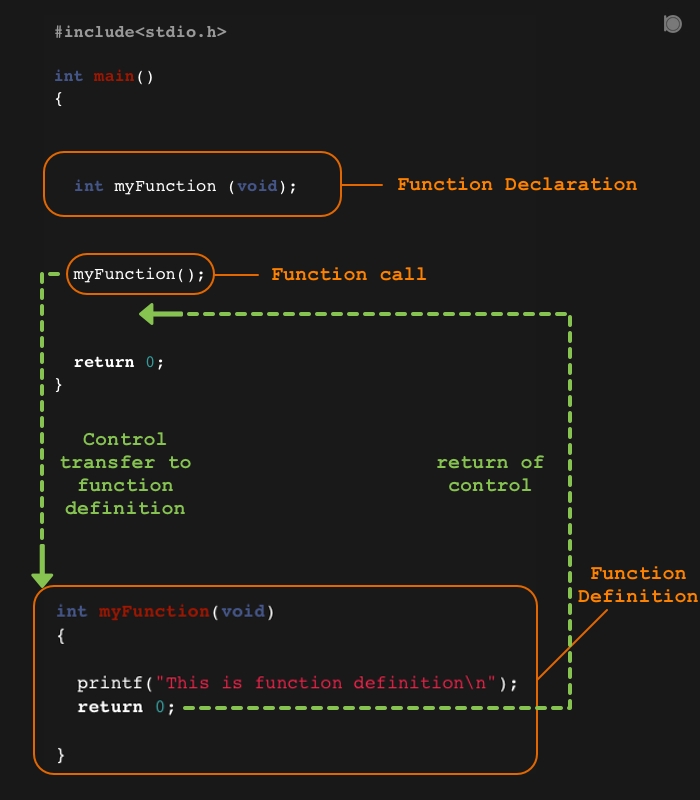
Let's read a final excerpt that solidifies the C function syntax.
This final section from 'C for Python Programmers' details the syntax for defining functions in C, highlighting the mandatory type specifications for returns and parameters.
Read the 'Functions' section. You can ignore the static modifier for now; we'll cover that later. Focus on the structure: <return_type> function_name(<parameters>).
Practice Exercise
To put this all together, try to write a simple C program yourself. Don't worry about getting it perfect on the first try. The goal is to practice the syntax.
Task: Write a C program that does the following:
- Includes the
stdio.hheader. - Contains a function called
is_eventhat takes oneintparameter and returns1if the number is even, and0otherwise. (Hint: use the modulo operator%). - In your
mainfunction, use aforloop to iterate from 1 to 10. - Inside the loop, call your
is_evenfunction. - Print a message for each number, indicating whether it is even or odd.
This exercise will give you a chance to practice variable declaration, function creation, loops, and conditional logic in C.
Conclusion
In this lesson, we've taken the first major step in your journey. You've learned how C's compiled nature influences its structure and how to translate your existing knowledge of variables, control flow, and functions from Python/C# into C syntax.
Key Takeaways:
- C is a compiled language, requiring a compile-then-run workflow.
- Syntax is governed by semicolons (
;) for statements and curly braces ({}) for blocks. - Variables are statically typed and must be declared with their type before use.
- The C
forloop has a distinct(initialization; condition; increment)structure. - Functions require explicit return types and parameter types.
This foundation is crucial. In our next lesson, we will dive into one of C's most powerful and defining features: pointers. Understanding pointers is fundamental to managing memory efficiently, which is a non-negotiable skill for building a game engine from scratch.