Hello! Let's get started with your next lesson.
Introduction
In our last lesson, you made a crucial strategic decision: you identified the single best social media platform for your niche and audience. This focus is your foundation for building a new, powerful traffic source for your affiliate business.
Today, we'll build directly on that decision. Our goal is to set up a professional-looking social media profile and add a link to your website in the bio. Think of your social media profile not just as a placeholder, but as a mini-landing page or a digital storefront. It's often the very first impression a potential customer will have of you. A professional, clear, and compelling profile builds immediate trust and guides visitors toward your website, which is exactly where you want them to go.
Let's break down the essential components that make a profile effective and walk through how to implement them on your chosen platform.
The Anatomy of a Professional Profile
Before we dive into platform-specific "how-to" steps, it's vital to understand the strategy behind each element of your profile. A comprehensive article from the ClickBank blog provides an excellent framework for this. We'll use it as our guide.
Create the Perfect Social Media Bio for Affiliate Marketing in 4 Steps
This article, 'Create the Perfect Social Media Bio for Affiliate Marketing in 4 Steps,' is a masterclass in profile optimization. It covers the 'why' behind each component, from your username to your bio link.
For now, we will read this article in sections. Start by reading 'Step 2: Choose the Perfect Social Media Username for Your Niche'. We'll cover the other parts as we go through the lesson. Pay attention to the five key tips for choosing a timeless and brandable name.
Based on that reading, let's break down the four pillars of a great profile.
1. Your Username: The First Point of Recognition
Your username (or handle) is your digital identity. As the article you just read points out, it should be memorable, easy to spell, and consistent across platforms if possible.
Key principles for a strong username:
- Clarity over cleverness:
HealthyEatingTipsis better thanHlthyEtngTpz123. - Niche relevance: Including a keyword like "fitness," "gardening," or "woodworking" instantly signals what you're about.
- Brand consistency: If your website is
MyAwesomeNiche.com, aim for a username likeMyAwesomeNicheto create a cohesive brand. - Timelessness: Avoid trendy slang that will feel dated in a year.
2. Visuals: Your Profile Picture and Cover Photo
Your visuals are your digital handshake. They need to convey professionalism and trustworthiness in a single glance.
Create the Perfect Social Media Bio for Affiliate Marketing in 4 Steps
Now, let's look at the advice for your profile photo from the same ClickBank article.
Read the section titled 'Profile Photo Tips for Personal Branding and Trust-Building'. Note the advice about using a clear headshot versus a logo.
Key decisions for your visuals:
- Headshot vs. Logo: For most affiliates starting out, a clear, friendly headshot where you make eye contact is more effective. It builds a personal connection and trust. A logo can work if you're building a distinct brand name, but a face is often more memorable.
- Quality is Non-Negotiable: Use a high-resolution, well-lit photo. A blurry or dark image immediately undermines your credibility.
- Cover/Banner Photo: On platforms like Facebook, YouTube, or Pinterest, the cover photo is valuable real estate. Use it to reinforce your brand, state your value proposition (e.g., "Helping you master sourdough baking"), or include a call-to-action.
3. The Bio: Your 150-Character Elevator Pitch
Your bio is arguably the most critical part of your profile. In just a few lines, you must answer three questions for a new visitor:
- Who are you?
- What's in it for me if I follow you?
- What should I do next?
Create the Perfect Social Media Bio for Affiliate Marketing in 4 Steps
Let's return to the ClickBank article one last time to learn how to write a bio that converts visitors into followers and clicks.
Read the section 'How to Write a Social Media Bio That Converts'. Focus on the five tips, especially leading with value and including a strong call-to-action (CTA).
A highly effective formula for your bio is:
"I help [Your Target Audience] do/achieve [Their Desired Outcome] so that they can [Experience the Benefit]."
Then, follow it with a clear Call-to-Action (CTA) that directs them to your link.
Example:
"Helping beginner gardeners grow their own organic vegetables. 🌿🍅 Click the link below for my free '5-Day Garden Setup' checklist! 👇"
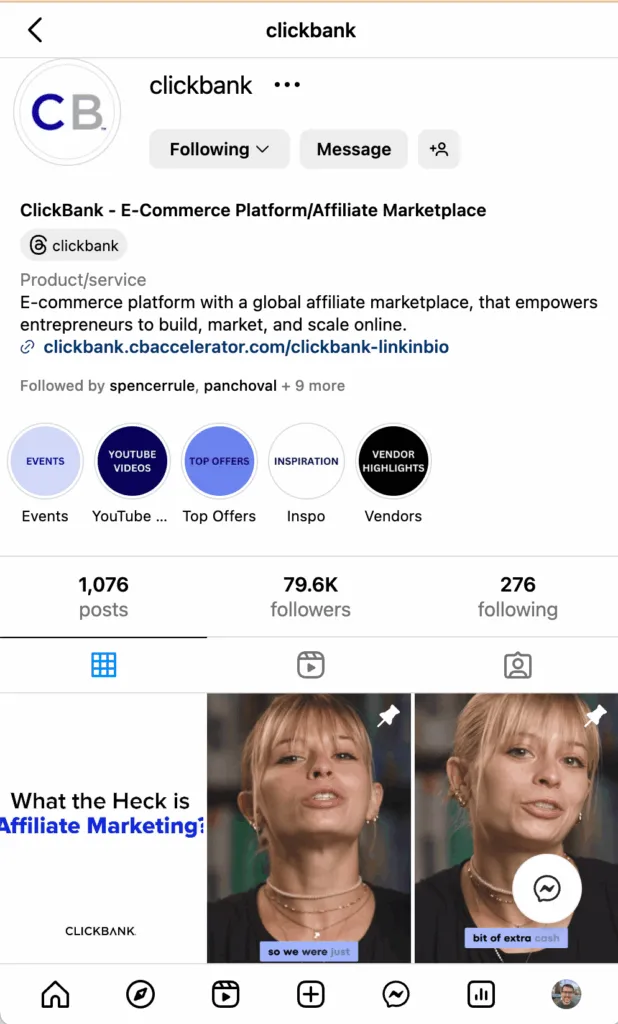
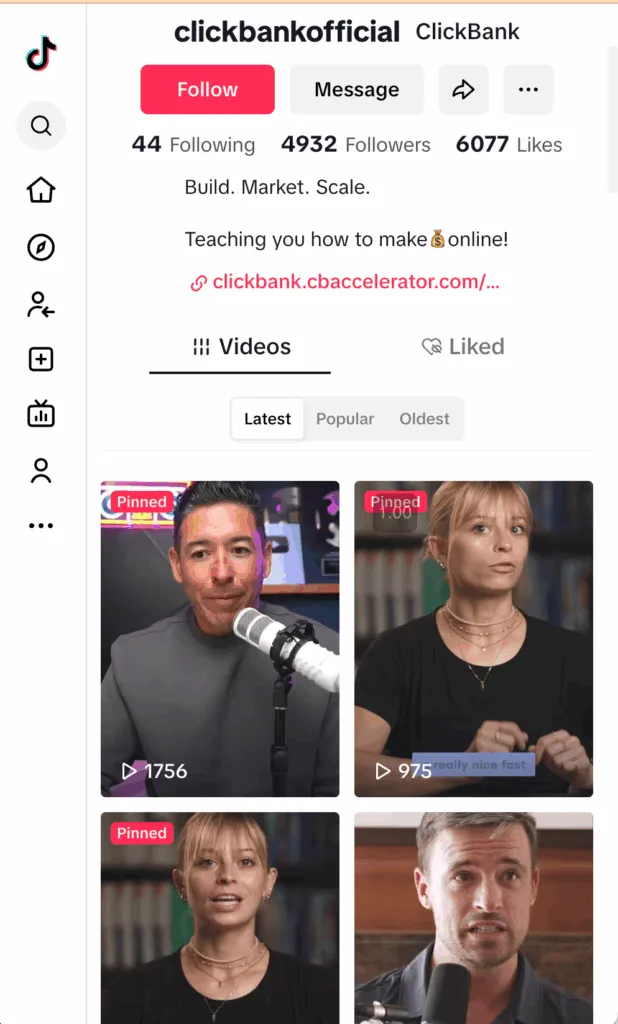
Look at how ClickBank does this on their own Instagram and TikTok profiles. Notice the clear description of who they are and the prominent link.
4. The Link in Bio: The Bridge to Your Website
This is the entire point of your social media presence as an affiliate: to drive traffic. The "link in bio" is the primary bridge between the social media platform and your affiliate website. All your content should, in some way, encourage people to visit your profile and click this link.
Practical Setup: Platform-Specific Instructions
Now that you understand the strategy, let's get practical. The exact steps to edit your profile and add a link vary slightly by platform. Find the platform you chose in the last lesson and follow the specific instructions.
For Instagram
Instagram is a visual platform where your profile serves as your main hub. This video walks you through the entire setup process.
How To Use Instagram For Business (Beginner's Guide To Getting Comfortable On Instagram)
The video 'How To Use Instagram For Business' provides a clear, step-by-step walkthrough of setting up a professional profile.
Watch from 02:14 to 04:57. This section covers everything from your profile picture and bio to adding your all-important website link. Pay close attention to the bio formula she recommends.
For Pinterest
Pinterest functions more like a visual search engine. Setting up your profile as a "Business Account" is essential to get access to analytics and other features.
Free Pinterest Affiliate Marketing Course
This clip from the 'Free Pinterest Affiliate Marketing Course' shows you not only how to create an account but also how to convert it to a business profile and add your website.
Watch from 07:45 to 14:47. This is a longer clip, but it's very detailed. The first part (until 09:59) covers signing up and converting to a business account. The second part (from 09:59 onwards) shows you how to edit your profile picture, banner, bio, and add your website link.
For TikTok
TikTok has a specific rule for adding a clickable link: you either need a Business Account or a certain number of followers (this number can change, but it's traditionally been 1,000). For a new affiliate, switching to a Business Account is the best path.
How to Add a Link to Your TikTok Bio (+ What to Do If You Can't)
The article 'How to Add a Link to Your TikTok Bio' from Buffer explains these rules clearly and shows you exactly what to do.
Please read the sections 'Who can add a link to their TikTok bio?' and 'How to add a link to your TikTok bio'. This will explain the requirements and give you the step-by-step process.
For Facebook, YouTube, or other platforms
The principles remain the same. On your Facebook Page, look for the "Edit Page" or "About" section to add your website link. On YouTube, the link can be added in your Channel's "About" tab and on your Channel Banner. The key is always to look for the profile/channel settings and find the field for "Website."
Your Action Plan
It's time to put this into practice. Open up your chosen social media platform and complete the following steps:
- Finalize Your Username: If you're creating a new account or your current one isn't professional, choose a new username based on the principles we discussed.
- Upload Your Profile Picture: Choose a high-quality headshot or a clean logo.
- Write and Add Your Bio: Use the "I help..." formula and include a strong call-to-action.
- Add Your Website Link: Find the "Website" field in your profile settings and add the full URL of your affiliate website. Double-check that the link works!
Conclusion
Congratulations! You have now transformed your social media profile from a simple presence into a strategic tool for your affiliate business. It's now optimized to attract your target audience, build trust, and most importantly, act as a gateway to your website.
Key Takeaways:
- A professional social media profile is your digital storefront; every element matters.
- Your username, profile picture, and bio must work together to quickly communicate who you are and the value you offer.
- A compelling bio clearly states who you help, what you help them achieve, and includes a call-to-action.
- The "link in bio" is the crucial bridge that turns social media followers into website visitors and potential customers.
Preview of the next lesson:
Your professional profile is ready and waiting. But what should you post? In the next lesson, we will define 2-3 core content themes or pillars for your social media presence. This will give you a clear strategy for creating consistent, valuable content that resonates with your audience and supports your affiliate goals.