Introduction
Hello! Welcome back to our exploration of performance tracking.
In the last lesson, we focused on your website, using Google Analytics to see where your visitors come from and which of your content pages are most popular. This gives you a fantastic view of how your audience finds and interacts with your site.
Today, we shift our focus from your website to your inbox. As you build your email list, sending out newsletters, product recommendations, and your welcome sequence, you'll need a way to measure what's working. Simply sending emails into the void isn't a strategy; understanding how your subscribers react is key to building trust and generating affiliate commissions.
This lesson is designed to help you interpret basic email marketing metrics, including open rate and click-through rate. We'll define the most important metrics, explain how they are calculated, and, most importantly, show you how to use them as diagnostic tools to improve your email marketing and grow your business.
The Language of Email Data: Metrics, KPIs, and Reports
Before we dive into specific numbers, it's helpful to understand the basic concepts that email marketers use to measure performance. Terms like "data," "metrics," and "KPIs" are often used interchangeably, but they represent a clear hierarchy.
- Data is the raw collection of facts (e.g., 500 emails were delivered, 100 were opened).
- Metrics add context to data, turning it into a quantifiable measurement (e.g., the open rate was 20%).
- Key Performance Indicators (KPIs) are the specific metrics you decide are most important for measuring success against your goals (e.g., your main KPI might be the conversion rate, not the open rate).
- Reports are collections of KPIs that summarize campaign performance.
To get a clear overview of these concepts, the following video provides an excellent introduction.
Collect and analyze email campaign data | Google Digital Marketing & E-commerce Certificate
This video from Google Career Certificates explains the foundational concepts of email marketing data and how metrics, KPIs, and reports fit together to help you make better decisions.
Please watch from 00:03 to 06:07. Focus on understanding the relationship between data, metrics, and KPIs.
The Two Most Important Engagement Metrics
While there are many metrics you can track, two are fundamental to understanding how your subscribers are interacting with your emails at a basic level: Open Rate and Click-Through Rate.
1. Open Rate
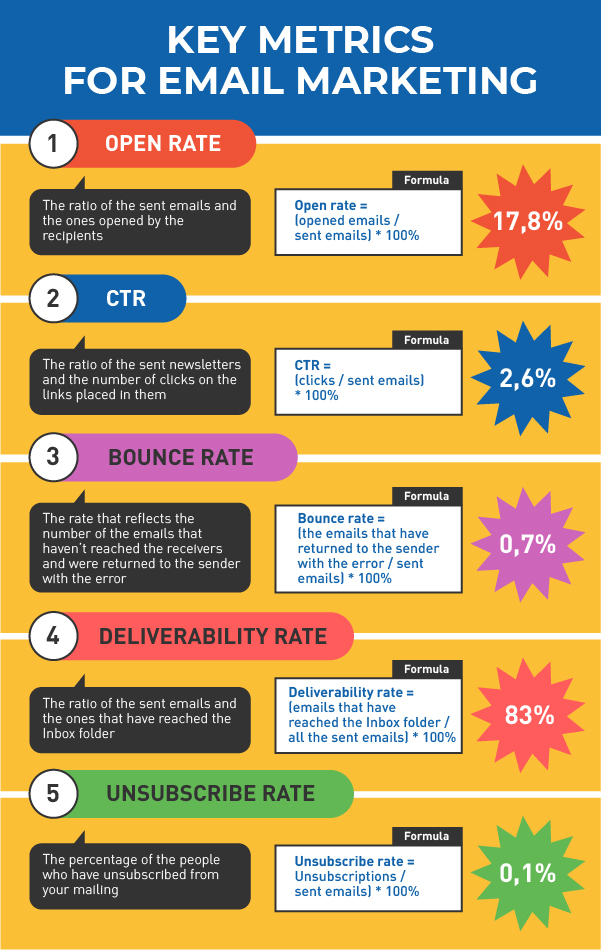
The Open Rate is the percentage of subscribers who opened your email out of the total number of people who received it.
Formula: (Total Emails Opened / Total Emails Delivered) × 100
A high open rate is a good indicator that your subject lines are compelling and that your subscribers recognize and trust you as the sender. It’s the first hurdle you need to clear; if no one opens your email, the amazing content inside doesn't matter.
2. Click-Through Rate (CTR)
The Click-Through Rate (CTR) is the percentage of subscribers who clicked on a link within your email out of the total number of people who opened it.
Formula: (Total Unique Clicks / Total Emails Opened) × 100
CTR is arguably more important than the open rate. It tells you if the content of your email—your copy, your images, and your call-to-action (CTA)—was persuasive enough to make someone take the next step. For an affiliate marketer, this "next step" is almost always clicking your affiliate link.

The following video provides a clear definition of these two metrics. It refers to CTR as the "click-to-open rate," which is the same concept.
Collect and analyze email campaign data | Google Digital Marketing & E-commerce Certificate
Let's continue with the Google Career Certificates video, which now specifically defines open rate and click-to-open rate (CTR).
Watch from 06:07 to 09:14. Pay close attention to how each metric is defined and what it tells you about your campaign's performance.
For a more detailed written guide, including industry benchmarks and an important modern consideration, please review the following resource from the ClickBank blog.
Top 16 Email Marketing Metrics for Affiliate Marketers to ...
This article, 'Top 16 Email Marketing Metrics for Affiliate Marketers,' provides text-based definitions and valuable context for the metrics we are discussing.
Please read the section '5 Key Engagement Metrics,' specifically focusing on the subsections for 'Open Rate,' 'Click Rate,' and 'Click-Through Rate.' Note the industry benchmarks provided and the important aside about Apple's Mail Privacy Protection (MPP) and its effect on open rates.
As the article mentions, a common point of confusion is the difference between Click Rate (clicks / delivered) and Click-Through Rate (clicks / opened). Most email marketers today focus on CTR because it gives a clearer picture of how engaging the email content itself is to the people who actually saw it. Always check which definition your specific email service provider (like MailerLite) is using.
A Broader View of Campaign Health
Open Rate and CTR are just the beginning. To get a full picture of your email campaign's health and its impact on your business, you need to be aware of a few other key metrics.
- Unsubscribe Rate: The percentage of recipients who opted out of your list. A high rate might mean your content isn't what they expected, or you're sending emails too frequently.
- Bounce Rate: The percentage of emails that couldn't be delivered. This indicates problems with your email list's health (e.g., old or invalid email addresses).
- Conversion Rate: The percentage of recipients who clicked a link and completed a desired action (for an affiliate, this is usually making a purchase). This is the ultimate measure of success.
The video below explains these additional metrics.
Collect and analyze email campaign data | Google Digital Marketing & E-commerce Certificate
This final clip from the Google video covers conversion rate, bounce rate, and complaint rate, rounding out your knowledge of essential email metrics.
Watch from 09:14 to 12:26. Focus on what each of these metrics signifies for your business.
Here is a helpful infographic that summarizes the key metrics we've discussed.
From Metrics to Actionable Insights
Knowing the definitions is one thing; using them to make decisions is another. Here’s how you can interpret your metrics to diagnose problems and find opportunities.
- High Open Rate, Low CTR: Your subject line did its job and got people to open the email. However, the content inside—the copy, the offer, or the call-to-action—wasn't compelling enough to earn a click. Action: Test different email copy, improve your CTA, or make sure the offer is a better fit for your audience.
- Low Open Rate, High CTR: The few people who opened your email loved it and clicked the link. The problem isn't your content; it's that not enough people are seeing it. Action: Your subject line needs work. Brainstorm more curiosity-driven or benefit-oriented subject lines and A/B test them. Also, check your deliverability to ensure you're not landing in the spam folder.
- High Unsubscribe Rate: You are losing subscribers with each email. This is a red flag that your content is not aligned with your audience's expectations, or your email frequency is too high. Action: Re-evaluate your content strategy. Are you providing the value you promised when they signed up? Consider sending fewer emails.
A Note on "Vanity Metrics"
As a ClickBank affiliate, your primary goal is to generate sales. While a high open rate feels good, it doesn't pay the bills. This is why experienced marketers often refer to Open Rate as a vanity metric—it looks good on the surface but doesn't directly correlate with revenue.
Your CTR is a better indicator of success, but the most important metric of all is your Conversion Rate. It's far better to have a small, engaged list with a high conversion rate than a massive list that opens emails but never buys anything.
The ClickBank blog reinforces this important point.
Launching an Affiliate Email Marketing Campaign for Beginners
In this article about launching an email campaign, the author makes a crucial point about focusing on the metrics that truly matter for an affiliate.
Please read just the first paragraph of the section titled 'Launching an Affiliate Email Marketing Campaign Wrap-up.' Note the emphasis on focusing on metrics that lead to success, rather than vanity metrics.
Conclusion
You now have a solid foundation for understanding the story your email data is telling you. By looking beyond the raw numbers and interpreting the metrics, you can systematically improve every aspect of your email marketing.
Key Takeaways:
- Open Rate measures the effectiveness of your subject line and sender reputation.
- Click-Through Rate (CTR) measures the persuasiveness of your email's content and call-to-action.
- Other metrics like Unsubscribe Rate and Bounce Rate help you monitor the health and engagement of your email list.
- For an affiliate marketer, the ultimate metric is Conversion Rate. Use opens and clicks as diagnostic tools to optimize for the action that truly matters: the sale.
Preview of the next lesson:
In this lesson, we focused on the metrics within your email service provider (like MailerLite). But what happens after someone clicks your affiliate link? In our next lesson, we will analyze ClickBank reporting data to see which links are getting clicks versus sales (hops vs. order form impressions). This will connect your email performance directly to purchase intent, giving you an even clearer view of what's driving your revenue.