Hello again! I hope you're ready to continue building our API.
In the last lesson, we created our first database-backed endpoint, GET /posts, which retrieves a list of all posts. This is the "Read" part of CRUD for multiple items. Now, we'll implement the other common "Read" operation: fetching a single item by its unique identifier.
Today's learning outcome is to implement a 'retrieve' endpoint to fetch a single record by its ID. This will involve three new, important concepts:
- Path Parameters: Capturing a dynamic value (like an ID) from the URL.
- Filtering Queries: Adding a
WHEREclause to our SQLAlchemy query to find a specific record. - Handling "Not Found" Errors: Returning a proper 404 error if the requested record doesn't exist.
By the end of this lesson, you will have a GET /posts/{post_id} endpoint that can retrieve any specific post from your database.
1. Path Parameters and Handling Not Found Errors
To fetch a single item, we need a way for the client to specify which item it wants. The standard RESTful pattern for this is to include the item's unique ID in the URL path, like /posts/1. This part of the URL, {post_id}, is called a path parameter.
FastAPI makes it simple to define and use them. You declare the parameter in the path decorator and then accept it as an argument in your function, using a type hint for automatic validation.
Once we have the ID, we query the database. But what if no post with that ID exists? The user might have typed a wrong ID, or the post may have been deleted. In this case, the API shouldn't crash; it should return a "Not Found" error. The standard HTTP status code for this is 404. FastAPI provides the HTTPException class specifically for this purpose.
The following video demonstrates this entire pattern clearly. Although it uses a synchronous version of SQLAlchemy, the core logic is identical to what we will implement:
- Define a path parameter (e.g.,
{user_id}). - Accept it as a typed function argument.
- Query the database for that specific ID.
- If the result is
None, raise anHTTPExceptionwith status code 404. - If found, return the result.
How to Build a FastAPI SQLite REST API in Python | CRUD Operations | SQLAlchemy | in Just 14 Minutes
Watch this clip from 'How to Build a FastAPI SQLite REST API' to understand the fundamental pattern of a 'retrieve by ID' endpoint.
Watch from 09:54 to 10:48. Pay close attention to how the {user_id} from the URL is used in the query, and how HTTPException is raised when the user is not found.
2. Filtering Queries with Async SQLAlchemy
Now, let's look at how to perform the database query using our modern async SQLAlchemy setup. In the last lesson, our query was select(Post) to get all posts. To get a specific post, we need to add a WHERE clause.
In SQLAlchemy 2.0, this is done by chaining the .where() method to our select statement.
select(Post).where(Post.id == post_id)
This creates a query that translates to SELECT * FROM posts WHERE posts.id = ?.
After executing the query with await db.execute(...), we don't want a list of all results. We want just the first one. For this, we use .scalars().first() instead of .scalars().all(). This method conveniently returns the first matching object, or None if no records match the WHERE clause—which is exactly what we need for our "Not Found" check.
The article below provides a perfect, concise example of this modern async implementation.
Setting up a FastAPI App with Async SQLALchemy 2.0 & Pydantic V2
The article 'Setting up a FastAPI App with Async SQLALchemy 2.0 & Pydantic V2' shows the exact syntax we'll be using. Focus on the get_user function, which is the service-layer logic for our endpoint.
Read the section titled 'CRUD'. Examine the get_user function. Note how it uses select(UserDBModel).where(...) to build the query and (...).first() to retrieve a single result. Also, observe the check if not user: which raises the HTTPException.
3. Hands-On: Implementing the GET /posts/{post_id} Endpoint
Let's apply these concepts to our application. We'll add a new endpoint to our routers/posts.py file.
- Open your
routers/posts.pyfile. - Add
HTTPExceptionto your imports fromfastapi. - Add the following endpoint function below your
get_all_postsfunction.
# routers/posts.py

from fastapi import APIRouter, Depends, HTTPException # Add HTTPException
from sqlalchemy import select
from sqlalchemy.ext.asyncio import AsyncSession


# Import our models and schemas
from models import Post
from schemas import PostRead
from database import get_async_session


# Create a new router
router = APIRouter()


@router.get("/posts", response_model=list[PostRead])
async def get_all_posts(db: AsyncSession = Depends(get_async_session)):
    """
    Get all posts from the database.
    """
    query = select(Post)
    result = await db.execute(query)
    posts = result.scalars().all()
    return posts


# --- ADD THE NEW ENDPOINT BELOW ---

@router.get("/posts/{post_id}", response_model=PostRead)
async def get_single_post(post_id: int, db: AsyncSession = Depends(get_async_session)):
    """
    Get a single post by its ID.
    """


    # Create a query to find the post by ID
    query = select(Post).where(Post.id == post_id)


    # Execute the query
    result = await db.execute(query)


    # Get the single post object, or None if not found
    post = result.scalars().first()


    # If the post is not found, raise a 404 error
    if post is None:
        raise HTTPException(status_code=404, detail=f"Post with ID {post_id} not found")

    return post
Notice a few key differences from the "list" endpoint:
- Path:
@router.get("/posts/{post_id}")includes the path parameter. - Function Argument: The
post_id: intargument captures the value from the URL. - Response Model:
response_model=PostReadexpects a singlePostReadobject, not a list. - Query: Uses
.where()to filter and.first()to get one result. - Error Handling: Includes the
if post is None:block to handle the "Not Found" case.
Testing Your Endpoint
With your uvicorn server running, go to the interactive docs at http://127.0.0.1:8000/docs. You will see your new endpoint listed.
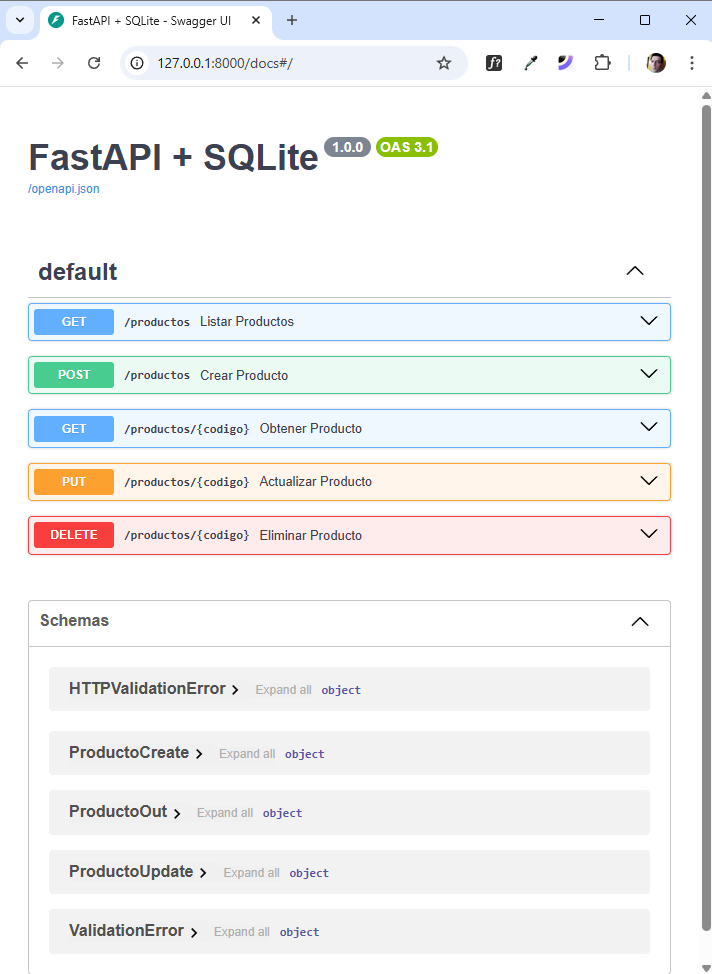
- Expand the
GET /posts/{post_id}endpoint. - Click "Try it out".
- Enter an ID, for example,
1, and click "Execute".
You should see a 404 Not Found response with the detail message "Post with ID 1 not found". This is the correct behavior! Our error handling is working perfectly because our database is still empty. Once we build the endpoint to create posts, you'll be able to test this again with a valid ID and see a successful 200 OK response with the post's data.
Conclusion
Fantastic work! You have now implemented the two fundamental "Read" operations for any API. You've learned how to retrieve a single resource by its identifier, a pattern you will use constantly in API development.
Key Takeaways:
- Path parameters like
{post_id}are defined in the decorator and captured as typed function arguments. - You can filter SQLAlchemy queries by chaining the
.where(Model.column == value)method. - To fetch a single result (or
None), use.scalars().first()after executing your query. raise HTTPException(status_code=404, ...)is the standard way to return "Not Found" and other HTTP errors from your endpoints.
In our next lesson, we will finally add some data to our database. We will tackle the "Create" part of CRUD by implementing a POST endpoint to add new posts. This will introduce us to handling incoming JSON data with Pydantic models.