Hello! Welcome to the final module of our course, Deployment to the Cloud.
In our last module, you successfully containerized our FastAPI application using Docker. You learned how to write a Dockerfile, run the container, and, most importantly, manage its configuration with environment variables. You now have a portable, self-contained, and configurable version of your application, ready to be deployed.
This lesson kicks off our journey into deployment by introducing the platform we'll be using: Google Cloud Run. The learning outcome for today is to explain the concept of serverless container deployment with Google Cloud Run. We'll focus on the "what" and "why" before we get to the "how" in the upcoming lessons. You'll understand what serverless means in this context, why Cloud Run is an excellent choice for deploying FastAPI applications (especially for AI/ML), and where it fits within the broader cloud ecosystem.
What is Serverless Container Deployment?
At its core, "serverless" doesn't mean there are no servers; it means you don't have to manage them. With a containerized application, the "serverless" model means you provide your container image, and the cloud platform takes care of everything else: provisioning infrastructure, handling network requests, and scaling resources up or down based on traffic.
Google Cloud Run is a platform that does exactly this. It's a fully managed environment designed to run stateless containers.
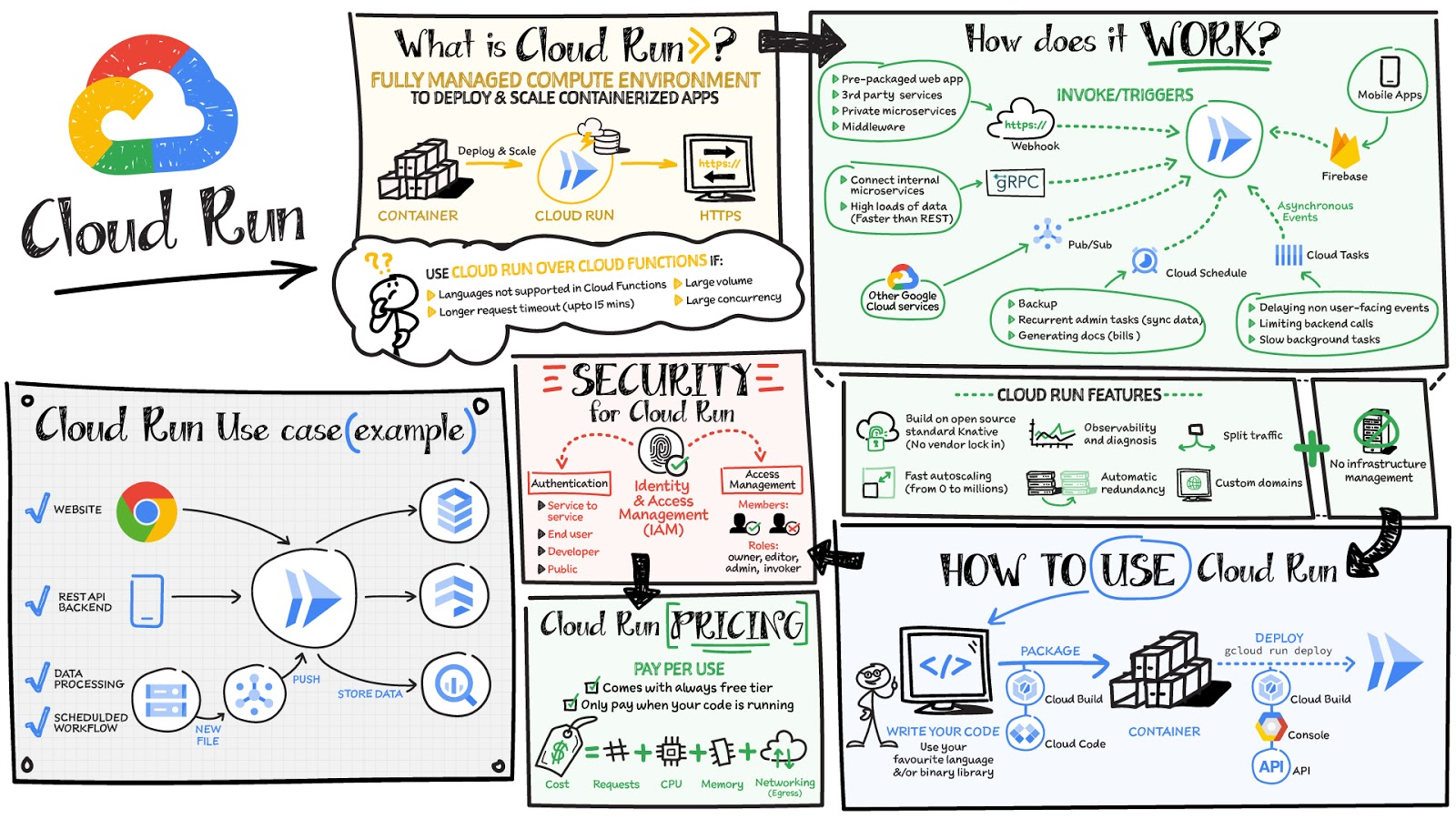
To get a clear initial understanding, let's watch a short introductory video.
Google Cloud Run Explained with Demo | Deploy Your First Containerized App on GCP
The video 'Google Cloud Run Explained with Demo' by TechTrapture provides an excellent and concise introduction to the platform. We'll start with the first few minutes to get a solid conceptual foundation.
Watch from 00:26 to 03:41. Focus on the core definition: Cloud Run as a managed, serverless platform that lets you run containers without managing any infrastructure. Notice the emphasis on how it abstracts away the complexity you might find in other systems like Kubernetes.
As the video explained, the main idea is to let you, the developer, focus on writing code, while Google handles the operational heavy lifting. You simply provide a container image, and Cloud Run makes it accessible to the world.
Core Concepts and Benefits of Cloud Run
Now that you have a basic idea, let's explore the key features that make Cloud Run so powerful, especially for projects like ours.
The official Google Cloud documentation provides the most accurate and detailed explanation of Cloud Run's features. We'll read through a few key sections.
Please read the following sections from the Google Cloud documentation: Start with the introductory paragraph under the main title. Jump to the section titled 'Cloud Run services' and read its overview, including the list of features (HTTPS endpoint, auto scaling, etc.). Continue to the section 'Scale to zero and minimum instances'. Finally, read the section 'Pay-per-use pricing for services'. Focus on understanding these key concepts: automatic HTTPS endpoints, request-based autoscaling, 'scale to zero', and the pay-per-use pricing model.
Let's summarize the crucial benefits you just read about:
- Automatic Scaling and "Scale to Zero": This is a defining feature of serverless. Cloud Run automatically creates more container instances to handle traffic spikes and, crucially, scales down when traffic subsides. If there are no requests, it can scale all the way down to zero instances.
- Pay-Per-Use Pricing: This is the financial benefit of scaling to zero. If your service isn't being used, you're not paying for it (beyond a generous free tier). This is perfect for personal projects, startups, or ML models that might be called infrequently.
- Fully Managed HTTPS: Every Cloud Run service gets a secure, public HTTPS endpoint automatically. You don't have to worry about buying or configuring SSL/TLS certificates.
- Language Agnostic: Because Cloud Run deploys containers, it can run code written in any language or framework—including our Python and FastAPI application.
Why is Cloud Run a Good Fit for Our API?
Cloud Run is not just a generic deployment platform; it's particularly well-suited for the kind of application you're building.
1. Ideal for APIs and Microservices
Your FastAPI application is an HTTP-based service. Cloud Run is designed specifically for this. It distinguishes between two main ways to run your code:
- Services: These are designed to run continuously (or on-demand) to respond to incoming web requests, like our API. They are given a stable URL.
- Jobs: These are designed to run a task to completion and then stop. This is useful for things like batch data processing or a scheduled script, but not for a live API.
Our FastAPI application will be deployed as a Cloud Run service.
2. Excellent for Serving AI/ML Models
Your primary goal is to deploy AI/ML models. Cloud Run is a popular choice for this for several reasons.
Cloud Run: A Guide to Deploying Containerized Apps in GCP
This article from DataCamp highlights several use cases for Cloud Run and compares it to other services. Let's focus on the sections relevant to our goals.
Please read the sections titled 'Key Features of Cloud Run' and 'Cloud Run Use Cases'. Pay special attention to the mention of 'On-demand GPU support' and the use cases for 'Video and image analysis' and 'AI workloads'.
As you just read, Cloud Run is a great fit for AI inference because:
- Cost-Effectiveness: An ML model might only receive prediction requests sporadically. The "scale to zero" model ensures you're not paying for an idle server waiting for the next request.
- Scalability: If your model suddenly goes viral and receives thousands of requests, Cloud Run can scale out automatically to handle the load.
- GPU Support: For more computationally intensive models, Cloud Run offers the ability to attach GPUs. While we won't cover this in our course, it's a critical feature for future growth.
Cloud Run in the Google Cloud Ecosystem
To fully appreciate why we've chosen Cloud Run, it's helpful to see where it fits among other Google Cloud services.
Google Cloud Run Explained with Demo | Deploy Your First Containerized App on GCP
Let's return to the TechTrapture video, which does a great job of comparing Cloud Run to its much larger and more complex counterpart, Google Kubernetes Engine (GKE).
Watch from 03:29 to 07:22. The video explains the scenarios where Cloud Run is preferable to Kubernetes, such as for low-traffic applications, APIs, and microservices. This will clarify why Cloud Run is the right starting point for us.
The key takeaway is about choosing the right level of abstraction.
- Google Kubernetes Engine (GKE) gives you maximum power and control over your container infrastructure, but it requires you to manage a complex cluster. It's like being given all the engine parts to build and maintain a car yourself.
- App Engine is a Platform-as-a-Service (PaaS) where you deploy code directly, but it's more restrictive about languages and system dependencies.
- Cloud Run hits a sweet spot: it gives you the flexibility of containers without the operational overhead of Kubernetes. It's like being given a reliable, self-driving car where you just need to tell it where to go.
For our goal of deploying a FastAPI application without getting bogged down in infrastructure management, Cloud Run is the ideal choice.
Conclusion
In this lesson, we've laid the conceptual groundwork for deploying our application. You now understand what serverless container deployment is and how Google Cloud Run implements it.
Key Takeaways:
- Serverless Container Deployment: You provide a container image, and the cloud provider runs and scales it for you without any server management.
- Google Cloud Run: A fully managed platform that runs stateless containers, providing automatic scaling, pay-per-use pricing, and secure HTTPS endpoints out of the box.
- Scale to Zero: A core feature of Cloud Run where your application scales down to zero instances when not in use, saving you money.
- The Right Tool for the Job: Cloud Run is perfectly suited for deploying APIs, microservices, and AI/ML models, offering a simpler alternative to complex systems like Kubernetes.
Now that we understand the "what" and "why" of Cloud Run, we're ready to start the practical steps. In the next lesson, we will push our Docker image to a container registry. This is the necessary first step to making our container available for Cloud Run to use.