Hello! Welcome to the first lesson in our final module on CI/CD and Scalability.
In our last session, you achieved a major milestone: you manually deployed a complete, production-ready Django application, secured with a custom domain and HTTPS. You navigated server provisioning, container configuration, and network setup. This experience, while crucial, also highlights the number of manual steps involved—each one a potential point of failure and a consumer of your valuable time.
Today, we address the "what if we could automate all of that?" question. We will explore the foundational concepts that make modern software development fast, reliable, and efficient. The learning outcome for this lesson is to explain the concepts of Continuous Integration (CI) and Continuous Deployment (CD). By the end of this lesson, you will understand the principles behind automating the entire software release lifecycle, from a git push to a live deployment.
This lesson will cover:
- The problems inherent in manual software deployment.
- Continuous Integration (CI): Automating code merging and testing.
- Continuous Delivery vs. Continuous Deployment (CD): Automating the release and deployment process.
- How these concepts combine to form a CI/CD pipeline.
Let's begin by revisiting the challenges of manual work.
1. The Pain of Manual Deployment
Think back to the last few lessons. To deploy a single change, you had to SSH into your server, pull the latest code, manage Docker containers, and run several commands in a specific order. While you now know how to do this, imagine doing it multiple times a day, or coordinating with a team of developers. This manual process is slow, stressful, and error-prone.
To see a vivid illustration of how these issues manifest in a team setting, watch the beginning of the following video. It sets the stage perfectly for why automation is not just a luxury, but a necessity.
CI/CD Explained: The DevOps Skill That Makes You 10x More Valuable
The video 'CI/CD Explained' by TechWorld with Nana starts with a relatable story about a manual, chaotic deployment process. It will resonate with the steps you just performed manually and highlight the bottlenecks.
Watch the first 3 minutes and 40 seconds of the video (from 00:00 to 03:40). As you watch, compare the described problems—merge conflicts, broken main branch, manual testing, deployment anxiety—to the process you just completed.
This scenario of "deployment anxiety" and human error is precisely what CI/CD aims to solve.
2. Continuous Integration (CI): Automating Code Quality
The first step in automating the development lifecycle is Continuous Integration (CI).
At its core, CI is a development practice where developers frequently merge their code changes into a central repository (like the main branch on GitHub). After each merge, an automated process builds the application and runs a suite of tests to ensure the new code doesn't break anything.
To understand this concept more deeply, let's continue with the video.
CI/CD Explained: The DevOps Skill That Makes You 10x More Valuable
This segment explains how Continuous Integration addresses the problems of manual merging and testing by introducing automated checks for every small code change.
Watch the video from 03:40 to 06:31. Focus on the core principles of CI: small, frequent commits and immediate, automated testing.
The main goals of Continuous Integration are to:
- Find and fix bugs earlier: By testing every small change, you can pinpoint the exact commit that introduced a problem.
- Reduce merge conflicts: Integrating small changes frequently is much easier than merging a massive feature branch that has diverged significantly from the main branch.
- Improve developer confidence: Developers get rapid feedback and can be confident that their changes haven't broken the application.
For a concise textual definition, please review the following resource.
Continuous Integration vs. Delivery vs. Deployment
The article 'Continuous Integration vs. Delivery vs. Deployment' from JetBrains provides clear, written definitions that complement the video.
Read the section titled 'Continuous integration (CI)' under the main heading. It crisply defines the practice and lists the typical automated checks involved.
A typical CI process is broken into a few automated stages that form a basic pipeline:
- Source Stage: A developer pushes code changes to a version control system (e.g., GitHub). This push automatically triggers the pipeline.
- Build Stage: The CI server checks out the code and builds the application. For our Django project, this would involve building a Docker image.
- Test Stage: The server runs automated tests against the build. This includes unit tests, integration tests, static code analysis (linting), and security scans.
If any stage fails, the pipeline stops and notifies the developer. The change is not integrated, and the main branch remains stable.
3. Continuous Delivery and Deployment (CD): Automating the Release
Once a change has been successfully integrated and tested (CI), the next step is to get it to users. This is where CD comes in. The "CD" in CI/CD can stand for two related but distinct concepts:
- Continuous Delivery
- Continuous Deployment
Let's clarify the difference, as this is a crucial point.
Continuous Delivery
Continuous Delivery is an extension of CI where the entire software release process is automated, up to the point of deploying to production. After passing all automated tests, the build is automatically deployed to a staging (or pre-production) environment. The final push to production, however, requires a manual trigger—typically a button click by a project manager or QA lead.
The key principle of Continuous Delivery is that the codebase is always in a deployable state.
Continuous Deployment
Continuous Deployment takes this one step further. It automates the entire release process. If a build passes all the automated tests in the CI and staging phases, it is automatically deployed to production without any human intervention.
The following video segments explain these two concepts and their relationship.
CI/CD Explained: The DevOps Skill That Makes You 10x More Valuable
The same video from TechWorld with Nana now explains how Continuous Delivery automates deployment to a staging environment, and how Continuous Deployment takes it all the way to production.
Watch the video from 08:04 to 17:11. Pay close attention to the distinction made between delivery (ready to deploy, with a manual trigger) and deployment (automatically deploys).
This diagram provides a simple, powerful visual summary of the distinction between the three practices.

As you can see:
- CI ends after the automated tests.
- Continuous Delivery extends CI by automatically releasing to a pre-production/staging environment, but requires a manual trigger for the final production deployment.
- Continuous Deployment extends Continuous Delivery by automating the final production deployment.
For a final clarification in text, refer back to the JetBrains article.
Continuous Integration vs. Delivery vs. Deployment
This resource excels at clearly differentiating the two 'CD' concepts and discussing when to choose one over the other.
Read the sections 'Continuous delivery and continuous deployment (CD)' and 'Continuous delivery vs. continuous deployment'. This will solidify your understanding of the key difference: the manual vs. automated final release step.
Test your understanding!
A development team has a fully automated process. When a developer merges a pull request to the main branch, it automatically builds, runs unit tests, integration tests, and deploys to a staging environment where automated end-to-end tests are performed. After all automated tests pass, the change is immediately deployed to production servers without any manual intervention.
Which practice does this team follow: Continuous Integration, Continuous Delivery, or Continuous Deployment? Why?
Show answer
The team follows Continuous Deployment.
The key reason is that the entire process, including the final release to production, is fully automated. The change goes live as soon as it passes all automated checks. If the process required a manual approval or button click before going to production, it would be Continuous Delivery.
4. The CI/CD Pipeline Visualized
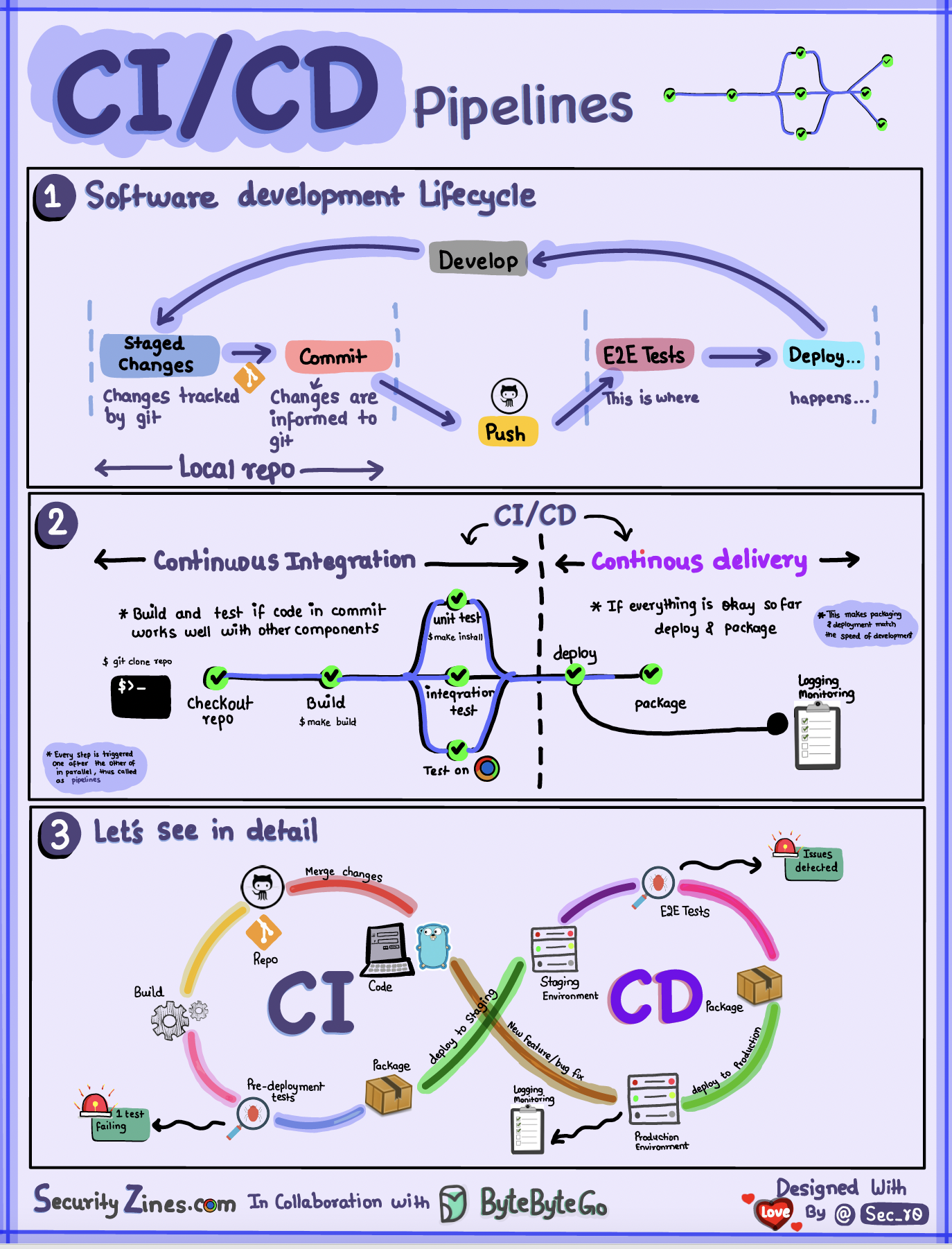
Together, these automated stages form what is known as a CI/CD pipeline. It's a pathway that every code change must travel to get to production. Each stage in the pipeline adds a layer of quality assurance and increases confidence in the change. If a change fails at any stage, the pipeline stops, providing fast feedback.
The image below shows a detailed view of a complete CI/CD pipeline, from the initial code commit to deployment in various environments.
Given your interest in the "under the hood" aspects of systems, it's also worth noting that advanced CI/CD pipelines often incorporate sophisticated deployment strategies like Blue-Green or Canary deployments to further reduce the risk of production releases. These strategies allow you to roll out changes to a small subset of users before a full release, providing a safety net against unforeseen issues. We touched on these when discussing scalability, and they are an integral part of mature DevOps practices.
Conclusion
In this lesson, you've moved from the world of manual deployments to understanding the principles of modern, automated software delivery. This conceptual foundation is the bedrock upon which reliable and rapidly-evolving backend services are built.
Key Takeaways:
- Manual deployment processes are slow, error-prone, and do not scale well with team size or release frequency.
- Continuous Integration (CI) is the practice of frequently merging small code changes, with each change triggering an automated build and test run to catch issues early.
- Continuous Delivery automates the entire release process, ensuring that every validated change is ready to be deployed to production with a single manual click.
- Continuous Deployment takes automation to its final conclusion, automatically releasing every validated change to production without human intervention.
- A CI/CD pipeline is the set of automated stages that a code change must pass through to be released, providing fast feedback and ensuring quality.
Preview of the Next Lesson:
Theory is great, but practice is better. In our next lesson, we will put these concepts into action. You will create a basic CI pipeline using GitHub Actions to automatically run tests for your Django project every time you push new code to your repository. This will be your first practical step into the world of DevOps automation.