Hello! Welcome back to our course on Backend Engineering.
In our last lesson, we focused on defining the structure of individual models using Django's various field types and constraints. You learned how to ensure data integrity at the lowest level by specifying data types, default values, and validation rules.
Today, we take the crucial next step: connecting these models. The power of a relational database lies in its ability to form a web of interconnected data. Our learning outcome is to implement relationships between models using OneToOneField, ForeignKey, and ManyToManyField. For any complex system, like your AI Career Coach project, this is essential. You need to link users to their interaction histories, job postings to required skills, and so on.
By the end of this lesson, you'll be able to model complex, real-world relationships in your Django application's schema.
1. The One-to-Many Relationship: ForeignKey
This is the most common type of relationship. It connects one object to many other objects.
- Conceptual Analogy: One
Usercan have manyInteractionswith your AI coach, but eachInteractionbelongs to only oneUser.
How it Works (Under the Hood):
When you use a ForeignKey, Django adds a column to the database table on the "many" side. For our analogy, it would add a user_id column to the interaction table. This column stores the primary key of the related User, creating a "foreign key" constraint at the database level.
Let's watch a short video that introduces the one-to-many concept and shows how to implement it.
Database Relationships | One To Many & Many to Many | Django (3.0) Crash Course Tutorials (pt 6)
The video 'Database Relationships' by Dennis Ivy provides a clear visual explanation of one-to-many relationships and how they are implemented in Django.
Please watch from 00:27 to 01:28 for the conceptual overview of a one-to-many relationship. Then, watch from 04:49 to 07:11 to see how models.ForeignKey is used in code.
As you saw in the video, a ForeignKey field is defined on the "many" side of the relationship. Let's look at the key components:
from django.contrib.auth.models import User
from django.db import models

class Interaction(models.Model):
    # ... other fields for the interaction ...

    # This establishes the relationship
    user = models.ForeignKey(
        User,  # The model on the "one" side
        on_delete=models.CASCADE  # What to do when the related user is deleted
    )
The on_delete Argument
This argument is required and is critical for maintaining data integrity. It tells Django what to do with the Interaction object if the User it's linked to is deleted. Common options include:
models.CASCADE: If the user is deleted, all their interactions are deleted too. This is the most common behavior.models.SET_NULL: If the user is deleted, theuserfield on their interactions is set toNULL. This requires you to also setnull=Trueon theForeignKeyfield.models.PROTECT: Prevents the user from being deleted as long as they have interactions. Deleting the user would raise aProtectedError.
Accessing Related Objects
Django automatically creates ways to traverse these relationships.
- From "many" to "one" (forward): You can directly access the related object as an attribute.
interaction = Interaction.objects.first() user_of_interaction = interaction.user - From "one" to "many" (reverse): Django adds a manager to the "one" side, named
[model_name]_setby default.
For more readable code, you can customize this name with theuser = User.objects.first() all_interactions_for_user = user.interaction_set.all()related_nameargument:user = models.ForeignKey(User, on_delete=models.CASCADE, related_name='interactions'). Then you could useuser.interactions.all().
For a great textual summary of ForeignKey, including shell examples, refer to the following resource.
Whats the difference between a OneToOne, ManyToMany ...
This Stack Overflow answer provides a concise and clear explanation of the ForeignKey (many-to-one) relationship with code examples.
Read the section titled 'ForeignKey'. Pay attention to the diagram, the model definitions, and the shell examples showing both forward and reverse relationship access.
2. The One-to-One Relationship: OneToOneField
This relationship ensures that an object is linked to at most one other object, and vice versa. It's like a ForeignKey with a unique=True constraint.
- Conceptual Analogy: A
Userhas exactly oneUserProfile. It's often used to extend an existing model with extra fields without modifying the original model's code.
How it Works (Under the Hood):
This also creates a foreign key column in the database, but it adds a UNIQUE constraint to that column, ensuring no two rows can point to the same related object.
Let's define a profile for your AI Coach users:
from django.contrib.auth.models import User
from django.db import models

class Profile(models.Model):
    user = models.OneToOneField(User, on_delete=models.CASCADE, primary_key=True)
    bio = models.TextField(blank=True)
    career_goals = models.TextField(blank=True)
Setting primary_key=True is a common and efficient pattern here. It means the Profile table will use the user's ID as its own primary key, avoiding the need for an extra id column.
Accessing the relationship is very direct:
user.profilegives you the user's profile.profile.usergives you the profile's user.
3. The Many-to-Many Relationship: ManyToManyField
This is the most flexible relationship type, where an object can be related to many other objects, and those objects can also be related to many of the first type.
- Conceptual Analogy: For your project, a
JobPostingcan list manySkills, and a singleSkill(e.g., "Python") can be listed on manyJobPostings.
How it Works (Under the Hood):
A many-to-many relationship cannot be represented by a single column in either table. Instead, a third table, known as a junction table or intermediary table, is created. This table has two columns: one foreign key for each of the related models. Each row in this table represents a single link between an object from each model.

This video will walk you through the concept and basic implementation.
Database Relationships | One To Many & Many to Many | Django (3.0) Crash Course Tutorials (pt 6)
Let's return to the Dennis Ivy video to see the conceptual breakdown of a many-to-many relationship and how models.ManyToManyField is defined.
First, watch the conceptual explanation from 01:28 to 04:49. Then, see the code implementation from 07:47 to 08:36.
Here is how you would define the JobPosting and Skill models:
class Skill(models.Model):
    name = models.CharField(max_length=100, unique=True)

class JobPosting(models.Model):
    title = models.CharField(max_length=200)
    # ... other fields ...
    skills = models.ManyToManyField(Skill) # You can put this on either model
Querying Many-to-Many Relationships
Because of the junction table, interacting with ManyToManyFields uses a special RelatedManager with methods like add(), remove(), set(), and clear().
To get a deep, practical understanding of how this works, we'll watch a detailed video.
Django ManyToManyFields and Through-Models for many-to-many relationships
The video 'Django ManyToManyFields' from BugBytes offers an excellent, in-depth look at implementing and querying many-to-many relationships. This is where we get into the practical details.
Please watch these segments carefully: Defining the Field (02:08 - 05:59): See how adding a ManyToManyField to a model automatically creates a new junction table in the database. Querying (06:26 - 16:24): This is a critical section. Pay close attention to how the RelatedManager is used with methods like .add(), .remove(), .set(), .clear(), and .filter() to manage the relationships. Reverse Access (16:13 - 18:55): Learn how to query the relationship from the other side using the _set syntax.
Test your understanding!
Imagine you are building the models for your AI Career Coach. You have the following requirements:
- A
Companycan have multipleJobPostings, but eachJobPostingbelongs to exactly oneCompany. - A
Usercan save multipleJobPostings as favorites, and aJobPostingcan be favorited by multipleUsers.
Define the Company, JobPosting, and User models below to represent these relationships. For the User model, assume you're using Django's built-in django.contrib.auth.models.User.
from django.db import models
from django.contrib.auth.models import User

class Company(models.Model):
    name = models.CharField(max_length=100, unique=True)
    # ... other company fields

class JobPosting(models.Model):
    title = models.CharField(max_length=200)
    description = models.TextField()
    # Add relationship fields here

    # Note: For requirement 2, you can define the ManyToManyField
    # on either the User or JobPosting model. Let's add it here.
Show answer
from django.db import models
from django.contrib.auth.models import User

class Company(models.Model):
    name = models.CharField(max_length=100, unique=True)
    # ... other company fields

class JobPosting(models.Model):
    title = models.CharField(max_length=200)
    description = models.TextField()

    # Requirement 1: A JobPosting belongs to one Company.
    company = models.ForeignKey(
        Company,
        on_delete=models.CASCADE,
        related_name='job_postings'
    )

    # Requirement 2: Users can favorite many JobPostings.
    favorited_by = models.ManyToManyField(
        User,
        related_name='favorite_job_postings',
        blank=True # It's okay for a job to be favorited by no one.
    )

# Explanation:
# 1. We use a `ForeignKey` on `JobPosting` pointing to `Company` to model the one-to-many relationship.
# 2. We use a `ManyToManyField` on `JobPosting` pointing to `User` to model the many-to-many relationship. `blank=True` is added so that a job posting doesn't need to be favorited by anyone to be valid.
4. Advanced: Extra Data on a Many-to-Many Relationship
What if you need to store information about the relationship itself?
- Analogy: A
Studentenrolls in aCourse. This is a many-to-many relationship. But where do you store the student'sgradefor that specific course? The grade belongs to neither the student nor the course alone; it belongs to the enrollment.
This is solved by creating a custom intermediary model, specified using the through argument on the ManyToManyField.
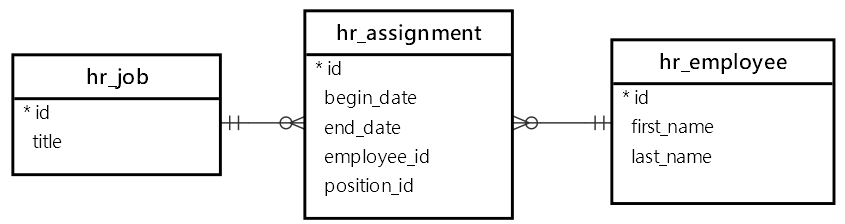
The final segment of the BugBytes video covers this advanced but powerful technique.
Django ManyToManyFields and Through-Models for many-to-many relationships
Let's finish the BugBytes video to see how to create and use custom through models for many-to-many relationships.
Introducing through Models (18:44 - 23:29): This part explains the 'why' and 'how' of creating a custom model to act as the junction table, allowing you to add extra fields (like salary in the video's example). Creating Associations (23:29 - 28:35): See how creating relationships changes when using a through model, introducing the through_defaults argument.
Conclusion
You've now learned how to weave your individual Django models into a connected, relational schema. This is the heart of database design and a foundational skill for any backend developer.
Key Takeaways:
ForeignKey(One-to-Many): The workhorse of relationships. Defined on the "many" side. Requires anon_deletepolicy.OneToOneField(One-to-One): Essentially aForeignKeywith auniqueconstraint. Perfect for extending models like user profiles.ManyToManyField(Many-to-Many): Handles complex relationships where objects on both sides can be linked to multiple partners. Django manages an intermediary junction table for you.throughModels: For advanced cases where you need to store extra data on the many-to-many relationship itself, you can define the junction table as your own explicit Django model.
Preview of the Next Lesson:
Our models are now designed and their relationships are defined. But how do we get this structure into our actual database? And how do we manage changes to it over time? In the next lesson, we will focus on creating and applying database migrations to manage your schema and then begin performing Create, Read, Update, and Delete (CRUD) operations using the Django ORM.