Hello! Welcome to the next lesson in your journey into Backend Engineering.
In our last session, we designed the blueprint for our application's data by defining models and establishing relationships between them using ForeignKey, OneToOneField, and ManyToManyField. However, these definitions exist only in your Python code (models.py). Your database is currently unaware of this structure.
Today, we bridge that gap. This lesson is all about a core concept in modern web frameworks: database migrations. The learning outcome is to be able to create and apply database migrations to manage schema changes. Think of migrations as a version control system, like Git, but for your database schema. They allow you to define, update, and track changes to your database structure in a systematic and repeatable way, directly from your Django code.
For someone with your background in building complex systems, you'll appreciate how migrations automate what would otherwise be a tedious and error-prone process of writing manual SQL commands (CREATE TABLE, ALTER TABLE, etc.) to keep your database in sync with your application logic.
1. The "Why" of Migrations
Before we dive into the "how," let's solidify the "why." In any evolving software project, your data models will change. You'll add new features that require new fields, modify existing ones, or remove old ones. Migrations solve several critical problems that arise from this evolution:
- Automation: They automatically generate the necessary SQL to alter the database, saving you from writing it by hand.
- Consistency: They ensure that every developer on a team, as well as your staging and production servers, has the exact same database schema.
- Version Control: Since migration files are just Python code, they can be committed to Git alongside your model changes. This keeps your application code and database schema perfectly in sync throughout the project's history.
- Synchronization: They keep track of which changes have already been applied to a database, so you can safely run them multiple times without causing errors.
The following article provides an excellent primer on the problems that migrations solve.
Read the introductory section of 'Django Migrations: A Primer' from Real Python to understand the fundamental problems that migrations are designed to solve.
Read the section titled 'The Problems That Migrations Solve'. This will provide a strong conceptual foundation for the rest of the lesson.
2. The Core Workflow: A Two-Step Process
Managing schema changes in Django revolves around two key commands. It's crucial to understand the distinct role of each.
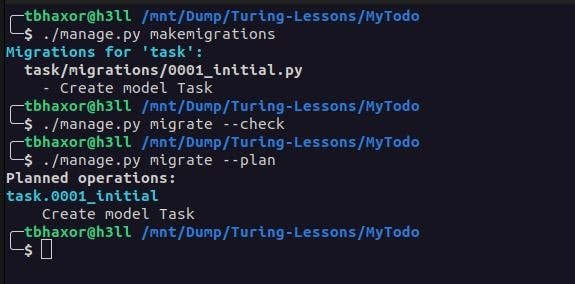
python manage.py makemigrations: This command inspects your models for changes (compared to the existing migration files) and generates new migration files. It does not touch the database. It's like preparing a commit that describes the intended changes.python manage.py migrate: This command takes the unapplied migration files and executes them against the database, altering the schema by running the necessary SQL. This is the step that actually applies the changes.
Let's watch a detailed video that walks through this entire process, from creating a model to applying the final changes to the database.
Django - What are migrations - actually? Introduction to migrations and the Django database
The video 'Django - What are migrations - actually?' from Very Academy provides a thorough, step-by-step guide. We'll watch it in segments to focus on specific concepts.
Please watch the following two segments: Making a Migration (16:23 - 21:00): This part shows you how to create a new app and model, and then run makemigrations. Pay close attention to the migrations directory and the initial file that gets created. Applying a Migration (23:54 - 26:16): This segment demonstrates the migrate command and shows how the database tables are actually created. It also introduces the showmigrations command, which is very useful.
As you saw, the process is straightforward: you change your models, run makemigrations to create the migration script, and then migrate to apply it.
3. Under the Hood: What's in a Migration?
Given your interest in the underlying mechanics, let's examine what Django is doing for us.
A. The Migration File
A migration file is a Python script that contains a Migration class. This class has two main attributes:
dependencies: A list of other migrations that must be applied before this one can run. This ensures migrations are applied in the correct order.operations: A list of declarative instructions (CreateModel,AddField,RenameField, etc.) that tell Django what schema changes to make.
B. The Generated SQL
The most powerful insight comes from seeing the raw SQL that Django generates from a migration file. This demystifies the process and connects the high-level ORM to the low-level database operations. The sqlmigrate command lets you do exactly this without affecting your database.
Let's return to the video to see how this works.
Django - What are migrations - actually? Introduction to migrations and the Django database
This segment of the Very Academy video demonstrates how to use sqlmigrate to inspect the SQL code that Django will run.
Watch from 20:52 to 23:54. The presenter runs sqlmigrate on the initial migration file, revealing the CREATE TABLE statements that Django has prepared. This is a fantastic way to see the link between your Python model and the database schema.
This ability to inspect the SQL is invaluable for debugging complex migrations and for deepening your understanding of how the ORM interacts with the database.
4. Managing Schema Evolution
In a real project, your schema is never static. The makemigrations and migrate workflow is designed to handle this continuous evolution.
Modifying Models and Reverting Changes
What happens when you need to change an existing model? You simply edit your models.py file and run the same two-step process again. Django is smart enough to detect the changes and generate a new migration that alters the existing table.
What if you make a mistake? Django's migration system allows you to "unapply" migrations, effectively rolling your database schema back to a previous state.
This final video segment will show you how to manage these changes.
Django - What are migrations - actually? Introduction to migrations and the Django database
Let's see the migration system in action for evolving a schema and reverting changes.
Changing a Model (26:16 - 29:43): Watch how a field is renamed in the model, a new migration is generated with makemigrations, and the corresponding ALTER TABLE SQL is inspected with sqlmigrate before being applied. Unapplying a Migration (29:43 - 33:12): This crucial part shows how to revert a migration, rolling the schema back to its previous state. Pay attention to the syntax used with the migrate command.
A Word of Caution: Unapplying migrations can be a destructive operation. For example, if you have a migration that removes a field (RemoveField), unapplying it will add the column back to the database, but all the data that was in that column will be lost forever. Always be careful when reverting migrations on a database with important data.
Test your understanding!
Let's use the models for the AI Career Coach from our previous lesson. Imagine you have the following models and you've already created and applied the initial migrations for them.
class Company(models.Model):
    name = models.CharField(max_length=100, unique=True)
    # No website field yet

class JobPosting(models.Model):
    title = models.CharField(max_length=200)
    company = models.ForeignKey(Company, on_delete=models.CASCADE)
    # No posted_date field yet
Now, you decide to make two changes:
- Add a
websiteURL field to theCompanymodel. - Add a
posted_datefield to theJobPostingmodel.
List the exact manage.py commands you would run, in the correct order, to achieve the following:
- Create the new migration file for these changes.
- See the SQL statements that will be executed for this new migration (assuming the app is named
jobsand the migration is numbered0002). - Apply the changes to the database.
- Finally, revert the database schema back to the state before you added the
websiteandposted_datefields.
Show answer
After updating the models.py file with the new fields:
-
Create the migration file:
python manage.py makemigrations(Or more specifically:
python manage.py makemigrations jobs) -
See the generated SQL:
python manage.py sqlmigrate jobs 0002 -
Apply the changes to the database:
python manage.py migrate(Or more specifically:
python manage.py migrate jobs) -
Revert the migration: To revert the
0002migration, you migrate back to the previous one, which was0001.python manage.py migrate jobs 0001
Conclusion
You have now mastered a fundamental pillar of modern backend development. By understanding and using Django's migration system, you can manage your database schema's entire lifecycle in a structured, automated, and version-controlled manner.
Key Takeaways:
- Migrations are Django's way of propagating model changes to the database schema.
- The core workflow is a two-step process:
makemigrationsto create migration files, andmigrateto apply them to the database. - You can inspect the generated SQL with
sqlmigrateto understand what's happening under the hood. - You can track the state of your migrations with
showmigrations. - You can reverse changes by "unapplying" migrations, effectively rolling your schema back to a previous version.
Preview of the Next Lesson:
Our database tables are now perfectly mirroring our Django models. The next logical step is to start putting data into them and getting it back out. In the next lesson, we will dive into performing Create, Read, Update, and Delete (CRUD) operations using the powerful Django ORM and its QuerySet API.