Hello! Welcome to the next lesson in your backend engineering course.
In our last session, we implemented pagination, which was a crucial step for making our API scalable and preventing it from being overwhelmed by large datasets. While our API can now serve data in manageable chunks, the client has no way to request specific data. They can only browse through pages of everything.
Today, we'll address that limitation. This lesson is designed to help you add filtering, searching, and ordering capabilities to API endpoints. By the end, you'll be able to empower your API clients to:
- Filter results based on precise criteria (e.g., show only tasks that are
completed). - Search for items with a simple text query (e.g., find tasks containing the word "report").
- Order the results based on different fields (e.g., sort tasks by creation date).
These features are fundamental to building a useful and user-friendly API.
1. The Strategy: DRF's Filter Backends
In Django REST Framework, the mechanism for implementing these features is called filter backends. You can think of a filter backend as a pluggable component that sits between the initial database query and the serializer. Its job is to inspect the incoming request for specific query parameters (like ?is_complete=true or ?search=report) and modify the queryset accordingly.
DRF comes with a few built-in backends, and it integrates seamlessly with a powerful third-party library called django-filter. We will use a combination of these to achieve our goal.
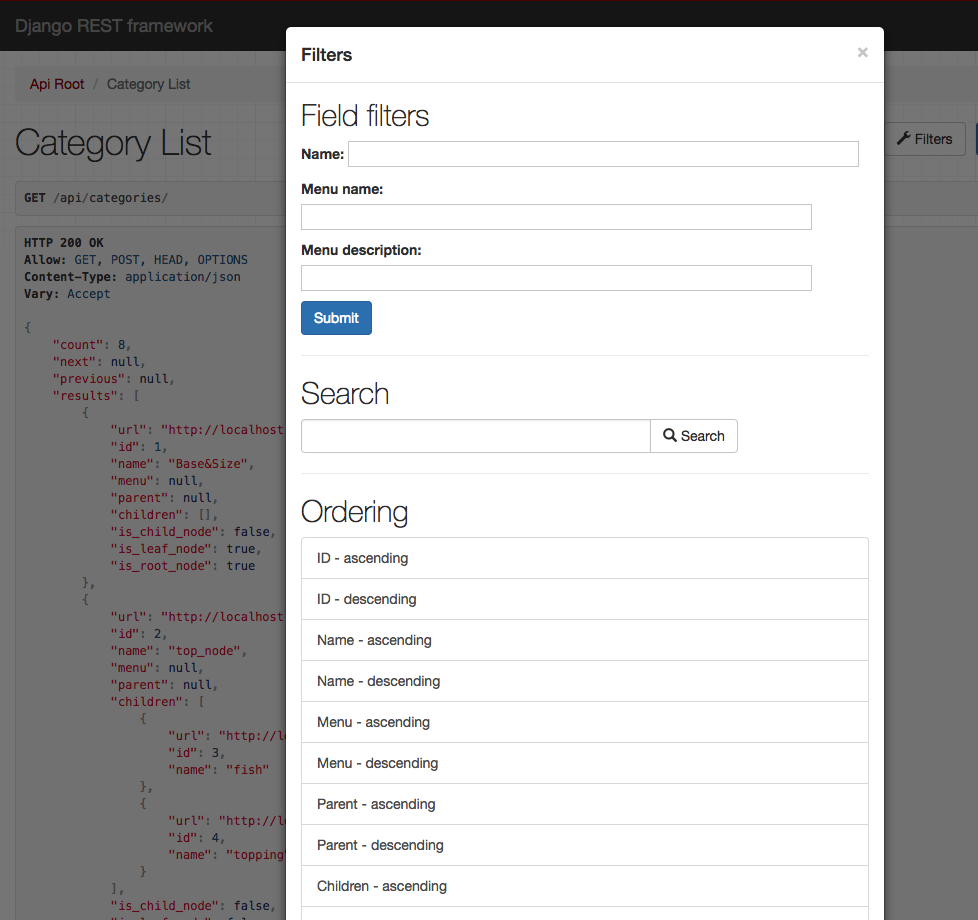
2. Filtering: Precise Data Retrieval with django-filter
Filtering is about selecting a subset of data based on exact field values or conditions (e.g., price is greater than 100, category is 'work'). The most powerful and common way to achieve this in DRF is with the django-filter library.
2.1. Setup and Simple Filtering
First, we need to install and configure the library.
-
Install the package:
pip install django-filter -
Add it to
INSTALLED_APPSin yourcore/settings.pyfile:# core/settings.py INSTALLED_APPS = [ # ... 'rest_framework', 'django_filters', # Add this line 'api', # ... ]
Now, let's start with the simplest form of filtering.
django-filter and DRF API filtering - Django REST Framework
The video 'django-filter and DRF API filtering' from the BugBytes channel provides an excellent walkthrough. We'll start by seeing how to set up django-filter and apply simple, equality-based filtering.
Please watch from 02:39 to 07:52. This segment covers: Installing django-filter and adding it to INSTALLED_APPS and REST_FRAMEWORK settings. Enabling simple filtering on a view using the filterset_fields attribute. Observing how this allows filtering via query parameters in the URL (e.g., ?name=television).
To summarize the video's steps and apply them to our project, let's add DjangoFilterBackend to your TaskViewSet and specify which fields we want to make filterable.
In api/views.py:
# api/views.py
from django_filters.rest_framework import DjangoFilterBackend
# ... other imports

class TaskViewSet(viewsets.ModelViewSet):
    queryset = Task.objects.all().order_by('-created_at')
    serializer_class = TaskSerializer
    pagination_class = StandardResultsSetPagination # From previous lesson

    # Add filter backends
    filter_backends = [DjangoFilterBackend]
    # Specify the fields to filter on
    filterset_fields = ['is_complete', 'priority']
With this change, clients can now make requests like:
GET /api/tasks/?is_complete=trueto see only completed tasks.GET /api/tasks/?priority=Hto see all high-priority tasks.
This is a great start, but it's limited. What if we want to filter for tasks created after a certain date, or find tasks whose title contains a certain word? Simple equality checks aren't enough.
2.2. Advanced Filtering with a Custom FilterSet
To unlock more powerful filtering capabilities, we need to create a custom FilterSet. This is a class that explicitly defines how each field can be filtered.
django-filter and DRF API filtering - Django REST Framework
Let's continue with the BugBytes video to see how to move beyond simple equality and create a more flexible filtering system.
Now watch from 07:52 to 15:34. This is a crucial section that demonstrates: The limitations of filterset_fields (e.g., case-sensitivity). Creating a dedicated filters.py file and a custom FilterSet class. Defining specific lookup expressions for each field (like icontains, gt, lt, range). Replacing filterset_fields with filterset_class in your view.
Let's apply this powerful pattern to our Task model.
-
Create a new file:
api/filters.py. -
Define the
TaskFilterclass insideapi/filters.py. Here, you'll specify your model and the fields you want to filter, along with the "lookup expressions" that define the type of filtering.# api/filters.py import django_filters from .models import Task class TaskFilter(django_filters.FilterSet): # We can add more specific filters here if needed. # For example, filtering by a date range: created_at = django_filters.DateFromToRangeFilter() class Meta: model = Task fields = { 'is_complete': ['exact'], # `?is_complete=true` 'priority': ['exact', 'in'], # `?priority=H` or `?priority__in=H,M` 'title': ['icontains'], # `?title__icontains=report` (case-insensitive) 'created_at': ['exact', 'gte', 'lte'], # `?created_at__gte=2024-01-01` }exact: An exact match.in: The value is in a list of possibilities.icontains: A case-insensitive "contains" search.gte/lte: Greater-than-or-equal-to / Less-than-or-equal-to.
-
Update your
TaskViewSetinapi/views.pyto use this new class.# api/views.py from .filters import TaskFilter # Import the new filter class class TaskViewSet(viewsets.ModelViewSet): queryset = Task.objects.all().order_by('-created_at') serializer_class = TaskSerializer pagination_class = StandardResultsSetPagination filter_backends = [DjangoFilterBackend] # filterset_fields = ['is_complete', 'priority'] # Remove this line filterset_class = TaskFilter # Add this line
You now have a highly flexible filtering system! Your clients can construct complex queries like GET /api/tasks/?is_complete=false&priority__in=H,M&created_at__gte=2024-05-01 to get exactly the data they need.
3. Searching: Full-Text Queries with SearchFilter
While filtering is for structured queries, searching is for user-driven, free-text queries, like a search bar in an application. DRF has a dedicated SearchFilter for this.
The official DRF documentation provides the canonical explanation for SearchFilter. Please read this section to understand how it works.
In this resource, find the section titled 'SearchFilter'. Read this section carefully, paying attention to: How to add SearchFilter to your filter_backends. The purpose of the search_fields attribute. How the client uses the default search query parameter. The table of prefixes (^, =, $, @) for customizing search behavior.
Let's add search functionality to our TaskViewSet. We'll configure it so users can search within the title and description of a task.
-
Update
api/views.py:# api/views.py from rest_framework import filters # Import filters # ... other imports class TaskViewSet(viewsets.ModelViewSet): queryset = Task.objects.all().order_by('-created_at') serializer_class = TaskSerializer pagination_class = StandardResultsSetPagination # Add SearchFilter and OrderingFilter filter_backends = [DjangoFilterBackend, filters.SearchFilter] filterset_class = TaskFilter # Configure search search_fields = ['title', 'description']Note that
filter_backendsis a list, so we can combine multiple backends. -
Test it out: Now your clients can make a request like
GET /api/tasks/?search=meetingto find all tasks where "meeting" appears in either the title or the description. The search is case-insensitive by default.
4. Ordering: Sorting Results with OrderingFilter
Finally, let's give clients the ability to order the results. This is handled by the OrderingFilter.
Let's return to the DRF documentation to learn about the OrderingFilter.
Find and read the section titled 'OrderingFilter'. Focus on: How to add OrderingFilter to filter_backends. The ordering_fields attribute and why it's important for security (preventing data leakage). How clients can specify ascending and descending order (- prefix).
Let's complete our TaskViewSet by adding ordering.
-
Update
api/views.py:# api/views.py # ... (other imports are already there) class TaskViewSet(viewsets.ModelViewSet): queryset = Task.objects.all() # We can remove the default ordering here serializer_class = TaskSerializer pagination_class = StandardResultsSetPagination # Add all three backends filter_backends = [DjangoFilterBackend, filters.SearchFilter, filters.OrderingFilter] # Filter configuration filterset_class = TaskFilter # Search configuration search_fields = ['title', 'description'] # Ordering configuration ordering_fields = ['priority', 'created_at', 'due_date'] ordering = ['-created_at'] # A default ordering for the view- We added
filters.OrderingFilterto thefilter_backendslist. - We defined
ordering_fieldsto explicitly allow which fields can be used for sorting. This is a good security practice. - We set a default
orderingfor the view, which applies if the client doesn't specify one. This also resolves the pagination warning about unordered querysets.
- We added
Clients can now sort the results:
GET /api/tasks/?ordering=priority(sorts by priority, A-Z)GET /api/tasks/?ordering=-due_date(sorts by due date, newest to oldest)
Test your understanding!
You need to implement a new API endpoint for a Project model. A user should be able to retrieve a list of projects that meet all the following criteria in a single API call:
- Are "active" (
status='active'). - Have the word "Q3" in their
namefield. - Are sorted by their
deadlinefrom the soonest to the latest.
What would the final URL query look like? And which filter_backends, filterset_class (or filterset_fields), search_fields, and ordering_fields would you need to configure in the ProjectViewSet to make this possible?
Show answer
Example URL Query:GET /api/projects/?status=active&search=Q3&ordering=deadline
ViewSet Configuration:
class ProjectViewSet(viewsets.ModelViewSet):
    # ...
    filter_backends = [DjangoFilterBackend, filters.SearchFilter, filters.OrderingFilter]

    # For criteria 1 (status='active')
    filterset_fields = ['status']

    # For criteria 2 (search='Q3')
    search_fields = ['name']

    # For criteria 3 (ordering=deadline)
    ordering_fields = ['deadline']
This configuration correctly maps each part of the requirement to the corresponding DRF backend and its configuration.
Conclusion
Congratulations! You've just added a suite of powerful and essential features to your API. By combining DRF's generic filter backends, you've given clients the ability to query your data with precision, making your API significantly more flexible and useful.
Key Takeaways:
- Filter Backends are pluggable DRF components that modify querysets based on request parameters.
DjangoFilterBackend(with thedjango-filterlibrary) is used for structured, field-level filtering. Usefilterset_fieldsfor simple cases and a customFilterSetclass for advanced lookups (icontains,gte, etc.).SearchFilterprovides simple, free-text search functionality across multiple fields, typically mapped to a single search bar in a UI.OrderingFilterallows clients to specify the sort order of the results. Always defineordering_fieldsas a security best practice.- These backends can be combined in the
filter_backendslist to create a rich, multi-faceted query interface for your API.
Preview of the Next Lesson:
Our API is now quite feature-rich. We have CRUD operations, pagination, filtering, searching, and ordering. But how do we ensure that these features continue to work as we add new code or refactor existing logic? In the next lesson, we will dive into testing API endpoints. You will learn how to write automated tests that verify your API's behavior, catch regressions, and give you the confidence to make changes without breaking your application.