Hello! Welcome to the first lesson of Module 11: Marketing and Selling Your Notion Template.
In the last module, you did the crucial work of polishing your template. You added instructions, cleaned up placeholder data, and most importantly, learned how to gather and implement feedback from real users. You now have a high-quality product that is ready for the market.
Now, we shift from being a builder to being a business owner. The first major business decision you need to make is pricing. This single choice can determine whether your template becomes a source of income or sits on a digital shelf.
This lesson is designed to help you conduct market research to determine an appropriate price for your template. We won't be picking a number out of thin air. Instead, we'll follow a structured research process that considers your template's value, your target audience, and the competitive landscape. This is a vital step in turning your design skills into a profitable venture.
1. The Core Principle: Pricing for Value
Before we look at any numbers, we need to establish the most important principle of pricing digital products: you are not selling your time; you are selling a solution.
A customer doesn't care if a template took you 2 hours or 200 hours to build. They care about the value it provides to them. Does it save them hours of work each week? Does it organize their chaotic life? Does it help them manage a complex project that would otherwise be overwhelming?
This is called value-based pricing. Your price should be a reflection of the problem your template solves.
The Ultimate Pricing Strategy Guide for Notion Templates
The article 'The Ultimate Pricing Strategy Guide for Notion Templates' from Pascio starts with this exact point. Let's begin by reading their short introduction to this concept.
Read just the first section, 'Understanding the Value of Your Template.' This sets the foundation for everything that follows.
So, what makes a template valuable in Notion? It's the features that save users time, money, or mental effort.
Selling Notion templates on Marketplace
In this video from Notion's official YouTube channel, they outline the specific features that contribute to a user's willingness to pay.
Watch from 00:11 to 01:07. As you watch, think about the Project & Task Manager you've built and which of these value-adding features it includes (e.g., relations, specific views, templates).
2. How to Conduct Market Research
With the principle of value in mind, your next step is to research the market. The goal is to understand what customers expect, what competitors are charging, and where your template fits in. Your background in project management will be an asset here, as this process requires systematic analysis.
How to Sell Notion Templates: The Complete Guide for 2025
The article 'How to Sell Notion Templates: The Complete Guide' from Automateed provides a detailed roadmap for market research and pricing strategy. This will be our primary guide for the research process.
Please read the following sections: 'Identifying Profitable Niches and Demand Validation': Focus on how to confirm people are looking for your solution. 'Competitor Analysis and Differentiation': Pay attention to the advice on studying market leaders to find your unique angle. 'Pricing Strategies and Product Mix': This section ties everything together into a pricing decision. Take note of the actionable steps and the price ranges mentioned.
3. Practical Research Tools and Techniques
The reading gave you the "what" and "why." Now let's focus on the "how." Where do you actually go to find this information, and what tools can you use?
A. Exploring Marketplaces
Your first stop should be the marketplaces where customers are actively shopping for templates.
- The Official Notion Template Gallery: This is the best place to see what has been officially vetted and what's popular among the core Notion community.
Selling Notion templates on Marketplace
Let's revisit the video from Notion's team to see exactly how to use their marketplace for research.
Watch from 02:51 to 03:31. The key technique here is filtering for 'Paid' templates and sorting by 'Most duplicated' to quickly see what's successful.
- Third-Party Marketplaces (Gumroad, Etsy): These platforms often have a wider variety of templates and can give you a better sense of mainstream pricing.

This marketplace page for a Notion creator demonstrates how pricing can vary. Note the comprehensive 'Content Creation Hub' is priced at $70.00, while simpler trackers are offered for free, likely as a way to attract customers and lead them to premium products.
B. Gauging Demand with Keyword Research
How do you know if you've built something people are actually searching for? Keyword research tools can give you data-driven insights. This is a crucial step to validate demand beyond just looking at existing templates.
How To Make & Sell Notion Templates (Make $1000+ MONTH!)
You don't need expensive software for this. This video demonstrates how to use free and accessible tools like Etsy's search bar, eRank, and Ubersuggest to research what potential customers are looking for.
Watch from 13:07 to 16:36. Pay close attention to how they use search suggestions to find popular niches, and then use tools to analyze search volume versus competition. This will help you validate demand for your project management template.
Test your understanding!
You use a keyword tool and find that "Notion project management template" has high search volume but also high competition. What does this tell you, and what might be a good strategic response?
Show answer
High volume and high competition indicate a mature, proven market. There's clear demand, but it will be hard to stand out. A good strategic response would be to niche down. Instead of a generic project management template, you could target a specific audience, such as a "Notion Project Manager for Freelance Designers" or "Notion Project Manager for Content Teams," and tailor your features and marketing to that specific group.
4. Synthesizing Your Research and Choosing a Model
After gathering data on value, competitors, and demand, it's time to synthesize it into a concrete pricing strategy. This involves selecting a pricing model and a price point.
Pricing Models
Most Notion templates use a simple one-time fee, but other models exist.
The Ultimate Pricing Strategy Guide for Notion Templates
Let's return to the Pascio article for its clear breakdown of the different pricing models you can choose from.
Read the sections 'Pricing Models for Notion Templates' and 'Factors to Consider When Pricing.' This will give you a clear framework for choosing between a one-time fee, subscription, or other models based on your template's complexity and your goals.
Common Price Ranges
Based on the resources, we can identify some general price tiers in the market:
- $0 - $10 (Freebies & Entry-Level): Simple, single-purpose templates. Often used as lead magnets to build an email list.
- $15 - $50 (The Sweet Spot): The most common range for comprehensive, well-designed templates that solve a significant problem (like project management or content creation).
- $50 - $100+ (Premium Systems): Highly advanced templates that function as complete "operating systems" for a business or life area. These often come with extensive video tutorials, community access, or personal support.
Your research will help you determine where your template fits on this spectrum.
✍️ Exercise: Price Your Project Manager
It's time to apply these concepts and conduct research for the Project & Task Manager template you've built.
- 1. Create Your Research Hub:
- In your private Notion workspace, create a new page titled "Market Research: Project Manager."
- Create a simple table or database to track your findings. You can draw inspiration from the competitive analysis template image below.
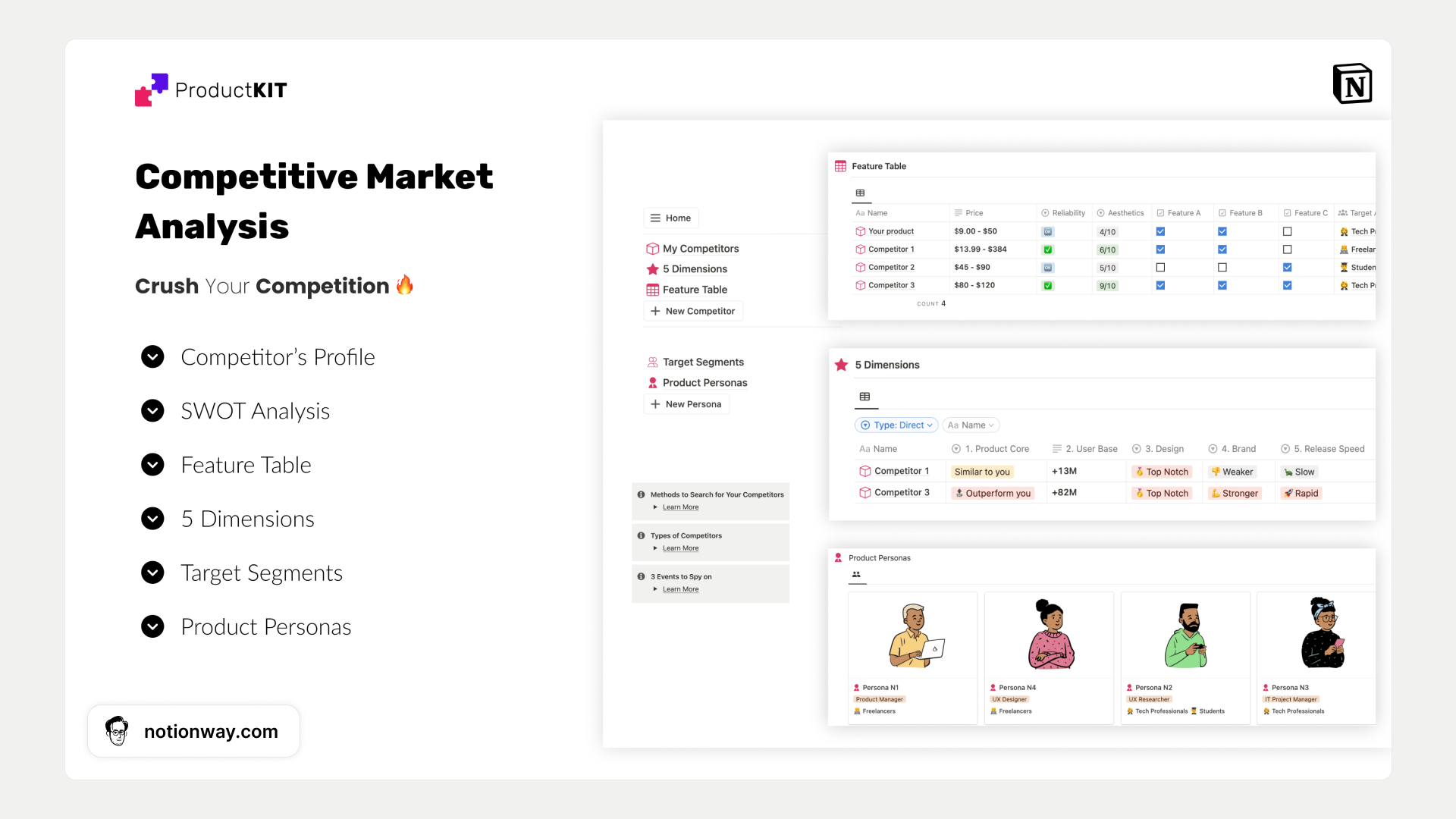
*A structured Notion page like this is perfect for organizing your competitive research. You can create a simplified version for your own use.*
-
2. Analyze Competitors:
- Go to the Notion Template Gallery, Etsy, and Gumroad. Search for "project management templates."
- Find 3-5 templates that are similar to yours. For each one, log the following in your research hub:
- Template Name & Creator
- Price
- Key Features (e.g., Gantt charts, task dependencies, team collaboration)
- Unique Selling Proposition (What makes it special? Aesthetics? Simplicity? Power?)
-
3. Validate Demand:
- Go to a free keyword tool like Ubersuggest or use the search bar on Etsy.
- Search for terms like "Notion project management," "Notion task manager," and "Notion planner."
- Note the search volume. Is there significant interest? What related keywords do you see?
-
4. Define Your Price:
- Based on your research, answer the following questions on your Notion page:
- Value: What is the primary value my template offers over others? (e.g., "It's simpler and more intuitive for solo freelancers.")
- Positioning: Where does my template fit in the market? (Entry-level, mid-tier, premium?)
- Price Point: What is a starting price you feel is fair? Write down a specific number (e.g., $29).
- Justification: Briefly explain why you chose this price, referencing your competitor and value analysis.
- Based on your research, answer the following questions on your Notion page:
Conclusion
You have now completed the foundational business task of pricing your product. By grounding your decision in research rather than guesswork, you've taken a professional approach that dramatically increases your chances of success.
Key Takeaways:
- Price based on value, not effort. Focus on the problems you solve for your customer.
- Conduct thorough market research. Analyze competitors on the Notion Gallery, Etsy, and Gumroad to understand the landscape.
- Use keyword tools to validate demand. Ensure people are actively searching for the solution you provide.
- Choose a pricing model that fits your product. A one-time purchase is most common, but other options exist.
- Position your template within established price tiers. Your research will tell you whether your template is an entry-level, mid-tier, or premium offering.
Preview of the Next Lesson:
Now that you have a price, you need to convince people to pay it. In the next lesson, you will learn how to write a compelling product description and title that highlights value and solves a problem. This is where you'll turn your research into persuasive marketing copy.