Welcome to the final lesson in our module on Identity and Access Management. In our previous discussions, we've explored the who of access control with managed identities and service principals, and the when, where, and why with Conditional Access policies. We established that Conditional Access is the policy engine that governs every access request. Today, we turn our attention to the how—the underlying protocols that applications use to programmatically request and manage the very tokens that Conditional Access scrutinizes.
Our objective is to compare the core authentication and authorization protocols supported by Microsoft Entra ID, specifically OAuth 2.0 and OpenID Connect. As a system architect, a deep understanding of these protocols is not merely academic; it's fundamental to designing secure, scalable, and interoperable applications. This knowledge dictates how your web apps, mobile apps, and backend services will securely integrate with the identity platform, a critical architectural decision point.
A Tale of Two Problems: Authentication vs. Authorization
Before diving into the protocols themselves, we must be precise about the problems they solve. In system design, two fundamental security questions must be answered for every request:
- Authentication (AuthN): Who are you? This is the process of proving an identity. When you log in with a username and password, you are authenticating.
- Authorization (AuthZ): What are you allowed to do? This is the process of granting permission to a verified identity to perform an action or access a resource.
These are distinct concerns. You might authenticate successfully but be unauthorized to access a specific admin panel. The protocols we're discussing today were purpose-built to handle these concerns in the distributed world of web APIs and modern applications. In short: OpenID Connect (OIDC) is for Authentication, and OAuth 2.0 is for Authorization. OIDC is, in fact, an intelligent extension built directly on top of OAuth 2.0.
The Evolution from Enterprise Federation to Web APIs
To understand why OAuth 2.0 and OIDC became the dominant standards, it helps to appreciate the historical context. For many years, the enterprise world relied on protocols like SAML 2.0 for single sign-on (SSO). SAML is powerful, enterprise-grade, and built around a complex XML-based format. While excellent for browser-based, enterprise web application federation, its complexity and reliance on browser redirects made it ill-suited for the emerging landscape of mobile apps and modern, lightweight web APIs.
The following article provides a superb narrative of this evolution, explaining the business and technical drivers that led from SAML to the modern protocols.
The Evolution of Enterprise Authentication
This blog post provides essential historical context on the shift from older protocols to the modern standards used by Entra ID.
Read through the first three major sections: Start with "The SAML Era," paying attention to its strengths (security, compliance) and, more importantly, its weaknesses (developer experience, mobile support). This sets the stage for what followed. Continue to "The OAuth Revolution." Focus on how OAuth 2.0 was designed to solve a different problem: delegated authorization for web APIs, not user authentication. Finally, read "OIDC Arrives," which explains how OpenID Connect was created to standardize the authentication layer that OAuth 2.0 was missing, providing a developer-friendly, JSON-based alternative to SAML's complexity.
OAuth 2.0: The Framework for Delegated Authorization
The core problem OAuth 2.0 was designed to solve is delegated authorization. Imagine a third-party application (e.g., a photo printing service) wanting to access your photos stored in Google Photos. You, the user, want to grant it permission to access only your photos, without giving it your Google password. This is the classic delegation scenario.
The following video provides one of the clearest explanations available of OAuth 2.0 and OIDC, starting from this foundational problem.
OAuth 2.0 and OpenID Connect (in plain English)
This video from OktaDev masterfully breaks down the concepts behind OAuth 2.0 and OIDC.
Watch the following segments carefully: Delegated Authorization: This section introduces the core problem OAuth solves, defines the key terminology (Resource Owner, Client, Authorization Server, Resource Server), and explains the role of scopes and the access token. Front-channel vs. Back-channel: This is a critical architectural concept. Pay close attention to the explanation of why the Authorization Code Flow involves exchanging a temporary code for an access token. This two-step dance, using both the browser (front-channel) and a secure server-to-server call (back-channel), is the cornerstone of the protocol's security.
As the video explains, the result of a successful OAuth 2.0 flow is an access token. This token is a credential that represents the specific permissions (defined by scopes) that the user has granted to the client application. The application presents this token to the resource server (e.g., the Google Photos API) to prove its authorization.
OpenID Connect: The Identity Layer on Top of OAuth 2.0
As you learned from the resources, developers started using the popular OAuth 2.0 framework for user login, a purpose for which it was not designed. This led to insecure and non-standard implementations.
OpenID Connect (OIDC) was created to formalize this process. It is a thin identity layer on top of OAuth 2.0 that introduces a standard way to handle authentication. It achieves this by adding a few key components:
- The
openidscope: A client requests this scope, in addition to any other OAuth 2.0 scopes, to signal that it wants to perform user authentication. - The ID Token: When the
openidscope is requested, the authorization server returns an ID Token alongside the access token. This ID token is a JSON Web Token (JWT). - The
/userinfoEndpoint: A standardized API endpoint that the client can call with the access token to retrieve additional information about the user.
A JWT is a compact, URL-safe means of representing claims to be transferred between two parties. The ID Token's claims contain information about the user, such as their name, email, and a unique identifier (sub), as well as metadata about the authentication event itself (e.g., when it happened). Because JWTs are digitally signed by the authorization server (Entra ID), the client application can cryptographically verify that the token is authentic and has not been tampered with.
OAuth 2.0 and OpenID Connect (in plain English)
Now, let's complete the picture by seeing how OIDC extends OAuth.
Watch these concluding segments from the same video: The Misuse of OAuth for Authentication: This explains the problem that OIDC was created to solve. How OIDC Extends OAuth: This section explains the role of the ID Token (JWT) and shows how a full OIDC flow works, providing you with the user's identity information.
Comparing the Authorization Flows in Microsoft Entra ID
As an architect, your primary task is to choose the correct protocol and, just as importantly, the correct flow for your application's specific scenario. Microsoft Entra ID supports several OAuth 2.0 grant types, or flows. The choice depends on the application type (e.g., web app with a server backend, single-page app, mobile app, or a background service).
The following research paper provides a concise, technical breakdown of the primary flows as implemented in Entra ID.
[PDF] OAuth 2.0 and OpenID Connect Integration with Azure ...
This paper details the main OAuth 2.0 flows and their recommended use cases within the Azure ecosystem.
Focus your reading on Section IV, "Authorization Flows in Azure Context." Pay particular attention to Table 1 and the descriptions of the three main flows: Authorization Code Flow: Note that this is the most secure and recommended flow for most applications. Microsoft's implementation mandates PKCE (Proof Key for Code Exchange), which provides critical security for public clients like mobile and single-page apps. Client Credentials Flow: Understand that this flow is for non-interactive, service-to-service communication. This is the flow used by a service principal or a managed identity when it needs to acquire a token to call another API. There is no user involved. Implicit Flow: Recognize this as a legacy flow that is no longer recommended. Understand why it's insecure (the access token is returned directly in the browser URL) and that it has been superseded by the Authorization Code flow with PKCE, even for single-page applications.
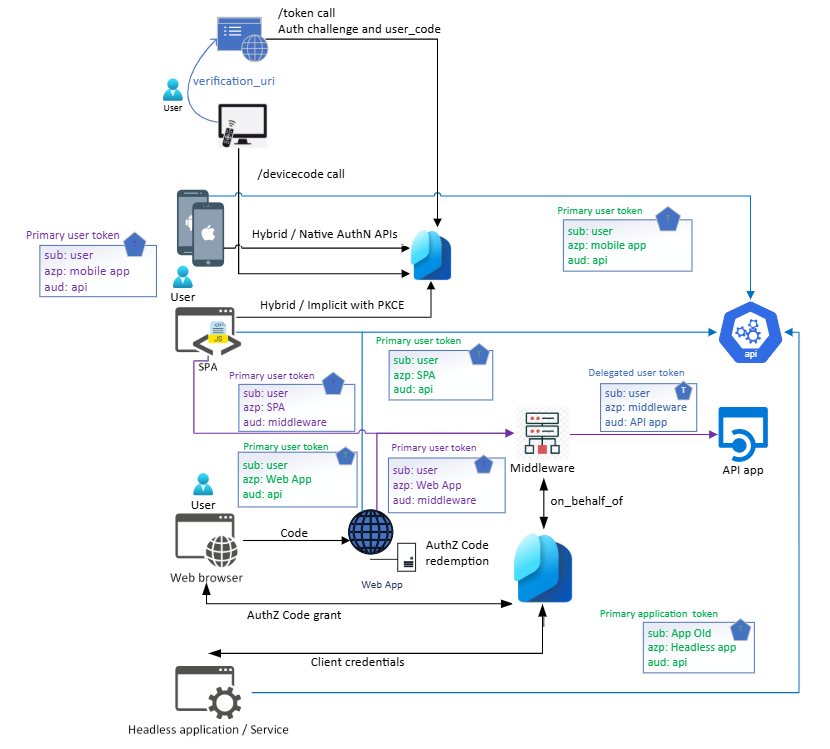
The diagram below from Microsoft provides an excellent architectural overview, mapping these flows to different application types. It synthesizes the information you've just read.
Your Architectural Decision Framework
With this knowledge, we can construct a simple decision framework for choosing the right protocol and flow:
-
Do I need to log in a user?
- Yes: You need OpenID Connect.
- No: You might only need OAuth 2.0 (e.g., for service-to-service authorization).
-
What type of application am I building?
- Web App with a server-side backend: Use the Authorization Code flow. The backend can securely store a client secret and manage tokens.
- Single-Page App (SPA) or Mobile/Native App: Use the Authorization Code flow with PKCE. This is the modern, secure standard for "public clients" that cannot securely store a secret.
- Backend Service, Daemon, or Script (non-interactive): Use the Client Credentials flow. This is where managed identities and service principals operate, acquiring their own application-level tokens.
- Integrating with a legacy enterprise app that only speaks SAML: You must use SAML. Entra ID supports this for backward compatibility, but OIDC is the standard for all new development.
Conclusion
In this lesson, we demystified the protocols that underpin modern identity systems. We traced their evolution and established their distinct but related roles in solving the challenges of authentication and authorization.
Your key architectural takeaways are:
- OAuth 2.0 is the framework for delegated authorization, enabling an application to access resources on behalf of a user. Its primary artifact is the access token.
- OpenID Connect is the identity layer built on OAuth 2.0, enabling an application to verify a user's identity. Its primary artifact is the ID token (a JWT).
- The Authorization Code flow with PKCE is the secure, modern standard for all user-facing applications (web, SPA, mobile) to obtain tokens.
- The Client Credentials flow is the standard for service-to-service communication, where an application authenticates as itself, not on behalf of a user.
- Legacy flows like Implicit should be avoided in new designs due to their security vulnerabilities.
This lesson concludes our module on Identity and Access Management in Azure. You now have a solid foundation covering the core components of Microsoft Entra ID, from resource hierarchy and RBAC to Zero Trust principles with Conditional Access, and finally, the protocols that tie it all together.
In our next module, we will pivot from identity to the foundational infrastructure of the cloud, beginning with Core Infrastructure: Azure Networking. We will explore how to design and secure the virtual networks that house your applications and data.