Welcome back. In our last lesson, we explored Azure App Service, a Platform-as-a-Service (PaaS) offering that gives you managed compute for your web applications. We focused on the architectural decision of selecting an App Service Plan, balancing cost, features, and isolation. Today, we take the final step up the abstraction ladder to Function-as-a-Service (FaaS), or what is commonly called "serverless" compute.
This lesson addresses the learning outcome: Compare Azure Functions consumption vs. premium plans and identify appropriate trigger types for serverless workloads. We will explore Azure Functions, the direct counterpart to AWS Lambda in the Azure ecosystem. Your experience with Lambda will provide a strong foundation, as we'll be discussing familiar concepts like event-driven execution, pay-per-use billing, and cold starts. Our goal is to build a decision framework for choosing the right hosting model and to understand how Functions integrate into broader system designs.
The Serverless Paradigm: Azure Functions
At its core, Azure Functions is an event-driven compute service that allows you to run small pieces of code—or "functions"—without managing the underlying infrastructure. The platform automatically provides and scales the necessary compute resources in response to events. This abstraction lets you focus entirely on your business logic.
The two central concepts in Functions are triggers and bindings.
- Triggers are what cause a function to run. A trigger defines how a function is invoked. Every function must have exactly one trigger.
- Bindings are a declarative way to connect other resources to your function. They can be input bindings, providing data to your function, or output bindings, sending data from your function. This powerful feature simplifies code by eliminating the need for boilerplate SDK logic to connect to services like databases or message queues.
The diagram below illustrates this powerful integration model. An event from a service on the left (e.g., a new message in a queue, a new file in Blob Storage, or an HTTP request) acts as a trigger. The function can then use input and output bindings to read from and write to other services.
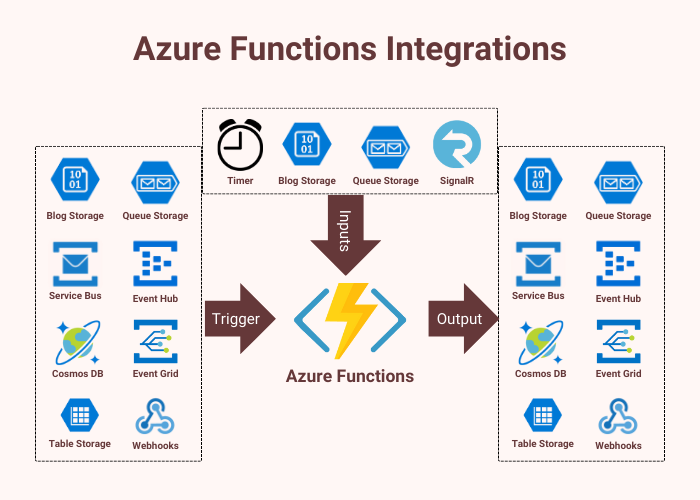
Common trigger types that you will encounter in system design include:
- HTTP Trigger: Executes in response to an HTTP request. Ideal for building serverless APIs and webhooks.
- Timer Trigger: Executes on a schedule (defined by a CRON expression). Perfect for scheduled tasks like nightly data processing or cleanup jobs.
- Queue Trigger: Executes when a new message appears in an Azure Queue Storage or Service Bus queue. A fundamental building block for decoupling components in a microservices architecture.
- Blob Trigger: Executes when a new or updated blob is detected in Azure Blob Storage. Useful for image resizing, log processing, or any file-based workflow.
- Event Hubs / Event Grid Trigger: Executes in response to events from Azure's high-throughput streaming and eventing services. This enables highly reactive and scalable architectures.
Understanding these trigger types is key to identifying where Functions can be used to orchestrate workflows and integrate different parts of an application.
Comparing Hosting Plans: Consumption vs. Premium
While you don't manage VMs, you still need to choose a hosting plan that dictates how your function app scales, performs, and is billed. The primary architectural choice for serverless development is between the Consumption plan and the Premium plan.
Azure Functions Scale and Hosting | Microsoft Learn
The official Microsoft documentation provides the definitive technical comparison of the hosting plans. This document contains the details you'll need to make an informed architectural decision.
Please review the following sections in this document: Start with the table in the Overview of plans section. Pay close attention to the "Benefits" described for the Consumption and Premium plans. Read the Function app timeout duration section to understand the execution time limits. Examine the table in the Scale section to see the differences in how each plan handles horizontal scaling. Review the Cold start behavior section, as this is a critical performance consideration. Finally, look at the table in the Billing section to understand the cost models.
Let's synthesize this information into a direct comparison focused on the trade-offs a Principal Engineer would evaluate.
1. Billing Model and Cost implications
- Consumption Plan: This is the "true" serverless model, analogous to the standard AWS Lambda pricing model. You are billed based on the number of executions and the resource consumption (measured in gigabyte-seconds) during execution. You pay nothing when your function is not running.
- Best for: Workloads that are spiky, unpredictable, or have significant idle periods. It offers maximum cost efficiency for applications with intermittent traffic.
- Premium Plan: This plan requires you to have one or more instances "pre-warmed" and "always ready." You are billed for these instances per core-second and GB-second of memory allocated, even when they are not actively processing events.
- Best for: Applications with sustained traffic where costs become more predictable, or for latency-sensitive workloads where the cost of a pre-warmed instance is justified by the performance gain.
2. Performance and the "Cold Start" Problem
A "cold start" occurs when an event triggers a function that isn't currently running on a provisioned server. The platform must allocate a server and start the Functions host process before your code can run, adding latency to the first request.
- Consumption Plan: Is susceptible to cold starts. If your app has been idle, the first request will experience this additional latency. While Azure has optimizations to mitigate this, it's an inherent characteristic of scaling from zero.
- Premium Plan: Eliminates cold starts. By maintaining pre-warmed instances, the platform can immediately run your function code on a ready server, ensuring consistent, low-latency performance. This is the primary reason to choose the Premium plan for user-facing or interactive APIs.
3. Execution Duration and Network Features
- Execution Duration:
- Consumption Plan: Has a maximum timeout, defaulting to 5 minutes and configurable up to 10 minutes. This makes it unsuitable for long-running processes.
- Premium Plan: The timeout is technically unbounded (defaulting to 30 minutes), making it suitable for longer-running background tasks, data processing, or orchestrations.
- Networking:
- Consumption Plan: Offers very limited networking capabilities. Crucially, it does not support Virtual Network (VNet) integration.
- Premium Plan: Provides full VNet integration. This allows your function to securely access other Azure resources (like databases or caches) inside a VNet using private endpoints, which is a common security requirement for enterprise applications.
The blog post below provides a concise summary table that brings these points together clearly.
Azure Function: Deployment Options -Consumption, Premium ...
This blog post by Rajeev Singh offers a well-structured summary of the key differences between the plans.
Focus on two tables in this article: The main overview table at the top, under the heading Overview of plans. This gives a quick, high-level comparison. The table under the Networking features heading, which clearly highlights the VNet integration difference.
What About the Dedicated Plan?
You will also see a Dedicated (App Service) Plan option. This isn't a serverless model. It allows you to run your Functions on the same App Service Plans we discussed in the previous lesson. You would choose this primarily for two reasons:
- Cost Savings: To run functions on existing, underutilized App Service Plan VMs that are already paid for.
- Predictability: For workloads that need completely predictable costs and manual or autoscaled (but not event-driven) scaling behavior.
For most new serverless designs, the choice will be between Consumption and Premium.
Orchestrating Workflows with Durable Functions
For complex system design, simple, stateless functions are often not enough. You frequently need to orchestrate a series of functions into a stateful workflow. Azure addresses this with Durable Functions, an extension built on top of Azure Functions. It allows you to write stateful orchestrations in code, simplifying complex patterns.

Durable Functions enables you to build reliable, long-running, and stateful serverless applications. It's not a separate hosting plan; it runs on the Consumption, Premium, or Dedicated plans. However, due to the potential for long-running orchestrations, it is often paired with the Premium or Dedicated plans to avoid the timeout limitations of the Consumption plan.
A Decision Framework: When to Choose Which Plan
As a Principal Engineer, your recommendation must be justifiable. Here is a decision framework for selecting between the Consumption and Premium plans:
| Decision Factor | Choose Consumption Plan if... | Choose Premium Plan if... |
|---|---|---|
| Workload Pattern | Traffic is spiky, unpredictable, or has long idle periods. | Traffic is consistent, high-throughput, or always active. |
| Performance | Cold start latency is acceptable (e.g., background processing, non-interactive tasks). | Low latency is critical and cold starts are unacceptable (e.g., user-facing APIs). |
| Execution Time | Tasks are short-lived and complete within 10 minutes. | Tasks are long-running or orchestrations can exceed 10 minutes. |
| Security/Networking | The function is public or does not need to access resources within a VNet. | The function must securely access private resources (databases, caches) within a VNet. |
| Cost Model | The primary goal is to minimize cost during idle times ("pay-for-what-you-use"). | The primary goal is predictable performance, and a predictable base cost is acceptable. |
Conclusion
In this lesson, we explored Azure Functions, Azure's FaaS offering. We've seen how it provides an event-driven compute model that, like AWS Lambda, allows you to focus on code rather than infrastructure.
Here are the key architectural takeaways:
- Triggers and bindings are the core mechanisms that make Azure Functions a powerful integration tool for building event-driven systems.
- The choice between the Consumption Plan and the Premium Plan is a fundamental trade-off.
- Consumption offers the ultimate pay-as-you-go serverless model, ideal for cost-sensitive and intermittent workloads where cold starts are tolerable.
- Premium offers superior performance by eliminating cold starts and adds critical enterprise features like VNet integration, making it the go-to choice for latency-sensitive and secure applications.
- Durable Functions is a powerful framework that runs on these plans to orchestrate complex, stateful serverless workflows, addressing common system design patterns.
We have now covered compute options from IaaS (VMs, VMSS), to PaaS (App Service), to FaaS (Functions). In our next lesson, we will turn our attention to containers, another dominant paradigm in modern application development, and contrast Azure Container Apps with Azure Kubernetes Service (AKS).