Greetings. In our last session, we focused on architecting elasticity at the Infrastructure-as-a-Service (IaaS) level using Virtual Machine Scale Sets. You learned to design scaling strategies by managing the virtual machines themselves. Today, we ascend the cloud abstraction ladder to Platform-as-a-Service (PaaS).
The learning outcome for this lesson is to describe Azure App Service hosting plans and evaluate the trade-offs between tiers for web application hosting. For a web application, this is one of the most fundamental architectural decisions you will make in Azure. The App Service Plan is the linchpin that defines the performance, features, cost, and scalability of your PaaS-hosted application. We will dissect the available tiers and, more importantly, construct a framework for choosing the right one based on workload requirements, a process central to the Principal Engineer role.
What is an App Service Plan?
In the IaaS world of VMSS, you define a template for VMs and manage a group of them. In the PaaS world of Azure App Service, you delegate the management of the underlying operating systems and virtual machines to Azure. The App Service Plan is the resource you provision that represents this underlying compute power. It's the fully managed "server farm" where your web apps, mobile backends, or API apps will run.
An App Service Plan is defined by a few key attributes:
- Operating System: Windows or Linux.
- Region: The geographical location where the compute resources are deployed.
- Number of VM instances: The count of machines running your app (for scalable tiers).
- Size of VM instances: The CPU and RAM of each machine.
- Pricing Tier: The SKU that determines the features, performance, and cost.
This last attribute, the pricing tier, is the focus of our evaluation.
AZ-204 Exam EP 03: App Service Plan
This short video provides a concise definition of an App Service Plan and shows where it fits into the process of creating an app.
Watch the initial segment from the beginning up to this point. It effectively frames the App Service Plan as the compute resource that powers your App Service applications.
A Spectrum of Tiers: From Development to Isolation
App Service Plans are categorized into three broad families, each serving a different purpose and providing a different level of capability and isolation. Understanding this spectrum is the first step in making an informed decision.
Azure App Service Plans - Microsoft Learn
The official Microsoft Learn documentation provides a definitive breakdown of the pricing tier categories.
In this document, focus on the table and descriptions under the Pricing tiers section. This table introduces the three main categories: Shared, Dedicated, and Isolated.
Let's break down these categories from an architectural perspective:
-
Shared Compute (Free, Shared Tiers)
- Architecture: Your application runs on a VM that is also used by other Azure customers. Resources like CPU are subject to quotas to ensure fair use.
- Use Case: Strictly for development, testing, and very low-traffic personal projects. They are not intended for production workloads.
- Key Limitation: Cannot scale out (increase instance count). Performance is not guaranteed.
-
Dedicated Compute (Basic, Standard, Premium Tiers)
- Architecture: Your application runs on VMs that are dedicated to your App Service Plan. While you might run multiple apps in one plan (sharing the dedicated VMs), you are not sharing resources with other Azure customers.
- Use Case: The starting point for professional and production applications. The tiers within this category unlock progressively more powerful features.
- Feature Progression:
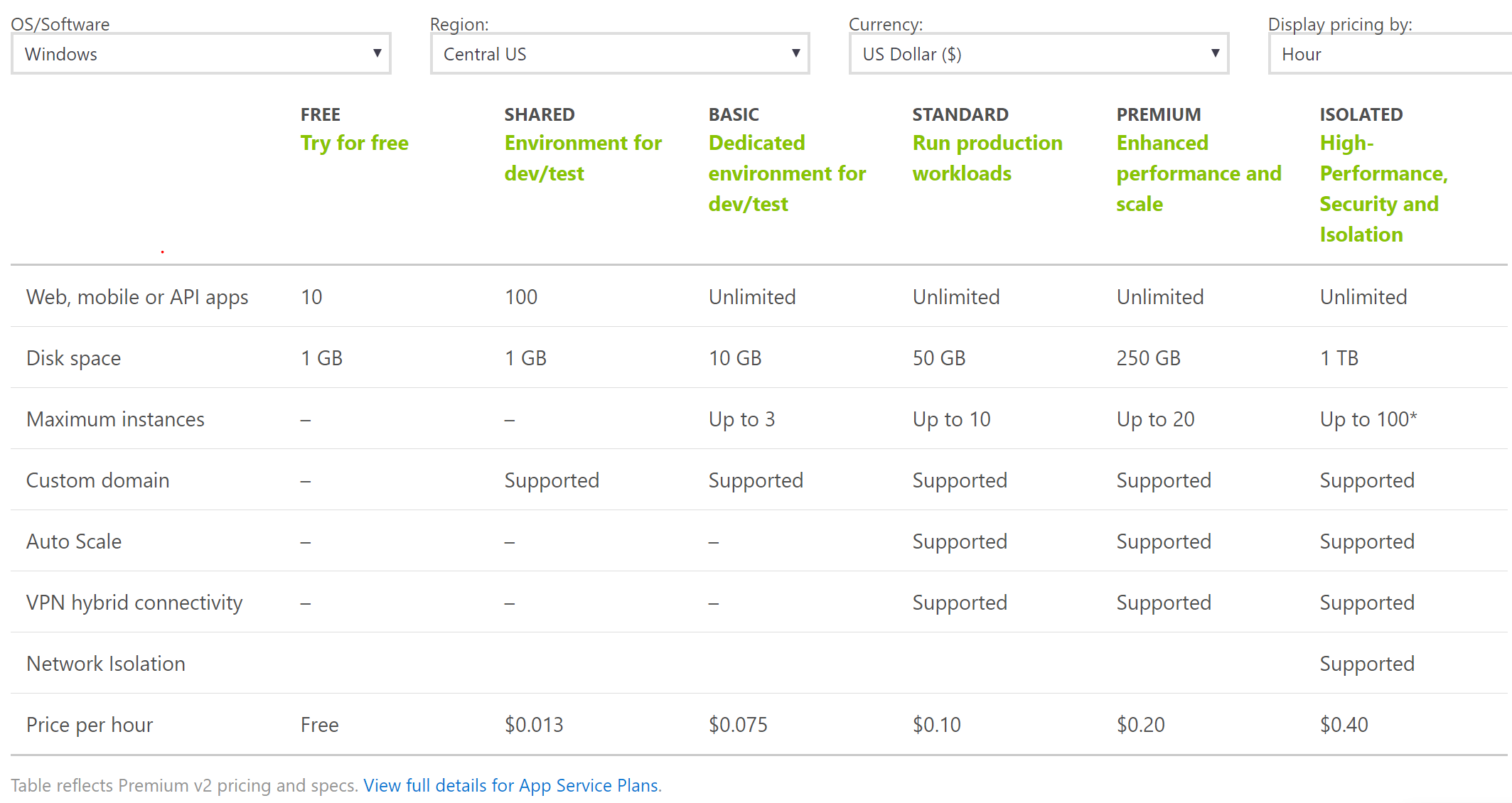
- Basic: Adds support for custom domains with TLS/SSL and allows manual scaling out to 3 instances.
- Standard: A significant step up. Introduces autoscale, deployment slots (for staging/blue-green deployments), and daily backups. This is often the minimum for serious production apps.
- Premium (v2/v3): The high-end production tier. Offers more powerful VM instances, higher scale-out limits, virtual network (VNet) integration, and support for zone redundancy for high availability.
-
Isolated (Isolated, IsolatedV2 Tiers)
- Architecture: Provides the highest level of isolation and security. Your application runs on dedicated VMs deployed into your own dedicated and isolated Azure Virtual Network, using a feature called an App Service Environment (ASE).
- Use Case: Mission-critical applications with stringent security, compliance, or network isolation requirements. Think financial services, government, or healthcare.
- Key Benefit: Combines the PaaS benefits of App Service with the network isolation previously only available with IaaS deployments.
The following image provides a great at-a-glance comparison of the features available across these tiers.
Key Architectural Trade-offs
With a clear understanding of the tiers, we can now focus on the evaluation process. As a Principal Engineer, you'll constantly weigh these trade-offs to align technical choices with business goals.
1. Density vs. Isolation: The Consolidation Dilemma
A core decision is whether to place multiple applications into a single, larger App Service Plan (high density) or to provision a separate plan for each application (isolation).
Architecture Best Practices for Azure App Service (Web Apps)
The Well-Architected Framework guidance for App Service directly addresses this crucial trade-off.
First, read the bullet point that discusses this trade-off. Then, scroll down to the "Tradeoffs" section and read the detailed explanation under the heading Density and isolation.
Based on this guidance, here's a decision framework:
-
Consolidate (Higher Density) when:
- Goal: Cost optimization.
- Workloads: Non-critical apps, microservices with similar lifecycles and load profiles, or dev/test environments.
- Risk: The "noisy neighbor" problem. A memory leak or CPU spike in one app can impact all other apps in the plan. All apps also scale together, which may be inefficient if their loads are not correlated.
-
Isolate (Separate Plans) when:
- Goal: Performance and reliability.
- Workloads: The application is resource-intensive, business-critical, or requires independent scaling rules. A common best practice is to always separate production environments from non-production environments in different plans.
- Benefit: Predictable performance and a limited "blast radius" — an issue with one app or plan does not affect others.
2. Scaling: Up vs. Out
Like with VMs, you have two dimensions for scaling:
- Scaling Up (Vertical): Changing the pricing tier of the plan (e.g., from Standard to Premium) or increasing the instance size within a tier (e.g., P1v3 to P2v3). You do this to get more powerful compute (CPU/memory/storage) or to unlock features available only in higher tiers.
- Scaling Out (Horizontal): Increasing the number of VM instances in your plan. This is the same principle we saw with VMSS and is used to handle higher request throughput. This is only available in the Basic tier and above, with autoscale being a feature of the Standard tier and above.
The architectural choice depends on the bottleneck. If your application is hitting CPU or memory limits on a single instance, scaling up might be necessary. If the application is stateless and needs to handle more concurrent users, scaling out is the answer.
3. Cost vs. Resilience and Features
Ultimately, the choice of plan is a balance between budget and requirements. While it's tempting to save money with lower tiers, for any serious production workload, the features in the higher tiers are not just nice-to-haves; they are essential for reliability and operational excellence.
Architecture Best Practices for Azure App Service (Web Apps)
The Well-Architected documentation provides clear recommendations on this front.
Review these three specific recommendations: The advice to use free or basic tiers for lower environments. The recommendation to choose the Premium v3 tier for production workloads. The explicit guidance to enable zone redundancy, a feature of the Premium tier that provides resilience against datacenter failures.
For production, the Premium tier is often the sweet spot. It provides zone redundancy, VNet integration for secure connections to other Azure services, and robust scaling, which are all pillars of a well-architected solution.
A Decision-Making Flowchart
To bring all these concepts together, consider the following flowchart. It provides a logical path to help select the right plan by asking a series of questions about the workload's purpose, expected traffic, and feature requirements. This is a practical tool that synthesizes the trade-offs we've discussed.

By following this logic, you can systematically justify your choice of hosting plan, moving from business requirements to a specific technical implementation.
Conclusion
In this lesson, we transitioned from the IaaS world of managing VMs to the PaaS paradigm of Azure App Service. We dissected the App Service Plan, the fundamental unit of compute for PaaS applications in Azure.
Your key takeaways for architectural design are:
- The App Service Plan defines the boundary for compute, cost, and features. The choice of tier is a primary architectural decision.
- The tiers exist on a spectrum: Shared for dev/test, Dedicated for production, and Isolated for high-security workloads.
- The decision to consolidate apps into one plan or isolate them is a critical trade-off between cost efficiency (density) and reliability (isolation).
- For production workloads, the features of the Standard and Premium tiers, such as autoscale, deployment slots, and zone redundancy, are typically mandatory for building a robust and scalable application.
In our previous lesson, you scaled VMs. In this one, you chose a managed compute tier. In our next lesson, we will ascend one final step on the abstraction ladder to Azure Functions, Azure's primary Function-as-a-Service (FaaS) or "serverless" offering. There, we'll explore a world where you focus almost exclusively on event-driven code, and the platform manages nearly everything else.