Welcome to the next lesson in our journey through the Azure ecosystem. In our previous sessions, we architected the foundational structure of an Azure environment using management groups, subscriptions, and resource groups, and then designed a tagging strategy to bring logical order and business context to those resources. We defined the rules of our organization; now, we will build the engine that enforces them.
This lesson delves into Azure Policy, the service that acts as the automated governance layer for your entire Azure estate. For a Principal Engineer, mastering policy is non-negotiable. It is the primary tool for translating organizational standards, security requirements, and cost controls into enforced reality, moving governance from a paper exercise to a core part of your infrastructure's DNA. We will evaluate how this service works, how it enforces compliance, and how its architectural approach differs from what you might be familiar with in AWS.
By the end of this lesson, you will be able to evaluate how Azure Policy enforces organizational standards and compliance across subscriptions, enabling you to design and implement robust governance-as-code strategies.
The Architectural Role of Azure Policy
At its core, Azure Policy is a service that evaluates your resources against a set of rules. It is deeply integrated into the Azure control plane, specifically the Azure Resource Manager (ARM), which processes all resource creation and modification requests. This placement is a fundamental design choice with significant implications.
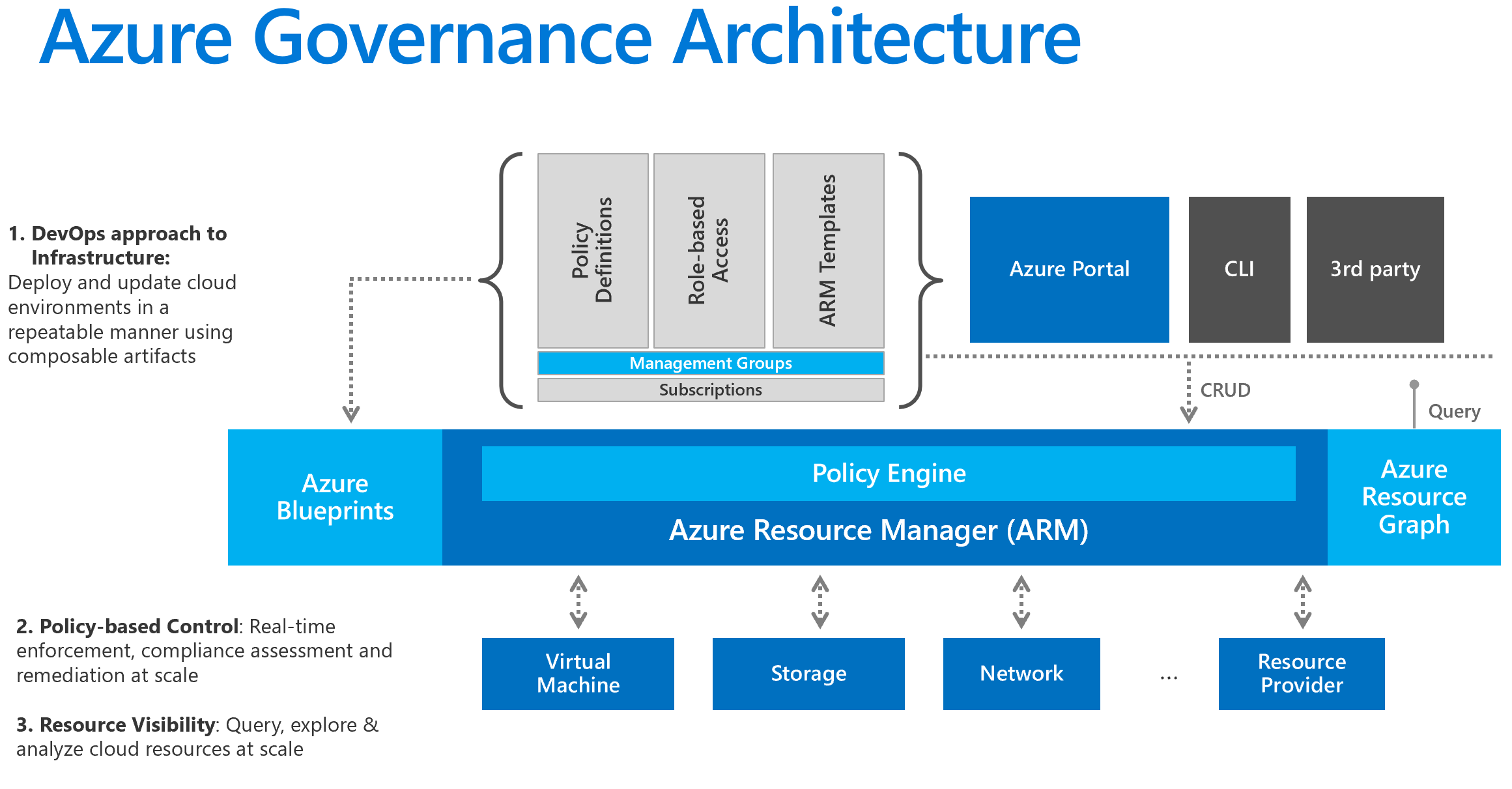
Because Policy is part of ARM, it can enforce rules regardless of how a resource is being deployed—whether through the Azure Portal, CLI, or an Infrastructure as Code (IaC) pipeline. This provides a consistent and centralized enforcement point.
This approach reflects a resource-centric governance philosophy. The focus is on the properties of the resource being created or modified, not just the permissions of the identity performing the action. This is a key distinction from the AWS model you are familiar with.
Azure Policy vs AWS SCPs: How Cloud Governance Works Differently
This article provides an excellent architectural comparison between Azure's and AWS's governance models. It will help frame Azure Policy in a context you already understand.
First, read the introduction, The Governance Problem, which sets the stage and introduces the philosophical difference between Azure's resource-centric model and AWS's identity-centric model. Then, read the section Enforcement model: resource-level vs identity-level control. This directly contrasts how Azure Policy intercepts resource operations through ARM, versus how AWS Service Control Policies (SCPs) place boundaries on IAM principals. Pay close attention to the implications this has for enforcing specific configuration rules.
The Building Blocks of Azure Policy
Azure Policy is built from a few key components that work together. Understanding their roles is crucial to designing effective governance.
- Policy Definition: This is the rule itself, written in JSON. It contains a conditional logic block (
if) that specifies the criteria to check (e.g., "if the resource type is a Storage Account and it does not have encryption enabled") and a consequence (then) that specifies the effect to apply. Azure provides hundreds of built-in definitions for common scenarios, and you can create custom ones for specific organizational needs. - Assignment: A policy definition has no effect until it is assigned. An assignment applies a policy to a specific scope: a management group, a subscription, or a resource group. Policies are inherited down the hierarchy, so a policy assigned to a management group applies to all subscriptions within it.
- Parameters: To make policy definitions reusable, they can be parameterized. For example, a policy to restrict resource deployments to certain locations can take the list of allowed locations as a parameter. This allows you to use the same definition with different values for your production and development subscriptions.
- Initiative (or Policy Set): An initiative is a collection of policy definitions grouped together to achieve a broader goal. For example, you could create a "NIST 800-53" initiative that groups all the individual policies needed to meet that compliance standard. You then assign the initiative as a single unit, which simplifies management.
The following article gives a solid overview of these components and how they fit together.
Deep Dive into Azure Policy Enforcement – ExamCollection
This article breaks down the core concepts of Azure Policy.
Read the following sections to solidify your understanding of the basic components: Built-In Versus Custom Policies The Role of Policy Assignments Exclusions and Fine-Grained Control Grouping Policies into Initiatives
How Policy Enforces Standards: The "Effects"
The real power of Azure Policy lies in its effects, which determine what happens when a resource violates a rule. These effects provide a spectrum of control, from simple auditing to active prevention and automated remediation.
- Audit: This is the most passive effect. It allows the non-compliant resource to be created or updated but flags it in a compliance dashboard. This is perfect for rolling out new policies to assess their impact without breaking existing workflows.
- Deny: This is the most straightforward enforcement action. It blocks the creation or update of any resource that violates the policy. This is the "hard stop" you would use for critical rules, such as preventing the creation of public IP addresses on certain VMs.
- Append & Modify: These effects actively change a resource configuration to bring it into compliance during deployment. For example, a policy with an
Appendeffect could automatically add a requiredcost_centertag if it's missing.Modifycan alter existing properties, like enabling a required setting. - AuditIfNotExists & DeployIfNotExists: These are more advanced effects that check for the existence of a related, dependent resource. For example, you can use
DeployIfNotExiststo automatically deploy a Log Analytics agent to every new virtual machine, ensuring all compute resources are monitored. This provides powerful, self-healing capabilities.
John Savill provides a fantastic technical deep dive into the remediation effects, Modify and DeployIfNotExists, which are crucial for building automated governance.
Azure Policy Remediation Deep Dive
This video explains the mechanics of how Azure Policy performs remediation, detailing the interaction with ARM and the use of managed identities.
Please watch these key segments: The introduction frames the purpose of remediation effects. The Modify effect section explains how policies can change a resource's properties before it's created. This is the mechanism for enforcing the tagging strategies we discussed previously. The DeployIfNotExists effect section details the multi-stage process for adding related resources, like monitoring agents. The role of Managed Identity is explained, which is a critical piece of the security model for how policies get the permissions to perform these automated actions. Remediating existing resources shows how you can apply these policies not just to new resources, but also run "remediation tasks" to fix existing, non-compliant ones.
Policy in an Enterprise Context
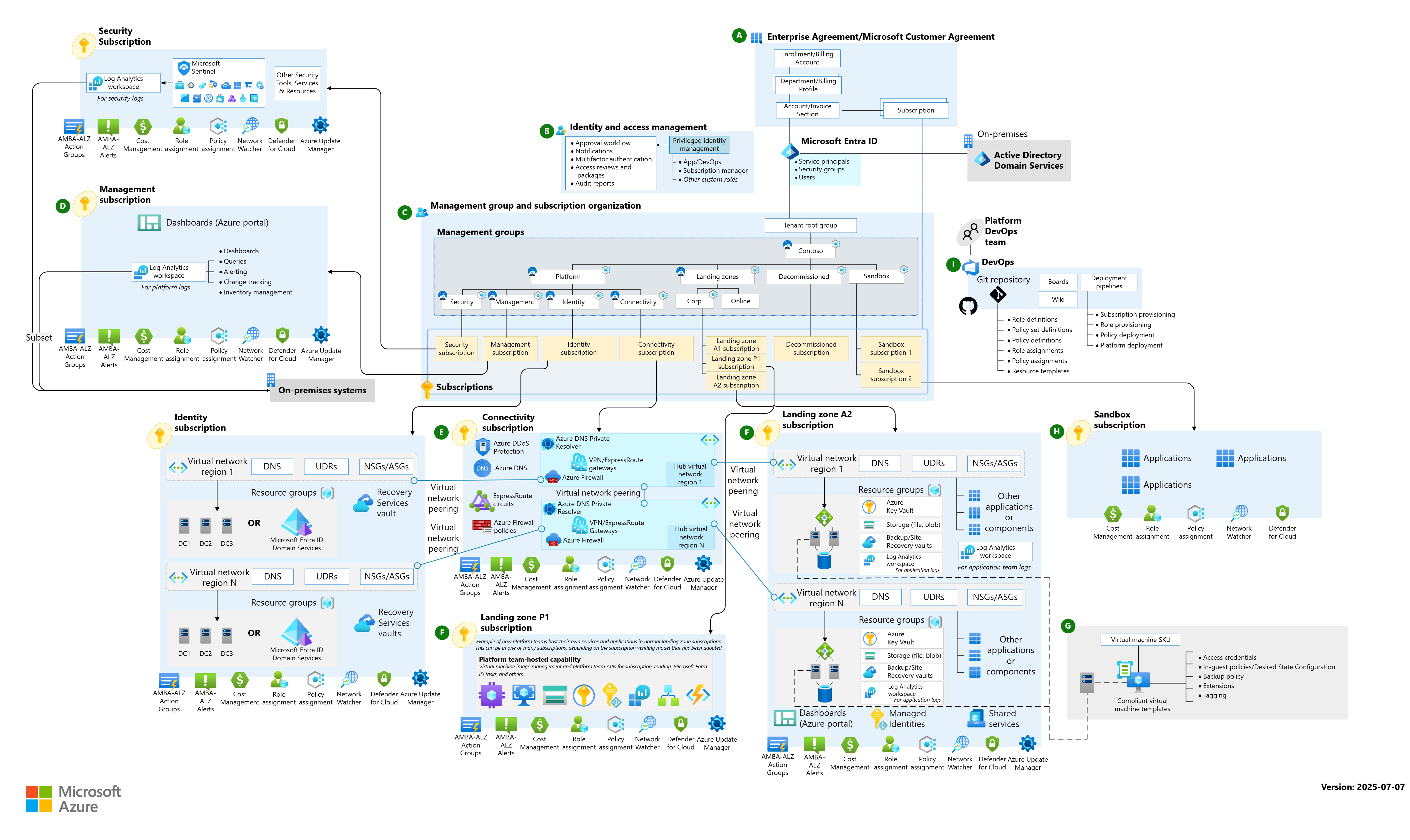
In a large enterprise, policies are not applied in an ad-hoc manner. They are a core component of a structured cloud environment, often deployed as part of an Azure Landing Zone. A landing zone is a pre-configured environment with established standards for networking, identity, security, and governance.
The diagram below shows a complex enterprise architecture. Notice how Azure Policy is applied at the management group and subscription levels, ensuring that all workloads—from connectivity to individual applications—adhere to a common set of rules.
John Savill's overview of Azure Landing Zones provides a practical look at how policies are bundled and deployed as part of these foundational blueprints.
This video introduces the concept of Azure Landing Zones and shows how Azure Policy is a fundamental component.
Watch the section on Azure Policy as guardrails, where he defines its role in enforcing requirements like region restrictions, VM SKUs, and tagging. Then, jump to the demonstration starting at where he shows the policies included in a "Cloud Adoption Framework (CAF) Foundation" blueprint. This provides a concrete example of policies that are deployed to a subscription to enforce standards from day one.
Evaluating Azure Policy: Strengths and Limitations
From a Principal Engineer's perspective, it's crucial to understand the trade-offs of any technology.
Strengths:
- Native, Centralized Enforcement: Integrated directly into ARM, providing a single point of enforcement.
- Rich Effects: Goes beyond simple prevention (
Deny) to include native remediation (Modify,DeployIfNotExists). - Resource-Level Granularity: Can target individual resource properties, offering much finer-grained control than account-level policies like AWS SCPs.
- Built-in Compliance Reporting: The Azure portal provides a comprehensive dashboard to view compliance status across the entire organization.
Limitations:
- Latency at Scale: In very large environments with thousands of policies, evaluation can add noticeable latency to provisioning times, especially with
DeployIfNotExistseffects. - Complexity: Writing complex custom policies in JSON can be challenging, and managing a large library of custom definitions requires disciplined lifecycle management (treating policy as code).
- Conflict Resolution: Debugging conflicts between contradictory policies assigned at different scopes can be complex.
The article we read earlier also contains an excellent summary of these points.
Azure Policy vs AWS SCPs: How Cloud Governance Works Differently
This resource offers a balanced view, highlighting both the capabilities and the challenges.
To round out your evaluation, review the comparison table for a quick summary of the differences with AWS SCPs. Finally, read the subsection on Azure Policy limitations to understand the potential challenges you might face when implementing policy at enterprise scale.
Conclusion
In this lesson, we have dissected Azure Policy, understanding it not just as a feature but as a fundamental architectural component for cloud governance. You can now evaluate how it uses a resource-centric model, integrated directly into Azure Resource Manager, to enforce organizational standards.
Here are the key architectural takeaways:
- Governance as Code: Azure Policy allows you to define and enforce rules as code, ensuring consistency and automation.
- A Spectrum of Control: Policy effects range from passive
Auditto preventativeDenyand proactive remediation (Modify,DeployIfNotExists), allowing you to tailor your enforcement strategy to the risk level. - Hierarchical and Inherited: By assigning policies at the management group level, you can enforce standards across your entire organization efficiently.
- Architectural Contrast with AWS: Azure Policy's resource-centric model and native remediation capabilities provide a different, and in many cases more granular, approach to governance than AWS SCPs' identity-centric model.
You now have a complete picture of Azure's governance foundation: the structural hierarchy (management groups, subscriptions) and the enforcement engine (Azure Policy).
In our next lesson, we will shift our focus to another critical pillar of cloud management: cost. We will explore how to estimate cloud costs for architectural scenarios using Azure's native tools, connecting the governance structures we've built to tangible financial outcomes.