Welcome to the first lesson in our module on Application Innovation with AI and ML Services. In the previous module, we focused on how to design event-driven architectures by connecting services through messaging. We established that the most robust systems often use a combination of services, each chosen for its specific strengths. Now, we shift our attention to what are often the most powerful components in such an architecture: AI and machine learning services. These services can act as intelligent consumers of events—for example, analyzing an image after an upload event—or as producers of insights that trigger new workflows.
Today, we'll dive into the flagship offering in this space: the Azure OpenAI Service. Your goal for this lesson is to describe Azure OpenAI Service models, deployment options, and common usage patterns like chat and completions. We'll approach this from an architect's perspective, focusing on the strategic decisions and trade-offs you'll face when designing systems that leverage large language models (LLMs), which is central to your goal of growing into a principal engineering role.
The Azure OpenAI Service Landscape
It's important to first establish that Azure OpenAI Service is far more than a simple passthrough to OpenAI's public APIs. It is a distinct, enterprise-grade service deeply integrated into the Azure ecosystem, providing the security, compliance, data residency, and networking features expected in a corporate environment. At its core, it gives you managed access to OpenAI's powerful foundation models within your own Azure subscription.
The service is built on three pillars: the models themselves, the infrastructure to deploy them, and the tools to manage them. Let's begin by surveying the model landscape.
The Model Catalog: A Spectrum of Capabilities
Azure provides access to a diverse and rapidly evolving set of models, each with different capabilities and price-performance characteristics. From a system design standpoint, your choice of model is the first critical decision, as it dictates what your application can do and has significant cost implications.
The models can be broadly categorized:
- GPT Series (e.g., GPT-4, GPT-4o, GPT-5.x): These are the workhorses for text generation, conversation, and complex reasoning. Newer versions and variants (like
pro,mini, ornano) offer different trade-offs between capability, speed, and cost. - Multimodal Models: A key evolution in AI is the ability to process multiple types of input. Models like GPT-4o can natively understand and reason about both text and images in a single request, opening up use cases in document analysis and visual understanding.
- Embedding Models: These specialized models convert text into numerical vectors. This is the foundational technology for semantic search and Retrieval-Augmented Generation (RAG), where you want to find information based on meaning rather than just keywords.
- Specialized Models: The platform also includes models purpose-built for tasks like image generation (DALL-E), video generation (Sora), and audio processing (Whisper for speech-to-text, and TTS models for text-to-speech).
The following document from Microsoft Learn provides an official overview of the available model families. Don't worry about the extensive details in the tables for now; just focus on understanding the high-level categories.
Foundry Models sold directly by Azure - Microsoft Learn
This official documentation serves as the canonical list of models available through Azure. We'll use it to get a high-level overview of the different model families.
Please read the introductory section and review the main summary table under the heading Azure OpenAI... models. Pay attention to the "Description" column to grasp the purpose of each model category, such as the GPT series, Embeddings, and models for image, video, and audio.
As you can see, the portfolio is extensive. The key architectural takeaway is to match the model to the task. Using a top-of-the-line, expensive model for a simple text classification task is inefficient, while using a small, fast model for nuanced, multi-step reasoning may yield poor results.
Architectural Decisions: Deployment and Cost Models
Simply choosing a model is not enough. How and where you deploy it has profound implications for performance, cost, and availability. This is where your system design expertise comes into play.
Let's break down the deployment choices you'll face. The hierarchy of options is neatly summarized in this diagram.
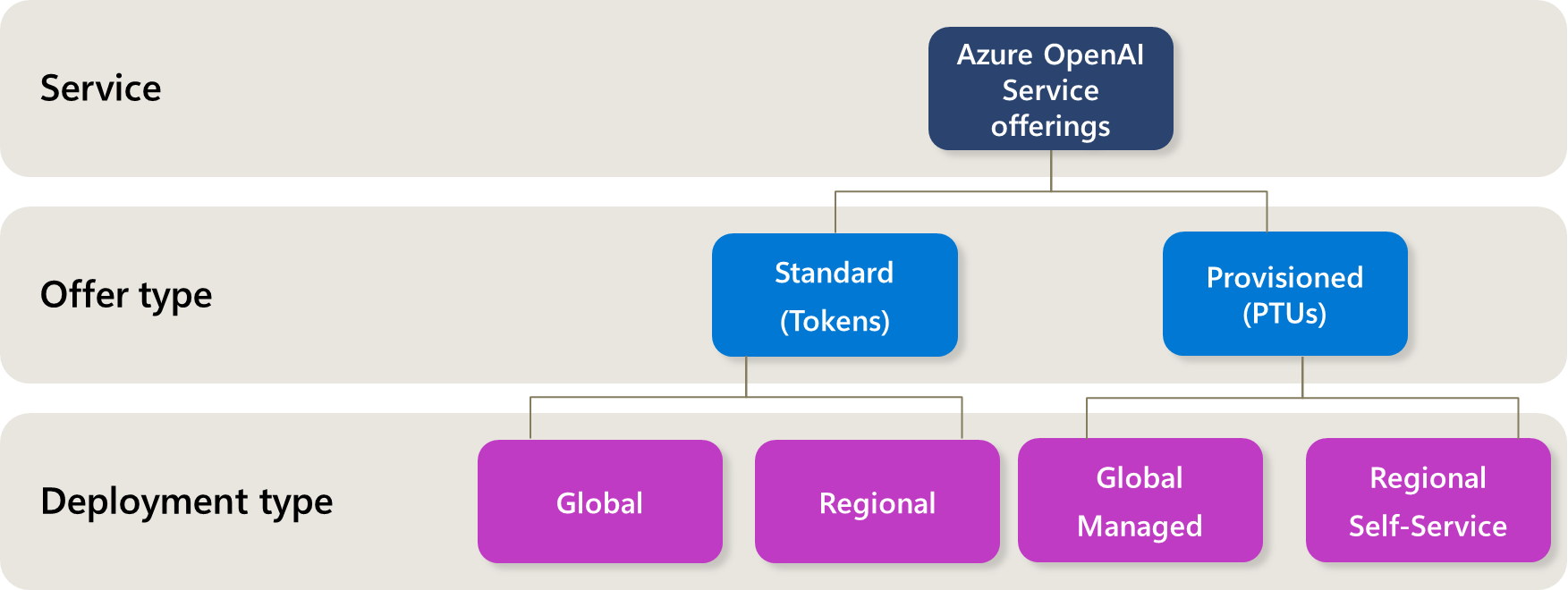
We will unpack this hierarchy, starting with the two main "Offer types": Standard (pay-as-you-go) and Provisioned Throughput.
Trade-off 1: Standard (Pay-as-you-go) vs. Provisioned Throughput (PTU)
This is the fundamental economic and performance trade-off.
-
Standard (Pay-as-you-go): This is a consumption-based model where you pay per token of input and output. It's ideal for development, testing, and production workloads that are variable or bursty. The primary advantage is flexibility; you only pay for what you use. However, throughput is not guaranteed—you compete for resources in a shared pool—and latency can be variable.
-
Provisioned Throughput Units (PTU): This model is for high-volume, mission-critical applications that require guaranteed throughput and consistent, predictable latency. You reserve a specific amount of processing capacity by purchasing PTUs for a fixed hourly rate (with discounts for monthly/yearly commitments). This is a fixed cost; you pay for the reserved capacity whether you use it fully or not. It's analogous to reserving database capacity (like AWS Provisioned IOPS) versus paying for on-demand usage.
John Savill provides an outstanding technical explanation of this trade-off. His insights are invaluable for anyone in an architectural role.
Azure OpenAI Deployment Types and Resiliency
In this video, John Savill dissects the underlying infrastructure and architectural choices in Azure OpenAI. We'll focus on his comparison of the two primary commercial models.
Please watch the segment from rethink about pay as you go. Pay close attention to his explanation of the trade-offs: Pay-as-you-go: Consumption-based, variable cost, but throughput is not guaranteed and latency is inconsistent. Provisioned Throughput (PTU): Fixed cost, guaranteed throughput, and consistent latency, but requires careful capacity planning to avoid wasting money.
This decision between Standard and Provisioned is a classic system design problem balancing cost, performance, and predictability. For a principal engineer, being able to articulate the business case for one over the other is a critical skill.
Trade-off 2: Deployment Scope (Regional vs. Global vs. Data Zone)
Once you've chosen between Standard and Provisioned, you must decide on the scope of your deployment. This choice impacts where your data is processed and which underlying pools of compute capacity your requests can access.
The foundational concept to grasp is that an Azure OpenAI resource is always created in a specific Azure region. That resource has a unique endpoint your application calls. However, where the inference actually runs depends on your deployment choice.
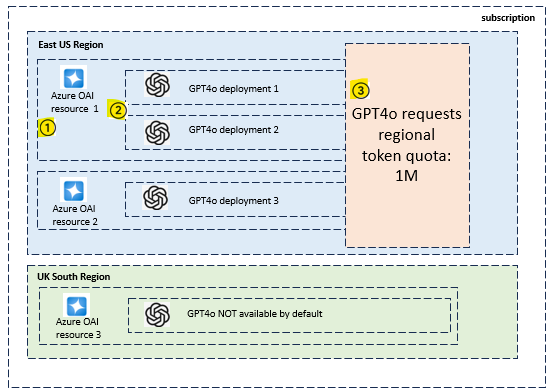
Let's explore the options:
- Regional (or "Standard" in the portal): Your requests are confined to the capacity pool within the single Azure region where your resource was created. This guarantees data residency for that region but limits you to a smaller capacity pool, potentially leading to lower performance or throttling during peak times.
- Global: Your requests can be routed to any Azure region worldwide that has capacity for your chosen model. This provides the largest possible capacity pool, leading to the best possible performance and availability, as intelligent routing can send your request to the least busy instance globally.
- Data Zone: This is a compromise between Regional and Global. It allows your requests to be routed to any region within a defined geopolitical boundary (e.g., the United States or the European Union). This helps meet data residency requirements while still benefiting from a larger, multi-region capacity pool.
- Batch: A special, asynchronous, global-only deployment type. You submit a batch of non-urgent jobs (e.g., summarizing thousands of documents) and get the results back within 24 hours. Because it allows Azure to use spare capacity globally, it comes at a significant discount (around 50%).
The following segment from John Savill's video is perhaps the most important part of this lesson for an architect. He brilliantly explains why traditional thinking about network latency is different for LLMs and how global deployments can paradoxically lead to lower overall latency.
Azure OpenAI Deployment Types and Resiliency
Let's continue with John Savill's explanation, this time focusing on the deployment scope and its impact on performance, availability, and data residency.
First, watch the segment from deploy a particular instance. This is the core of the deployment decision. Focus on his explanation of the capacity pools and the counter-intuitive argument that for LLMs, inference latency is far more significant than network latency. Next, watch the brief segment on the Batch API from batch is only Global to understand this cost-effective option for non-interactive workloads.
Common Usage Patterns
With an understanding of the models and deployment options, let's connect them to the real-world usage patterns that deliver business value.
Microsoft Azure OpenAI Service: Complete Technical Guide - Smartbridge
This technical guide from Smartbridge provides a concise summary of several common enterprise use cases for Azure OpenAI.
Please read the section titled Real-World Use Cases. As you read, think about how the models and deployment options we've discussed would map to each scenario. For example, a real-time customer support chatbot would likely require a Provisioned deployment for consistent latency, while a bulk document analysis job could be a perfect fit for the Batch API.
Let's summarize a few key patterns:
- Chat and Completions: This is the most prevalent pattern, powering applications from customer service chatbots to internal Q&A systems. The core interaction is a conversation or a prompt that requires a generated text response.
- Content Generation: Automating the creation of marketing copy, product descriptions, email drafts, or even code. This can be interactive (a user asking for a draft) or done in bulk via the Batch API.
- Summarization and Extraction: Processing large documents (e.g., legal contracts, financial reports, academic papers) to extract key entities, summarize paragraphs, or answer questions about the content. Multimodal models are particularly powerful here, as they can handle documents with diagrams and tables.
- Code Generation and Assistance: As a software engineer, you're likely familiar with this via tools like GitHub Copilot. Models can generate boilerplate code, write unit tests, explain complex functions, and assist in debugging.
- Retrieval-Augmented Generation (RAG): This is a critical architectural pattern that we will explore in detail in a future lesson. It involves "grounding" the model's responses in your own private data. Instead of relying only on its training data, the system first retrieves relevant documents from your knowledge base (using embedding models and Azure AI Search) and then uses the LLM to synthesize an answer based on those documents.
Conclusion
In this lesson, we've surveyed the Azure OpenAI Service from an architect's viewpoint. You are now equipped to describe its core components and, more importantly, to reason about the critical design trade-offs involved in building applications with it.
Here are the key takeaways:
- A Spectrum of Models: Azure OpenAI provides a wide range of models, from powerful text and multimodal GPTs to specialized models for embeddings, audio, and image generation. The first step in any design is choosing the right tool for the job.
- Deployment Trade-offs are Key: The most critical architectural decisions revolve around the deployment model. You must consciously trade off:
- Cost vs. Performance: Standard (Pay-as-you-go) for flexibility versus Provisioned (PTU) for guaranteed performance.
- Data Residency vs. Capacity: Regional for strict data control versus Global/Data Zone for access to larger capacity pools and better performance.
- Latency is Nuanced: For LLMs, the time spent on inference usually dwarfs network latency. This means a globally distributed deployment can often provide a faster end-to-end response than a purely regional one by finding an underutilized compute instance.
- Patterns Drive Value: The service's value is realized through patterns like chat, content generation, summarization, and Retrieval-Augmented Generation (RAG).
In our next lesson, we will broaden our view of the Azure AI landscape. We will explore Azure AI Services (formerly Cognitive Services). These are collections of pre-built, task-specific models for things like vision, speech, and language understanding. We will compare and contrast this approach with the foundational, generative models of Azure OpenAI, giving you another crucial framework for making architectural decisions.