In our previous lesson, we explored the Azure OpenAI Service, focusing on its powerful, general-purpose foundation models for tasks like chat, content generation, and complex reasoning. We established that architectural decisions about deployment types—balancing cost, latency, and data residency—are paramount. Now, we will broaden our perspective to another critical part of Azure's AI portfolio.
Today's lesson focuses on Azure AI Services, the suite of pre-built models that were formerly known as Cognitive Services. Your goal is to explain the capabilities of these services for integrating pre-built vision, language, and speech models into applications. This is the other side of the AI coin: where Azure OpenAI offers a versatile, generative tool, AI Services provide a collection of specialized, highly-optimized tools for common AI tasks. For an architect, understanding when to reach for a specialized API versus a general-purpose model is a fundamental design decision.
The Landscape of Pre-Built AI
Azure AI Services are a portfolio of production-ready APIs and SDKs that allow you to embed intelligence into applications with minimal AI expertise. Think of them as specialized microservices for AI. Instead of prompt engineering with a large language model to determine the sentiment of a sentence, you can call an API endpoint specifically designed and optimized for that single task.
The video below, from Matt on Data Science, provides an excellent conceptual introduction to what these services are and how they are grouped. While some service names have since been consolidated under the "Azure AI" brand (e.g., Text Analytics is now part of Azure AI Language), the core capabilities and categories he describes remain the same.
Understanding Azure Cognitive Services
This video provides a clear, high-level overview of Azure Cognitive Services (now AI Services), explaining their purpose as pre-packaged, ready-to-use machine learning APIs.
Watch the introductory segment from specifically I want to talk about. Focus on the idea of Cognitive Services as an "umbrella term" for a silo of APIs that cover vision, speech, language, and decision-making.
This "umbrella" concept has a direct architectural implication. You can provision a single, multi-service Azure AI Services resource that gives you one API key and endpoint to access most of these capabilities. Alternatively, you can provision individual services (e.g., a standalone Azure AI Vision resource). The unified resource simplifies management, while individual resources provide more granular control over billing and access—a trade-off you'd need to consider based on team structure and project requirements.
The following flowchart illustrates the high-level decision process when approaching a use case with Azure's AI tools.
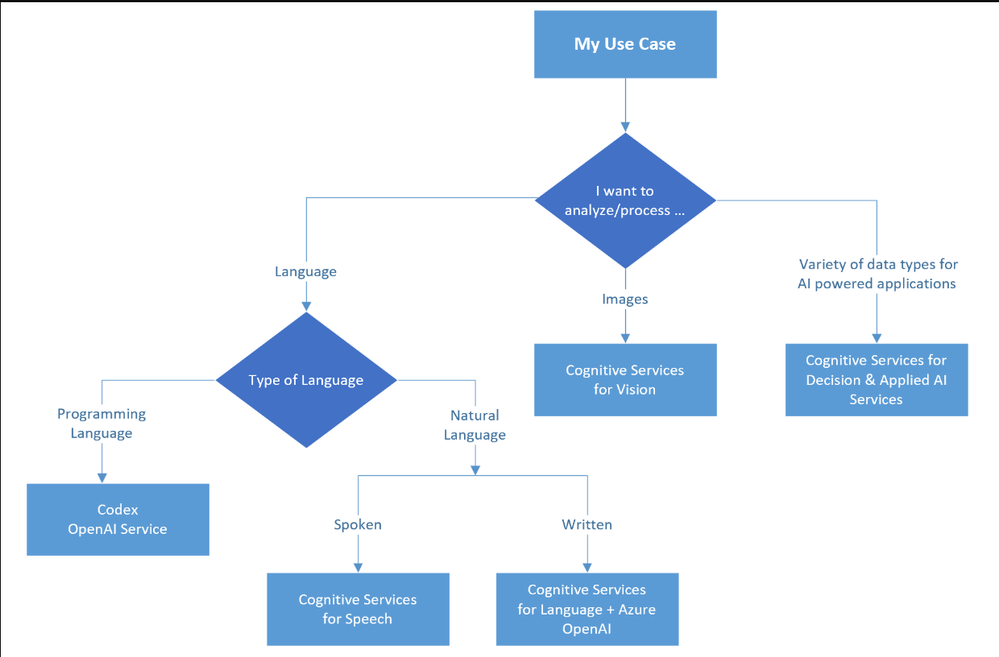
Following this structure, let's explore the capabilities within each of these domains.
Capabilities by Domain
The Azure AI Services portfolio is organized into logical categories. For someone with your background in AWS, you'll find these parallel the offerings of services like Amazon Rekognition, Transcribe, and Comprehend.
The table below provides a high-level comparison of specialized services across the major cloud providers, which can serve as a useful reference.
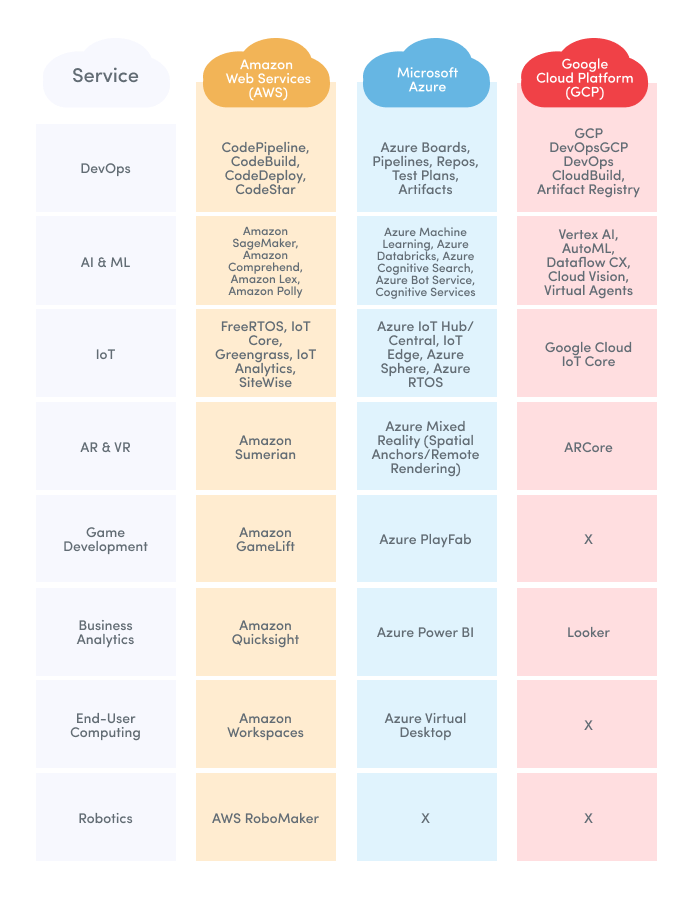
Let's now dive deeper into Azure's specific offerings for Language, Speech, and Vision.
1. Language Services
This category focuses on understanding and processing text. These services are the building blocks for analyzing user feedback, processing documents, and enabling multilingual support.
- Language Understanding: This service, which includes capabilities from the former Text Analytics and LUIS services, can perform tasks like:
- Sentiment Analysis: Determine if text is positive, negative, or neutral.
- Key Phrase Extraction: Identify the main talking points in a block of text.
- Named Entity Recognition (NER): Detect and categorize entities like people, places, organizations, and dates.
- Language Detection: Identify the language of a given text.
- Translator: Provides real-time text translation for over 100 languages. It can also handle document translation, preserving the original layout and formatting.
- Document Intelligence: A specialized service that combines vision (OCR) and language understanding to extract structured data from forms and documents. It can identify tables, key-value pairs, and text from invoices, receipts, contracts, and more. This is particularly powerful for automating business workflows.
- Q&A anwering: Formerly a separate service called QnA Maker, this is now a feature of Azure AI Language that allows you to build a conversational question-and-answer layer over your existing documents and FAQs.
The following video segment explains these capabilities with clear examples.
Understanding Azure Cognitive Services
Let's continue with the "Matt on Data Science" video for a tour of the language capabilities.
Watch the segment on with the text offerings. He provides concise explanations for sentiment analysis, entity extraction, language understanding (LUIS), and translation.
2. Speech Services
These services enable applications to hear, understand, and speak. They are fundamental to creating voice-enabled interfaces and improving accessibility.
- Speech-to-Text: Transcribes audio streams into text in real-time or from batch processing. It supports customization to improve accuracy for specific vocabularies or speaking styles.
- Text-to-Speech: Converts text into natural-sounding speech using a wide variety of voices and languages. You can create custom neural voices that match a specific brand or persona.
- Speech Translation: Provides real-time, multi-language speech translation.
- Speaker Recognition: Can identify and verify speakers based on their unique voice characteristics (a "voiceprint").
This next video segment will walk you through these speech functionalities.
Understanding Azure Cognitive Services
Now, let's look at the speech services available in the portfolio.
Watch the part of the video covering Speech so. Pay attention to the distinction between the different speech tasks: text-to-speech, speech-to-text, speaker recognition, and translation.
3. Vision Services
Vision services analyze content in images and videos to identify objects, text, and faces, providing rich metadata about visual content.
- Vision: This is the core service for image analysis. It can:
- Tag content: Generate a list of tags related to the objects, actions, and scenery in an image.
- Object Detection: Identify and locate specific objects within an image.
- Optical Character Recognition (OCR): The "Read" API extracts printed and handwritten text from images and documents. This is the underlying technology for Document Intelligence.
- Face: A specialized service for detecting and analyzing human faces. It can find face locations, analyze attributes (like glasses or hair color), and perform facial recognition for identity verification.
- Custom Vision: While the general Vision service uses a massive pre-trained model, Custom Vision allows you to train your own image recognition model for domain-specific tasks. For example, you could train it to identify specific products on a shelf or detect cracks in a manufactured part. This is an excellent example of a "customizable" pre-built service.
The following segment offers a look into these vision capabilities.
Understanding Azure Cognitive Services
Finally, let's explore the vision services.
Please watch the segment from cool so moving on to Vision. Note the critical difference between the general-purpose Vision service and Custom Vision, which you train with your own images.
The Architect's Choice: When to Use Which AI Service?
You now have an overview of two distinct categories of AI services in Azure: the general-purpose, generative models of Azure OpenAI and the specialized, pre-built models of Azure AI Services. The critical skill for a principal engineer is not just knowing what they are, but developing the judgment to know when to use them.
The choice involves a trade-off between flexibility, cost, performance, and development speed.
A Practical Overview of Azure AI Services for Technical Leaders
This article from ITmagination provides a clear decision framework for selecting the right AI service, which is directly relevant to your goal of making high-level architectural decisions.
Please read the section titled How to Choose. Focus on the two key decision points presented: Use Case–Driven Selection: This reinforces the idea of mapping your problem to the right tool. Prebuilt APIs vs. Custom Models: This is the central trade-off. Pay close attention to the argument that prebuilt APIs are faster and cheaper for common use cases, while generative models offer more flexibility at a potentially higher cost.
To summarize the decision framework:
-
Choose Azure AI Services (Pre-built APIs) when:
- Your problem is well-defined and maps directly to a service's capability (e.g., "I need to get the sentiment of this customer review," or "I need to transcribe this call center audio").
- Speed of development and cost-efficiency for a specific task are primary concerns.
- The required performance is for a high-volume, repetitive task.
-
Choose Azure OpenAI Service (Generative Models) when:
- Your problem is open-ended, creative, or requires complex, multi-step reasoning (e.g., "Write a marketing email based on these bullet points," or "Summarize this complex legal document and explain its implications for our project").
- You need flexibility to handle a wide variety of tasks that don't fit into a pre-built category.
- The task requires a "human-like" understanding of context, nuance, or creativity.
This is not an either/or decision. Many advanced architectures combine both. For example, you might use Azure AI Document Intelligence to extract structured data from a PDF, then pass that structured data to an Azure OpenAI model to generate a natural language summary.
Conclusion
In this lesson, we have surveyed the landscape of Azure AI Services, contrasting them with the Azure OpenAI Service we covered previously. We've seen that Azure provides a rich toolbox of pre-built models for common vision, language, and speech tasks, allowing for rapid integration of AI capabilities into applications.
Key Takeaways:
- Specialized Tools for Common Problems: Azure AI Services are a suite of pre-built, task-specific APIs for vision, speech, language, and decision-making, analogous to services like AWS Rekognition and Comprehend.
- Architectural Trade-offs: The primary decision is whether to use a specialized, pre-built API or a general-purpose generative model. This choice hinges on the specificity of your use case, development speed, cost, and required flexibility.
- Unified vs. Granular Management: You can provision a single AI Services resource for simplified management or individual services for more granular billing and access control.
- Hybrid Architectures: The most powerful solutions often combine services, using pre-built APIs for efficient data extraction and generative models for sophisticated synthesis and reasoning.
This lesson and the previous one have given you a framework for the "buy" side of the AI spectrum on Azure—using pre-built and foundational models. In our next lesson, we will move to the "build" side. We will evaluate the role of Azure Machine Learning in orchestrating the end-to-end machine learning lifecycle, covering how to train, deploy, and manage your own custom models when pre-built solutions are not sufficient.