Hello! Welcome to the second lesson of our course.
In our first lesson, we set up a clean and reproducible Python environment. This is our workshop. Now, it's time to learn how to work with the primary material we'll be shaping in that workshop: data.
Your agentic AI will constantly be communicating with other services—specifically, Large Language Models (LLMs) and the web applications it's testing. These communications happen via APIs, which almost always exchange data in a structured, hierarchical format. In Python, these structures are represented as nested dictionaries and lists.
This lesson is all about mastering the manipulation of these complex data structures. The skills you learn here are fundamental to your goal; you will use them to parse responses from the LLM, extract information from web elements, and manage the agent's internal state.
What are Nested Data Structures?
In Python, a dictionary stores key-value pairs, and a list stores an ordered sequence of items. A nested data structure is simply one that contains other dictionaries or lists as values.
- A dictionary can contain another dictionary.
- A dictionary can contain a list.
- A list can contain dictionaries.
- A list can contain other lists.
This allows us to represent complex, real-world relationships. For example, an e-commerce order might have a customer associated with it (a nested dictionary for the customer), and that order might contain multiple items (a list of dictionaries for the products).
This simple visual helps clarify the concept of a dictionary within a dictionary.
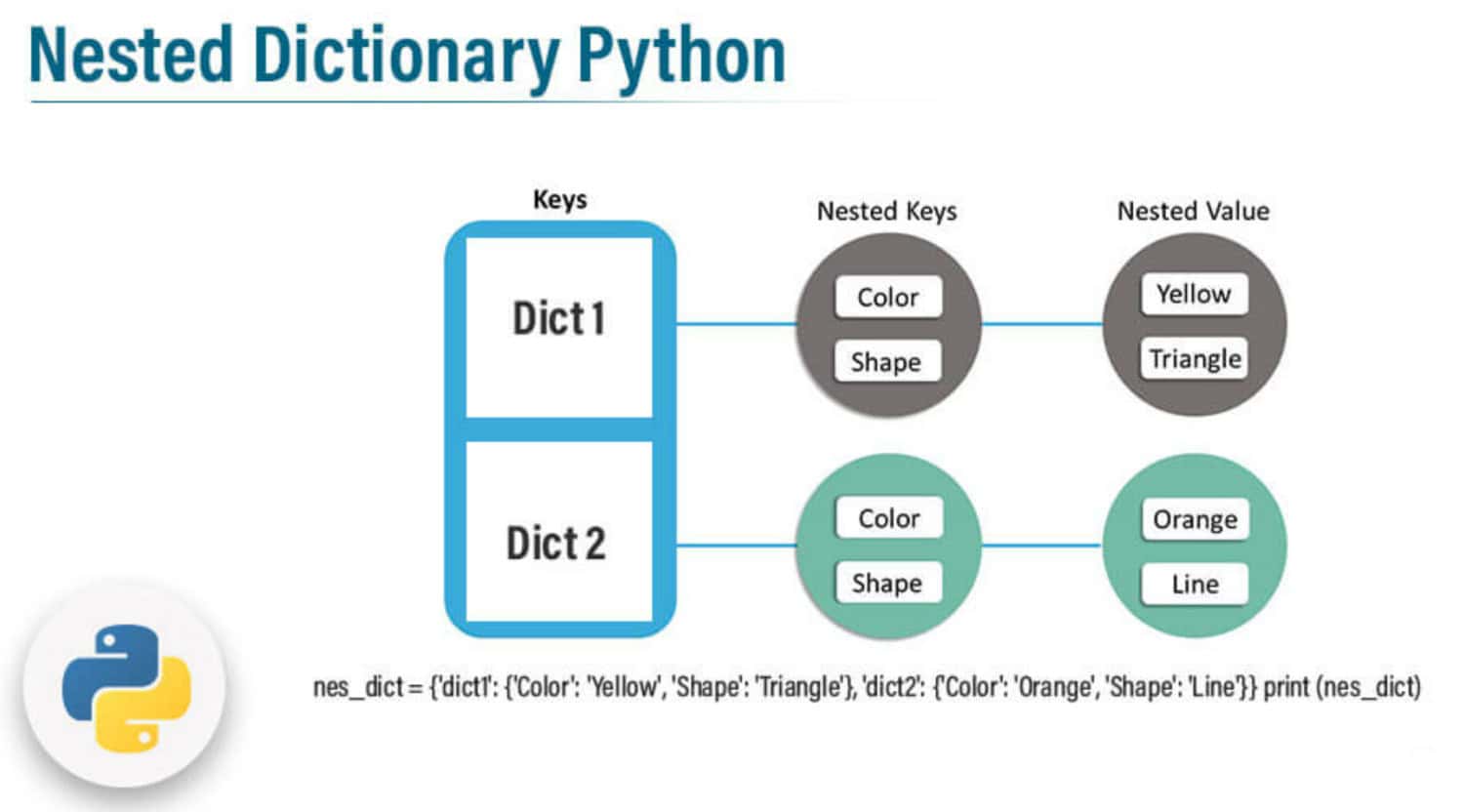
Here is how that looks in Python code:
data = {
    'user': {
        'id': 123,
        'name': 'Jane Doe',
        'address': {
            'street': '123 Main St',
            'city': 'Anytown'
        }
    },
    'orders': [
        {'order_id': 1, 'product': 'Laptop'},
        {'order_id': 2, 'product': 'Smartphone'}
    ]
}
In this example, the main dictionary data contains:
- A key
'user'whose value is another dictionary. - The nested
'user'dictionary contains a key'address'whose value is another dictionary. - A key
'orders'whose value is a list of dictionaries.
This is the kind of structure you will constantly encounter.
Accessing and Modifying Nested Data
Now that we understand the structure, let's see how to get information out of it and change it. To get started, please read the following sections from the article "How to Work with Nested JSON Data in Python". While the title mentions JSON, the Python code it demonstrates works directly with the dictionaries and lists we're discussing.
How to Work with Nested JSON Data in Python
This article provides clear, practical examples for accessing and modifying nested data. It also introduces a critical best practice for avoiding common errors.
Please read the sections titled 'Accessing Nested JSON Data' and 'Modifying Nested JSON Data'. Pay close attention to how chained square brackets [] are used and how new data is added or updated.
The Problem with Direct Access: KeyError
As you saw in the article, you can access nested elements by chaining keys and indices like this:
# Accessing the city from our example data
city = data['user']['address']['city']  # Returns 'Anytown'

# Accessing the product from the first order
product = data['orders'][0]['product']  # Returns 'Laptop'
However, what happens if a key or index doesn't exist? For example, what if the API response you get doesn't include an address for a user?
# This will raise a KeyError and crash your program!
city = data['user']['address']['city']
As a software tester, you know that robust code must gracefully handle unexpected or missing data. A crashing program is a failed test.
The Safe Solution: The .get() Method
The get() method is the preferred way to access dictionary keys when you can't be sure they exist. It lets you provide a default value to return if the key is not found, preventing a KeyError.
Please review the following section, which covers this vital technique.
How to Work with Nested JSON Data in Python
This section from the same article explains how to use the .get() method to write more resilient code.
Focus on the subsection '1. Missing Keys' under 'Common Pitfalls and Best Practices'. The example clearly shows how .get() can prevent errors.
Here's how you'd apply it. Notice how we can chain a .get() call after a direct access [] if we are certain the first key exists.
# Safely get the address dictionary. If 'address' doesn't exist, address_info will be None.
address_info = data['user'].get('address')

# Now, safely get the city from address_info
# If address_info is not None, it gets the city. If 'city' is missing, it returns 'Unknown'.
# If address_info was None to begin with, this would cause an error. We need to be careful.
if address_info:
    city = address_info.get('city', 'Unknown')
else:
    city = 'Unknown'

print(city)
Test your understanding!
Given the following dictionary:
test_report = {
    'suite_name': 'Login Tests',
    'tests': [
        {'id': 'TC01', 'status': 'passed'},
        {'id': 'TC02', 'status': 'failed', 'error_details': {'code': 404, 'message': 'Not Found'}}
    ]
}
Write Python code to perform these three actions:
- Safely retrieve the error message from the second test (
TC02). Iferror_detailsormessagedon't exist, it should result in the string'No message available'. - Update the status of the first test (
TC01) to'skipped'. - Add a new test result to the
testslist:{'id': 'TC03', 'status': 'passed'}.
After these operations, print the modified test_report dictionary.
Show answer
test_report = {
    'suite_name': 'Login Tests',
    'tests': [
        {'id': 'TC01', 'status': 'passed'},
        {'id': 'TC02', 'status': 'failed', 'error_details': {'code': 404, 'message': 'Not Found'}}
    ]
}

# 1. Safely retrieve the error message
error_details = test_report['tests'][1].get('error_details', {})
error_message = error_details.get('message', 'No message available')
print(f"Error Message: {error_message}")

# 2. Update the status of the first test
test_report['tests'][0]['status'] = 'skipped'

# 3. Add a new test result
new_test = {'id': 'TC03', 'status': 'passed'}
test_report['tests'].append(new_test)

# Print the final dictionary
import json
print(json.dumps(test_report, indent=2))
The output should be:
{
  "suite_name": "Login Tests",
  "tests": [
    {
      "id": "TC01",
      "status": "skipped"
    },
    {
      "id": "TC02",
      "status": "failed",
      "error_details": {
        "code": 404,
        "message": "Not Found"
      }
    },
    {
      "id": "TC03",
      "status": "passed"
    }
  ]
}
Iterating and Extracting Data Efficiently
Often, you'll need to extract multiple pieces of data from a list within your nested structure. For example, getting all the products from all orders. You can do this with a standard for loop, but Python provides a more concise and efficient tool: list comprehensions.
A list comprehension allows you to build a new list by applying an expression to each item in an iterable. Your previous experience with JavaScript might remind you of methods like .map() or .filter(), and list comprehensions can serve similar purposes.
This article provides some great examples of both basic iteration and list comprehensions.
Mastering Nested Data Structures: Handling Lists and ...
This article from Medium demonstrates practical ways to pull data out of nested lists and introduces the power of list comprehensions.
Please read the sections '2. Accessing Data in Nested Lists' and '4. Combining List and Dictionary Traversals'. The second one shows a powerful list comprehension in action.
Let's break down the list comprehension from the article:
# Using our initial 'data' example
all_products = [order['product'] for order in data['orders']]
# `all_products` will be ['Laptop', 'Smartphone']
This single line is equivalent to the following for loop:
all_products = []
for order in data['orders']:
    all_products.append(order['product'])
List comprehensions are not just shorter; they are often faster and are considered more "Pythonic" (the idiomatic way of writing Python).
You can also include an if condition to filter items:
# Get only the IDs of failed tests
failed_test_ids = [test['id'] for test in test_report['tests'] if test['status'] == 'failed']
# `failed_test_ids` will be ['TC02']
Advanced Technique: A Reusable Helper Function
When you need to access data that is very deeply nested, chaining many .get() calls can become clumsy and hard to read.
# This is hard to read
city = data.get('user', {}).get('address', {}).get('city', 'Unknown')
A better approach is to create a reusable helper function. This is a great habit for writing clean and maintainable code, something you've likely appreciated in your software testing career.
The following resource shows how to build such a function.
Mastering Nested Data Structures: Handling Lists and ...
This section provides a clean solution for a common problem: accessing data that is many levels deep in a nested structure without writing ugly, repetitive code.
Please review the section '1. Accessing Deeply Nested Data'. Focus on understanding how the get_nested_value function works and how it simplifies the code.
Conclusion
In this lesson, we moved from setting up our environment to handling the data that will flow through it. Manipulating nested dictionaries and lists is a core skill for our project, and you'll be using it in almost every module that follows.
Here are the key takeaways:
- Hierarchical Data: APIs and LLMs provide data in nested dictionaries and lists to represent complex relationships.
- Safe Access is Crucial: Always use the
.get()method to access dictionary keys that might be missing to prevent your agent from crashing. - Modification is Direct: You can update, add, and delete elements using standard dictionary and list syntax (
data['key'] = value,.append(),del). - Efficient Extraction: Use
forloops and list comprehensions to iterate through nested lists and extract the data you need. - Write Robust Code: Use helper functions to simplify access to deeply nested data and make your code cleaner and more resilient.
In our next lesson, we will focus on parsing and generating JSON data. You'll see how the JSON format, which is just plain text, is converted into the Python dictionaries and lists you've mastered today, and vice-versa. This will complete the picture of how your agent will communicate with external APIs.