Hello! Welcome to the third lesson in our "Python and Asynchronous Programming Foundations" module.
In our last lesson, we mastered the art of manipulating nested Python dictionaries and lists—the in-memory structures that will hold your agent's understanding of the world. Now, we'll learn how to translate those structures into a universal language for communication with external services.
This lesson focuses on parsing and generating JSON data. JSON (JavaScript Object Notation) is the standard text-based format for data exchange on the web. Your agent will use it to send instructions to Large Language Models (LLMs) and to receive information from the web applications it's testing. Think of the Python dictionaries and lists you've been working with as the thoughts in your agent's mind, and JSON as the written language it uses to communicate those thoughts.
By the end of this lesson, you will be able to convert Python data into JSON strings and files, and vice-versa, setting the stage perfectly for our next topic: making live API calls.
From Python Objects to a Universal Text Format
In the previous lesson, you worked with Python data structures like this:
data = {
    'user': {
        'id': 123,
        'name': 'Jane Doe'
    },
    'orders': [
        {'order_id': 1, 'product': 'Laptop'},
        {'order_id': 2, 'product': 'Smartphone'}
    ]
}
This is a Python dict object. When we need to send this data over the internet—for example, to an LLM API—we can't send the Python object directly. We must first convert it into a standardized, text-only format. This is where JSON comes in. The JSON representation of the data above would look like this:
{
    "user": {
        "id": 123,
        "name": "Jane Doe"
    },
    "orders": [
        {
            "order_id": 1,
            "product": "Laptop"
        },
        {
            "order_id": 2,
            "product": "Smartphone"
        }
    ]
}
As you can see, the structure is nearly identical. This direct mapping makes it incredibly easy to work with API data in Python.
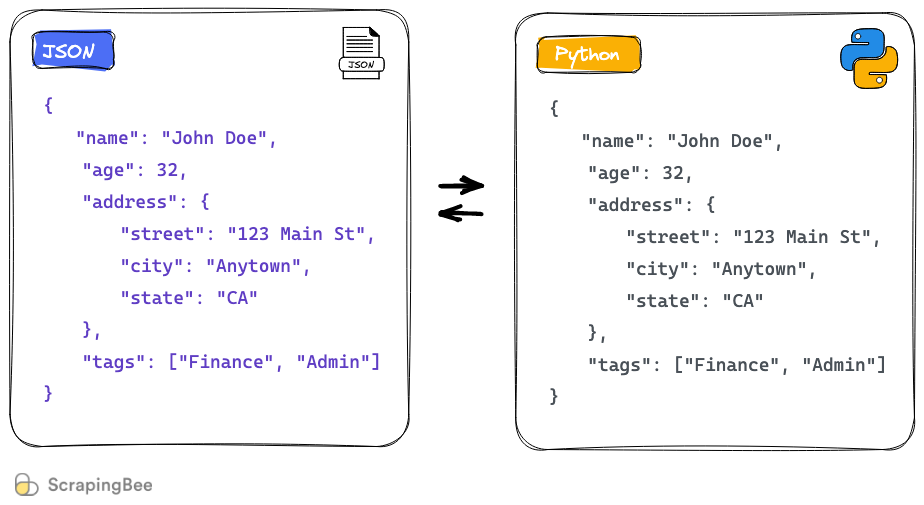
To understand the specific syntax rules of JSON, let's turn to a great resource on the topic.
Working With JSON Data in Python
The article 'Working With JSON Data in Python' by Real Python provides an excellent introduction to JSON. This first section will walk you through the syntax and how it compares to the Python data types you already know.
Please read the sections titled 'Introducing JSON', 'Examining JSON Syntax', and 'Exploring JSON Syntax Pitfalls'. Pay special attention to the table of JSON data types and the rules about quotes and boolean values.
Key Differences Between Python and JSON
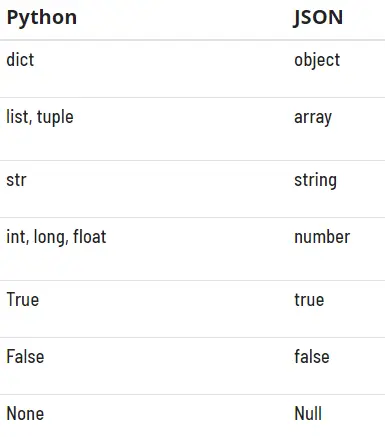
From the reading, here are the most important distinctions to remember:
- Strings: JSON requires double quotes (
") for all keys and string values. Python is more flexible and allows single quotes ('). - Booleans: JSON uses lowercase
trueandfalse. Python uses title-caseTrueandFalse. - Null Values: JSON uses
null. Python usesNone. - Comments: The formal JSON standard does not allow comments.
This table provides a clear visual summary of the conversions:
Generating JSON from Python (Serialization)
The process of converting a Python object into a JSON-formatted string is called serialization. Python's built-in json module makes this straightforward with two primary functions:
json.dumps(): Dumps a Python object to a JSON-formatted string.json.dump(): Dumps a Python object to a JSON-formatted file-like object (e.g., a file open for writing).
The following reading explains how to use both.
Working With JSON Data in Python
Now let's see how to perform the conversion in code. This section from the same Real Python article covers both serializing to a string and writing to a file.
Please read the sections 'Writing JSON With Python' and 'Prettify JSON With Python'. Focus on the examples for json.dumps() and json.dump(). Note the use of the indent parameter, which is extremely useful for debugging.
Let's put this into practice. Here’s how you can take a Python dictionary and save it as a nicely formatted JSON file:
import json

# Our Python dictionary
test_result = {
    'test_id': 'TC04-Login-Success',
    'passed': True,
    'duration_ms': 1543,
    'steps': [
        'Navigate to login page',
        'Enter valid credentials',
        'Verify dashboard is visible'
    ],
    'environment': None
}

# 1. Serialize to a string with human-readable formatting
# The `indent=4` argument adds newlines and 4-space indentation.
pretty_json_string = json.dumps(test_result, indent=4)

print("--- Pretty JSON String ---")
print(pretty_json_string)

# 2. Serialize directly to a file
with open('test_result.json', 'w', encoding='utf-8') as f:
    # Use json.dump() to write to the file object 'f'
    json.dump(test_result, f, indent=4)

print("\n'test_result.json' has been created.")
If you run this code, it will print the formatted string and create a test_result.json file in the same directory. The contents of both will be a clean, readable JSON object. Your experience in software testing will tell you how valuable well-formatted logs and data are for debugging!
Parsing JSON into Python (Deserialization)
The reverse process—converting JSON data back into a Python object—is called deserialization. The json module provides two corresponding functions for this:
json.loads(): Loads a Python object from a JSON-formatted string.json.load(): Loads a Python object from a file-like object containing JSON data.
The "s" in dumps and loads is a helpful mnemonic for "string".
Working With JSON Data in Python
This final reading from the Real Python article covers deserialization. It also points out a subtle but important detail about how data types can change during a round-trip conversion.
Please read the section 'Reading JSON With Python'. Pay attention to the examples for json.loads() and json.load(). Critically, notice what happens to a Python tuple when it's serialized to JSON and then deserialized back.
As the article highlights, serialization and deserialization are not always perfectly symmetrical. For instance, if you serialize a Python dictionary containing a tuple, it becomes a JSON array. When you deserialize it, that array becomes a Python list, not the original tuple.
Python tuple -> JSON array -> Python list
This is a key detail to be aware of when building robust systems.
Here’s how you'd read the test_result.json file back into a Python dictionary:
import json

# Assuming 'test_result.json' exists from the previous step

# Read the JSON file and deserialize it into a Python object
with open('test_result.json', 'r', encoding='utf-8') as f:
    data = json.load(f)

# Now 'data' is a Python dictionary, and you can work with it natively
print(f"Test ID: {data['test_id']}")
print(f"Type of 'passed' value: {type(data['passed'])}") # Will be <class 'bool'>
print(f"Second step: {data['steps'][1]}")
Test your understanding!
You receive the following JSON string from an API.
json_payload = '{"report_id": "a-123", "summary": {"total_tests": 5, "passed": 4, "failed": 1}, "details": [{"test_name": "Login", "result": "passed"}, {"test_name": "Logout", "result": "failed"}]}'
Perform the following tasks:
- Parse this JSON string into a Python dictionary called
report_data. - Using the
report_datadictionary, access theresultof the second test in thedetailslist ("Logout"). - Change the
resultof that second test from"failed"to"retried". - Convert the modified
report_datadictionary back into a pretty-printed JSON string (with an indent of 2) and print it.
Show answer
import json

json_payload = '{"report_id": "a-123", "summary": {"total_tests": 5, "passed": 4, "failed": 1}, "details": [{"test_name": "Login", "result": "passed"}, {"test_name": "Logout", "result": "failed"}]}'

# 1. Parse the JSON string into a Python dictionary
report_data = json.loads(json_payload)

# 2. Access the result of the second test
# The value is now in memory
logout_result = report_data['details'][1]['result']
print(f"Original logout result: {logout_result}")

# 3. Change the result of the second test
report_data['details'][1]['result'] = 'retried'

# 4. Convert the modified dictionary back to a pretty-printed JSON string
modified_json_string = json.dumps(report_data, indent=2)

print("\n--- Modified JSON ---")
print(modified_json_string)
The final output will be:
--- Modified JSON ---
{
  "report_id": "a-123",
  "summary": {
    "total_tests": 5,
    "passed": 4,
    "failed": 1
  },
  "details": [
    {
      "test_name": "Login",
      "result": "passed"
    },
    {
      "test_name": "Logout",
      "result": "retried"
    }
  ]
}
Conclusion
In this lesson, we bridged the gap between Python's internal data structures and the universal text format used for web communication. You now have the complete toolset to handle the data lifecycle in your agent: creating data in Python dictionaries, serializing it to JSON for transmission, receiving a JSON response, and deserializing it back into a dictionary for processing.
Here are the key takeaways:
- JSON is the Lingua Franca: It's the standard text format for exchanging data with APIs, including the LLM APIs that will power your agent's brain.
- Serialization (Python to JSON):
json.dumps()converts a Python object to a JSON string.json.dump()writes a Python object to a JSON file.
- Deserialization (JSON to Python):
json.loads()parses a JSON string into a Python object.json.load()reads a JSON file into a Python object.
- Readability is Key: Use the
indentparameter when generating JSON to create human-readable output, which is invaluable for logging and debugging. - Type Awareness: Be mindful that some Python types (like tuples) may not be perfectly preserved during a serialize/deserialize round-trip.
You are now ready to put this knowledge into action. In the next lesson, we will make HTTP requests to REST APIs using the requests library. You'll finally see how to send your newly-crafted JSON data to a server and process the JSON response you get back.