Hello! Welcome back.
In our previous lesson, we explored the why of asynchronous programming, establishing that it's essential for building efficient, I/O-bound AI agents that need to communicate with web pages and LLM APIs. We conceptually introduced keywords like async and await and the idea of running tasks concurrently.
Today, we transition from the "why" to the "how." This lesson is all about writing your first asynchronous Python code. Our goal is to define and execute simple coroutines using async def/await and run them concurrently with asyncio.gather. We'll cover the fundamental syntax and patterns you need to start writing non-blocking code.
Given your experience with JavaScript and Playwright, some of these concepts might feel familiar. We'll draw parallels to JavaScript's Promise and async/await patterns to help bridge the gap.
Part 1: Defining and Running a Single Coroutine
In Python, an asynchronous function is called a coroutine. It's a special kind of function that can be paused and resumed. This "pausing" is what allows the program to work on other tasks instead of waiting idly.
To define a coroutine, you use the async def syntax instead of just def.
import asyncio

async def my_coroutine():
    print("Starting coroutine...")
    await asyncio.sleep(1) # This is a non-blocking wait
    print("...coroutine finished.")
Let's break down the key pieces:
async def: This declaresmy_coroutineas a coroutine. Just callingmy_coroutine()doesn't run it; it creates a coroutine object that can be run later.await: This keyword can only be used inside anasync deffunction. It tells the program, "Pause this function here and wait for the result ofasyncio.sleep(1)to complete. While you're waiting, you are free to run other code."asyncio.sleep(1): This is the asynchronous version oftime.sleep(1). It yields control back to the system for 1 second, allowing other tasks to run, rather than blocking the entire program.
To actually run this coroutine and see the output, you need an entry point that manages the asynchronous event loop. The simplest way to do this is with asyncio.run().
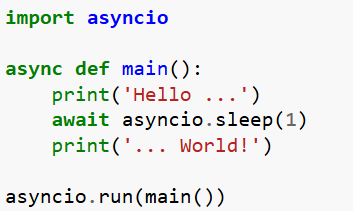
In this example, asyncio.run(main()) starts the event loop, runs the main coroutine until it completes, and then closes the loop.
Part 2: Running Coroutines Concurrently with asyncio.gather
The real power of asyncio comes from running multiple I/O-bound tasks concurrently. If you simply await two coroutines one after another, they will still run sequentially.
# This is still sequential!
await task_one()
await task_two()
To run them at the same time, we need asyncio.gather. This function takes multiple coroutines and schedules them to run concurrently. It then waits for all of them to finish.
This is where your JavaScript experience comes in handy. asyncio.gather() is the direct Python equivalent of Promise.all().
From Promise.all() to asyncio.gather()
This article provides a fantastic comparison between JavaScript's async patterns and Python's asyncio. Let's focus on the section that directly compares Promise.all() with asyncio.gather.
Please read the section titled 'Promise.all() → asyncio.gather()'. Pay close attention to the code examples. Notice how in both JavaScript and Python, an array/list of asynchronous operations is created and then passed to a single function (Promise.all or asyncio.gather) to be executed concurrently.
The key pattern is:
- Create a list of coroutine objects (but don't
awaitthem yet). - Pass this list to
asyncio.gatherusing the*operator, which unpacks the list into separate arguments. awaitthe single call toasyncio.gather. The program will pause here until all the tasks passed togatherhave completed.
The total time taken will be roughly the duration of the longest task, not the sum of all tasks.
A Practical Example: Asynchronous API Calls
Let's put this all together with a practical example. We'll write a script to download several avatars from an API. This is a classic I/O-bound task, as we'll spend most of our time waiting for the network.
We will use the requests library for a synchronous version and aiohttp for the asynchronous one. You'll need to install aiohttp:
pip install aiohttp
Creating Asynchronous Web Requests with Python
This blog post by Emmanuel Katchy provides a clear, step-by-step walkthrough of converting a synchronous program to an asynchronous one. We'll use its code as our guide.
First, briefly review the synchronous code in sections 'Up next will be the actual HTTP requests...' and 'Now to create an entry point...'. This establishes our baseline. Next, carefully study the asynchronous version. In the section starting 'Enter asynchrony libraries...', examine the aio_create_new_avatar function. Note the async def and the async with client_session.get(...) syntax. Finally, in the updated main.py code, focus on the async_generate_profile_pics function. This is where asyncio.gather is used. See how the Tasks list is built by appending coroutine objects, and then how asyncio.gather(*Tasks) executes them concurrently.
Let's summarize the transformation from the article:
- Synchronous Version (
sync_api.py): Uses a standarddeffunction andrequests.get(). Each call blocks until the download is complete. If you call it 20 times, the total time is20 * (time for one download). - Asynchronous Coroutine (
async_api.py): The function is redefined asasync def aio_create_new_avatar(...). It usesaiohttpandawait resp.read()to fetch the data without blocking. - Concurrent Execution (
main.py): Theasync_generate_profile_picsfunction creates a list of 20aio_create_new_avatarcoroutine objects.await asyncio.gather(*Tasks)starts all 20 downloads concurrently. The total time is now close to the time of the single longest download, offering a massive performance boost, just as the article concludes.
Test your understanding!
Let's apply what you've learned. Imagine you have two coroutines:
get_user_data()which simulates a network call and takes 2 seconds.get_user_posts()which simulates another network call and takes 3 seconds.
Write a small Python script using asyncio that runs these two coroutines concurrently and prints the total time elapsed. You can use asyncio.sleep() to simulate the network delay.
import asyncio
import time

async def get_user_data():
    print("Fetching user data...")
    await asyncio.sleep(2)
    print("User data fetched.")
    return {"name": "Alex", "id": 123}

async def get_user_posts():
    print("Fetching user posts...")
    await asyncio.sleep(3)
    print("User posts fetched.")
    return [{"title": "Post 1"}, {"title": "Post 2"}]

async def main():
    start_time = time.time()

    # Your code here to run the coroutines concurrently

    end_time = time.time()
    print(f"Total time taken: {end_time - start_time:.2f} seconds")

if __name__ == "__main__":
    asyncio.run(main())
Show answer
The key is to use asyncio.gather.
import asyncio
import time

async def get_user_data():
    print("Fetching user data...")
    await asyncio.sleep(2)
    print("User data fetched.")
    return {"name": "Alex", "id": 123}

async def get_user_posts():
    print("Fetching user posts...")
    await asyncio.sleep(3)
    print("User posts fetched.")
    return [{"title": "Post 1"}, {"title": "Post 2"}]

async def main():
    start_time = time.time()

    # Run the coroutines concurrently using asyncio.gather
    results = await asyncio.gather(
        get_user_data(),
        get_user_posts()
    )

    # The results list contains the return values in the same order
    user_data, user_posts = results
    print("Results received:", user_data, user_posts)

    end_time = time.time()
    print(f"Total time taken: {end_time - start_time:.2f} seconds")

if __name__ == "__main__":
    asyncio.run(main())
When you run this, you'll see that the total time taken is approximately 3 seconds (the duration of the longest task), not 5 seconds (2 + 3). This confirms they ran concurrently.
Conclusion
Congratulations! You have now written and executed asynchronous Python code. This is a foundational skill for building performant AI agents.
Here are the key takeaways from this lesson:
- Coroutines are special functions defined with
async defthat can be paused. - The
awaitkeyword is used inside a coroutine to pause its execution and wait for an I/O-bound operation to complete. asyncio.run()is the main entry point to execute the top-level coroutine.asyncio.gather()is the tool for achieving concurrency. It's the Python equivalent of JavaScript'sPromise.alland allows you to run multiple coroutines at the same time.
You've successfully completed the first module of our course, covering Python fundamentals. You are now equipped with the essential programming concepts needed to build our agent.
In our next lesson, we will begin Module 2: Web Automation with Python and Playwright. We'll immediately put your new asyncio skills to use as we learn to initialize Playwright and manage browser contexts using its async API.