Hello! Welcome to the seventh lesson in our course on building an agentic AI for web testing.
In our last lesson, we established a strong architectural foundation by learning how to use Python classes to structure our agent and its tools. We created a blueprint for an Agent class that could hold a conversation and a Tool class that could encapsulate a specific capability. However, the agent we designed executes its tasks sequentially, one after another.
This lesson addresses a crucial concept for building efficient agents: explaining the use of asynchronous programming for I/O-bound tasks in agent development. We will explore why the simple, sequential approach breaks down when our agent interacts with the real world—calling APIs, loading web pages, or waiting for elements to appear—and how asynchronous programming provides a powerful solution.
The Problem with Waiting: Synchronous Code
When you write a standard Python script, it runs synchronously. This means it executes one line at a time, and it must wait for each operation to finish before starting the next.
For an AI agent, many operations involve waiting. These are called I/O-bound (Input/Output-bound) tasks because the program spends most of its time waiting for data from an external resource, not performing calculations. For our web testing agent, this includes:
- Making a network call to an LLM API.
- Using Playwright to navigate to a URL and wait for the page to load.
- Waiting for a file to be read from the disk.
- Querying a database.
While the program waits, the CPU is essentially idle. This is like a chef who puts bread in a toaster and stares at it until it pops, instead of doing something else in the meantime. It's inefficient, especially when many tasks need to be done.
Let's see what this looks like in the context of an agent.
This article, 'Why Your AI Agents Need Async' by Ashish Patel, provides a perfect illustration of the problem. We'll start by looking at a synchronous agent example.
Please read the section 'Sync Agent in Python'. The code simulates an agent that performs three sequential I/O-bound tasks: searching a database (2s wait), searching a vector store (1.5s wait), and calling an LLM (3s wait). Pay close attention to the total execution time.
As the article shows, the total time is the sum of the individual waits: 2 + 1.5 + 3 = 6.5 seconds. For a single query, this might be acceptable. But if our agent needs to handle multiple tasks or users, this sequential waiting quickly becomes a major bottleneck, leading to slow and unresponsive applications.
The Solution: Asynchronous Programming and Concurrency
Asynchronous programming offers a solution. It allows a program to start a long-running task (like an API call) and then switch to work on other tasks instead of just waiting. When the first task is complete, the program is notified and can process the result.
This enables concurrency—the ability to manage multiple tasks over the same period. It's important to distinguish this from parallelism, which involves running tasks simultaneously on multiple CPU cores. Asynchronous programming in Python typically happens on a single CPU core.
Think of our chef again:
- Synchronous Chef: Puts toast in, waits. Grabs eggs, waits. Cooks eggs, waits.
- Asynchronous Chef: Starts the toast (a waiting task). While the toast is cooking, grabs and starts cooking the eggs. The toast pops (an event), so the chef butters it. Then the eggs finish.
The asynchronous chef finishes breakfast much faster by working on other things during the waiting periods.
This diagram provides an excellent visual comparison:
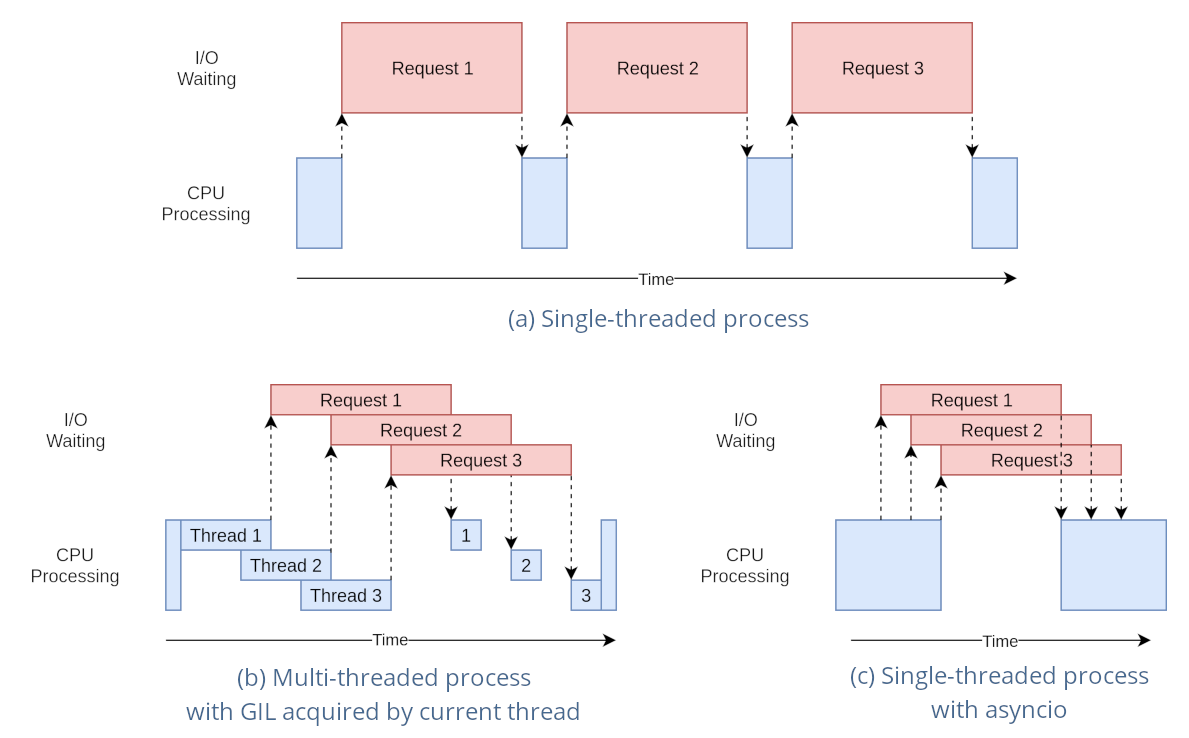
How Asynchronous Code Works in an Agent
Let's see how this applies to the agent example we just looked at. The database search and the vector store search are independent of each other; we don't need the result of one to start the other. An asynchronous approach would run them concurrently.
Now, let's look at the same agent rewritten asynchronously using Python's asyncio library. This will demonstrate the practical benefit.
Read the sections 'Async Agent in Python' and 'Handling Multiple Users'. Notice the new keywords async and await, and the use of asyncio.gather. See how the database and vector store tasks are run concurrently, and observe the dramatic reduction in total time, especially when handling multiple users.
Let's break down what happened in the async version:
- Concurrent Execution: The database search (2s) and vector store search (1.5s) are started at the same time. The total time for this step is
max(2, 1.5) = 2seconds, not2 + 1.5 = 3.5seconds. - Total Time Reduction: The total time becomes 2s (for concurrent searches) + 3s (for the LLM call) = 5 seconds. We saved 1.5 seconds on a single query.
- Scalability: The real magic happens with multiple users. As the article shows, handling 10 queries synchronously takes 65 seconds (10 * 6.5s), while the asynchronous version takes just over 5 seconds. This is a more than 10x improvement!
In the next lesson, we will learn the syntax for async def, await, and asyncio.gather in detail. For now, understand their conceptual roles:
async def: Marks a function as a coroutine, meaning it can be paused and resumed.await: Pauses the function and tells the system, "I'm waiting for this result. Feel free to run other tasks in the meantime."asyncio.gather: Takes multiple awaitable tasks and runs them concurrently.
When to Use Asynchronous Programming: I/O-Bound vs. CPU-Bound
Asynchronous programming is a powerful tool, but it's not a silver bullet. Its benefit is specifically for I/O-bound tasks.
What about tasks that are constantly using the CPU, with no waiting? These are called CPU-bound tasks. Examples include:
- Performing complex mathematical calculations.
- Processing a large in-memory dataset.
- Resizing an image with a library like Pillow.
Using asyncio for CPU-bound tasks on a single thread provides no benefit, because there is no "idle" waiting time to fill. The CPU is already 100% busy. For true parallelism with CPU-bound tasks, you would use Python's multiprocessing library to distribute the work across multiple CPU cores.
This article gives a clear mental model for when to choose synchronous or asynchronous code.
Read the section 'When to Use Sync vs Async' to solidify your understanding of the difference between I/O-bound and CPU-bound workloads.
Since our web testing agent's primary tasks will be communicating with an LLM API and a web browser over a network, its workload is heavily I/O-bound. This makes asyncio an essential tool for building a performant agent.
Test your understanding!
For each of the following tasks, classify it as either I/O-bound or CPU-bound.
- Calling the OpenAI API to get a chat completion.
- Using Playwright to wait for a "Submit" button to become visible on a page.
- Calculating the first 1,000,000 prime numbers in a loop.
- Reading a large 1GB JSON file from a network-attached storage drive.
- Sorting a list of 10 million integers that is already loaded into memory.
Show answer
- I/O-bound: The program spends most of its time waiting for a response over the network from the OpenAI servers.
- I/O-bound: The program is waiting for an event from the browser process. It's not performing heavy computation, just waiting for communication.
- CPU-bound: This involves pure mathematical computation. The CPU will be fully occupied.
- I/O-bound: The program is limited by the speed of the network and the disk drive, waiting for data to be transferred.
- CPU-bound: Although it involves memory access, a large sorting algorithm is computationally intensive and will keep the CPU busy.
Conclusion
In this lesson, we explored the critical role of asynchronous programming in agent development. You now have the conceptual framework to understand why it's not just a "nice-to-have," but a necessity for building responsive and scalable agents.
Here are the key takeaways:
- Synchronous code is inefficient for I/O-bound tasks because it wastes time waiting, leaving the CPU idle.
- Asynchronous programming enables concurrency, allowing a program to manage multiple I/O operations at once on a single thread by utilizing that idle time.
- AI agents are typically I/O-bound, as they frequently communicate with external services like LLM APIs and web browsers.
- The choice between synchronous, asynchronous, and multiprocessing depends on the task: use
asynciofor I/O-bound work andmultiprocessingfor CPU-bound work.
You now understand the why behind asynchronous programming. In our next lesson, we will move to the how. We will define and execute simple coroutines using async def/await and run them concurrently with asyncio.gather, writing our first piece of asynchronous Python code.