Hello! Welcome back to our advanced SEO course.
In our last lesson, we focused on capturing visual real estate in the SERPs by optimizing images and videos. We saw how crucial schema markup, file optimization, and sitemaps are for getting your content featured in image packs and video carousels.
This lesson shifts our focus from sight to sound. We'll be tackling the learning outcome: Identify and target conversational long-tail keywords that align with voice assistant behaviors.
As devices like Google Assistant, Alexa, and Siri become more integrated into daily life, the way people search is fundamentally changing. Users are moving from short, typed keywords to longer, spoken questions. Your ability to anticipate and target these conversational queries will be a key differentiator in 2026 and beyond. We'll explore practical, tool-based methods—including AI—to find the exact phrases people are speaking into their devices.
1. The Shift to Conversational Search
Before we hunt for keywords, it's essential to understand the difference between how people type and how they speak. Voice searches are inherently more natural, specific, and question-oriented.
Let's start with a reading that clearly breaks down this distinction.
Voice Search Optimization: SEO in the AI-age
The article 'Voice Search Optimization: SEO in the AI-age' from ScriptBee.ai provides a concise and effective comparison of voice and text search. The table in this section is particularly useful for framing our thinking.
Please read from the beginning of the article down to the end of the table under the heading 'How does Voice Search Differ from Text Search?'. Pay close attention to the differences in query length, structure, and user intent.
As the article highlights, we're moving away from fragmented keywords like "best running shoes" and toward complete questions like "What are the best running shoes for a person with flat feet?"
These longer, more specific queries are often called long-tail keywords. While you're already familiar with this concept from your SEO work, it's important to recognize that voice search is almost exclusively made up of them.
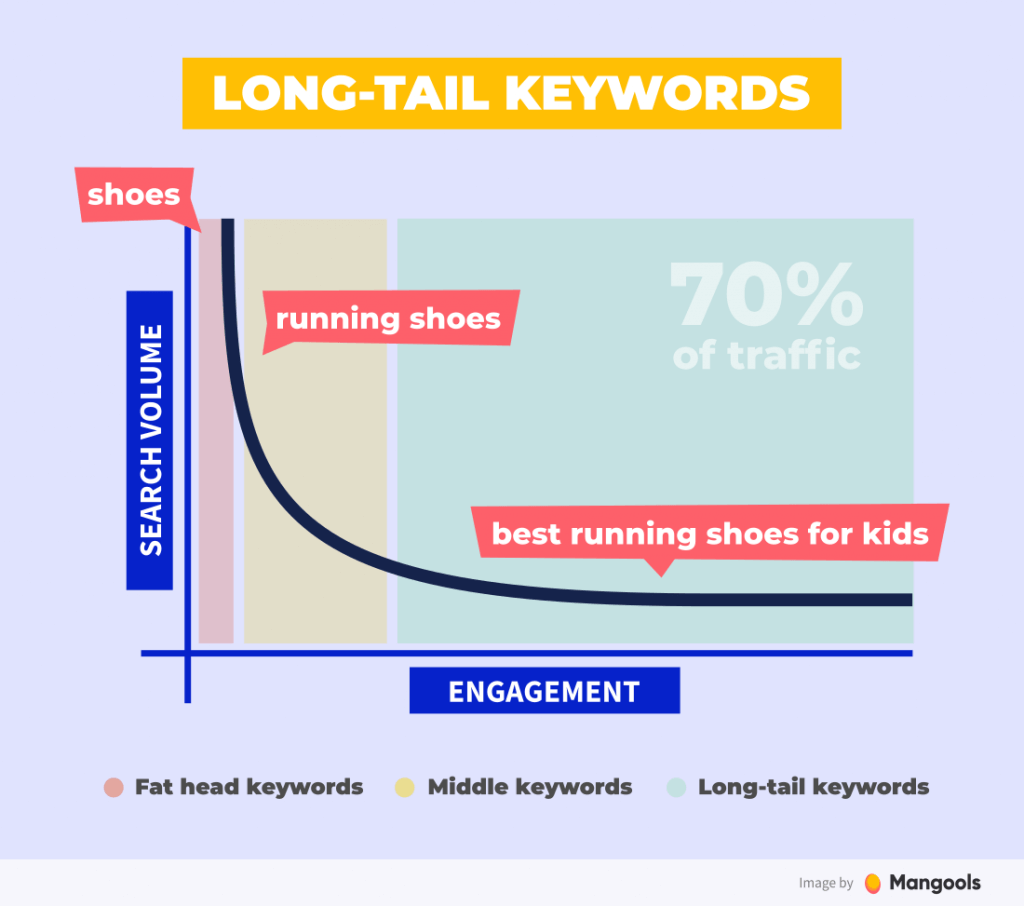
The core characteristics of voice search queries are that they are:
- Longer: Often 7+ words.
- Question-based: Frequently start with words like "who," "what," "where," "when," "why," and "how."
- Conversational: They use natural language, including filler words.
2. Finding Existing Conversational Keywords with Google Search Console
The best place to start your research is with your own data. Your website is likely already getting traffic from voice searches, and Google Search Console (GSC) can help you uncover these queries. To do this effectively, we can use regular expressions (regex) to filter your performance report. Given your background in technical SEO, you'll find this a powerful way to slice your data.
The following video demonstrates exactly how to apply this technique.
How to Optimize Your Site for Voice Search
This clip from the Rank Math SEO video 'How to Optimize Your Site for Voice Search' provides a practical, step-by-step guide to using regex in GSC to find question-based queries.
Watch the segment from 01:50 to 03:13. Focus on how the 'Custom (regex)' filter is used to isolate queries containing common question words.
To find these question-based keywords in your own GSC account, navigate to the Performance report, click "+ New" > "Query...", select "Custom (regex)" from the dropdown, and paste in the following expression:
^(who|what|where|when|why|how|can|is|do|does|are)\s
This regex will filter for queries that begin with common question words. You can then analyze which pages are ranking for these terms and identify opportunities for better optimization.
Test your understanding!
Imagine you manage SEO for a financial planning blog. You want to find queries in GSC that are comparison-based, as these often indicate high-intent users close to making a decision. Examples might include "roth ira vs 401k" or "which is better term or whole life insurance".
What custom regex could you use in GSC to find queries that contain words like "vs", "versus", or "or"?
Show answer
A good regex for this would be: vs|versus|or
You would apply this in the GSC query filter by selecting "Custom (regex)" and pasting this expression. It will match any query containing one or more of those comparative terms, helping you isolate these valuable keywords.
3. Discovering New Conversational Keyword Opportunities
While GSC is great for analyzing past performance, you also need to proactively find new conversational keywords. Here are two effective methods, one using free tools and the other leveraging AI.
Method A: Using Free Tools and SERP Analysis
You don't always need complex tools to find what users are asking. Google itself is a treasure trove of information.
How to Optimize Your Site for Voice Search
Let's return to the 'How to Optimize Your Site for Voice Search' video. This next segment shows how to use a free tool and the 'People Also Ask' (PAA) section of Google's results to generate a list of conversational queries.
Watch the segment from 03:13 to 03:55. Notice how expanding one question in the PAA box reveals more related questions, allowing you to quickly build a list of relevant topics.
To summarize the techniques from the video:
- Answer Socrates (formerly AnswerThePublic): This tool takes a seed keyword and generates a large visualization of questions people are asking about it.
- People Also Ask (PAA) Mining: Search for a broad topic on Google and look for the PAA box. As you click to expand questions, Google will load more related questions, giving you a deep insight into the topic's conversational landscape.
Method B: AI-Powered Keyword Ideation with ChatGPT
To really get ahead of the curve, you can use large language models (LLMs) like ChatGPT to brainstorm conversational queries at scale. This goes beyond simple question generation and helps you think about user situations.
The following video presents an innovative "hack" for this, which aligns perfectly with your goal of mastering AI-driven SEO.
The AI Keyword Research Hack No One Talks About
This video, 'The AI Keyword Research Hack No One Talks About', demonstrates a powerful method for using ChatGPT to generate situational and conversational queries. It's about finding the 'common denominator' that connects a user's problem to your product or service.
Watch the segment from 02:32 to 05:44. Pay close attention to the structure of the prompt provided. The goal is to make the AI think from the perspective of a customer facing a specific problem or situation.
Here is the powerful prompt from the video that you can adapt for your own use:
I'm promoting a [product/service].
Please identify the common denominator that connects customer problems, situations, or needs back to this product. Example for a healthy meal subscription: the common denominator could be 'lack of time' or 'health consciousness'.
Then, break the denominator into logical subcategories. Example for 'lack of time': busy professionals, new parents, students.
Finally, provide conversational and situational queries that real people would ask online. Group them under each subcategory that naturally points toward my product as the solution. Use this format:
Subcategory:
- [Query 1]
- [Query 2]
This approach is highly effective because it forces the AI to move beyond generic questions and generate queries rooted in real-world user intent.
Conclusion
You are now equipped with a multi-faceted strategy for identifying the conversational long-tail keywords that are crucial for voice search success. By combining data mining in GSC with proactive research using both free and AI-powered tools, you can build a comprehensive map of how your audience uses voice to search.
Key Takeaways:
- Voice search queries are fundamentally different from typed queries: they are longer, question-based, and use natural, conversational language.
- You can uncover existing conversational keywords your site already ranks for by using custom regex filters in Google Search Console.
- Free tools like Answer Socrates and manual analysis of Google's "People Also Ask" section are effective ways to discover new question-based keywords.
- AI tools like ChatGPT can be used with advanced prompts to generate situational queries that reflect deep user intent, moving beyond simple keyword brainstorming.
In our next lesson, we will take the keywords you've learned to identify and put them to work. The learning outcome will be: Structure content to provide direct answers in formats preferred by voice search algorithms. We'll explore how to create content that is perfectly formatted to be picked up by voice assistants and featured in snippets.