Hello! Welcome back to our module on advanced automation for content and schema.
In our last lesson, we mastered a scalable workflow for deploying and validating schema markup using Google Tag Manager. We saw how GTM variables can dynamically populate schema templates, freeing us from manual updates across thousands of pages.
Today, we're tackling another time-consuming but critical on-page task: image alt text. For a large website, manually writing descriptive alt text for every image is an overwhelming, often neglected, task. This is where automation becomes a game-changer. Your learning outcome for this lesson is to implement automated workflows for creating descriptive image alt text at scale.
We will explore two primary approaches:
- Platform-Specific Tools: Leveraging integrated plugins and apps for common platforms like WordPress and Shopify.
- Custom Scripted Workflows: Building a more powerful, platform-agnostic process using crawl data and AI vision APIs for ultimate control and scalability.
1. The Importance of Automating Alt Text
As an experienced SEO specialist, you already know that alt text is crucial for both accessibility (for screen reader users) and SEO (helping search engines understand image content). The challenge isn't knowing why but figuring out how to manage it across thousands, or even tens of thousands, of images without dedicating hundreds of hours to the task. AI-powered automation solves this problem of scale.
2. The "Easy Button": Integrated AI Tools for CMS Platforms
For websites built on popular content management systems like WordPress or e-commerce platforms like Shopify, the most direct path to automation is through dedicated plugins or apps. These tools are designed for ease of use and can often be configured in minutes.
A great example is the AI feature within the Rank Math SEO plugin for WordPress.
Automatically Generate Alt Text Using AI For Every Image
The video 'Automatically Generate Alt Text Using AI For Every Image' by the Rank Math team demonstrates how seamlessly this can be integrated into your workflow.
Please watch from 01:06 to 04:03. This section covers the core functionality: Single Image Generation (01:06 - 02:22): Notice how you can generate alt text with a single click in the WordPress editor and media library. Bulk Generation (02:22 - 04:03): Pay close attention to how you can select all images missing alt text and generate descriptions for them in one bulk action. This is the key to scaling.
This "plug-and-play" model is not unique to WordPress. Similar apps exist for most major platforms.
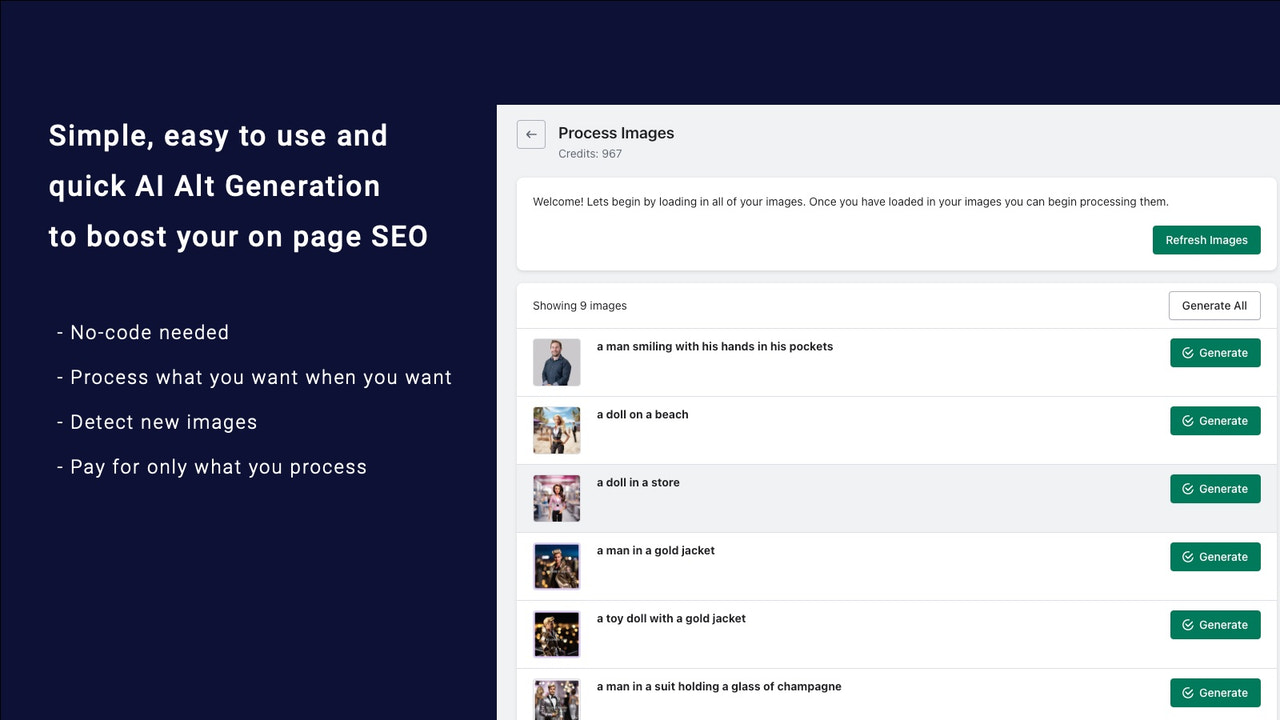
A key feature to look for in these tools is the ability to provide additional context or keywords to guide the AI, ensuring the generated alt text is not only descriptive but also aligned with your SEO strategy.

Pros and Cons of Integrated Tools:
- Pros: Extremely fast to set up, no coding required, user-friendly interface.
- Cons: Often tied to a specific platform, may have recurring costs (e.g., credit-based system), and offer less customization than a bespoke script.
For many standard websites, these tools provide an excellent balance of power and convenience.
3. Building a Custom, Scalable Workflow
While integrated tools are convenient, building a custom workflow provides maximum flexibility and can be applied to any website, regardless of the underlying technology. This is the expert-level approach for enterprise-scale SEO.
A robust custom workflow must address several key challenges:
- Vision: The AI must accurately interpret the contents of the image.
- Context: The alt text should make sense on the page where the image appears. A picture of a laptop might be "a silver laptop on a wooden desk" on a blog post, but it should be "Apple MacBook Pro 16-inch M3" on a product page.
- Quality Control: You need a way to ensure the output is accurate and doesn't contain nonsensical descriptions.
- Resource Management: The process must be cost-effective and efficient.
Let's explore a powerful workflow that addresses these challenges by combining crawl data with a cloud-based AI vision API.
Using AI to generate ALT text for 27,000 images
Ian Lurie's article, 'Using AI to generate ALT text for 27,000 images', provides a fantastic real-world case study of building such a workflow. We'll focus on the methodology he outlines.
Please read the following sections to understand the architecture of this workflow: Start with the introductory section that lists the five core problems (Vision, Context, Subject matter, etc.). This sets the stage for why the workflow is designed the way it is. Jump to 'Step three: Get the images and export the list' to see how Screaming Frog is used to gather the initial data. Read 'What the script is doing'. This is the most important part, as it explains how page context (H1s, adjacent headlines) is combined with the image analysis to create relevant alt text. Finally, review the 'Resource management' section for practical tips on reducing costs and handling duplicates.
The Custom Workflow in a Nutshell
The process described in the article can be broken down into these core steps:
- Crawl & Identify: Use Screaming Frog (with JavaScript rendering enabled) to crawl the website. Export a list of all images, their source page URLs, and whether they have existing alt text. You will filter this list to only include images that are missing alt text.
- Orchestrate with a Script: A Python script is used to loop through your list of target images.
- Gather Context: For each image, the script visits the source page URL and scrapes key contextual elements, such as the page's
<title>tag, the<h1>, and any headings or captions located near the image in the HTML. - AI Vision & Generation: The script sends the image URL and the scraped contextual text to a multimodal AI API (like Anthropic's Claude or OpenAI's GPT-4 with Vision).
- Generate Alt Text: The AI is prompted to first describe the image and then use the provided page context to write a relevant and descriptive alt text. For example: "Describe this image, then write an alt text for it, keeping in mind the page title is 'X' and the nearest headline is 'Y'."
- Output: The script saves the results to a CSV file, mapping each image URL to its newly generated alt text.
This method's strength is its ability to solve the context problem, which is often the biggest weakness of simple image-to-text tools.
Test your understanding!
You are tasked with generating alt text for an e-commerce site with 50,000 product images. The site runs on a custom-built platform, not WordPress or Shopify. Your primary goal is to ensure the alt text is highly relevant and includes the product name. Which of the two main approaches discussed (integrated tools vs. custom script) would be more suitable, and why?
Show answer
The custom scripted workflow is the far more suitable approach.
- Platform-Agnostic: Since the site is on a custom platform, off-the-shelf plugins won't work. A custom script that uses a crawler and APIs can work on any website.
- Contextual Relevance: The key requirement is including the product name. The custom workflow excels at this by scraping the product name from the page's
<h1>or title tag and feeding it to the AI as context for generating the alt text. An integrated tool without this contextual capability might just describe the image generically (e.g., "a blue t-shirt") instead of "Brand X Model Y blue t-shirt".
An Alternative Hybrid Workflow
Another advanced approach involves a hybrid model that separates image analysis from text refinement. This is detailed in an article from Search Engine Land, "Generate image alt text at scale with AI". The core idea is:
- Crawl with Screaming Frog and download all images locally.
- Use a local, open-source AI model (like BLIP) to perform the initial image-to-text conversion. This can be cheaper for very large volumes as it runs on your own hardware.
- Take the raw, often grammatically imperfect, captions from the local model and send them to a cloud text-to-text AI (like ChatGPT) with a prompt to "clean up this grammar and format it as high-quality alt text."
This multi-step pipeline gives you granular control over each stage but is more complex to set up than the single-API approach.
4. Implementation and Quality Control
Once your automated workflow generates a CSV file of image URLs and corresponding alt texts, the final step is implementation.
- For CMS platforms: You can often use a bulk import plugin to upload the CSV and update the media library.
- For custom platforms: This typically involves handing the CSV to a developer, who can write a script to update the site's database.
Crucially, never blindly trust the AI output. Always implement a quality control step. Before handing off the final CSV, spot-check a random sample of 50-100 images and their generated alt text to ensure accuracy, relevance, and tone. Tweak your prompts and re-run the process if you notice systemic issues. Remember the "human-in-the-loop" principle.
Conclusion
You now have a clear framework for automating one of the most tedious tasks in on-page SEO. By moving from manual entry to scalable, AI-driven workflows, you can ensure 100% alt text coverage, improving both accessibility and organic visibility for large-scale websites.
Key Takeaways:
- For common CMS platforms, integrated AI plugins/apps are the fastest and easiest solution for automating alt text generation.
- For maximum control, flexibility, and scalability on any site, a custom workflow using a crawler (Screaming Frog) and a multimodal AI API (like Claude or GPT-4V) is the expert-level approach.
- The key to high-quality automated alt text is providing on-page context (titles, headlines) to the AI during generation.
- Quality control is non-negotiable. Always spot-check AI-generated content before it goes live.
In our next lesson, we'll continue exploring content automation by learning how to use performance data and AI tools to automatically identify existing content with high potential for a refresh.