Hello! Welcome back to our module on AI-Powered Link Building & Outreach.
In our last lesson, we focused on analyzing a large list of potential link prospects, using AI-driven metrics to identify a smaller, high-value list of websites. You learned how to assess links based on contextual relevance, trust, and risk, moving beyond simple metrics like DR.
Now we have a qualified list of target domains. But a website is not a person. The crucial next step is to find the right individual to contact at each of these organizations. This traditionally manual, time-consuming task is a major bottleneck in scaling any link-building campaign.
Today, we'll solve that problem. This lesson directly addresses the learning outcome: Automate prospect research and contact discovery for outreach campaigns using AI-powered tools. We'll explore how modern platforms can turn hours of manual searching into an automated workflow that runs in minutes, dramatically increasing the efficiency and scale of your outreach efforts.
1. From Manual Hunting to Automated Discovery
Before we dive into the tools, let's briefly acknowledge the old way of doing things. For each domain on your prospect list, you would typically:
- Visit the website.
- Search for an "About Us," "Team," or "Blog" page.
- Try to identify the author of a relevant article, a content manager, or a marketing lead.
- Take that name and company, and use a separate tool like Hunter.io or VoilaNorbert to guess or find their email address.
- Manually verify the email to avoid bounces.
This process is slow, tedious, and doesn't scale. If you have a list of 500 prospects, this could take days. AI-powered automation collapses this entire sequence into a single, efficient process.
The article below provides an excellent overview of the stages of link building that can be automated, focusing on prospecting and contact discovery.
How to Automate Outreach & Link Acquisition Guide
To understand the strategic framework, let's start with the 'How to Automate Outreach & Link Acquisition Guide' from Authority Solutions. This guide clearly outlines the stages ripe for automation.
Please read the section 'Execute This Automation-Ready Link Building Framework,' focusing on the descriptions for Stage 1: Prospecting and Stage 2: Contact Discovery. Notice how it frames automation as the solution to manual searching and contact hunting.
As you've just read, the goal is to use automation to handle the repetitive, mechanical tasks of finding websites and, more importantly for our focus today, locating the decision-makers at those sites.
2. A Practical Deep Dive: Automating Contact Discovery with Clay
To make this concrete, we're going to explore a powerful data automation and enrichment platform called Clay. While many tools perform these functions, Clay's "waterfall" approach is particularly effective and illustrates the power of modern automation. It allows you to chain multiple data providers together, dramatically increasing the likelihood of finding the contact information you need.
The following video provides a comprehensive tutorial. We'll watch it in segments to break down the core concepts.
The Easiest Way To Get B2B Clients In 2025 [Clay.com Tutorial]
This video from the official Clay channel, 'The Easiest Way To Get B2B Clients In 2025,' is an excellent tutorial on the platform's capabilities. While it's framed for B2B sales, the exact same workflows apply to SEO link-building outreach.
Please watch the following parts of the video: 00:00 - 01:14 (What is Clay?): Pay attention to the four core components: data sources, enrichments, AI, and connections. This is the foundation of the platform. 01:14 - 02:45 (Data Enrichment & Waterfalling): This is the most critical part for our lesson. Focus on how Clay uses 'enrichments' to find data like work emails and the powerful concept of 'waterfalling'—trying multiple data providers in a sequence. 04:40 - 07:41 (Full Workflow Example): Watch how all the pieces come together. Observe the process: importing companies, enriching them with data, finding specific people (contacts), finding their emails, and finally, sending the data to an outreach tool.
Let's recap the key workflow demonstrated in the video, adapted for link building:
- Import Data: You start with your list of qualified domains from our previous lesson and import it into a Clay table (this is your data source).
- Find People: You use an enrichment like "Find Contacts at Company" and filter by job titles relevant to link building, such as "Content Manager," "Head of SEO," "Editor," or "Digital PR Manager."
- Find Emails (with Waterfalling): For the list of people you just found, you run the "Find Work Email" enrichment. This is where the magic happens. You configure a waterfall to:
- First, try Provider A (e.g., Hunter).
- If it fails, automatically try Provider B (e.g., Prospeo).
- If that fails, try Provider C, and so on.
This automated, sequential process gives you the highest possible success rate for finding a valid email address.
- Export for Outreach: Once your list is enriched with names, titles, and verified emails, you can send this data directly to your outreach tool (like Instantly, Smartlead, or even just a Google Sheet) using Clay's integrations.
Test your understanding!
Imagine you've used Clay's "Find Contacts at Company" enrichment on a target website and it returned three potential contacts: the CEO, the Head of Content, and a a junior writer. For your link-building campaign (offering a resource link), who would you prioritize finding an email for, and why?
Show answer
You should prioritize finding the email for the Head of Content.
Reasoning:
- The CEO is likely too busy to handle a specific link request and may ignore or delete your email.
- The junior writer may not have the authority to edit published content or make decisions about adding links.
- The Head of Content is the most appropriate contact. This person oversees the website's content strategy and has the authority to approve and implement link additions. They are the decision-maker for the action you are requesting.
This demonstrates the importance of not just finding any contact, but the right contact.
3. The Broader Tool Landscape for Prospecting
Clay is a powerful, flexible data-enrichment tool, but it's one of many players in this space. The market includes everything from all-in-one outreach suites to specialized tools.
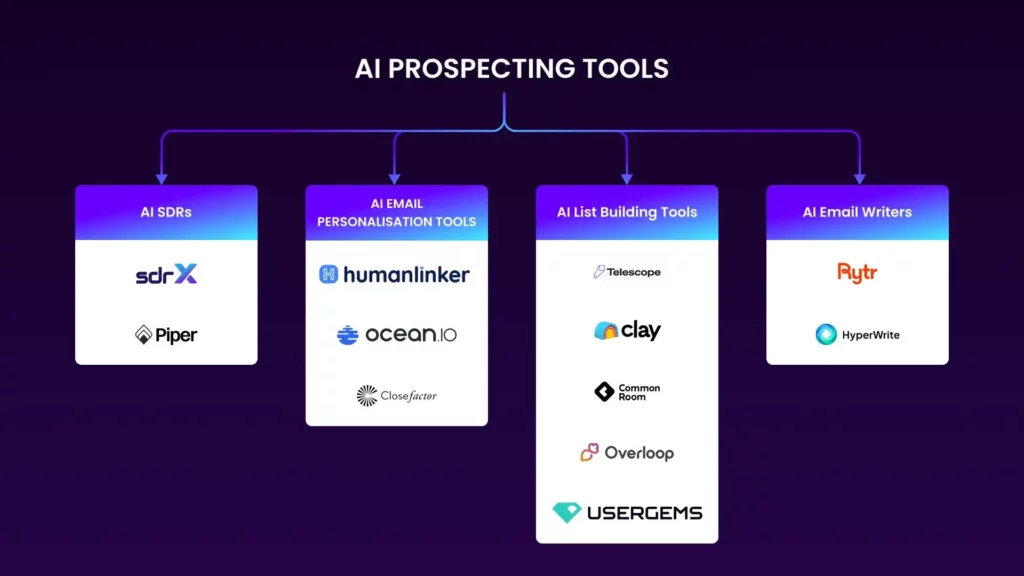
Here's a breakdown of the main categories of tools you'll encounter.
All-in-One Outreach Platforms
These tools aim to manage the entire link-building process, from prospecting to outreach and reporting. They have built-in features for contact discovery.
- Pitchbox ($495+/mo): An enterprise-grade tool that automates prospecting based on keywords and finds contact details for each prospect automatically. Its strength is in large-scale, systematic workflow automation.
- Respona ($99+/mo): An AI-powered platform that matches your content to relevant prospects and finds their contact information simultaneously. It's known for its AI-driven personalization features.
- BuzzStream ($24+/mo): Strong on the CRM and relationship management side, BuzzStream also includes prospect research tools and a Chrome extension to capture contact details as you browse.
This article provides more detail on these platforms.
10 Best AI Backlink Outreach Tools for Link Building in 2025
The '10 Best AI Backlink Outreach Tools' article from Backlinker.ai blog offers concise summaries of the top platforms. It's a great way to quickly compare their features for contact discovery.
Please read the sections on Pitchbox (2), Respona (3), and Postaga (6). For each tool, focus on how it handles 'automated prospect research' and 'contact discovery.' Notice that while they all achieve a similar outcome, their approaches and primary strengths differ.
Custom AI Agents and GPTs
For a more bespoke approach, you can even use custom GPTs to assist with prospect research. While less scalable for finding emails in bulk, they can be excellent for specific tasks like finding the right outreach opportunities in the first place.
AI Link Building GPT: FREE ChatGPT Tool to Automate DR 92 SEO Backlinks
In this video, 'AI Link Building GPT,' Julian Goldie demonstrates how he built a custom GPT for various link-building tasks. We'll focus on a specific part relevant to discovering outreach opportunities.
Watch the segment from 02:49 to 04:44. Observe how the custom GPT is used to find podcasts in a specific niche and, crucially, provides direct links to their guest application forms. This is a form of automated opportunity and contact discovery, bypassing the need to find an individual's email.
This use of a custom GPT highlights a key principle: automation is about finding the most direct path to the person or system that can fulfill your request. Sometimes that's an email, and other times it's a contact form.
Conclusion
You've now learned how to bridge the gap between having a list of target websites and having an actionable list of contacts to email. By replacing slow, manual research with automated workflows, you can prepare large-scale outreach campaigns in a fraction of the time.
Key Takeaways:
- Automating prospect research and contact discovery is essential for scaling link-building efforts.
- Tools like Clay.com use data enrichments and waterfalling logic to find contact information with a high success rate.
- All-in-one outreach suites like Pitchbox, Respona, and BuzzStream integrate contact discovery directly into their campaign management workflows.
- The goal of automation is to efficiently find the right decision-maker, whether that's via a direct email, a contact form, or another submission channel.
In our previous lessons, we identified target domains and analyzed their quality. Today, we found the right people to contact at those domains. The next logical step is to write the outreach email itself. In our next lesson, we will use GPT-4 to draft personalized outreach email templates for specific link-building prospects, bringing all of our research together to craft a message that gets results.