Hello! Welcome to the final lesson in our module on enterprise-level migrations.
In our last session, you conducted the crucial pre-launch audit on a staging server. You acted as the final quality gate, validating the redirect map, checking for indexing blockers, and comparing the new site against the old to provide a confident "Go" for launch.
The switch has been flipped, and the new site is live. Now, the real test begins. This lesson focuses on the immediate aftermath of the launch. Our learning outcome is to execute a post-launch monitoring plan to track crawl data, indexing, and rankings after a site migration. This is where you'll verify that the transition is proceeding as planned, catch any live issues before they cause significant damage, and report on the migration's success.
1. The Post-Launch Framework: What to Monitor and When
A successful migration isn't just about a smooth launch day; it's about a stable transition over the following weeks. Your monitoring should be structured, moving from immediate, critical health checks to broader performance tracking.
The following resource provides an excellent, high-level checklist for this process.
2025 SEO Migration Guide: Protect Your Search Visibility
The article '2025 SEO Migration Guide' from BrightEdge offers a concise and modern framework for post-migration monitoring.
Please read the sections 'Post-Migration: Monitor, Fix, and Optimize' and the 'Post-Migration Monitoring' checklist. Focus on the key areas to watch: The primary signals: Redirects, indexation, rankings, and traffic. The timeline: The checklist breaks down tasks for the critical first 1-4 weeks. The tools mentioned (even if they are specific to BrightEdge, the concepts are universal).
This framework gives us our core pillars for monitoring: Crawl Data, Indexing, Rankings & Traffic. Let's break down how to track each one using the tools you have at your disposal.
2. Tracking Crawl Data & Search Bot Behavior
The first sign of a successful or failed migration is how search engine bots interact with the new site. Are they finding the new pages? Are they respecting your redirects?
Using Google Search Console for Crawl Stats
Your first port of call is the Crawl Stats report in Google Search Console (GSC). It gives you a direct view of how Googlebot is interacting with your site.
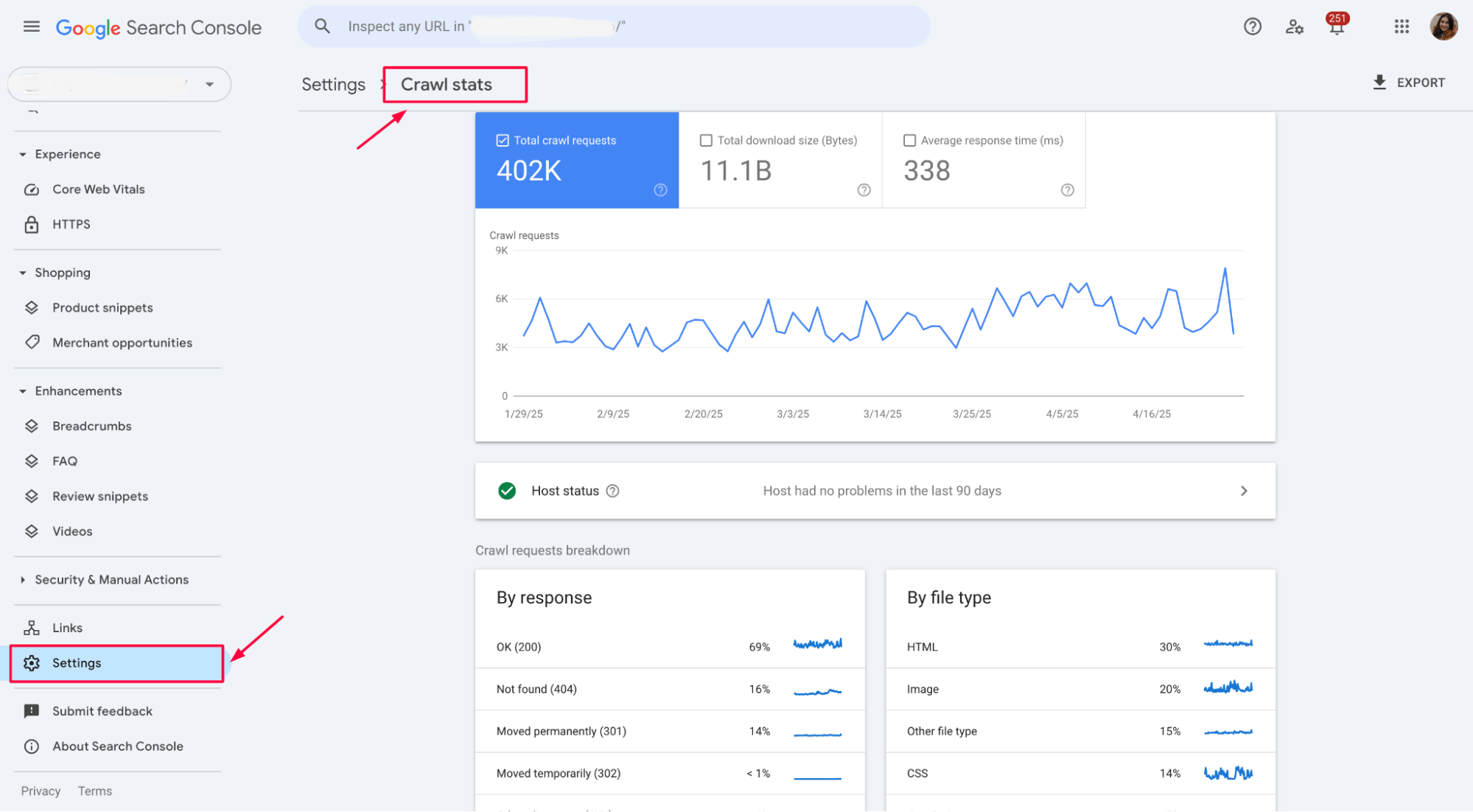
After a migration, you should be looking for:
- Crawl Requests by Response: You should expect to see a large number of
301 (Moved permanently)responses as Googlebot crawls the old URLs and discovers the redirects. A spike in404 (Not found)errors could indicate a problem with your redirect map. A spike in5xx (Server error)responses signals a critical server instability issue that must be addressed immediately. - Total Crawl Requests: You will likely see a significant increase in crawl activity as Googlebot processes the redirects and explores the new site structure. This is normal and should stabilize over a few days or weeks.
Using Log File Analysis for Real-Time Insight
While GSC is essential, its data is often sampled and can have a time lag. For an enterprise site, log file analysis gives you the complete, real-time picture of bot activity. You were introduced to this in a previous module; now is a critical time to apply it.
6 Ways To Use Log File Analysis To Optimize Your Crawl ...
The article '6 Ways To Use Log File Analysis' by Cyfe explains why this technique is so valuable during a migration.
Please read section 5, 'Reduce the Negative Impact of Site Migration.' It highlights how log data helps you verify that search bots are crawling the new site's pages and not hitting dead ends.
By analyzing your server logs (using a tool like Screaming Frog Log File Analyser), you can answer questions that GSC can't:
- Is Googlebot crawling the old URLs, receiving a 301, and then immediately crawling the new destination URL?
- Are bots wasting crawl budget on old URLs that should have been redirected but weren't?
- Are there any important sections of the new site that bots haven't crawled at all?
This granular data allows you to spot inefficiencies in the crawl process and fix redirect issues before they impact indexing.
3. Tracking the Indexation Handover
The goal of a migration is for the new site's URLs to seamlessly replace the old ones in Google's index. This "handover" is a process you must monitor closely.
The GSC Page Indexing Report
The Page Indexing report in GSC is where you'll track this transition. You need to monitor this report for both the old and new domain properties in GSC.
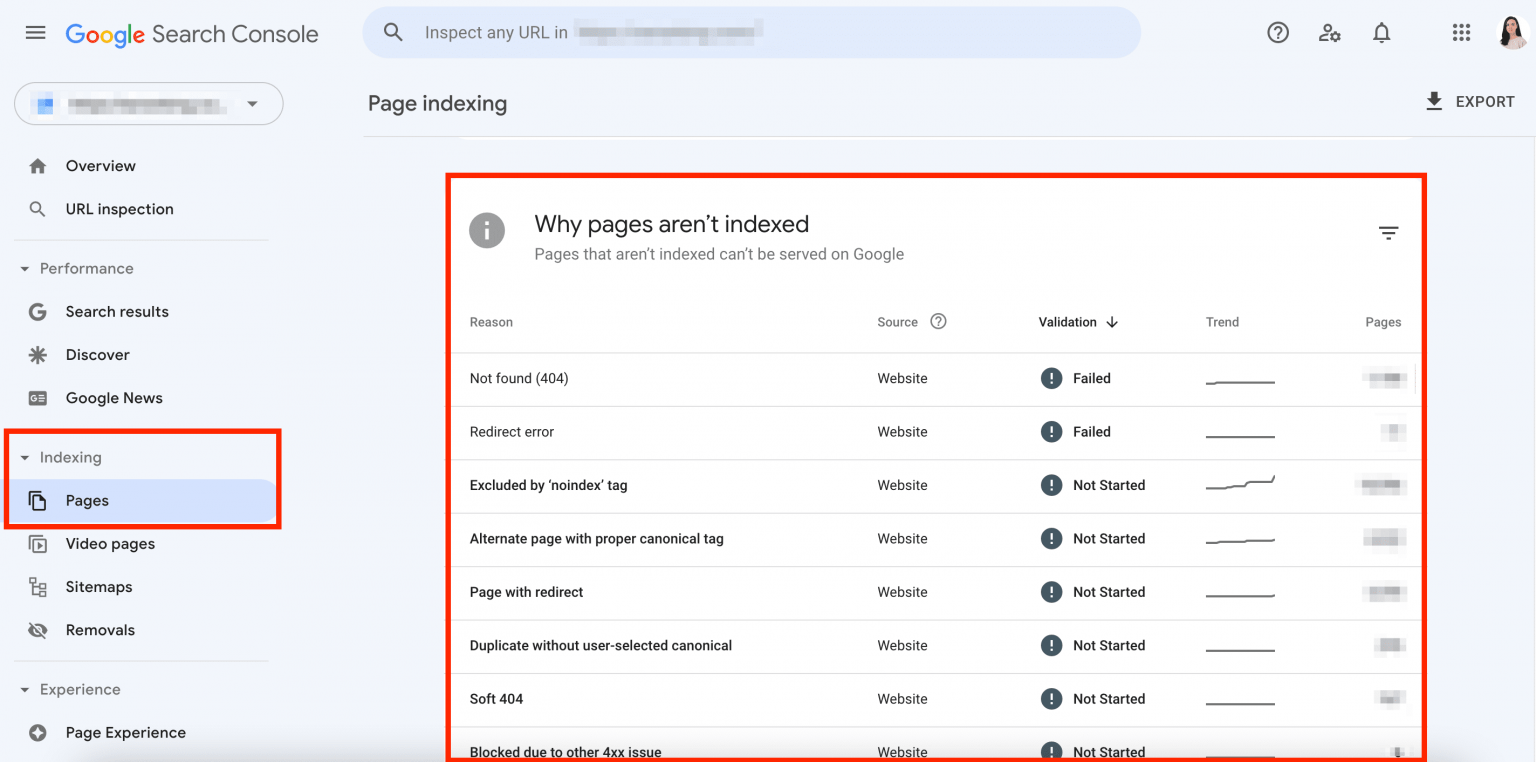
Here’s the ideal trend you want to see over several weeks:
- On the old domain's GSC property: The number of indexed pages should steadily decrease. The "Why pages aren't indexed" report should show a growing number of pages listed under "Page with redirect."
- On the new domain's GSC property: The number of indexed pages should steadily increase, ideally mirroring the decrease from the old domain.
If the new site shows a large number of pages failing to be indexed, use the report to diagnose why. Common post-migration issues include Redirect error, Excluded by 'noindex' tag (if a development tag was left in place), and Blocked by robots.txt.
Test your understanding!
One week after a migration, you check the GSC Page Indexing report for your new domain. You see that a large number of important product pages are listed under the reason "Duplicate, Google chose different canonical than user." What does this likely indicate happened during the migration, and what is the potential SEO impact?
Show answer
This indicates that the canonical tags on these new product pages are likely pointing back to the URLs on the old domain, or to another incorrect version. This is a critical error. Instead of passing authority to the new pages, you are telling Google that the old pages are still the definitive versions. The potential impact is that Google will not index the new pages, and as the old pages are eventually de-indexed, these products will lose all organic visibility. This must be fixed immediately by updating the canonical tags to be self-referencing to the new URLs.
4. Tracking Rankings & Traffic
This is the metric that stakeholders care about most. A well-executed migration should result in a smooth transition of traffic and rankings, not a catastrophic drop.
First, let's set expectations. What does a "smooth transition" look like?
Site Migrations: SEO Mythbusting
Before we look at the charts, let's hear from Google. This 'SEO Mythbusting' video from the Google Search Central channel explains what happens behind the scenes during a site move and what to expect regarding traffic.
Watch from 1:49 to 6:07, where they discuss the myth of guaranteed traffic drops. Then, watch from 8:12 to 10:18 to understand how Google passes signals to the new domain. The key takeaway is that a clean, 1-to-1 move should be a fluid transition rather than a sharp drop.
As the video explains, while some fluctuation is normal, a major, sustained drop is a sign that something is wrong. Your job is to monitor traffic against the pre-migration benchmarks you established to quickly identify these drops.
Setting Up Your Monitoring Dashboard in GA4
Your pre-migration benchmarks are your source of truth. Now, you need to build the reports in GA4 to track performance against them.
5 SEO reports in Google Analytics 4
To monitor organic traffic effectively, you need to create specific reports in Google Analytics 4. This practical tutorial from Analytics Mania shows you how to build a simple but powerful SEO dashboard.
This video will guide you through creating two essential reports for post-migration analysis: Landing Pages (Organic Search) report (0:00 - 4:34): This will show you exactly which pages on the new site are receiving organic traffic. Google Search Console Integration (10:28 - 13:13): This brings GSC data (clicks, impressions, queries) directly into GA4, allowing you to correlate ranking data with on-site behavior. Set these reports up in your GA4 property.
With these reports, you can now systematically compare post-launch performance against your pre-launch benchmarks for key page templates (e.g., top 10 category pages, top 20 product pages). Look for significant drops in organic sessions, clicks, or impressions. A drop in impressions often indicates a loss in rankings, while a drop in clicks with stable impressions might point to a title/meta description issue.
5. Troubleshooting & When to Sound the Alarm
What if you see a significant, sustained drop? The key is to diagnose, not panic. Reverting a migration is a measure of last resort.
Site Migrations: SEO Mythbusting
Deciding to roll back a migration is a serious step. Let's return to the Google Search Central video for their perspective on when this might be necessary.
Watch the segment from 14:54 to 17:24. Notice the emphasis on first trying to diagnose the root cause of the problem and the suggested timeframe ('after a month or so') before considering a reversion.
Before considering a rollback, exhaust all diagnostic possibilities using the tools we've discussed:
- Crawl Errors? Check GSC and logs for 5xx or 404 spikes.
- Indexing Blockers? Check GSC for
noindexorrobots.txtissues. - Content/On-Page Issues? Did critical content or metadata not get migrated? Recrawl the live site and compare against your pre-migration crawl.
- Ranking Loss? Use GSC reports to pinpoint which queries and pages have lost visibility.
Only after a thorough investigation fails to identify a fixable cause should a rollback be considered.
Conclusion
You have now completed the entire enterprise migration process, from initial planning and URL mapping to pre-launch auditing and now, post-launch monitoring. This structured monitoring plan is what separates a smooth, professional migration from a chaotic, value-destroying one.
Key Takeaways:
- A post-launch plan is essential and should cover the first four weeks, focusing on crawl data, indexing, and traffic/rankings.
- Use a combination of tools: GSC provides a high-level overview, while log file analysis offers granular, real-time data on bot behavior.
- Track the indexation handover by monitoring the indexed page counts for both the old and new domains in GSC. A steady decrease on the old site should be mirrored by an increase on the new one.
- Benchmark performance by comparing post-launch traffic and rankings in GA4 and GSC against the data you collected before the migration.
- Diagnose before you panic. A traffic drop has a root cause. Use your tools to find it. Reverting a migration is a final, last-resort option.
This concludes our deep dive into enterprise SEO for site migrations. You've covered the critical technical challenges that come with large-scale website changes.
In our next module, we'll pivot to another key area of enterprise SEO: Scaling Multi-Location & Local SEO. We'll begin by defining the content strategy and structural template for a high-performing, scalable local landing page.