Hello and welcome back!
In our last lesson, you built your first piece of SEO automation: a site health alert system using Zapier. You learned how to create a workflow with a trigger and an action, allowing you to move from reactive manual checks to proactive, automated monitoring.
Today, we'll apply that same automation mindset to a different, but equally critical, area of SEO: performance tracking. Your learning outcome for this lesson is to set up automated rank tracking and reporting systems with custom alerts for significant ranking changes. This will enable you to monitor keyword performance at scale, get notified of important shifts instantly, and build dynamic reports without the daily grind of exporting and pasting data.
1. The Anatomy of Automated Rank Tracking
Before we build the automation, let's quickly formalize the components. Any rank tracking system, whether manual or automated, requires a few key inputs. As an experienced SEO specialist, you're already familiar with these, but it's useful to see them laid out in the context of automation.
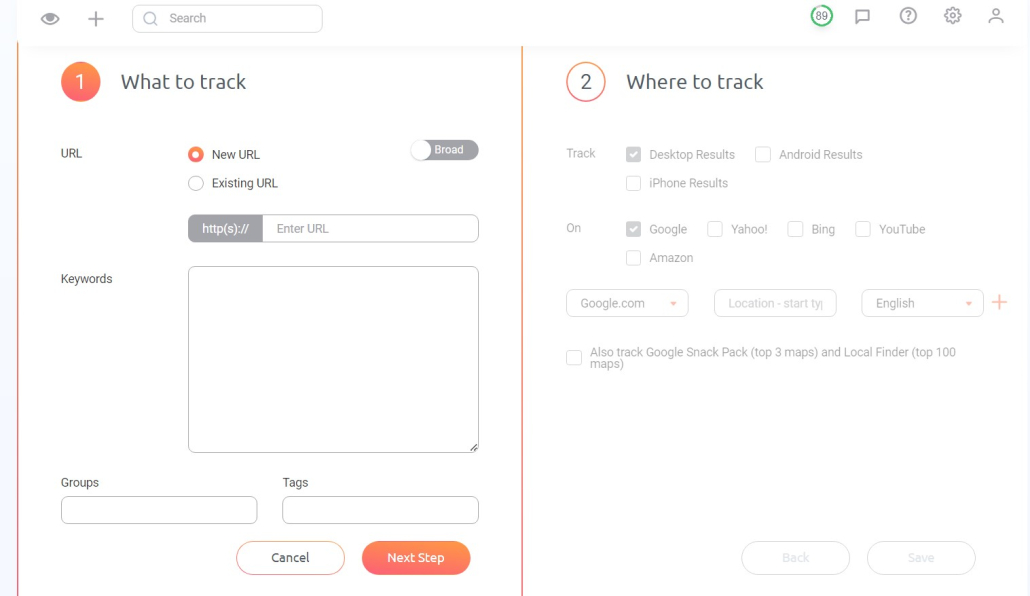
The core components our automated system will need to handle are:
- Keywords: The list of search queries to monitor.
- Domain: Your target website.
- Location & Language: The specific market you're targeting (e.g., Google.com in the US vs. Google.de in Germany).
- Device: Desktop or mobile, as rankings often differ.
- Schedule: The frequency of checks (e.g., daily, weekly).
Our goal is to create a system that runs these checks automatically, stores the results, and intelligently alerts us when something important happens. We'll explore two primary methods for achieving this: a low-code approach and a more powerful, code-based approach.
2. The Low-Code Approach: Orchestrating Your Tools
Building on what you learned with Zapier, we can use a workflow automation platform to connect different services. For this, we'll look at an architecture using n8n, a powerful open-source alternative to Zapier. The principles are identical.
The article below outlines a robust system for automated rank tracking. Don't worry about the specific tools mentioned (like Bright Data); focus on the workflow architecture itself.
How to Build an Automated SEO Rank Tracker with AI Agents...
The article 'How to Build an Automated SEO Rank Tracker with AI Agents, n8n and Bright Data' provides a clear blueprint for an automated system. Pay close attention to the components and how they connect.
Read the sections 'The Architecture' and 'Implementation Overview'. Note the flow of data: Schedule Trigger -> Keyword Input -> Data Scraper -> Output Parser -> Google Sheets Logger. This is the fundamental pattern for our automation.
As the article illustrates, a typical automated workflow looks like this:
- Schedule Trigger: The process starts automatically at a set time (e.g., daily at 7 AM).
- Get Keywords: The system fetches the list of keywords you want to track, perhaps from a Google Sheet or a database.
- Fetch SERP Data: An API call is made to a service that provides search engine results. This is the step that actually "Googles" the keyword.
- Parse and Store Data: The system extracts the rank, URL, and other data for your domain and logs it into a Google Sheet or database, adding a new row with the current date.
Creating Custom Alerts
With this system logging data automatically, how do we add alerts for significant changes? This is where you apply the logic from our last lesson. You can create a second, separate workflow:
- Trigger: New row is created in your rank tracking Google Sheet.
- Action 1 (Code/Formula): Compare the
current_positionin the new row with theprevious_positionfrom the last entry for that same keyword. - Action 2 (Filter): Only continue if the change in position is greater than a threshold you define (e.g.,
abs(change) > 3). - Action 3 (Notification): Send a detailed message to Slack or email with the keyword, the old rank, the new rank, and the landing page URL.
This approach separates data collection from alerting, creating a clean and modular system. It's a powerful way to get started without writing extensive code.
3. The Code-Based Approach: Ultimate Flexibility with Python
While no-code tools are excellent, a code-based solution using Python offers maximum control, customization, and cost-efficiency at scale. This is the path to becoming a true SEO automation expert.
The following guide provides a complete walkthrough of building a custom rank tracker with Python. We will focus on two key parts: scheduling the job and sending alerts.
Automating Rank Tracking with Python & APIs: A Complete Implementation Guide
The 'Automating Rank Tracking with Python & APIs' guide by Hashmeta gives us the exact code we need to implement our system.
First, read the section 'Scheduling and Automation' to see how the Python schedule library is used to run the tracking job automatically. Then, review the code under 'Slack Notifications'. This section demonstrates exactly how to query your stored data, identify significant changes, and send a formatted alert.
The Python script in the article implements the alerting logic we conceptualized earlier:
- It connects to a database where rankings are stored.
- It pulls the rankings for the two most recent dates.
- It compares the positions for each keyword between those two dates.
- If the change exceeds a threshold (e.g.,
abs(position_change) >= 5), it formats a summary message. - It sends this message to a Slack channel via a webhook.
This gives you complete control over the alerting threshold, the message format, and where the notification is sent.
Test your understanding!
In the Python code for Slack notifications from the Hashmeta article, the alert is triggered for changes of 5 positions or more (ABS(r2.position - r1.position) >= 5).
How would you modify this logic to only get alerts when a keyword drops out of the top 10 (i.e., its previous position was 10 or better, and its new position is 11 or worse)?
Show answer
You would change the WHERE clause in the SQL query. Instead of checking for an absolute change, you would specify the conditions for the previous and current positions.
The modified part of the query would look something like this:
WHERE r1.date = ? AND r2.date = ? AND r2.position <= 10 AND r1.position > 10
r2.position <= 10: The previous position was in the top 10.r1.position > 10: The current position is now outside the top 10.
This makes your alert system much more specific and actionable, focusing on high-value keywords losing critical visibility.
4. Building Your Reporting System
Collecting data is only half the battle; you also need to visualize it to spot trends.
Advanced Visualization with Python
A simple spreadsheet log is functional, but with Python, you can create powerful, dynamic visualizations. The next video demonstrates how to use data collected over time to create animated charts that show SERP volatility. This is an incredibly insightful way to analyze ranking changes.
Python and SEO: Tracking Rankings on SERP Second by Second
In this video, 'Python and SEO: Tracking Rankings on SERP Second by Second', Koray Tuğberk GÜBÜR demonstrates a sophisticated approach to rank tracking.
First, watch from 00:13:53 to 00:25:49 to see how a Python script is set up with an API key and scheduled to run at regular intervals. This reinforces the scheduling concept from the article. Then, watch from 00:25:49 to 00:39:00. This is the crucial part where he combines the collected data into a single DataFrame and uses plotly Express to create animated scatter plots. Pay attention to how this visualization makes it easy to see how rankings for different domains move over time. This is a reporting system in action.
Dashboarding with Looker Studio
For executive-level reporting, you'll often want a persistent dashboard. By logging your ranking data to a Google Sheet (from either a no-code workflow or a Python script), you can easily connect it as a data source in Google Looker Studio.
The following video shows a comprehensive SEO dashboard. We'll just look at the part focused on rank tracking to see what a final report could look like.
Stel My Free Google Looker Studio SEO Template...😱
Olga Zarr's 'Free Google Looker Studio SEO Template' video showcases a professional-grade dashboard. We'll focus on the specific tab she created for rank tracking data.
Watch the section from 00:04:27 to 00:05:09. Notice how the 'Rankings overview' tab pulls data from a rank tracker (in her case, SE Ranking) to display metrics like 'Average position' and a table of keyword performance over time. This is a great example of an automated reporting system.
Conclusion
Today you've explored the architecture for one of the most fundamental SEO automations: rank tracking and alerting. You've seen how to design and build systems that save time, provide timely insights, and scale your monitoring efforts.
Key Takeaways:
- Automated rank tracking consists of three main parts: scheduled data collection, data storage, and custom alerting/reporting.
- Low-code/no-code platforms like n8n or Zapier are great for orchestrating existing tools and creating alert systems based on data logged to a spreadsheet.
- Code-based solutions using Python provide ultimate flexibility to customize data collection, alerting logic (e.g., threshold-based alerts), and create advanced visualizations.
- The goal of custom alerts is to reduce noise by notifying you only of significant changes that require your attention.
In our next lesson, we will continue our journey into automated monitoring by shifting our focus to off-page SEO. You will learn how to use AI tools to automatically monitor backlink profiles and identify potentially toxic links, adding another layer of automation to your SEO toolkit.