Hello! Welcome back to your course on investing in the Colombo Stock Exchange.
In our last lesson, you learned the essential first step: how to open your Central Depository System (CDS) and brokerage accounts. With those accounts set up, you now have your gateway to the market. The logical next question is, "How do I actually buy or sell shares?"
Today's lesson will answer exactly that. Our learning outcome is to explain how to place buy and sell orders through a licensed stockbroker. We will cover the different methods for placing an order, the specific information you need to provide, and the most common types of orders you will use. This is the moment where theory turns into action.
1. How to Communicate Your Order
Once your account is active, you have two primary ways to communicate your trading instructions to your broker. Think of these as two different user interfaces to the same trading system.
-
Contacting Your Investment Advisor: The traditional method is to communicate directly with the Investment Advisor assigned to you by your brokerage firm. This is usually done via a phone call, but can also be through email or a visit to their office. This method is beneficial for beginners as the advisor can offer guidance and confirm your order details.
-
Using an Online Trading Platform: Most, if not all, Sri Lankan stockbrokers now offer online trading platforms. These can be web-based portals you access on your computer or dedicated mobile apps. Given your background in IT, you will likely find these platforms intuitive. They give you direct control to place, monitor, and cancel your orders independently, along with access to real-time market data.
Getting Started - Lanka Securities
The website of Lanka Securities, a licensed broker, clearly outlines these two methods. Let's take a quick look at their 'Getting Started' page.
On the webpage, please find the heading 'Place an order'. Read the short paragraph under this heading. It succinctly describes the two methods we've just discussed.

2. The Anatomy of a Trade Order
Whether you are calling your advisor or using an online platform, the information you need to provide is the same. An order is a precise set of instructions. In a way, it's like an API call to the market; every parameter must be correct for it to be processed as intended.
Before placing an order, you must have the following details ready:
- Your CDS Account Number: To identify your account.
- Action: Are you Buying or Selling?
- Security: The name of the company (e.g., "John Keells Holdings PLC") or its unique three-letter ticker symbol (e.g., "JKH").
- Quantity: The number of shares you wish to trade. Sometimes, for a buy order, you might specify the total cash amount you want to invest, and the broker will calculate the number of shares.
- Price / Order Type: How much are you willing to pay (or accept)? This is crucial and leads us to the different types of orders.
- Duration: How long should the order remain active if it's not immediately filled?
Let's dig deeper into the most important part of your order: the price.
3. Key Order Types: Market vs. Limit Orders
The two most fundamental order types you will use are Market Orders and Limit Orders. Choosing the right one depends on whether your priority is immediate execution or price control.
Colombo Stock Exchange - A Basic Guide to Investing in Shares
The Colombo Stock Exchange's 'Basic Guide to Investing' explains these concepts clearly. Please read the section on what to specify before placing an order.
Please read the section titled 'Buying and Selling shares - basic steps'. Focus on the bullet points that detail the information you need, especially the explanations for 'Share price: at market order or limit order?' and 'Duration of the order'.
Let's visualize and define these order types.
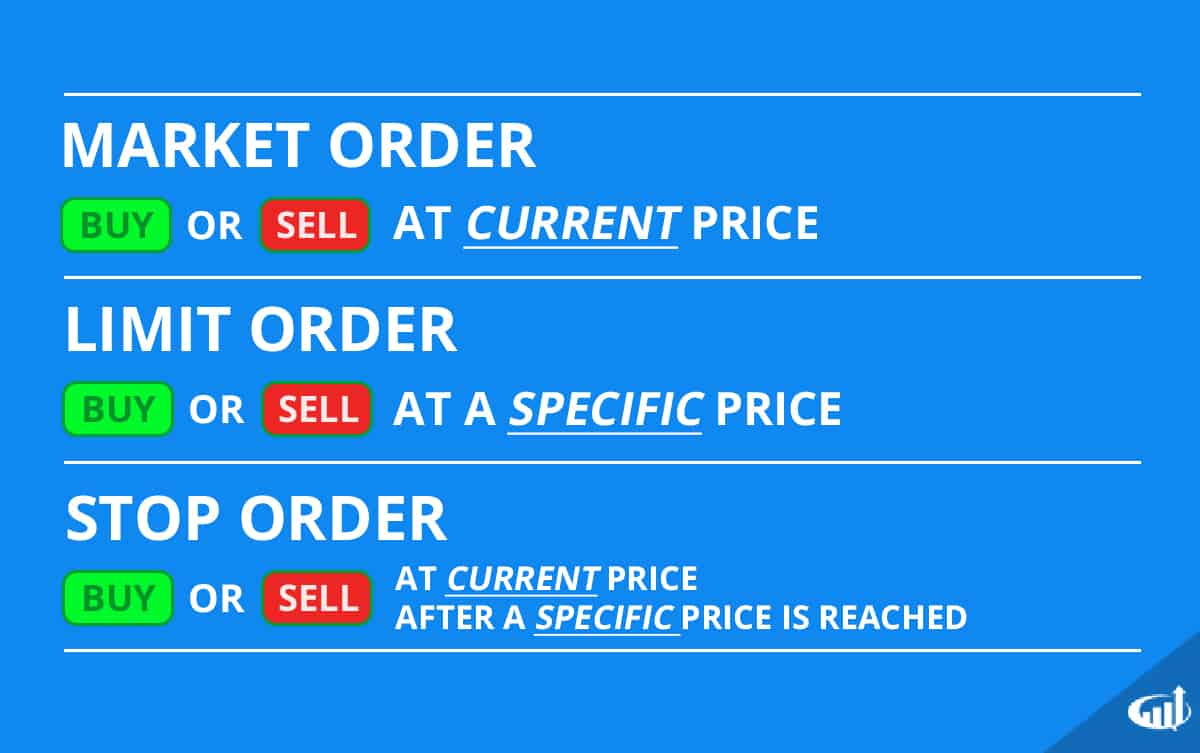
As you can see from the guide and the image, the distinction is clear:
-
Market Order:
- Instruction: Buy or sell shares immediately at the best available price in the market right now.
- Advantage: Guarantees your order will be executed (as long as there are buyers/sellers). It's the fastest way to get in or out of a stock.
- Disadvantage: You have no control over the exact price. In a fast-moving market, the execution price might be different from the last price you saw.
-
Limit Order:
- Instruction: Buy shares only at or below a specific price, or sell shares only at or above a specific price.
- Advantage: You have complete control over the price you pay or receive. You will never get a worse price than your limit.
- Disadvantage: Your order is not guaranteed to execute. If the market price never reaches your limit price, your order will not be filled.
The image also shows a Stop Order, which is a risk-management tool. A stop-loss order, for instance, becomes a market order to sell if a stock's price falls to a certain level, helping to limit potential losses. For now, focus on mastering Market and Limit orders.
4. Order Execution and Confirmation
Once you place your order, what happens next?
- Entry: Your broker enters the order into the CSE's Automated Trading System (ATS).
- Matching: The ATS attempts to match your buy order with a corresponding sell order (or vice versa) based on price and time priority.
- Execution: If a match is found, the trade is executed.
This all happens during the official trading hours of the CSE.
Getting Started - Lanka Securities
It's important to know when you can trade. The Lanka Securities page provides a clear schedule of the CSE's trading day.
Scroll to the 'Trading sessions' section. Review the table and the short descriptions of the 'Pre-open session' and 'Regular Trading' to understand when orders are accepted and matched.
As you can see, regular trading happens from 9:30 AM to 2:30 PM.
After your trade is executed, your broker must send you a legal confirmation.
Colombo Stock Exchange - A Basic Guide to Investing in Shares
This confirmation comes in the form of a 'Bought Note' or a 'Sold Note'. Let's refer back to the CSE guide to understand their purpose.
Find the subheading 'What are Bought Notes and Sold Notes?' and read the paragraphs that follow. This explains their role as your official transaction record.
These contract notes are critical. They are your official proof of the transaction and will detail the number of shares, the price, and the associated transaction costs. You should always review them carefully to ensure the details match the order you placed.
Conclusion
Congratulations on completing this crucial lesson! You now understand the practical mechanics of participating in the stock market.
Key Takeaways:
- You can place orders by contacting your Investment Advisor or by using an online trading platform.
- An order requires specific instructions: buy/sell, security, quantity, and order type.
- A Market Order prioritizes speed of execution, while a Limit Order prioritizes price control.
- Orders are executed on the CSE's Automated Trading System during trading hours.
- After a successful trade, you will receive a Bought Note or Sold Note from your broker as official confirmation.
Preview of the Next Lesson:
That confirmation note you receive is just the beginning of the post-trade process. In our next lesson, we will examine what happens after the trade is executed. We will cover the trade settlement process (T+2) and take a detailed look at the transaction costs on the CSE that appear on your contract notes.