In our previous lesson, we delved into the Branch and Bound algorithm, a powerful method for finding guaranteed optimal solutions to complex scheduling problems under conditions of certainty. We saw how to allocate time to different photoshoot "looks" to maximize a "sexiness" score. However, real-world project planning is not just about optimal allocation; it's also about managing a sequence of interconnected tasks over time.
This lesson transitions from static optimization to dynamic project scheduling. We will explore the Critical Path Method (CPM), a foundational technique in project management. Your goal is to apply the Critical Path Method (CPM) to a boudoir photoshoot plan, calculating and interpreting total float and free float for non-critical activities like accessory selection. By the end of this lesson, you will be able to map out a project, identify its time-critical activities, and quantify the scheduling flexibility of all other tasks. This will provide a clear framework for managing timelines and resources effectively.
From Task Lists to Project Networks
At its core, any project is a collection of activities with specific durations and dependencies. The Critical Path Method provides a systematic way to analyze these relationships to determine the project's overall duration.
To begin, let's establish the fundamental concepts and steps of CPM. The following reading provides a clear overview of the process, from listing activities to building the network diagram.
Use Critical Path Method (CPM) for Project Management ...
This article from Asana provides a concise, step-by-step guide to the entire CPM process. It will serve as our road map for this lesson.
Focus on the sections from the beginning through "How to find a project's critical path." Pay close attention to the five initial steps: List activities Identify dependencies Create a network diagram Estimate task duration Calculate the critical path This reading introduces the forward and backward pass techniques for calculating start and finish times, which we will now explore in detail.
The Mechanics: Forward and Backward Pass
Let's apply these steps to our boudoir photoshoot scenario. Imagine the project consists of the following activities, durations (in hours), and dependencies:
| Task ID | Activity | Duration | Predecessors |
|---|---|---|---|
| A | Concept & Wardrobe | 3 | - |
| B | Lighting Setup | 4 | A |
| C | Accessory Selection | 2 | A |
| D | Makeup & Hair | 3 | C |
| E | Look 1 Shoot | 2 | B, D |
| F | Look 2 Shoot | 3 | B, D |
| G | Image Review & Selection | 2 | E, F |
To analyze this, we construct an Activity-on-Node (AON) network diagram. Each node represents an activity, and the arrows represent dependencies. For each activity, we need to calculate four key values: Early Start (ES), Early Finish (EF), Late Start (LS), and Late Finish (LF).

1. The Forward Pass (ES and EF)
We start from the beginning of the project and move forward to calculate the earliest possible start and finish times for each activity.
- The Early Start (ES) of an activity is the maximum of the Early Finish (EF) times of all its predecessors. For the first activity, ES is 0.
- The Early Finish (EF) is simply .
2. The Backward Pass (LS and LF)
Next, we start from the end of the project and move backward to determine the latest permissible start and finish times that won't delay the project.
- The project's total duration is the maximum EF from the forward pass. We set the Late Finish (LF) of the final activity to this value.
- The Late Start (LS) is .
- The Late Finish (LF) of a preceding activity is the minimum of the Late Start (LS) times of all its successor activities.
After performing these passes on our photoshoot example, the network diagram would look like this:
A CPM network diagram for our boudoir photoshoot project. The critical path is highlighted in red.
The path A-C-D-F-G is the Critical Path. It is the longest path through the network, taking 13 hours. Any delay in an activity on this path will delay the entire project. Notice that for these critical activities, and .
Uncovering Flexibility: Total Float and Free Float
The real power of CPM for you as an efficiency expert lies in understanding the flexibility of the non-critical activities. This flexibility is called float or slack. There are two crucial types of float.
The following resources provide clear definitions and formulas.
Free Float vs Total Float - PMP Terminologies - Techademy
This article from Techademy clearly defines and distinguishes between Total Float and Free Float, which is the central concept for this part of the lesson.
Read the sections Total Float and Free Float. Focus on the definitions and the formulas provided: Total Float: TF = LS - ES or LF - EF Free Float: FF = \text{Early Start of Successor} - \text{Early Finish of Current}
To see these calculations in action and understand their nuances, this video provides an excellent worked example.
Determine Total Float & Free Float (AKA "Slack") of activities in a network diagram
This video from Engineer4Free provides a clear, step-by-step calculation of both total and free float on a network diagram, and importantly, explains what the results mean.
Please watch the entire video. Pay close attention to these key segments: Calculating Total Float for all activities. Calculating Free Float and noting that it can never exceed total float. The explanation of the difference in interpretation between the two types of float. For example, why can an activity have total float but zero free float?
Let's apply these calculations to our photoshoot project:
- Total Float (TF): The total time an activity can be delayed without delaying the project's final completion.
- For Task B (Lighting Setup): . So, TF = 2 hours.
- Free Float (FF): The time an activity can be delayed without delaying the earliest start time of any of its immediate successors.
- For Task B (Lighting Setup): Successors are E and F. The minimum ES of successors is 8 (for task E). So, hour.
Interpreting the Float
This is where the analysis becomes strategically useful.
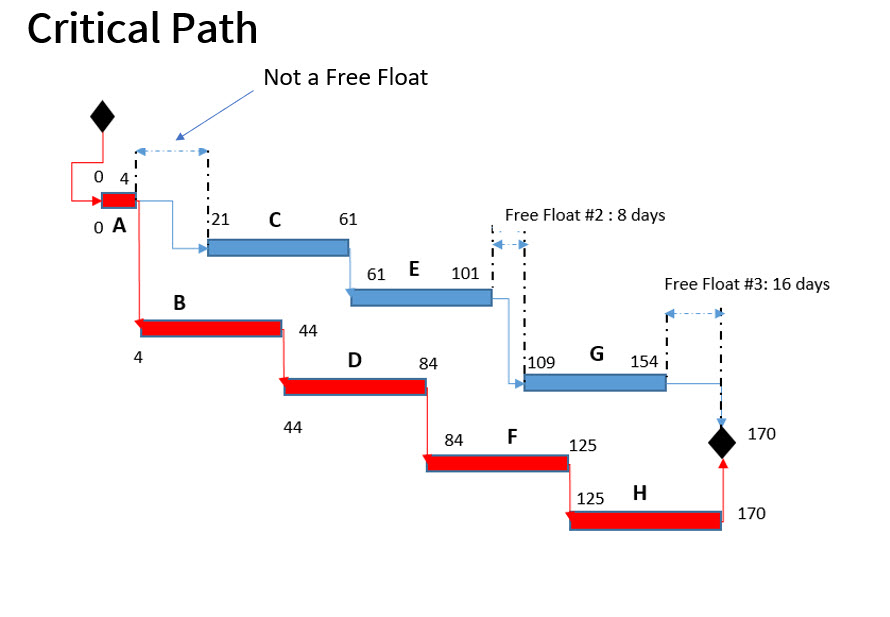
- Task B has a Total Float of 2 hours. This means the lighting setup can be delayed by up to 2 hours somewhere in the schedule without pushing the project's 13-hour completion time. This 2-hour float is shared along the non-critical path A-B-E-G. If Task B uses 1 hour of this float, only 1 hour remains for Task E. The concept of shared float is key and is something your OR background will help you appreciate as a constrained resource along a path.
- Task B has a Free Float of 1 hour. This means the lighting setup can be delayed by up to 1 hour without impacting the earliest possible start time of its successors (Task E at hour 8). This 1 hour is Task B's "private" buffer. The team can use this hour without needing to coordinate with the teams for Task E or F.
- The Difference: Why is but ? Task B can be delayed by 1 hour (its free float) without causing any immediate downstream effects. If it's delayed by more than 1 hour (but less than or equal to 2), it will force Task E to start later than its earliest possible time, but it won't delay the entire project. This is because it starts eating into the shared total float of the path.
Application to Your Scenarios
1. Boudoir Photoshoot
The learning outcome specifically mentions interpreting float for "accessory selection" (Task C).
- Task C (Accessory Selection): . This task has zero float, making it part of the critical path.
- Interpretation: In our model, Accessory Selection is a critical task. This means any delay in selecting accessories will directly delay the Makeup & Hair task and, consequently, the entire project. As a manager, this tells you to devote resources to ensure Task C stays on schedule. If you wanted to create float for this task, you would need to re-evaluate the project dependencies. For example, could Makeup & Hair (Task D) start before Accessory Selection (Task C) is completely finished? If so, changing the logic of the network could move Task C off the critical path.
The real value here is in risk management. Knowing that the Lighting Setup (Task B) has 2 hours of total float but only 1 hour of free float allows for precise control. You can confidently tell the lighting technician they have a 1-hour buffer. If they need more time, you know it will start impacting the schedule of the makeup artist and photographer, requiring active coordination.
2. Hotwife Intimacy Analogy
Let's model an encounter as a mini-project to optimize the experience.
- Activities: A (Arrange free time - 2 hrs), B (Book romantic venue - 1 hr), C (Shop for new lingerie - 3 hrs), D (The encounter - 4 hrs), E (Travel to venue - 1 hr).
- Dependencies: A -> B, A -> C, B -> E, C -> D, E -> D.
- Goal: Schedule the encounter (D).
In this network, booking the venue (B) and shopping for lingerie (C) can happen in parallel after arranging the time (A). However, the encounter (D) requires both the lingerie to be ready and for you to have traveled to the venue (E).
If the path A -> C -> D takes hours and the path A -> B -> E -> D takes hours, then the lingerie shopping path is critical. The path involving booking the venue has total float. This means there is flexibility in when the venue gets booked, as long as it's done before you need to travel. This float is a resource. It could be used to find a better deal on a venue or to handle an unexpected work call without jeopardizing the timing of the encounter. Understanding the float gives you control over the preparatory phase, minimizing stress and maximizing anticipation.
Conclusion
In this lesson, you learned to deconstruct a project into a logical network and analyze its temporal characteristics using the Critical Path Method. We moved beyond merely listing tasks to understanding their intricate dance of dependencies and durations.
Key Takeaways:
- The Critical Path Method (CPM) provides a deterministic model for project scheduling, identifying the longest path of dependent activities that defines the minimum project duration.
- Activities on the critical path have zero float; any delay to them directly delays the project.
- Total Float is the maximum time an activity can be delayed without extending the project's final deadline. It is a shared resource along a non-critical path.
- Free Float is the time an activity can be delayed without affecting the earliest start of its immediate successors. It is an activity's private buffer.
- Interpreting the difference between total and free float is crucial for effective resource management and risk mitigation.
Our analysis today assumed that all task durations are known and fixed. In our next lesson, we will relax this assumption. We will explore the Program Evaluation and Review Technique (PERT), which extends CPM to handle uncertainty by modeling task durations not as single point estimates, but as probability distributions. This will allow us to answer questions not just about the project's expected duration, but also about the probability of finishing by a certain date.