Bonjour! Let's continue building your skills for the call center.
In our last lesson, you learned how to give clear, simple instructions using the imperative, with commands like Redémarrez votre ordinateur (Restart your computer) and Ne cliquez pas sur ce lien (Don't click on this link). This is a vital skill for guiding a customer.
Today, we'll focus on the other side of that interaction: finding out what the customer is seeing. To solve a problem, you first need to understand it from their perspective. This lesson addresses the learning outcome: Ask the customer to describe what they see on their screen. By the end of our session, you'll be able to ask the right questions and understand the key vocabulary needed to picture the customer's screen.
1. Key Phrases: Asking What the Customer Sees
The most direct way to get this information is to simply ask. Here are the essential questions you'll use constantly. Notice how they are built to be polite and clear.
-
Qu'est-ce que vous voyez à l'écran ?(What do you see on the screen?)Qu'est-ce que(pronounced "keskuh") is a very common way to start a "What..." question in spoken French.vous voyezmeans "you see".à l'écranmeans "on the screen".
-
Pouvez-vous me décrire ce que vous voyez ?(Can you describe to me what you see?)- This is a slightly softer, more collaborative way to ask. You are asking for their help in describing the situation.
-
Y a-t-il un message à l'écran ?(Is there a message on the screen?)- This is a great follow-up question if the customer gives a vague answer. It helps you narrow down the possibilities. You can also be more specific:
Y a-t-il un message d'erreur ?(Is there an error message?)Y a-t-il une fenêtre ?(Is there a window?)
- This is a great follow-up question if the customer gives a vague answer. It helps you narrow down the possibilities. You can also be more specific:
2. "On-Screen" Vocabulary
Once you've asked the question, you need to understand the answer. Let's build your vocabulary for the most common things a customer might describe on their screen.
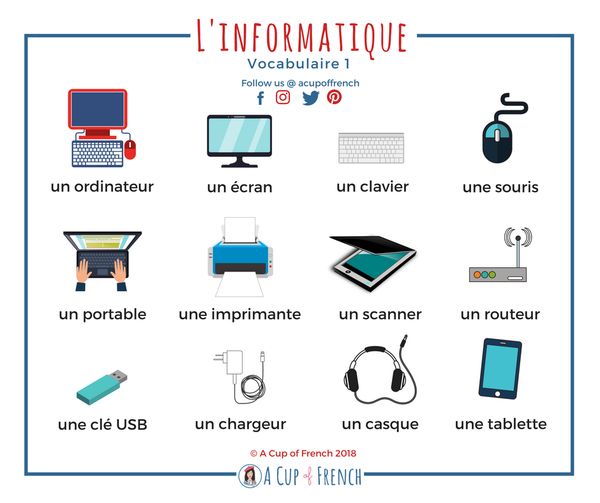
First, a quick refresher on the basic hardware. The image below shows the names for key items, including un écran (a screen).
Now, let's look at what appears on the screen. Here is a list of essential terms:
| French Term | Pronunciation (Approx.) | English Meaning |
|---|---|---|
une fenêtre |
oohn fuh-net-ruh | a window (e.g., a pop-up) |
un message |
uhn meh-sazhj | a message |
un message d'erreur |
uhn meh-sazhj deh-ruhr | an error message |
un bouton |
uhn boo-tohn | a button |
une icône |
oohn ee-kohn | an icon |
un code |
uhn cohd | a code |
le curseur |
luh cure-suhr | the cursor |
du texte |
doo text | some text |
Now, let's see these words in a realistic context. The image below is a typical fake technical support scam pop-up. A customer might call you in a panic after seeing something like this.
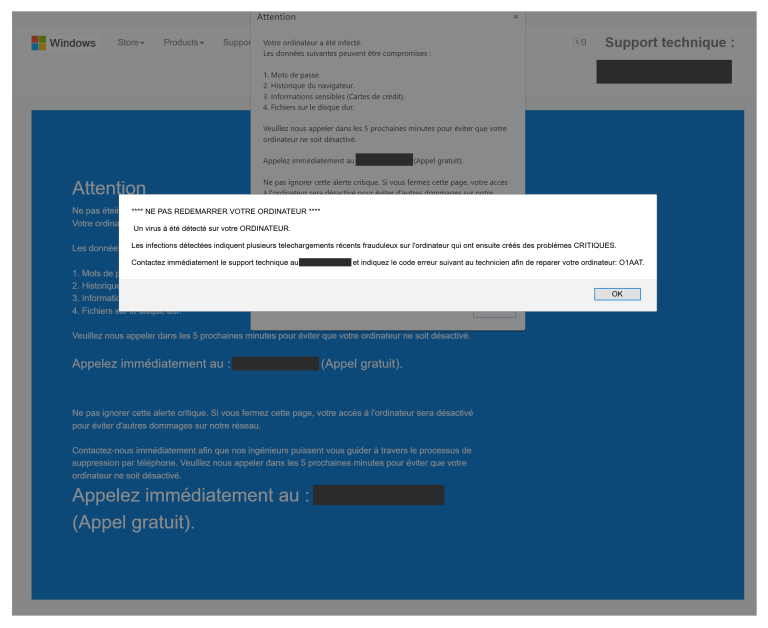
Imagine a customer calling you and seeing this. They might say:
- "Je vois une fenêtre au milieu de l'écran." (I see a window in the middle of the screen.)
- "Il y a un message qui dit 'NE REDÉMARREZ PAS VOTRE ORDINATEUR'." (There is a message that says "DO NOT RESTART YOUR COMPUTER.")
- "Je vois un code d'erreur." (I see an error code.)
Test your understanding!
A customer calls and says, "Il y a une petite fenêtre avec un message et un bouton 'OK'". What are they seeing?
Show answer
They are seeing a small window with a message and an "OK" button.
3. Putting It Together: A Mini-Dialogue
Let's practice this in a short, realistic conversation. You are the agent.
Agent (You): "Support technique, bonjour. Que puis-je faire pour vous ?"
(Technical support, hello. What can I do for you?)
Client: "Bonjour. Mon ordinateur est bloqué. Il y a plein de choses à l'écran."
(Hello. My computer is frozen. There are lots of things on the screen.)
Agent (You): "D'accord, ne vous inquiétez pas. Qu'est-ce que vous voyez exactement à l'écran ?"
(Okay, don't worry. What exactly do you see on the screen?)
Client: "Je vois une grande fenêtre avec une alerte rouge."
(I see a big window with a red alert.)
Agent (You): "Pouvez-vous me lire le message dans la fenêtre, s'il vous plaît ?"
(Can you read me the message in the window, please?)
Client: "Oui. C'est écrit : 'Virus détecté. Vos données sont compromises'."
(Yes. It's written: "Virus detected. Your data is compromised.")
Agent (You): "Je vois. Et y a-t-il un code d'erreur visible ?"
(I see. And is there a visible error code?)
Client: "Oui, un code en bas : ERREUR #DW6VB36."
(Yes, a code at the bottom: ERROR #DW6VB36.)
In this short exchange, you successfully used your new questions to identify the core problem on the customer's screen.
4. Asking for Specifics
Sometimes you need to guide the customer to find specific information. Here are some useful follow-up questions:
- To ask them to read something:
Pouvez-vous lire ce qui est écrit ?(Can you read what is written?)
- To ask about a specific element:
Est-ce que vous voyez un bouton 'Accepter' ou 'Annuler' ?(Do you see an 'Accept' or 'Cancel' button?)
- To ask them to spell something out (review from a previous module):
Pouvez-vous m'épeler le code, s'il vous plaît ?(Can you spell the code for me, please?)
Test your understanding!
Look again at the scam warning image Arnaque support technique.
- How would you ask the customer if they see a phone number on the screen?
- The customer says yes. How would you politely ask them to read it to you? (Hint: Use
pouvoirorveuillez).
Show answer
- You could ask:
Y a-t-il un numéro de téléphone à l'écran ?(Is there a phone number on the screen?) - You could ask:
Pouvez-vous me lire le numéro, s'il vous plaît ?(Can you read the number to me, please?) or, more formally,Veuillez me lire le numéro.(Please read the number to me.)
Conclusion
Excellent work today! You have learned a critical skill for any technical support role: how to see the problem through the customer's eyes. By asking the right questions and knowing the key vocabulary, you can quickly diagnose issues that you can't see directly.
Key Takeaways:
- You can ask what a customer sees with phrases like
Qu'est-ce que vous voyez à l'écran ?andPouvez-vous me décrire ce que vous voyez ? - You can ask about specific items using
Y a-t-il... ?(e.g.,Y a-t-il un message d'erreur ?). - You now know the essential vocabulary for on-screen elements, including
une fenêtre,un message,un bouton, andun code.
Preview of the Next Lesson:
In the last lesson, you learned to give direct commands with the imperative (Cliquez !). Today, you learned to ask what's on the screen. In our next lesson, "Use the verbs 'vouloir' and 'pouvoir' to politely ask the customer to perform an action," we will explore a "softer," more collaborative way to give instructions. Instead of a command, you'll learn to ask "Pouvez-vous cliquer sur le bouton ?" (Can you click on the button?), which is often more effective in customer service.
À bientôt