Bonjour! Welcome back to your French lesson.
In our last session, we built your foundational technical vocabulary, learning how to name key pieces of hardware like un ordinateur, un écran, une souris, and un routeur. This was the first step toward discussing a customer's issue.
Today, we take the next logical step. Now that you can identify the what, you will learn to describe its condition. This lesson focuses on the learning outcome: Describe common technical states (e.g., on/off, connected, slow). You'll learn the essential adjectives to understand a customer's description of a problem, such as "My computer is slow" or "The screen is off." This vocabulary is the bridge between identifying a problem and being able to solve it.
1. On and Off: The Most Basic States
Let's start with the most fundamental status of any electronic device: whether it is on or off.
In French, we use the adjectives:
allumé(on)éteint(off)
Like many French adjectives, these must agree in gender with the noun they describe. Remember the hardware from our last lesson?
un ordinateur(masculine) -> L'ordinateur est allumé.un écran(masculine) -> L'écran est éteint.une imprimante(feminine) -> L'imprimante est allumée.la box(feminine) -> La box est éteinte.
Notice the extra -e for feminine nouns (allumée, éteinte). The pronunciation changes slightly, but the meaning is the same.
In a technical or professional context, you will also frequently encounter these synonyms:
activé(activated/on)désactivé(deactivated/off)
Let's look at how a real technical support document uses these terms.
Dépannage du réseau sans fil et de la connexion Internet ...
This support document from HP shows how these words are used in a professional troubleshooting guide. It will help you see 'on' and 'off' in an authentic context.
Please read two short sections: Under the heading 'Vérification du signal sans fil', notice the use of 'activé' and 'désactivé' to describe the wireless signal. Under the heading 'Réinitialisation du routeur...', in the bullet points, look for the phrases 'Tous les voyants sont éteints' (All the lights are off) and 'Le voyant d'alimentation reste allumé' (The power light stays on).
As you saw, voyant means "indicator light." A customer might say, "Le voyant du routeur est éteint" (The router's light is off), which is a crucial piece of information for you.
Test your understanding!
A customer tells you, "Mon imprimante est branchée, mais elle est éteinte." (branchée = plugged in). What is the status of their printer?
Show answer
The printer is plugged in, but it is off.
2. Connected and Disconnected
Another critical state, especially for internet issues, is whether a device is connected.
The key adjectives are:
connecté(e)(connected)déconnecté(e)(disconnected)
These also agree in gender with the noun.

A customer might say:
"Je suis connecté au réseau Wi-Fi."(I am connected to the Wi-Fi network.)"Mon ordinateur est déconnecté."(My computer is disconnected.)
Sometimes, a customer can be connected to their Wi-Fi network (le réseau Wi-Fi) but not to the internet. This is a common support scenario.
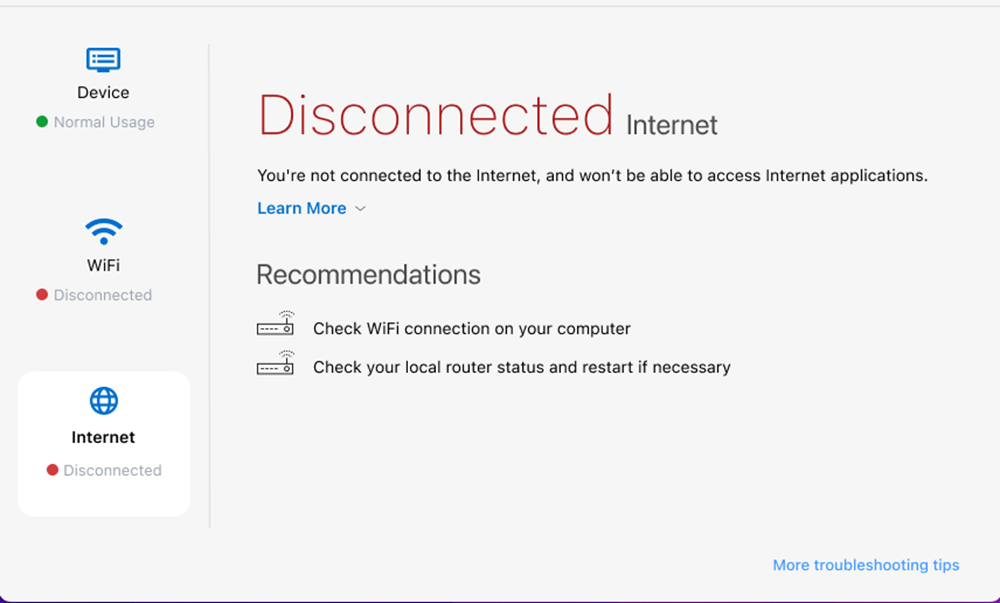
Look at the image above. You could describe this situation to the customer like this: "D'accord, je vois que votre ordinateur est bien connecté au Wi-Fi, mais la connexion Internet est déconnectée." (Okay, I see your computer is connected to the Wi-Fi, but the internet connection is disconnected.)
3. Other Common Problems: Slow, Frozen, and More
Beyond on/off and connected/disconnected, customers will use a range of other adjectives to describe their issues. The following blog post provides an excellent list of common troubleshooting vocabulary.
Computer parts and troubleshooting in French
The article 'Computer parts and troubleshooting in French' lists several key phrases for describing technical problems. We'll focus on the most common states you're likely to hear.
Please read the list under the heading 'Learn the most common computer troubleshooting in French'. Pay close attention to the example sentences for states like 'lent' (slow), 'gelé' (frozen), 'cassé' (broken), and 'plein' (full).
Let's summarize the key vocabulary from that resource in a table. These are phrases you will hear often.
| English State | French Adjective(s) | Example Phrase a Customer Might Say |
|---|---|---|
| Slow | lent / lente |
"Mon PC est trop lent." (My PC is too slow.) |
| Frozen | gelé / gelée |
"Mon écran est gelé." (My screen is frozen.) |
| Broken | cassé / cassée |
"L'écran de mon smartphone est cassé." (My smartphone screen is broken.) |
| Full | plein / pleine |
"Mon disque dur est plein." (My hard drive is full.) |
| Poor / Bad | mauvais(e) |
"Ma connexion Internet est très mauvaise." (My internet connection is very poor.) |
| Black | noir / noire |
"L'écran est tout noir." (The screen is all black.) |
Test your understanding!
Match the customer's complaint to the technical state.
Complaints:
"Je ne peux rien faire. La flèche de la souris ne bouge pas."(I can't do anything. The mouse arrow doesn't move.)"Je ne peux pas enregistrer mon document. Le système dit 'espace insuffisant'."(I can't save my document. The system says 'insufficient space'.)"Chaque fois que je clique sur une icône, je dois attendre 30 secondes."(Every time I click on an icon, I have to wait 30 seconds.)
Technical States:
A. L'ordinateur est lent.
B. L'écran est gelé.
C. Le disque dur est plein.
Show answer
- -> B.
L'écran est gelé.(The screen is frozen.) - -> C.
Le disque dur est plein.(The hard drive is full.) - -> A.
L'ordinateur est lent.(The computer is slow.)
Conclusion
Excellent work today! You have now learned the essential vocabulary to understand and describe the condition of a customer's hardware. This is a fundamental skill for any technical support role.
Key Takeaways:
- You can now describe the most common technical states using adjectives like:
- On/Off:
allumé(e)/éteint(e)and their technical synonymsactivé(e)/désactivé(e). - Connection:
connecté(e)/déconnecté(e). - Performance:
lent(e)(slow),gelé(e)(frozen),cassé(e)(broken).
- On/Off:
- You understand that these adjectives must agree in gender with the hardware they are describing.
Preview of the Next Lesson:
So far, you can identify a piece of hardware and describe its state. The next step is to guide the customer toward a solution. In our next lesson, "Form and use the imperative ('vous' form) to give simple, one-step instructions," you will learn how to tell the customer what to do. You'll move from diagnosis to action with phrases like "Cliquez sur le bouton" (Click on the button) and "Redémarrez votre ordinateur" (Restart your computer).
À la prochaine! (Until next time!)