Hello! Welcome back to the second lesson in our module on consuming external APIs.
In our last session, you successfully used Guzzle to make a GET request to an external API and retrieve a response. You saw that the response body was a raw string of text formatted in JSON. While we used a quick json_decode() to peek at it, a real application needs to handle this data in a structured and robust way.
Today's lesson focuses on exactly that. Our learning outcome is to parse JSON responses and extract relevant data. We'll dive deep into PHP's tools for converting JSON strings into native PHP variables that you can easily manipulate, and we'll learn how to do it safely by handling potential errors.
1. What is JSON?
Before we can parse JSON, it's helpful to have a clear understanding of its structure. JSON (JavaScript Object Notation) is a lightweight, text-based format for data exchange. It's the de facto standard for APIs because it's easy for both humans to read and machines to parse.
JSON data is built on two main structures:
- Objects: A collection of key/value pairs, similar to a PHP associative array. Enclosed in curly braces
{}. Keys must be strings in double quotes. - Arrays: An ordered list of values, just like a PHP indexed array. Enclosed in square brackets
[].
To get a quick but thorough overview of JSON syntax, the following video is an excellent resource.
Parse JSON in PHP | How to validate and process nested JSON data
Watch this first part of a video from the Dave Hollingworth channel. It clearly explains the basic data types and structures of JSON, using a practical 'books' example.
Watch from the beginning to 02:58. Focus on understanding the different data types (string, number, boolean, null) and the two complex types (object, array).
2. Decoding JSON with json_decode()
PHP provides a built-in function, json_decode(), to convert a JSON string into a PHP variable. Its most important parameter after the JSON string itself is the second one, $associative. This parameter dictates the type of variable you get back.
json_decode($jsonString, false)(or omitting it, asfalseis the default): Decodes JSON objects into generic PHPstdClassobjects.json_decode($jsonString, true): Decodes JSON objects into PHP associative arrays.
JSON arrays are always decoded into PHP indexed arrays.
To see a demonstration of how json_decode() works and the difference between its outputs, let's turn to another clip from the same video.
Parse JSON in PHP | How to validate and process nested JSON data
This clip demonstrates how to use json_decode() and, critically, shows how to get either objects or associative arrays and how to access data from each.
First, watch from 02:58 to 03:41 to see the basic use of json_decode(). Then, jump to 07:18 and watch until 10:39. This second part is crucial; pay close attention to the difference between object syntax (->) and array syntax ([]) for accessing the same data.
Let's break down the two approaches with an example. Imagine our API returns this JSON string:
{
  "title": "My First Post",
  "author": {
    "name": "Alex",
    "id": 1
  },
  "tags": ["php", "api", "json"]
}
Approach 1: Decoding to Objects (Default)
When you decode to objects, you use the object property accessor -> to get values.
$jsonString = '{"title":"My First Post","author":{"name":"Alex","id":1},"tags":["php","api","json"]}';
$postObject = json_decode($jsonString);

// Accessing top-level properties
echo $postObject->title; // Output: My First Post

// Accessing nested object properties
echo $postObject->author->name; // Output: Alex

// Accessing an array element
echo $postObject->tags[0]; // Output: php
The decoded variable becomes a structure of nested stdClass objects. Here's a visual representation of a similar decoded object structure.
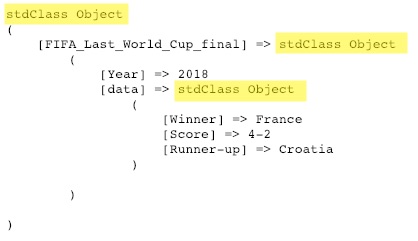
Approach 2: Decoding to Associative Arrays
When you decode to associative arrays by passing true, you use array key syntax ['key'] for access. This is often preferred by PHP developers as they are very familiar with arrays.
$jsonString = '{"title":"My First Post","author":{"name":"Alex","id":1},"tags":["php","api","json"]}';
$postArray = json_decode($jsonString, true);

// Accessing top-level keys
echo $postArray['title']; // Output: My First Post

// Accessing nested array keys
echo $postArray['author']['name']; // Output: Alex

// Accessing an array element
echo $postArray['tags'][0]; // Output: php
The choice between objects and arrays is mostly a matter of coding style and preference. For the rest of this course, we will generally prefer decoding to associative arrays as it's a common convention in many PHP projects.
3. Practical Example: Parsing an API Response
Let's apply this to the Guzzle code from our last lesson. We fetched a list of posts for userId 1. That response body is a JSON array of post objects. Let's parse it and display the title of each post.
<?php

require 'vendor/autoload.php';

use GuzzleHttp\Client;
use GuzzleHttp\Exception\RequestException;

$client = new Client([
    'base_uri' => 'https://jsonplaceholder.typicode.com',
    'timeout'  => 2.0,
]);

try {
    $response = $client->get('/posts', [
        'query' => ['userId' => 1]
    ]);

    // Get the body as a string
    $body = $response->getBody()->getContents();

    // Decode the JSON string into an associative array
    // The 'true' argument is key here!
    $posts = json_decode($body, true);

    // Now $posts is a regular PHP array we can loop through
    echo "Posts by User 1:\n";
    foreach ($posts as $post) {
        // Each $post is an associative array
        echo "- " . $post['title'] . "\n";
    }

} catch (RequestException $e) {
    echo "Guzzle Error: " . $e->getMessage();
}
When you run this script, you'll see a neatly formatted list of post titles. We've successfully transformed a raw data string into structured information and used it in our application logic.
4. Robust Error Handling
What if the API returns a malformed response that isn't valid JSON? Or what if the response is an empty string?
By default, json_decode() will return null in case of a parsing error. This is problematic because a valid JSON string of "null" also decodes to null. You can't tell if the decoding failed or if the API legitimately sent you a null value.
The Modern Approach: JSON_THROW_ON_ERROR
Since PHP 7.3, the best practice is to use the JSON_THROW_ON_ERROR flag. This tells json_decode() to throw a JsonException if an error occurs. This fits perfectly with the try...catch blocks we're already using for network requests.
The video below explains this modern exception-based approach, as well as the older method of checking for errors manually.
Parse JSON in PHP | How to validate and process nested JSON data
This clip from Dave Hollingworth's channel is excellent for learning how to handle JSON parsing errors professionally.
Watch from 03:41 to 07:18. Pay attention to the older method using json_last_error() first, then focus on the cleaner, modern approach using the JSON_THROW_ON_ERROR flag within a try...catch block.
Let's update our example to include this robust error handling.
<?php

require 'vendor/autoload.php';

use GuzzleHttp\Client;
use GuzzleHttp\Exception\RequestException;

$client = new Client([
    'base_uri' => 'https://jsonplaceholder.typicode.com',
    'timeout'  => 2.0,
]);

try {
    $response = $client->get('/posts', ['query' => ['userId' => 1]]);
    $body = $response->getBody()->getContents();

    // Decode the JSON, throwing an exception on error
    $posts = json_decode($body, true, 512, JSON_THROW_ON_ERROR);

    echo "Posts by User 1:\n";
    foreach ($posts as $post) {
        echo "- " . $post['title'] . "\n";
    }

} catch (RequestException $e) {
    // This catches network errors
    echo "Guzzle Error: " . $e->getMessage();
} catch (JsonException $e) {
    // This catches JSON parsing errors
    echo "JSON Decode Error: " . $e->getMessage();
}
Now our code is resilient. It can handle both network failures (Guzzle) and data format failures (JSON parsing), which is essential for building professional, reliable applications.
For further reading, the official PHP documentation for json_decode is the ultimate reference.
The official PHP Manual page for json_decode is a valuable resource. It details all the possible parameters and flags.
Briefly scan the 'Description', 'Parameters', and 'Return Values' sections. You don't need to memorize everything, but it's good to be familiar with the official source of information. Notice the $flags parameter where we used JSON_THROW_ON_ERROR.
Conclusion
You have now mastered a critical step in consuming APIs: taking the raw text response and turning it into structured, usable PHP data.
Key Takeaways:
- JSON is a lightweight data format using key/value objects (
{}) and ordered arrays ([]). - The
json_decode()function parses a JSON string into a PHP variable. - Using
json_decode($string, true)decodes JSON objects to associative arrays, which is a common practice. Otherwise, you getstdClassobjects. - Data is accessed using
['key']for arrays and->propertyfor objects. - The best practice for error handling is to use the
JSON_THROW_ON_ERRORflag and catch theJsonException.
Preview of the Next Lesson:
We've learned how to get data from an API. The next logical step is to send data to an API. In the next lesson, we'll explore how to make POST and PUT requests, which are used to create and update resources. This will involve using the inverse function, json_encode(), to convert our PHP arrays into JSON strings before sending them.