Hello! Welcome to the eighth module of our course, "Session Management and User Authentication."
In our last module on security, we wrapped up by looking at the Principle of Least Privilege, which is about securing your application's environment. We discussed how to lock down file system and database permissions to minimize potential damage from a breach. Now, we're shifting our focus from the application's environment to the users interacting with it.
This lesson addresses the learning outcome: Explain the difference between cookies and sessions for state management. Understanding this is fundamental to building any web application that needs to "remember" its users, whether they're logged in, have items in a shopping cart, or have set personal preferences.
1. The Challenge of a Stateless Web
At its core, the protocol that powers the web, HTTP, is stateless. This means each request a browser makes to a server is treated as an independent, isolated event. The server has no built-in memory of previous requests from the same user.
Imagine you log into a website. You go to your profile page, and the server verifies your credentials. Then, you click a link to view your messages. Without a state management mechanism, the server would have already forgotten who you are. It would be like having a conversation with someone who has no short-term memory—you'd have to re-introduce yourself with every sentence.
To solve this, we need a way to maintain a user's state across multiple requests. This is where cookies and sessions come in.
2. Cookies vs. Sessions: The Core Difference
The most fundamental difference between cookies and sessions is where the data is stored.
To get a concise definition, let's watch the first 36 seconds of the following video.
PHP Sessions & Cookies - Output Buffering - Headers Already Sent Warning - Full PHP 8 Tutorial
This clip from Program With Gio clearly explains the primary distinction between cookies and sessions regarding their storage location and default lifespan.
Watch the video from the beginning until 00:36. Focus on where cookies are stored versus where sessions are stored.
As the video states:
- Cookies are stored on the client-side (in the user's web browser).
- Sessions are stored on the server-side.
An Analogy: The Coat Check
Think of it like a visit to a club or a fancy restaurant with a coat check:
-
A Cookie is like a Name Tag: Imagine the host gives you a name tag to wear that has your name and favorite drink written on it. You carry this information with you everywhere you go. It's convenient, but it's also public, you're responsible for it, and there's a limit to how much you can write on it. This is a cookie: a small piece of data the server asks your browser to hold onto.
-
A Session is like a Coat Check Ticket: You hand your coat and bag (containing your wallet, keys, etc.) to the coat check staff. They store your belongings securely behind the counter and give you a small, numbered ticket. The ticket itself is meaningless to anyone else, but it's the key to retrieving your specific belongings from the secure storage area. This is a session: your important data (login status, user ID) is stored safely on the server. The server gives your browser a unique identifier (the "ticket," called a session ID), which is usually stored in... a cookie!
This last point is crucial: PHP sessions typically use a cookie to store the session ID. The cookie itself doesn't contain the sensitive data, only the random key needed to look up that data on the server.
This next short video segment explains this relationship very well.
Sessions & Cookies tutorial | PHP for Beginners - Part 15
This clip from The Codeholic elaborates on how a session ID, stored in a cookie, acts as the bridge between the client's browser and the session data stored on the server.
Watch from the start until 01:31. Notice how he explains that the session ID is created and written into a cookie, which is then used to associate the browser with its data on the server.
3. A Detailed Comparison
Now that we have the main concept down, let's look at the differences in more detail. This chart provides a great visual summary.
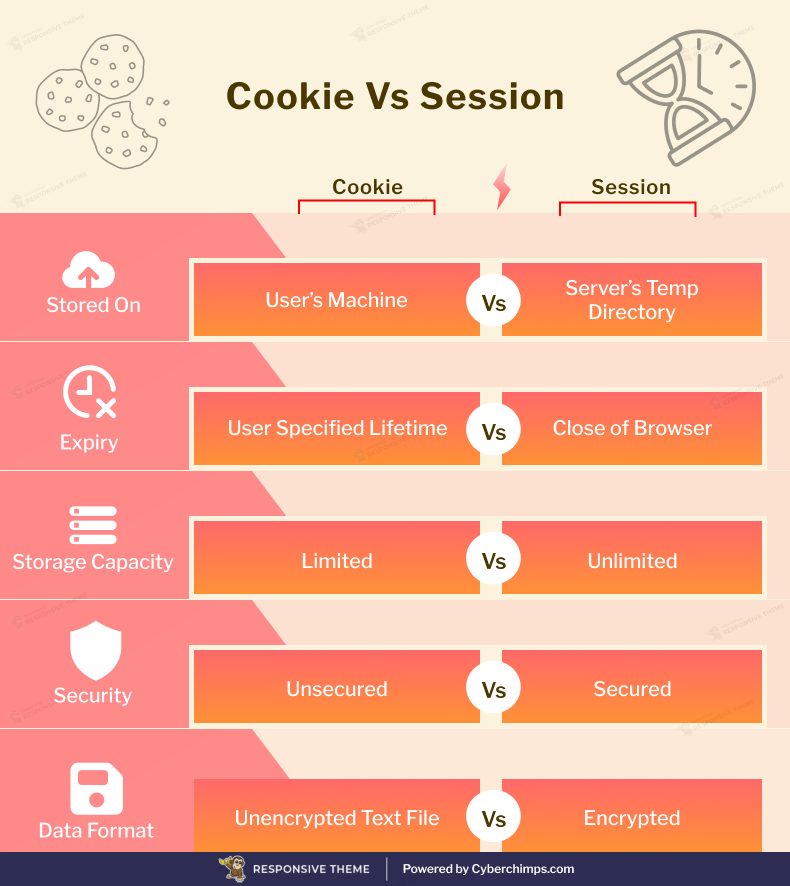
To expand on this, the following article provides a comprehensive comparison table. Please read through it to see a more granular breakdown of the distinctions.
Key Differences Between Sessions and Cookies & Use Cases
The article 'Key Differences Between Sessions and Cookies & Use Cases' contains an excellent table that contrasts cookies and sessions across 15 different criteria.
Locate the table under the heading 'Core Differences Between Sessions and Cookies' and read through it. Pay special attention to rows like 'Data Transmission', 'Accessibility', and 'Performance Impact'.
Based on that table, here are some of the most important practical differences for a developer:
- Security: This is the big one. Since cookies are stored on the client, they can be read and modified by the user. You should never store sensitive information like passwords or personal details in a cookie. Session data is stored on the server, making it far more secure and the correct choice for sensitive data.
- Data Size: Cookies are limited to about 4KB of data. Sessions, being stored on the server, can hold much more information. However, storing excessive data in sessions can consume server memory.
- Data Transmission: The entire content of a cookie is sent with every single HTTP request to your domain. The more data in your cookies, the slower your site becomes. For sessions, only the small session ID is sent with each request, which is much more efficient.
- Lifespan: Cookies can be set to expire at a specific time, allowing them to persist for days, months, or even years. Sessions typically expire when the user closes their browser, though this is configurable.
4. When to Use Which? (Use Cases)
Given these differences, the choice between a cookie and a session depends on your goal.
Use Cases for Cookies:
Cookies are ideal for storing small amounts of non-sensitive data that need to persist for a long time.
- Personalization: Remembering a user's preferred language or theme (e.g., "dark mode").
- Tracking: Analytics tools like Google Analytics use cookies to identify unique visitors and track their behavior across a site.
- "Remember Me" functionality: Storing a secure, random token (not the user's password!) that allows the site to automatically log a user back in.
This next video segment gives an excellent overview of these three main purposes.
Sessions & Cookies tutorial | PHP for Beginners - Part 15
Let's return to The Codeholic's video to hear his explanation of the three primary uses for cookies.
Watch the segment from 06:13 to 09:10. Listen for the explanations of Session Management, Personalization, and Tracking as use cases for cookies.
Use Cases for Sessions:
Sessions are the standard for handling sensitive or temporary data related to a user's current interaction with your site.
- User Authentication: Storing the fact that a user is logged in and who they are (
user_id). - Shopping Carts: Keeping track of items a user has added to their cart before they check out.
- Multi-Step Forms: Saving data from one page of a form so it can be used on the next page (e.g., a multi-page registration or checkout process).
Conclusion
You now understand the fundamental mechanisms for managing state in a web application. Grasping the distinction between client-side and server-side storage is a critical step toward building secure and functional PHP applications.
Key Takeaways:
- HTTP is stateless; cookies and sessions are used to create stateful experiences.
- Cookies store data on the client (browser). They are visible to the user, have a size limit, and are less secure.
- Sessions store data on the server. They are more secure and can hold more data.
- Sessions typically rely on a cookie to store a unique session ID, which acts as a key to retrieve the server-side data.
- Use cookies for long-term, non-sensitive data like user preferences or tracking.
- Use sessions for short-term, sensitive data like login status or shopping cart contents.
Preview of the Next Lesson:
Now that we've covered the "what" and "why," our next lesson will dive into the "how." We'll get hands-on and learn how to start and manage user sessions, storing and retrieving data from the $_SESSION superglobal in PHP. This will be our first practical step in building a user authentication system.