Hello! Welcome back to our course.
In our last lesson, we mastered PHP's server-side session management. We saw how session_start() works and how the server uses a special cookie, PHPSESSID, to link a user's browser to their data stored on the server. This separation is key for security.
Today, we're going to take direct control of that client-side storage. This lesson focuses on the $_COOKIE superglobal and its related functions. Our learning outcome is to set, read, and delete cookies using PHP functions. Understanding cookies is essential for creating features like "Remember Me" functionality, storing user preferences (like a dark/light mode theme), and understanding the basics of web tracking and analytics.
Recap: The Role of the Session Cookie
As a quick refresher, let's look at the diagram we saw previously. It shows how the server sends a session ID in a Set-Cookie header, and the browser sends it back on subsequent requests. This is the fundamental mechanism that makes sessions work.

While PHP handles this session cookie automatically, we can create and manage our own cookies for other purposes.
1. What Are Cookies and Why Use Them?
A cookie is a small piece of text-based data that a web server asks the browser to store. When the browser requests a page from that same server in the future, it sends the cookie data back.
Watch this short video segment to understand the three primary purposes of cookies.
Sessions & Cookies tutorial | PHP for Beginners - Part 15
This clip from The Codeholic provides an excellent overview of the main reasons we use cookies in web development.
Watch from 06:25 to 08:34. The video explains the three main uses for cookies: session management, personalization, and tracking.
As the video explained, cookies are great for non-sensitive data that enhances the user experience. However, because they are stored and can be read on the client's machine, you should never store sensitive information like passwords or personal identifiers in a cookie.
2. Setting a Cookie with setcookie()
The primary function for managing cookies in PHP is setcookie(). It's used to create, modify, and delete cookies.
A crucial point to remember from our last lesson applies here as well: setcookie() sends an HTTP header and must be called before any output is sent to the browser. This includes HTML, echo statements, or even whitespace before your <?php tag.
The setcookie() Parameters
The setcookie() function has a number of parameters, but the first three are the most important for basic use.
setcookie(name, value, expires_or_options, path, domain, secure, httponly)
| Parameter | Description | Example |
|---|---|---|
name |
The name of the cookie (e.g., 'username'). | "theme" |
value |
The data you want to store. | "dark" |
expires_or_options |
A Unix timestamp for when the cookie should expire. Usually calculated with time() + seconds. If set to 0 or omitted, it becomes a session cookie that is deleted when the browser closes. |
time() + (86400 * 30) (expires in 30 days) |
path |
The server path where the cookie will be available. / makes it available on the entire domain. |
"/" |
domain |
The domain the cookie is available on. | "example.com" |
secure |
If true, the cookie will only be sent over a secure HTTPS connection. |
true |
httponly |
If true, the cookie cannot be accessed by client-side scripts like JavaScript. This is a key security feature. |
true |
For a complete and authoritative definition of every parameter, the official PHP manual is the best resource. You don't need to read it all now, but it's good to know where to find it.
Take a quick look at the official PHP documentation for setcookie(). This will give you a detailed breakdown of all the function's parameters, which we'll be discussing.
Skim the 'Parameters' section to see the official definitions for name, value, expires_or_options, path, domain, secure, and httponly. This is a valuable reference for your future work.
3. Reading and Deleting Cookies
Now that you know how to set a cookie, let's see how to read it back and then get rid of it.
This video from Bro Code provides a very clear, step-by-step demonstration of the entire cookie lifecycle: setting, viewing in the browser, reading with PHP, and deleting.
Watch the video from the beginning to 05:10, but you can skip from 01:36 to 02:25. Focus on: 00:00 - 01:36: How to use setcookie() with a name, value, and expiration time. Also, how to find the cookie in your browser's developer tools (Application > Cookies). 02:25 - 02:41: The simple trick for deleting a cookie. 02:41 - 05:10: How to use the $_COOKIE superglobal to read all cookies and how to use isset() to check for a specific one.
Let's summarize the key actions:
Reading with $_COOKIE
You can access cookies sent by the browser using the $_COOKIE superglobal associative array.
// Check if a cookie named 'theme' has been sent by the browser
if (isset($_COOKIE['theme'])) {
    $userTheme = $_COOKIE['theme'];
    echo "Your saved theme is: " . htmlspecialchars($userTheme);
} else {
    echo "You don't have a theme preference saved.";
}
Important: The $_COOKIE array is populated at the start of the script. It contains cookies from the previous request. A cookie set with setcookie() in the current script will not be available in $_COOKIE until the next time the user loads a page.
Deleting a Cookie
As the video showed, to delete a cookie, you call setcookie() with the same name, but with an expiration date in the past.
// To delete the 'theme' cookie, set its expiration to one hour ago
setcookie('theme', '', time() - 3600, '/');
It's good practice to set the value to an empty string and include the same path you used when creating it to ensure it's properly removed.
4. Securing Your Cookies
Given your interest in cybersecurity, this part is especially relevant. Improperly configured cookies can open your application to attacks. The two most important flags for securing cookies are secure and httponly.
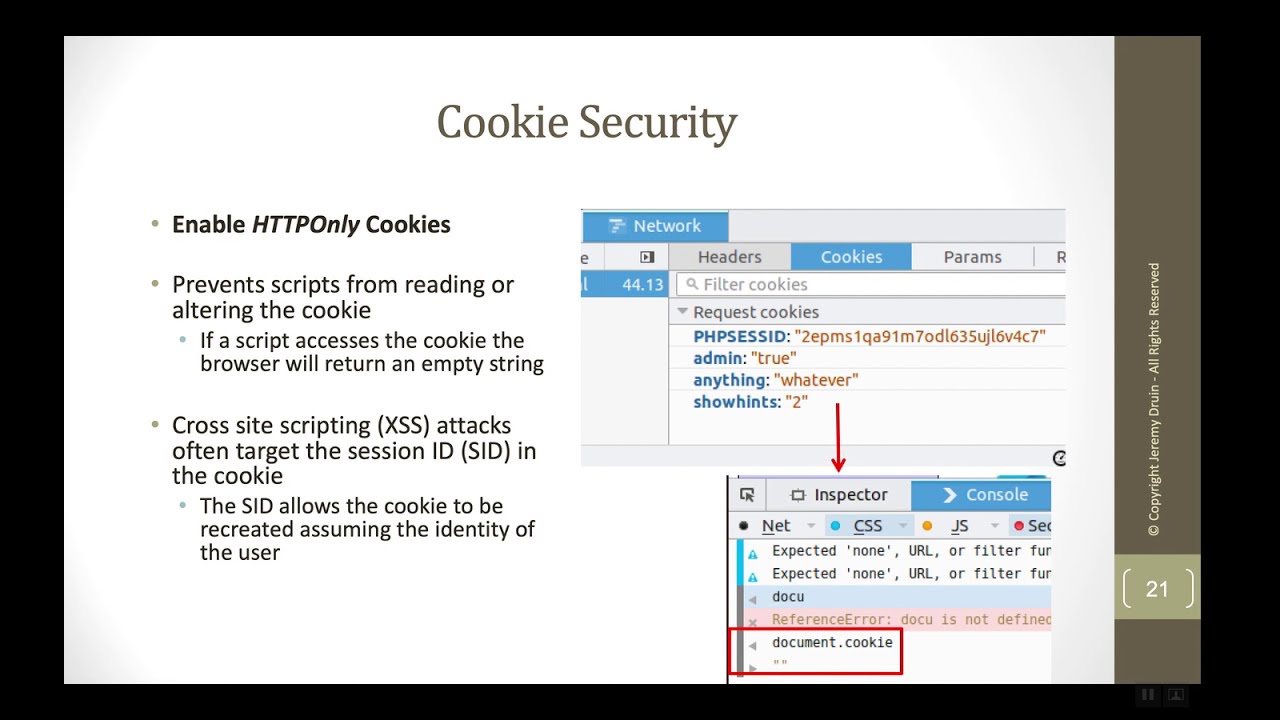
secureflag: Ensures the cookie is only ever transmitted over an encrypted HTTPS connection. This prevents attackers from sniffing the cookie data on an insecure network (like public Wi-Fi).httponlyflag: Prevents the cookie from being accessed by client-side JavaScript (document.cookie). This is a critical defense against Cross-Site Scripting (XSS) attacks, where an attacker might inject malicious script to steal a user's session cookie.
This image clearly illustrates the goal of an HttpOnly cookie.
The following article provides a concise guide on these security practices.
PHP \$_COOKIE: Securely Store and Manage Data - FlatCoding
Please read this section from an article by FlatCoding. It reinforces the importance of using security flags when setting cookies.
Read the section titled 'Securing $_COOKIE in PHP'. Pay close attention to the explanations of HTTPS, HttpOnly, and the secure flag, as well as the code example that combines them.
So, a securely set cookie would look like this, using all the parameters:
<?php
$cookie_name = "user_preference";
$cookie_value = "dark_mode";
$expiry_time = time() + (86400 * 30); // 30 days
$path = "/";
$domain = "yourdomain.com"; // Be specific where possible
$is_secure = true; // For HTTPS only
$is_http_only = true; // Prevent JS access

setcookie(
    $cookie_name,
    $cookie_value,
    $expiry_time,
    $path,
    $domain,
    $is_secure,
    $is_http_only
);

echo "Secure cookie has been set!";
?>
Conclusion
You now have a solid foundation for working with cookies in PHP. You can create them to store user preferences, read them back to personalize the user experience, and delete them when they are no longer needed. Most importantly, you know how to do so securely.
Key Takeaways:
- Cookies are small pieces of data stored on the client's browser, ideal for non-sensitive information.
- The
setcookie()function is used to create, update, and delete cookies. It must be called before any browser output. - The
$_COOKIEsuperglobal array is used to read cookie data sent by the browser. It reflects the state from the previous page load. - To delete a cookie, you call
setcookie()with an expiration time in the past. - For security, always consider using the
secure(for HTTPS) andhttponly(to block JavaScript access) flags.
Preview of the Next Lesson:
We've now thoroughly covered both server-side sessions and client-side cookies. With these two powerful tools for state management in our toolkit, we are perfectly prepared for the next step: building a user registration system with secure password handling. We will see how sessions are used to manage a user's logged-in state and how cookies could be used to implement a "Remember Me" feature.