Hello! Welcome to the final lesson in our PHP Fundamentals Refresher module.
In our last lesson, we saw how to handle form data submitted by users. You might have noticed that our HTML form code and our PHP processing logic were mixed together in the same file. For a small script, that's okay, but as your applications grow, this becomes messy and hard to maintain.
Today, we'll address that exact problem. This lesson covers how to include and require PHP files for code organization. This is a foundational practice for building any non-trivial web application. By splitting your code into logical, reusable pieces, you'll write cleaner, more manageable, and more secure applications—a crucial step toward your goal of PHP mastery.
We will learn about the four statements PHP provides for this: include, require, include_once, and require_once.
1. The "Why": Organizing Your Project
Before we jump into the code, let's understand why we need to split our code across multiple files. As projects grow, keeping everything in one file leads to:
- Difficulty in maintenance: Finding and changing a specific piece of code becomes a nightmare.
- Code repetition: You might copy and paste the same header, footer, or database connection code on every page. If you need to update it, you have to change it everywhere.
- Security risks: Sensitive information, like database credentials, might be accidentally exposed in a publicly accessible file.
A common professional practice is to structure a project into different directories. For example, keeping publicly accessible files (like index.php, CSS, images) separate from internal logic, functions, and sensitive configuration files. This aligns with the "principle of least privilege," a key concept in cybersecurity.
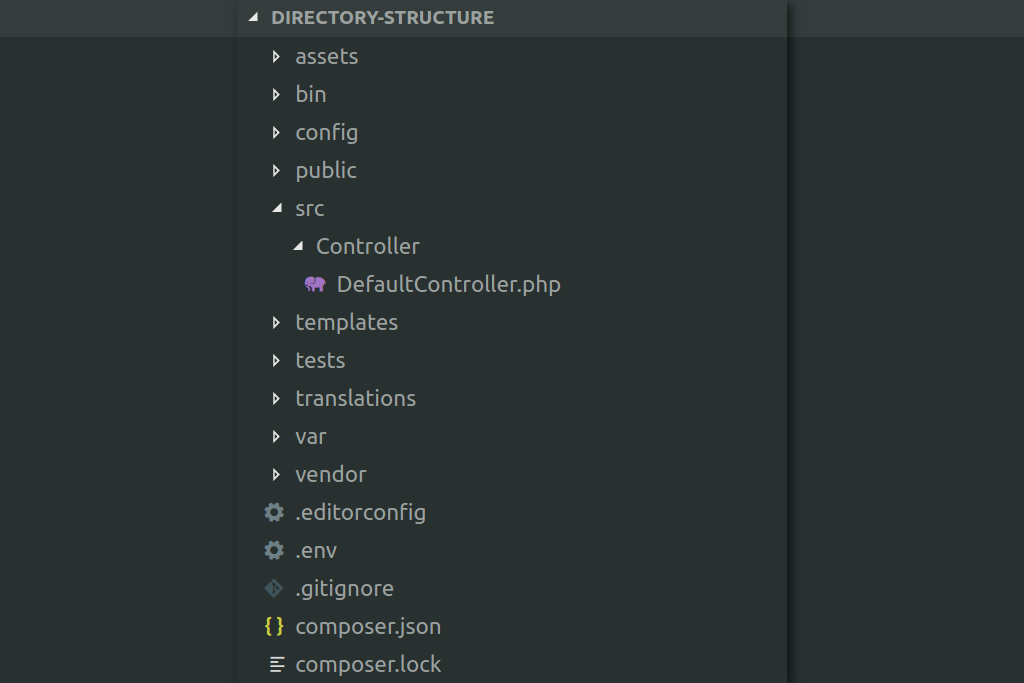
Now, let's see how to put this organization into practice.
2. Practical Examples of File Inclusion
The most common use case is to separate reusable parts of a webpage, like a navigation bar, header, or footer.
How To Include Files In PHP - Include and Require - Full PHP 8 Tutorial
This video from Program With Gio demonstrates a classic real-world example: extracting a navigation bar into its own file and including it on multiple pages. This is a technique you will use constantly.
Watch the segment from 05:24 to 06:48. Pay attention to how creating a partials/nav.php file allows you to reuse the same navigation menu on different pages and update it in just one place.
Another great use is to separate different types of code. For instance, you could have one file for your database connection, another for utility functions, and another for your business logic.
This approach of separating concerns is a cornerstone of modern software development.
3. The Four Inclusion Statements
PHP gives us four ways to include files. They fall into two main groups: include/require and the _once variants.
include vs. require
The fundamental difference between include and require lies in how they handle errors if the specified file cannot be found.
include: If the file is not found, it will generate a warning (E_WARNING), but the script will continue to execute.require: If the file is not found, it will generate a fatal error (E_COMPILE_ERROR) and halt the script's execution.
How to Use PHP Include and Require Statements
The following article gives a clear explanation and code examples that perfectly illustrate the error-handling difference between include and require.
Read the section titled 'Include vs Require'. Focus on the output of the code examples when an invalid file path ('abc.php') is used. See how the script behaves differently in each case.
Which one should you use?
Given your goal of professional development, here's a strong rule of thumb: Prefer require for critical dependencies.
If your page absolutely cannot function without a file (e.g., a database connection, a file containing core functions, or class definitions), use require. You want the script to fail loudly and immediately if a critical piece is missing. This prevents unexpected behavior and potential data corruption down the line.
Use include for optional content. For example, if you are including an HTML template snippet that is not essential for the page's core logic to run, include might be appropriate. In practice, most professional developers default to using require.
include_once and require_once
What happens if you accidentally include the same file twice? If that file contains a function or class definition, PHP will throw a fatal error because you cannot redeclare a function or class.
include_once and require_once solve this problem. They work exactly like their counterparts but with one extra check: they verify if the file has already been included. If it has, they will not include it again.
How to Use PHP Include and Require Statements
Let's return to the same article to see how the _once variants work.
Read the section 'Preventing Errors: PHP Include_Once and Require_Once Statements'. It demonstrates the fatal error caused by double inclusion and how include_once prevents it.
As a best practice, when including files that define functions or classes, you should almost always use require_once. This prevents hard-to-debug redeclaration errors, especially in large projects where one included file might itself include others.
Visual Summary
Here is a handy infographic that summarizes the behavior of all four statements.

Test your understanding!
You are building a page that needs two external files:
database-connection.php: Contains the code to connect to your application's database.advertisements.php: Contains HTML for a third-party ad banner. This file is sometimes unavailable due to issues with the ad server.
Which inclusion statement (include, require, include_once, require_once) would be most appropriate for each file, and why?
Show answer
-
database-connection.php: Userequire_once.require: The database connection is critical. If it fails, the rest of the page is useless, so the script should stop immediately._once: It's likely this file will be needed by multiple parts of your application, so using_onceprevents any potential issues from trying to establish the connection more than once.
-
advertisements.php: Useinclude.include: The ad banner is not critical to the core function of your page. If the file is missing, you want your page to continue loading for the user rather than showing a fatal error. A warning will be logged for you, the developer, to see.- You likely wouldn't use
_oncehere unless there was a specific reason to prevent the same ad block from appearing multiple times on one page.includeis sufficient.
4. Professional Practice: Robust Paths & Security
When you start including files from different directory levels, using relative paths like ../ or ../../ can become confusing and brittle. A much more robust method is to define absolute paths using PHP constants.
This article from CodePath introduces some excellent professional practices for organizing code, including a powerful technique for defining constant paths.
Read the section 'Using Constants and Absolute Paths'. Focus on the example that uses dirname(__FILE__) to define constants like PRIVATE_PATH and PROJECT_PATH. This is a very common and powerful pattern.
By creating an initialize.php file that defines these paths and including it at the start of your script, you can then use these constants everywhere, making your require statements clean and independent of the current file's location.
Example:
// in private/initialize.php
define("PRIVATE_PATH", dirname(__FILE__));
define("PROJECT_PATH", dirname(PRIVATE_PATH));
define("SHARED_PATH", PRIVATE_PATH . '/shared');

// in public/index.php
require_once('../private/initialize.php');
require_once(SHARED_PATH . '/header.php');
A Critical Security Warning
Your interest in CyberSecurity makes this next point especially important. There is one golden rule with file inclusion:
NEVER, EVER include a file based on user input.
For example, do not do this: include($_GET['page'] . '.php');.
This creates a massive security hole called File Inclusion Vulnerability. An attacker could trick your script into including and executing a malicious file from a remote server, giving them complete control. Always use a hardcoded, trusted file path or a whitelist of allowed values.
Conclusion
You've now completed the PHP Fundamentals Refresher! You've reinforced your knowledge of the basics and added a crucial new skill: organizing code into separate, reusable files. This practice is not just about tidiness; it's fundamental to building scalable, maintainable, and secure web applications.
Key Takeaways:
- Splitting code into multiple files using
includeandrequireis essential for organization and reusability. requireis for critical files (it halts on error), whileincludeis for non-critical ones (it only warns).require_onceandinclude_onceprevent fatal errors from redeclaring functions or classes by ensuring a file is included only once.- Using constants for absolute file paths makes your application more robust.
- For security, never include files based on direct user input.
Preview of the Next Lesson:
With a solid grasp of these fundamentals, you are ready to move into a more powerful and structured way of programming. In our next lesson, we will begin the Object-Oriented PHP module by learning how to define classes with properties and methods. You'll immediately see how the file organization skills you've just learned are essential for managing a project built with classes.