Hello! Welcome back to our course on PHP mastery.
In the last lesson, we successfully established a front controller, ensuring all web requests are directed to a single public/index.php file. We used a simple switch statement to handle different URIs, but we also noted that this approach isn't scalable for a real application.
Today, we will build upon that foundation. Our goal is to create a basic router to parse request URIs and dispatch to controller methods. We will replace the rigid switch statement with a flexible, object-oriented Router class. This class will act as the "traffic director" of our application, cleanly mapping incoming requests to the specific controller responsible for handling them.
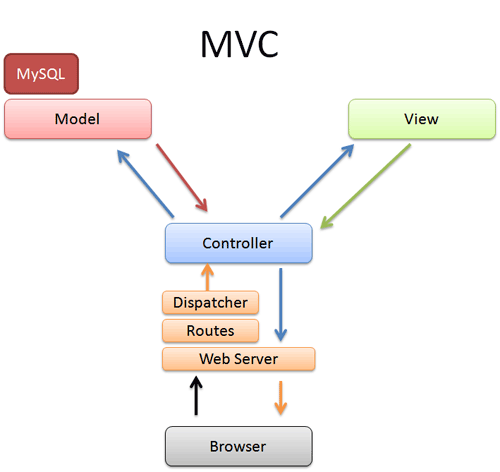
1. From Conditionals to a Routing Table
Before we build a full class, let's think about how to improve our switch statement. A more flexible approach is to use an associative array to create a "routing table" or a map. This map will associate a URI path with the code that should handle it.
The following video demonstrates this evolution perfectly. It starts with a simple conditional structure (like our switch statement), refactors it into an associative array, and shows how to handle requests for pages that don't exist.
PHP For Beginners, Ep 15 - Make a PHP Router
Let's watch how to evolve our simple routing logic from a long list of conditionals into a much cleaner and more maintainable routing table.
Watch the video from 02:07 to 09:27. Pay close attention to how the if/else if statements are refactored into an associative array (a 'lookup table') and how it handles routes that don't exist.
The key takeaways from this video are:
-
Parsing the URI: We get the request URI from
$_SERVER['REQUEST_URI']. It's crucial to useparse_url($uri, PHP_URL_PATH)to strip off any query string (e.g.,?id=123), so we only get the clean path like/contact. -
Creating a Route Map: Instead of
iforswitch, we can define our routes in an associative array. This is much cleaner and easier to manage.$routes = [ '/' => 'controllers/index.php', '/about' => 'controllers/about.php', '/contact' => 'controllers/contact.php' ]; -
Matching the Route: We can then check if the current URI exists as a key in our
$routesarray usingarray_key_exists(). -
Handling 404s: If the key doesn't exist, it means we don't have a route for that URI. We should then send a
404 Not FoundHTTP status code usinghttp_response_code(404)and display an error page.
2. Building an Object-Oriented Router
The associative array is a big improvement, but we can do even better by encapsulating all of this logic into a dedicated Router class. This adheres to the principle of Separation of Concerns and will make our main index.php file incredibly simple.
Let's design our Router class. It will be responsible for two main things:
- Registering routes: Storing the URI paths and the actions they should trigger.
- Dispatching the request: Matching the current request to a registered route and executing the corresponding action.
Here is the basic structure for our Router.php file.
<?php

class Router
{
    protected $routes = [];

    public function addRoute($method, $path, $action)
    {
        $this->routes[$method][$path] = $action;
    }

    public function dispatch()
    {
        // Logic to match the route and call the action will go here
    }
}
Registering Routes
Instead of a generic addRoute method, it's more common and readable to have methods for each HTTP verb, like get() and post().
Let's add these convenience methods to our Router class. We will also define that an action is an array containing a controller class name and a method name, like [HomeController::class, 'index'].
// Inside Router.php

class Router
{
    protected $routes = [];

    // Adds a route to our routing table
    private function addRoute($method, $path, $action)
    {
        $this->routes[$method][$path] = $action;
    }

    // A convenience method for registering a GET route
    public function get($path, $action)
    {
        $this->addRoute('GET', $path, $action);
    }

    // A convenience method for registering a POST route
    public function post($path, $action)
    {
        $this->addRoute('POST', $path, $action);
    }

    // ... dispatch method will go here
}
Dispatching the Request
The dispatch() method is the heart of the router. It needs to:
- Get the current request method (e.g., 'GET') and path (e.g., '/about').
- Look for a match in the
$routesarray. - If a match is found, instantiate the specified controller and call the specified method.
- If no match is found, send a 404 response.
Here's the implementation of the dispatch() method:
// Inside Router.php, after the get() and post() methods

public function dispatch()
{
    // Get the request method and URI path
    $method = $_SERVER['REQUEST_METHOD'];
    $path = parse_url($_SERVER['REQUEST_URI'], PHP_URL_PATH);

    // Find the action for the current method and path
    // The null coalescing operator `??` returns `null` if the key doesn't exist
    $action = $this->routes[$method][$path] ?? null;

    if ($action === null) {
        // No route found
        http_response_code(404);
        echo "404 Not Found";
        return;
    }

    // If the action is an array [Controller::class, 'method']
    if (is_array($action)) {
        [$controllerClass, $methodName] = $action; // Array destructuring

        // Check if the controller class exists
        if (class_exists($controllerClass)) {
            $controllerInstance = new $controllerClass();

            // Check if the method exists on the controller instance
            if (method_exists($controllerInstance, $methodName)) {
                // Call the controller method
                $controllerInstance->$methodName();
            } else {
                http_response_code(500);
                echo "Error: Method {$methodName} not found in controller {$controllerClass}";
            }
        } else {
            http_response_code(500);
            echo "Error: Controller class {$controllerClass} not found";
        }
    }
}
Note: In a real-world application, we would use more robust error handling and logging instead of echoing error messages directly.
3. Putting It All Together
Now that we have our Router class, let's see how to use it. We'll need three files for this example:
public/index.php(our front controller)Router.phpcontrollers/HomeController.php
controllers/HomeController.php
First, let's create a very simple controller. This class contains the logic that will be executed for our home page route.
<?php

class HomeController
{
    public function index()
    {
        echo '<h1>Welcome to the Homepage!</h1>';
        echo '<p>This content is being served by the HomeController.</p>';
    }

    public function about()
    {
        echo '<h1>About Us</h1>';
        echo '<p>This is the about page, served by the HomeController.</p>';
    }
}
public/index.php
Our front controller is now beautifully simple. Its only jobs are to set up the router, define the routes, and tell the router to dispatch the request.
<?php

// For now, we manually require the files.
// Later in the course, we'll use an autoloader.
require_once __DIR__ . '/../Router.php';
require_once __DIR__ . '/../controllers/HomeController.php';

// Create a new router instance
$router = new Router();

// Define our routes
$router->get('/', [HomeController::class, 'index']);
$router->get('/about', [HomeController::class, 'about']);

// Dispatch the request to the appropriate controller method
$router->dispatch();
With this setup:
- A GET request to
/will cause the router to create an instance ofHomeControllerand call itsindex()method. - A GET request to
/aboutwill call theabout()method on a newHomeControllerinstance. - Any other request (e.g.,
/contactor a POST request) will result in a "404 Not Found" error, because we haven't defined a route for it.
Conclusion
Well done! You have successfully built a foundational piece of a modern PHP application. By creating an object-oriented router, you've taken a massive step towards a clean, scalable, and maintainable MVC architecture.
Key Takeaways:
- Separation of Concerns: The
Routerclass cleanly separates routing logic from the rest of your application. Yourindex.phpis now just a setup file. - Mapping to Controllers: The router's main job is to map a request (HTTP method + URI path) to a specific controller action (
[ControllerClass::class, 'methodName']). - Dispatching: The router instantiates the correct controller and calls the correct method, effectively "dispatching" the request to the code that can handle it.
- Scalability: Adding new pages is now as simple as adding a new line in
index.phpand creating a new method in a controller. This is far more manageable than the oldswitchstatement.
Preview of the Next Lesson:
Our router successfully dispatches requests to controllers, but our controllers are still echoing HTML directly. This mixes application logic with presentation. In the next lesson, "Separate business logic (Model), presentation (View), and application flow (Controller)," we will complete the MVC triad. We'll explore how controllers can work with Models to fetch data and then pass that data to Views, which are dedicated to rendering the final HTML output.