Hello! In our previous lessons, you've written, compiled, and debugged your first C programs. We've often treated the gcc command as a single magic step that turns human-readable source code into an executable program. Today, we're going to pull back the curtain and demystify that process.
You'll recall from our last discussion on comments that they are stripped out during a stage called "preprocessing." This is the very first step in a four-stage pipeline that takes your .c file and transforms it into a program your computer can run. This lesson will explore all four stages: preprocessing, compilation, assembly, and linking. Understanding this pipeline is a key piece of "deep knowledge" that separates a novice from a practitioner, and it's fundamental to your goals in systems programming and debugging.
The Journey from Source Code to Executable
Before we dive into the details, let's look at a high-level map of the journey. Every C program you build goes through this sequence of transformations.
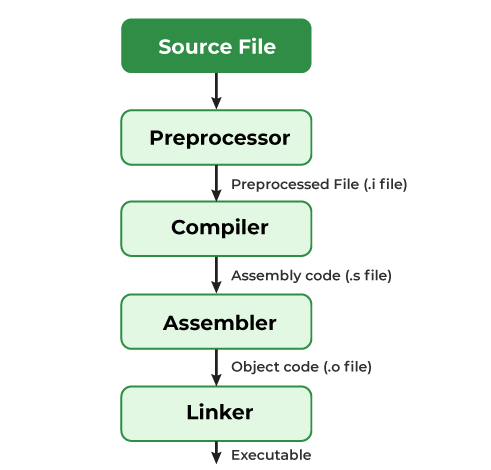
As you can see, what we call "compiling" is actually a multi-stage process where the output of one stage becomes the input for the next. Now, let's examine each of these stages in detail.
The article "The Four Stages of Compiling a C Program" by Calle Luks provides a clear, step-by-step walkthrough using a simple "Hello, World!" program. We'll use it as our guide.
Stage 1: Preprocessing
This is the stage we hinted at in our last lesson. The preprocessor is a program that modifies your source code according to special instructions called directives. These are the lines that begin with a #.
The most common directive is #include <stdio.h>, which tells the preprocessor to find the stdio.h file (the standard input/output header) and paste its entire content into your file. This is how your program gets the declarations for functions like printf(). The preprocessor also strips all comments from your code, as they are only for human readers.
The Four Stages of Compiling a C Program
This first section of the article explains the role of the preprocessor and shows you how to see its output.
Please read the section Preprocessing. Focus on understanding the three main tasks it performs: handling commands (directives), joining continued lines, and stripping comments. Note the gcc -E command, which stops the process after this stage.
Stage 2: Compilation
After the preprocessor has finished, the modified source code (which is still human-readable C code) is passed to the compiler. The compiler's job is to translate this C code into a lower-level language called assembly language.
Assembly language is specific to a particular CPU architecture (like x86-64 for most modern PCs or ARM for many mobile devices). It's a symbolic representation of the actual machine instructions the processor can execute. While humans can read it, it's much more verbose and complex than C.
The Four Stages of Compiling a C Program
This section covers the transformation from preprocessed C code to assembly language.
Now, read the section Compilation. The key takeaway is that this stage translates C to assembly. Don't worry about understanding the assembly code itself; just recognize its purpose as an intermediate step. The gcc -S command is used to generate the assembly file (.s).
Stage 3: Assembly
The assembly code is then fed into the assembler. The assembler takes the symbolic assembly instructions (like movl, pushq, retq) and translates them into their binary equivalents, known as machine code.
The output of this stage is an object file (usually with a .o or .obj extension). This file contains the actual machine instructions that your CPU understands, but it's not quite ready to run. It's a piece of the puzzle, not the complete picture.
The Four Stages of Compiling a C Program
Here, the article explains how assembly code is converted into a binary object file.
Read the Assembly section. Notice that the output, the object file, is now in a binary format and no longer human-readable. The command for this stage is gcc -c.
Stage 4: Linking
This is the final and crucial step. Your program likely uses functions you didn't write, such as printf(). The code for printf() exists in a pre-compiled library that came with your C compiler. The object file you created in the assembly stage contains a call to printf(), but the actual code for printf() is missing.
The linker's job is to resolve these missing pieces. It takes your object file (or multiple object files, if your program is split into several source files) and combines them with the necessary code from libraries to produce a single, complete executable file.
The Four Stages of Compiling a C Program
This final section explains how the linker assembles all the pieces into a finished program.
Finally, read the section on Linking. This explains how the linker resolves references to library functions. When you simply run gcc hello_world.c, it performs all four stages and runs the linker for you automatically.
Seeing it in Action: A Practical Demo
Reading about the stages is one thing, but seeing them happen provides the kind of hands-on insight you prefer. The following video by Engineer Man is a fantastic, fast-paced demonstration of using gcc to stop at each stage and inspect the intermediate files.
Understanding how GCC carries out compilation
This video provides a quick and practical walkthrough of the four compilation stages using GCC commands.
Watch the entire video. It's short and packed with information. The explanation of preprocessing. The -E demo, where he shows the massive preprocessed file. The -S demo, showing the generation of the assembly (.s) file. The -c demo, creating the binary object (.o) file. The final linking step, creating and running the executable.
To deepen your understanding of why linking is so essential, especially for functions like printf, this next video provides a great conceptual explanation.
Compiling, assembling, and linking
This video segment explains the role of the linker in connecting your code to external libraries.
Watch the segment on linking from this timestamp. The diagram at 04:54 is particularly helpful. It shows how the linker finds the code for sub and printf in other files and "stitches" everything together to create the final executable. This answers the question: "Where does the code for printf actually come from?"
Your Turn: The Build Pipeline Challenge
Now it's time for you to become the build system. Take the hello.c program you wrote in a previous lesson. Your mission is to manually run each stage of the compilation process.
Open your terminal in the directory where hello.c is located and execute the following commands one by one. After each step, take a moment to look at the new file that is created.
-
Preprocessing: Generate the preprocessed file
hello.i.gcc -E hello.c -o hello.i(Try opening
hello.iin your editor. You'll see a huge amount of text fromstdio.hfollowed by your simplemainfunction at the very bottom.) -
Compilation: Generate the assembly file
hello.sfrom the preprocessed code.gcc -S hello.i -o hello.s(Open
hello.s. You don't need to understand it, but recognize it as the code's assembly representation.) -
Assembly: Generate the object file
hello.ofrom the assembly code.gcc -c hello.s -o hello.o(You won't be able to read
hello.oin a text editor, as it's binary machine code.) -
Linking: Create the final executable
hellofrom the object file.gcc hello.o -o hello(This last command invokes the linker. It finds the code for
printfand combines it with your object code to create the final, runnable program.) -
Run it!
./hello
Completing this challenge will give you a tangible feel for a process that is usually hidden from view.
Conclusion
You've now peeked behind the curtain of the C compiler, transforming it from a "magic black box" into a predictable, four-stage pipeline.
Here are the key takeaways:
- The Four Stages: Your C source code is transformed through Preprocessing (handling
#directives), Compilation (C to assembly), Assembly (assembly to machine code), and Linking (combining object files and libraries). - Intermediate Files: You can use
gccflags (-E,-S,-c) to stop the process at any stage and inspect the intermediate files (.i,.s,.o). - The Linker's Role: The linker is what makes libraries possible. It finds and includes the code for functions you use but don't write, like
printf, to create a complete executable.
This marks the end of our first module! You've set up your environment, written and debugged code, and now you understand how that code becomes a running program. You've built a solid foundation.
Preview of the next lesson: In our next module, we'll start diving into the core syntax of C. We'll begin with the absolute fundamentals: how to declare variables to store information and how C represents different data types like integers, floating-point numbers, and characters in memory.