In our last session, you honed your skills as a code detective, learning to interpret the compiler's error messages and fix the most common syntax mistakes. Now that you know how to make your code correct, it's time to learn how to make it clear. Writing code that a computer understands is only half the battle; writing code that other humans (including your future self!) can understand is a hallmark of a great programmer.
This lesson focuses on exactly that: documenting your code. We will explore how to use single-line and multi-line comments to leave explanatory notes within your programs. This simple practice is fundamental to everything from collaborating on large systems to preparing for technical interviews, where clear, well-documented code is highly valued.
Leaving Notes for Your Future Self
Imagine you've written a clever piece of code for a competitive programming puzzle. You come back to it six months later to reuse the logic, but you can't remember why you made a certain choice or how a complex calculation works. This is where comments come in.
Comments are lines of text in your source code that are completely ignored by the compiler. Their sole purpose is to be read by humans to help explain what the code is doing, why it's doing it, and how it works. In the context of the C build process (which we'll explore in the next lesson), comments are stripped out during the very first stage, called preprocessing, so they have zero effect on the final executable program.
The article from Unstop provides a good introduction to this concept.
Comments In C | Types, Rules, Uses And Examples (Codes)
This article explains the fundamental role of comments in C programming for documentation and readability.
Start by reading the section What Are Comments In C & Why Use Them?. Then, skip down to the section What Does Compiler Do With Comments to solidify your understanding of how the compiler treats them.
The Two Flavors of C Comments
C provides two distinct ways to write comments, each suited for different situations.
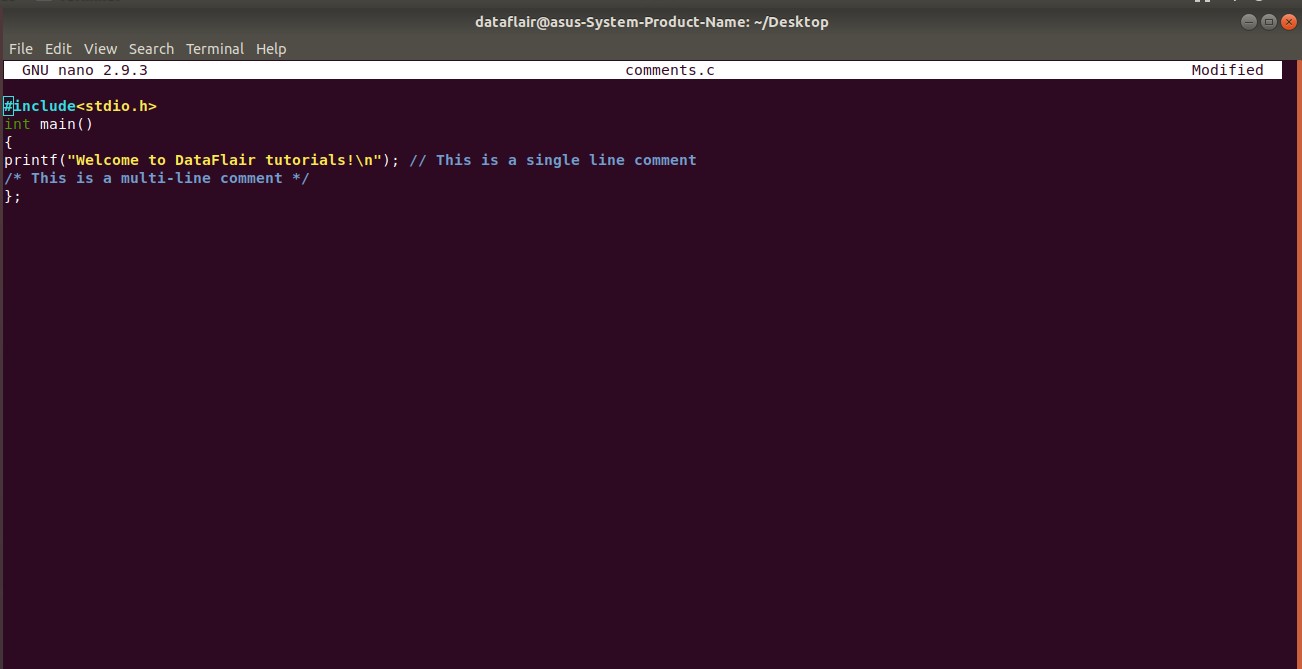
- Single-line comments: These start with a double forward slash
//and extend to the end of the line. They are perfect for brief notes. - Multi-line comments: These start with
/*and end with*/. Everything between these markers, even across many lines, is treated as a comment. They are ideal for longer explanations.
The image below shows both types in action within a simple program.
For a dynamic demonstration, the following video from Programiz clearly shows how to use both comment types.
#5: Comments in C Programing | [2025] C Programming for Beginners
This video from Programiz provides a practical walkthrough of adding comments to a C program.
First, watch the segment from the beginning up to the introduction to see how single-line comments are used. Then, jump to the section on multi-line comments from this timestamp to see the /* ... */ syntax in action.
A Powerful "Quick Win": Comments for Debugging
Beyond documentation, comments are an indispensable debugging tool. In the last lesson, you dealt with compiler errors. But sometimes a program compiles and runs, yet produces the wrong output. This is called a logic error.
A common technique to find the source of a logic error is to "comment out" sections of your code. By temporarily turning a line or a block of code into a comment, you can disable it without deleting it. This allows you to isolate the problematic part of your program.
The Programiz video you just looked at has an excellent segment demonstrating this technique. It's a practical skill you can start using immediately.
#5: Comments in C Programing | [2025] C Programming for Beginners
This part of the video shows how to use comments to temporarily disable code for debugging purposes and introduces handy keyboard shortcuts.
Watch the segment from this timestamp. Pay close attention to how the instructor disables the code related to height to test the rest of the program. The video also mentions the keyboard shortcut (Ctrl + / on Windows/Linux, Cmd + / on Mac), which is a huge time-saver.
The Art of Writing Good Comments
Knowing the syntax is easy; knowing what and when to comment is an art. A program cluttered with useless comments is almost as bad as one with no comments at all. The goal is to improve clarity, not to state the obvious.
A core principle is to explain the "why," not the "what." Good code often makes it obvious what it is doing. A good comment explains why it's being done that way.
- Bad Comment:
i = i + 1; // Add one to i(The code is already clear) - Good Comment:
retries++; // Increment the retry counter for the network request(This explains the purpose and context)
The short video below from Jacob Sorber offers a great high-level perspective on the philosophy of good commenting.
This video discusses the finer points of writing effective comments, focusing on readability and maintenance.
Watch the segments from The Art of Commenting and Maintaining Comments. The key takeaway here is that an outdated, incorrect comment is often worse than no comment at all.
Now, let's look at some concrete best practices and common mistakes to avoid.
C Comments: The Complete Beginner’s Guide with Syntax
This guide provides a structured overview of effective commenting strategies and common pitfalls.
Please read the sections Common Mistakes and Best Practices for Using Comments. Pay special attention to the mistake of nesting multi-line comments and the practice of explaining "why," not "what."
Your Turn: The Documentation Challenge
Let's put this into practice. Here is a small, uncommented function that converts a temperature from Celsius to Fahrenheit. Your task is to copy this code into your editor and add clear, effective comments.
Your Mission:
- Add a multi-line comment at the top of the function explaining its overall purpose, its parameter (
celsius), and what it returns. - Add a single-line comment inside the function to explain the conversion formula itself.
- Add a single-line comment for the
return 0;line inmain, explaining its significance.
#include <stdio.h>

double celsius_to_fahrenheit(double celsius) {
    double fahrenheit = (celsius * 9.0 / 5.0) + 32.0;
    return fahrenheit;
}

int main() {
    double temp_c = 20.0;
    double temp_f = celsius_to_fahrenheit(temp_c);
    printf("%.1f degrees Celsius is %.1f degrees Fahrenheit.\n", temp_c, temp_f);
    return 0;
}
There's no single "right" answer here. The goal is to practice writing comments that make the code easier to understand for someone seeing it for the first time.
Conclusion
You've now added a crucial tool to your programming toolkit. Effective commenting is a discipline that pays dividends throughout your career, making your code more professional, maintainable, and collaborative.
Here are the key takeaways from this lesson:
- Two Types of Comments: Use
//for short, single-line notes and/* ... */for longer, multi-line explanations. - Comments are for Humans: The compiler ignores them entirely, so they are purely for improving code readability and documentation.
- A Debugging Power Tool: Commenting out code is a fast and effective way to isolate and diagnose problems.
- Explain the "Why": The best comments provide context and explain the intent behind your code, rather than simply restating what the code does.
Preview of the next lesson: We've mentioned several times that the compiler "ignores" comments during a stage called "preprocessing." In our next lesson, we will demystify the entire build process, breaking it down into its four distinct stages: preprocessing, compilation, assembly, and linking. Understanding this pipeline will give you a much deeper insight into how your source code becomes a running program.