Welcome! In our last lesson, we focused on crafting a user persona. By synthesizing your research, you created a detailed, data-driven representation of who you are designing for. This persona acts as a crucial reference point, grounding your design decisions in the needs and goals of a real person.
Now that we have our "who," it's time to map out what they do. This lesson introduces the user journey map, a powerful tool for visualizing the end-to-end experience a person has while trying to achieve a goal. We will explore how to chart their actions, thoughts, and feelings through each step of the process. For you, coming from a graphic design background, you can think of this as a form of visual storytelling—a narrative that helps the entire team understand a user's experience from their perspective.
By the end of this lesson, you will be able to construct a user journey map that clearly identifies user pain points and uncovers opportunities for design improvements, completing our foundational work in UX research and strategy.
What is a User Journey Map?
A user journey map is a visualization of the process that a person goes through in order to accomplish a goal. It tells the user's story, chronologically, from their point of view. It's not just about their interaction with a specific website or app; it often includes steps taken before and after the direct interaction, providing a holistic view of their experience.
The primary purpose of a journey map is to build a shared understanding and empathy for the user. By mapping out their experience, we can pinpoint moments of frustration (pain points) and moments of delight, which in turn reveal opportunities to improve the product or service.
An Introduction to User Journey Map - PDF Templates
This article by UX Designer Stéphanie Walter provides a concise and clear definition of a user journey map and its purpose.
Read the section What is a User Journey Map and the following two paragraphs. Pay close attention to how it helps identify touchpoints, pain points, and opportunities.
The Anatomy of a Journey Map
While formats can vary, most journey maps share a common structure. They are typically organized as a grid, with the user's phases or stages of the journey laid out horizontally, and different aspects of their experience detailed in rows.
Let's look at a classic example from the Nielsen Norman Group.
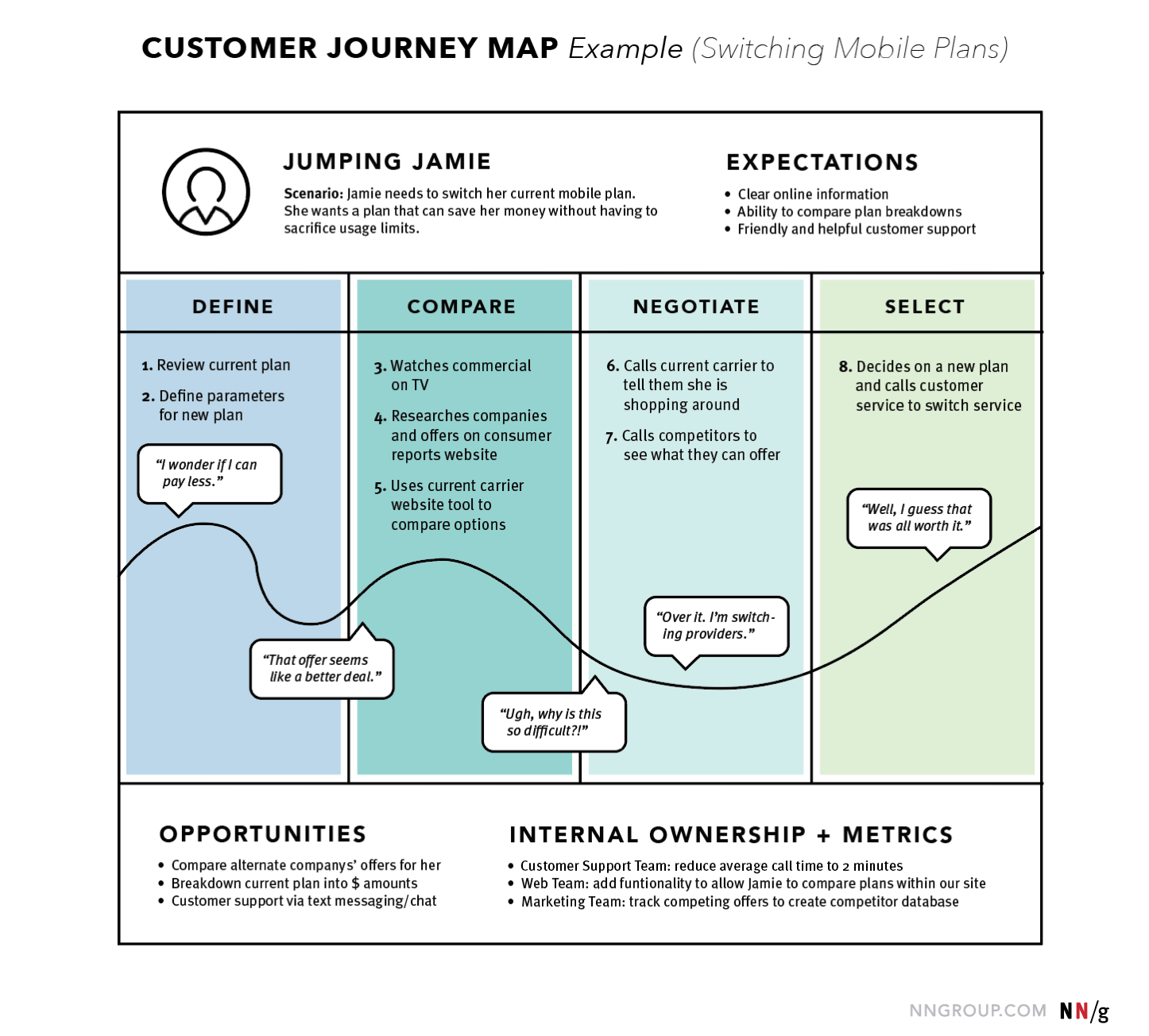
Notice the key elements:
- Persona & Scenario: The map is for a specific person ("Jumping Jamie") with a specific goal ("switch her current mobile plan").
- Phases: The journey is broken down into high-level stages: Define, Compare, Negotiate, Select.
- Actions: Specific steps Jamie takes within each phase are listed.
- Emotional Journey: The curved line is a powerful visual device. It shows Jamie's emotional state, dipping into frustration ("Ugh, why is this so difficult?!") and rising with resolution. This is often the most impactful part of the map.
- Opportunities & Ownership: The map concludes with actionable insights—opportunities for the business to improve the experience.
Journey maps can also be more detailed, capturing more layers of the experience.

To create an effective map, you need to understand all these potential components.
15 Real-Life User Journey Map Examples to Learn From
This article from UXtweak provides a great summary of the essential parts of a user journey map.
Please read the section titled "Parts of the User Journey Map." This will give you a clear list of the building blocks you'll be working with.
How to Create a User Journey Map
Creating a journey map is a process of synthesis, transforming your user research into a compelling visual narrative. It's not an exercise in imagination; every entry on the map should be grounded in the data you've collected.
The process involves several key steps, starting with the persona you've already created and the research that informed it.
An Introduction to User Journey Map - PDF Templates
This article provides a practical, step-by-step guide to building your map. It connects research directly to the final artifact.
Read the entire section titled "How to build a User Journey Map," from step 1 to the warning at the end of the "It's an iterative exercise" subsection. As you read, focus on how each step builds on the last: Research & Persona: This is your foundation. Phases: Breaking the journey into manageable chunks. Actions & Tasks: The specific user behaviors. Emotions & Pain Points: Capturing the user's internal experience. This is where you identify the problems. Opportunities: Brainstorming solutions based on the pain points. The article also notes that once the structure is defined, it's time for visual designers to "have fun." This is where your graphic design skills become a significant asset, allowing you to turn the map into a clear and impactful communication tool.
A Practical Walkthrough
Now, let's see this process in action. The best way to understand how to build a journey map is to watch one being created from scratch. The following video provides an excellent, step-by-step demonstration of a UX designer creating a journey map in FigJam (a digital whiteboarding tool) for a user signing up for Netflix.
Customer journey mapping in Figjam
This video by Nick Babich is a complete and concise walkthrough of the journey mapping process, from defining the components to filling them out for a real-world scenario.
Watch the video from the beginning. First, he provides a quick refresher on the purpose of a journey map. Then, he introduces the components of his template, which align with what you've just read. The most valuable part is the practical demonstration, where he populates the map for "Sara," who wants to watch a new Netflix show. Observe how he translates her actions, feelings, and frustrations into specific pain points and then derives opportunities from them.
Conclusion
In this lesson, you've learned how to create a user journey map, a cornerstone artifact in UX design. By visualizing the user's experience, you can move beyond a simple list of problems and understand the context in which they occur. This deepens empathy and provides a clear, evidence-based roadmap for improving a product.
Here are your key takeaways:
- Journey Maps Tell a Story: They are chronological, visual narratives of a user's experience while pursuing a goal.
- They are Based on Evidence: A journey map is only as good as the research behind it. It synthesizes data from interviews and observations for a specific user persona.
- Structure is Key: Maps are typically structured with phases along the top, and rows detailing actions, thoughts, emotions, pain points, and opportunities.
- The Goal is Actionable Insight: The ultimate purpose of a journey map is to identify pain points and brainstorm opportunities to create a better user experience.
You have now completed the UX Research and Strategy module! You've learned to differentiate UX from UI, apply the Design Thinking process, conduct research, and synthesize that research into powerful artifacts like affinity diagrams, personas, and now, journey maps.
In our next lesson, we will move into the second module and begin translating this strategic understanding into the structure of a digital product. We'll start with Information Architecture (IA), the art and science of organizing and labeling content to support findability and usability.