Hello and welcome to your first lesson! I'm excited to start this journey with you as you transition from graphic design into the world of UI/UX. Your background in graphic design gives you a fantastic head start, as you already possess a keen eye for aesthetics and visual communication.
This course is designed to build upon that foundation, and our first step is to clarify the landscape. Today's lesson addresses a fundamental question: What is the difference between UX and UI design? We will define each discipline, explore the specific roles and responsibilities of UX and UI designers, and, most importantly, connect these concepts to your existing skills. By the end of this lesson, you will have a clear understanding of these two distinct but interconnected fields, setting the stage for the rest of our first module on UX Research and Strategy.
Unpacking "UX" and "UI"
To begin, let's establish what the acronyms UX and UI stand for.
- UX stands for User Experience. This concerns the overall feeling a person has when they interact with a product or service. It’s about the entire journey—from their first point of contact to the final outcome. Is it easy? Is it logical? Does it solve their problem effectively?
- UI stands for User Interface. This refers to the specific visual and interactive elements of a digital product that a user interacts with—the screens, buttons, icons, typography, and colors.
A great way to think about this is with the analogy of a building's blueprint versus its interior decor. The user experience (UX) designer is like the architect who plans the structure, the flow between rooms, and ensures the building is functional and meets the needs of its inhabitants. The user interface (UI) designer is like the interior designer who chooses the paint colors, furniture, and fixtures that make the space aesthetically pleasing and easy to live in.
The following short video offers another excellent analogy, comparing UX to the "blueprint" and UI to the "visual varnish" applied on top.
Working in Graphic Design vs UI/UX or Web Design
Please watch this brief segment from the video "Working in Graphic Design vs UI/UX or Web Design" by Design Gal Christine.
Watch from this timestamp to understand the core distinction between UI design as the visual top layer and UX design as the underlying structure.
How UX and UI Apply to a Product
While analogies are helpful, let's look at how these disciplines apply to a real digital product. Consider something as common as the checkout process on an e-commerce website.
-
The UX designer asks questions about the overall flow and logic:
- What are the essential steps to complete a purchase? Can we reduce the number of steps?
- What information do we absolutely need from the user? (e.g., shipping address, payment)
- How do we handle errors, like an invalid credit card number?
- Should we allow guest checkout, or force users to create an account?
-
The UI designer focuses on the visual presentation and interaction of that flow:
- How are the form fields laid out on the screen? Is there enough space between them?
- What do the buttons look like? Is the "Complete Purchase" button visually distinct?
- What font and colors will we use to ensure readability and match the brand's style?
- How do we visually indicate that a field has an error? (e.g., a red border)
The article "UI vs. UX Design" from Tilda Education provides excellent examples of how UX and UI considerations play out in common interface components.
UI vs. UX Design: Differences, Skill Sets, & Possible Career Paths
In this article from Tilda Education, we'll explore concrete examples of how UX and UI designers contribute to different parts of a product.
Please read the section What UX & UI Designers Work On Daily. Pay close attention to how the author breaks down the UX and UI considerations for elements like menus, checkout flows, and product cards. This will help you see how the two roles tackle the same feature from different angles.
Distinct Roles, Shared Goals
As you've seen, UX and UI designers have different focuses, which translate into distinct day-to-day responsibilities. UX is more analytical and strategic, while UI is more focused on visual and interactive execution.
The two images below offer a concise visual summary. The first image outlines the separate responsibilities, while the Venn diagram highlights where their skills and concerns overlap.
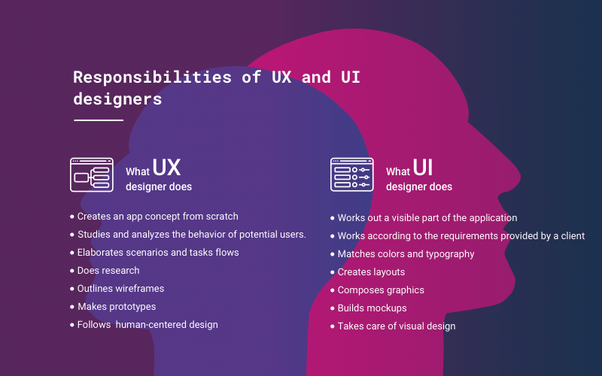

To dig deeper into the specifics, let's turn to a detailed breakdown of the tasks, responsibilities, and required skills for each role.
UX vs UI design: What's the difference? [2025 Update]
This article from the UX Design Institute provides a comprehensive list of what UX and UI designers actually do.
Please navigate to the section titled What do UX and UI designers do?. Study the two tables that compare the "tasks and responsibilities" and the "skills and requirements" for each role. As you read, think about which tasks align with your current skills and which represent new areas for you to learn.
From Graphic Design to UI/UX: Bridging the Gap
Your experience as a graphic designer is your greatest asset in this transition. You already have a deep understanding of many principles that are central to UI design—color theory, typography, composition, and visual hierarchy. However, there is a fundamental shift in mindset when moving into the digital product space.
Graphic design often prioritizes visual appeal and communication for a static medium (like a poster or a brochure). The goal is to grab attention and convey a message. In contrast, the primary goal of UI/UX design is usability and functionality. The best digital designs are often "invisible"—they are so intuitive and seamless that the user doesn't even notice the design; they simply accomplish their goal effortlessly.
This video directly addresses this shift in thinking.
Working in Graphic Design vs UI/UX or Web Design
Let's return to the "Working in Graphic Design vs UI/UX" video.
Please watch the segment from this timestamp. The speaker makes a crucial point about the goal of graphic design (visual appeal, the "movie star") versus the goal of tech design (usefulness, invisibility).
Another key difference is the nature of the medium. Graphic design often deals with static elements. UI design, on the other hand, deals with dynamic elements that respond to user interaction. A UI designer must consider not just how a button looks, but what happens when it's hovered over, clicked, or disabled.
This final video does an excellent job of summarizing how your existing skills are transferable and what new ways of thinking you'll need to adopt.
How to go from Graphic Designer to Product (UX/UI) Designer
This video, "How to go from Graphic Designer to Product (UX/UI) Designer," is tailored for someone with your background.
First, watch the opening segment from the beginning, which explains the difference between designing static visual elements (graphic design) and dynamic ones (UI design). Then, jump to the section on transferable skills, which offers reassurance and practical advice on the new skills you'll be learning in this course, like user research.
Conclusion
In this lesson, we've established the fundamental differences and relationship between UX and UI design. Let's summarize the key takeaways:
- UX (User Experience) Design is about the overall journey and strategy. It focuses on research, analysis, structure, and problem-solving to make a product useful, usable, and logical.
- UI (User Interface) Design is about the visual and interactive execution. It focuses on the look and feel of the product's interface, including colors, typography, and interactive elements.
- While distinct, UX and UI are deeply intertwined and collaborative. A beautiful UI is useless if the underlying UX is confusing, and a brilliant UX can be ruined by a poor UI.
- Your graphic design background is a powerful springboard into UI design. The transition to a full UI/UX role involves a mindset shift from prioritizing static aesthetics to championing dynamic usability and user-centric problem-solving.
You are at the beginning of an exciting path. The concepts of user research and analysis that we've touched on today are central to the UX process. In our next lesson, we will dive into the Design Thinking process, a five-phase framework that provides a structured approach for tackling complex problems, which is the backbone of modern UX design.