Welcome to the next module in your journey through SQL for cyber security. In the previous lessons, you mastered several advanced manual SQL injection techniques, from extracting data bit-by-bit with blind injections to reading and writing files on the server's file system. You've likely realized that while these methods are powerful, they can be incredibly time-consuming and complex to execute manually.
This module introduces automation. We will focus entirely on sqlmap, the undisputed industry-standard tool for detecting and exploiting SQL injection vulnerabilities. In this first lesson, we will lay the essential groundwork. You will learn how to set up a safe and effective lab environment, install and configure sqlmap, and launch your first automated scan against a target URL. This practical setup will serve as your personal pentesting range for the rest of the course.
What is sqlmap?
Before we dive into the setup, it's important to understand what sqlmap is and the breadth of its capabilities. At its core, sqlmap is an open-source penetration testing tool that automates the entire process of finding and exploiting SQL injection flaws. It's a security analyst's most powerful ally when assessing a web application for this critical vulnerability.
To get a full sense of its power, let's start with a video that provides an excellent overview of the tool's features.
Beginner's Guide to sqlmap - Full Course
The "Beginner's Guide to sqlmap" from the Cybr channel offers a clear introduction to the tool.
Please watch the following two segments: First, watch the section What is sqlmap?. Pay close attention to the list of features, such as database fingerprinting, support for six different injection types, data enumeration, and even accessing the underlying server. This connects directly to the manual techniques you've already learned. Next, watch the segment on legality and ethical use. As a security professional, understanding the legal boundaries of using such a powerful tool is non-negotiable.
As you can see, sqlmap can do everything we did manually in the previous module—and much more—at a fraction of the time. However, as the video stresses, it's a tool that must be used responsibly and only on systems where you have explicit, written permission to test.
Setting Up Your Lab Environment
To use sqlmap safely and legally, you must have a controlled environment. We will set up a virtual lab using Kali Linux, which comes with sqlmap and other penetration testing tools pre-installed. Inside Kali, we will use Docker to run a deliberately vulnerable web application (DVWA - Damn Vulnerable Web Application). This gives us a safe and legal target to practice on.
The following video provides a comprehensive, step-by-step guide to this entire setup process. Since your goal is to be highly hands-on, I encourage you to follow along with the video to build your lab.
Beginner's Guide to sqlmap - Full Course
This segment from the same Cybr video guides you through creating the complete lab environment.
Follow the instructions in this video from setting up our environment to get your lab up and running. Here is a breakdown of the key steps you will perform: Install VirtualBox: A free and widely used virtualization platform. Download and Import Kali Linux: You'll use a pre-built .ova file, which simplifies the setup. Initial Kali Configuration: This includes changing the default password, which is a critical first step. Install Docker: You'll install Docker inside your Kali VM, which allows you to run containerized applications like DVWA. Launch DVWA: You'll use a single Docker command to download and run the DVWA container. The video will walk you through the initial database setup within DVWA. Take your time with this section. Having a properly configured lab is essential for all the hands-on exercises to come.
Installing and Configuring sqlmap
With your Kali Linux virtual machine running, the good news is that sqlmap is already installed. However, it's a constantly evolving tool, so it's good practice to know how to check your version and update it.
Beginner's Guide to sqlmap - Full Course
Let's return to the Cybr guide one last time to look at the sqlmap installation itself.
Watch the segment from downloading sqlmap. This will show you how to: Check the version of sqlmap that came with your Kali installation. Clone the latest development version from the official GitHub repository. For this course, the stable version that comes with Kali is perfectly fine. The key takeaway is knowing how to update it should you need the latest features for a real-world engagement.
For additional reference, this article also provides a concise summary of the installation process.
sqlmap for Beginners: A Simple, Step-by-Step Guide to Testing for Database Flaws
This article from Haktechs provides a quick textual reference for installation.
Read the section on installing and updating. It reinforces what you saw in the video about using the package manager or cloning the repository on Kali.
Running Your First Scan
Now that your lab is ready, it's time to run your first scan. We will target the "SQL Injection" page of the DVWA instance you just set up.
First, log in to your DVWA instance (username: admin, password: password). Navigate to the "DVWA Security" tab and set the security level to "Low". Then, go to the "SQL Injection" page. The URL in your browser should look something like this:http://127.0.0.1/vulnerabilities/sqli/?id=1&Submit=Submit#
This is our target. The id=1 portion is a GET parameter that is vulnerable to SQL injection at the low security level.
The most basic sqlmap command uses the -u flag to specify the target URL.
Sqlmap for beginners: the ultimate guide to getting started!
This Medium article clearly explains the basic syntax.
Please review the section Basic Use of SQLmap. This will introduce you to the -u option for specifying a target URL, which is the foundation of our first command.
To run the scan, we need to provide sqlmap with two pieces of information: the target URL and the session cookie from your logged-in DVWA session.
-
Get the Cookie: In your browser's developer tools (F12), go to the "Storage" (Firefox) or "Application" (Chrome) tab, find the cookies for
127.0.0.1, and copy the values forPHPSESSIDandsecurity. It will look something likesecurity=low; PHPSESSID=a1b2c3d4e5f6g7h8i9j0. -
Construct the Command: Open a terminal in your Kali VM and type the following command, replacing the cookie value with your own.
sqlmap -u "http://127.0.0.1/vulnerabilities/sqli/?id=1&Submit=Submit" --cookie="YOUR_COOKIE_VALUES_HERE" --batch
Let's break this command down:
sqlmap -u "...": Specifies the target URL.--cookie="...": Provides the session cookie, allowingsqlmapto run its tests within your authenticated session.--batch: This flag tellssqlmapto use the default answer for all interactive questions it might ask. It's useful for initial scans to let the tool run without interruption.
When you run this command, you will see output similar to the following screenshot.
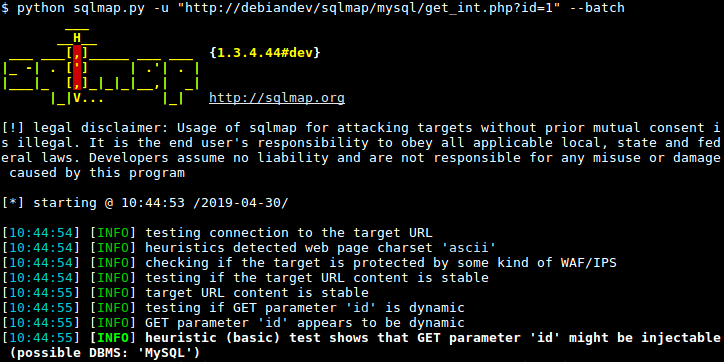
Notice how sqlmap starts by testing the connection, checking for web application firewalls (WAF), and analyzing the parameters. In the end, it makes a preliminary judgment: heuristic (basic) test shows that GET parameter 'id' might be injectable. This is automation in action. sqlmap has already formed a hypothesis that the id parameter is vulnerable, a conclusion that would have required several manual probes.
Conclusion
In this lesson, you transitioned from manual exploitation to automated security testing. You've built a reusable, safe, and practical lab environment—a crucial asset for any security analyst. You now know how to install, verify, and launch a basic sqlmap scan against a target URL.
Key Takeaways:
sqlmapis the essential tool for automating the detection and exploitation of SQL injection vulnerabilities.- A dedicated lab environment, such as a Kali VM running vulnerable Docker containers, is critical for safe and legal practice.
- Kali Linux includes
sqlmapby default, but you can update it by cloning its GitHub repository. - The basic command to test a web page is
sqlmap -u "URL". - For web applications that require login, you must provide a valid session cookie using the
--cookieflag.
You have successfully installed and configured sqlmap. In the next lesson, we will dive deeper into its core function: automatically detecting injectable parameters. We'll examine the tool's output more closely and learn how to use flags like --level and --risk to control the depth and aggressiveness of the scans.