Introduction
In our last lesson, we mastered the art of document chunking, breaking down large texts into small, meaningful pieces. We now have a collection of text chunks, but they're still just text. To enable the "retrieval" in RAG, we need to convert these chunks into a format that allows for efficient, semantic search—a format that a machine can understand based on meaning, not just keywords.
This lesson is the critical bridge from raw text to machine-readable meaning. Your goal today is to generate high-quality embeddings for text chunks using sentence-transformer models. We will explore what sentence embeddings are, why they are the right tool for this job, and how to implement them using the industry-standard sentence-transformers library. By the end of this lesson, you'll be able to convert any piece of text into a dense vector that captures its semantic essence, paving the way for building our searchable knowledge index.
From Words to Vectors: The Concept of Embeddings
At its core, an embedding is a numerical representation—a vector—of a piece of text. The magic of a good embedding model is that it places texts with similar meanings close to each other in a high-dimensional vector space.
Think of the words "apple" and "banana." A good embedding model would generate vectors for them that are close together. The vector for "car," however, would be distant. This geometric relationship, measured by metrics like cosine similarity, allows us to quantify semantic relatedness.
While this idea started with word embeddings (like word2vec), for RAG, we need to represent entire text chunks, not just single words. A naive approach might be to take the average of all the word embeddings in a chunk. However, this "mean pooling" approach often produces mediocre results because it dilutes the meaning and ignores word order and context.
This is where specialized sentence embedding models come in.
Retrieval Augmented Generation (RAG) Explained: Embedding, Sentence BERT, Vector Database (HNSW)
The video 'RAG Explained' by Umar Jamil provides a clear conceptual foundation for why we use embeddings and how models are trained to produce them. It builds from the basic idea of word vectors to the more sophisticated approach of Sentence-BERT.
Please watch the following segments: Why Vectors? (00:13:29 - 00:15:00): Understand the geometric intuition behind using vectors for meaning. Context and BERT: (00:15:00 - 00:19:33): See how models like BERT are trained to understand context, which is the basis for modern embeddings. The Problem with Vanilla BERT: (00:22:41 - 00:23:35): Grasp why a standard pre-trained BERT model isn't suitable for sentence similarity tasks out-of-the-box. The Sentence-BERT Solution: (00:23:35 - 00:28:18): Learn about the Siamese network architecture that is specifically designed to create high-quality, comparable sentence embeddings.
As the video explains, Sentence-BERT (SBERT) fine-tunes a base transformer model (like BERT) using a Siamese network structure. This process explicitly trains the model to produce sentence-level embeddings where the distance between vectors accurately reflects the semantic similarity of the source sentences.
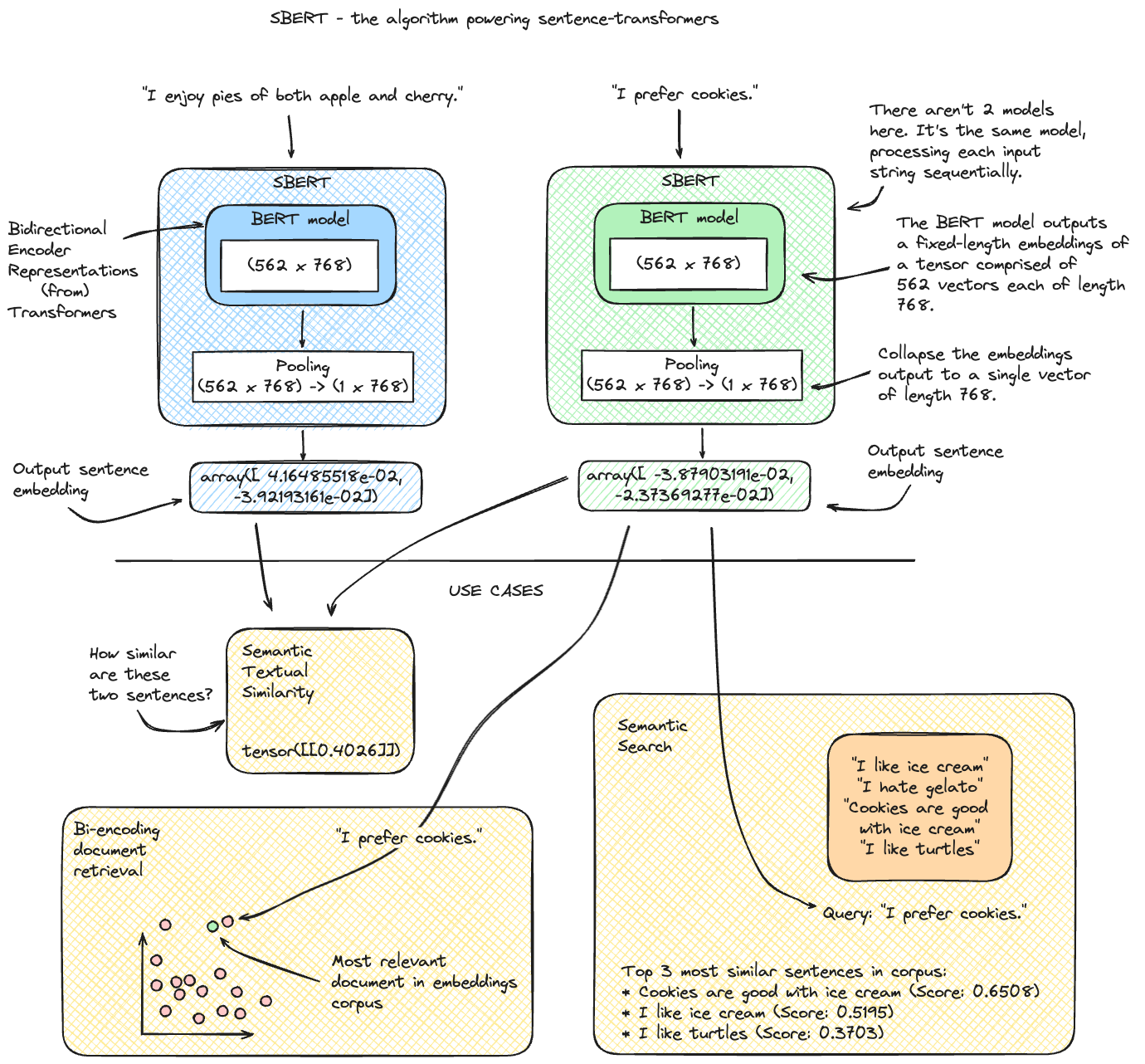
The Engineering Trade-off: Bi-Encoders vs. Cross-Encoders
For someone with your engineering background, it's crucial to understand not just how to generate embeddings, but why a specific architecture like SBERT (a Bi-Encoder) is used for retrieval in RAG. The alternative is a Cross-Encoder.

Let's break down this critical architectural choice:
-
Bi-Encoder (e.g., SBERT):
- How it works: It generates embeddings for the query and the document chunks independently. The search process then involves comparing the query vector to the pre-computed document vectors using a fast operation like cosine similarity.
- Pros: Extremely fast and scalable. You can embed millions of documents offline (the "indexing" step). The online search is just a vector similarity search, which is highly optimized.
- Cons: Less accurate than a Cross-Encoder because the query and document don't interact during the encoding process.
- Use Case: This is the standard for the retrieval step in RAG.
-
Cross-Encoder:
- How it works: It takes both the query and a document chunk as a single input and passes them through the transformer model together. The output is a single score from 0 to 1 indicating their similarity.
- Pros: More accurate because the model can perform full self-attention across both texts simultaneously, capturing fine-grained interactions.
- Cons: Prohibitively slow for search. To find the best document in a collection of 1 million, you would need to run the model 1 million times.
- Use Case: Perfect for re-ranking the top-k documents returned by a Bi-Encoder to improve the final ordering before sending them to the LLM.
For the core task of building our searchable knowledge base, we will use Bi-Encoders via the sentence-transformers library.
Practical Implementation with sentence-transformers
The sentence-transformers library, built by the team behind the original SBERT paper, is the go-to tool for this task. It provides a simple API for downloading pre-trained models from the Hugging Face Hub and using them to generate embeddings.
Let's see this in action.
Sentence Transformers: Sentence Embedding, Sentence Similarity, Semantic Search and Clustering |Code
The video 'Sentence Transformers: Sentence Embedding...' by Pradip Nichite provides a concise, code-first demonstration of using the library.
Watch from 01:40 to 05:19. This will walk you through the essential steps: Loading a pre-trained model from Hugging Face. Using the model.encode() method to generate embeddings for a list of sentences. Examining the output vectors.
As you saw, the process is remarkably straightforward. Let's formalize the steps with a modern, high-performance model like Google's EmbeddingGemma.
Generate Embeddings with Sentence Transformers | Gemma
This guide from Google AI, 'Generate Embeddings with Sentence Transformers | Gemma', provides an up-to-date practical example. It reinforces the core concepts and introduces some powerful features for generating high-quality embeddings.
Read the 'Setup' and 'Generating Embedding' sections. The key takeaway is the code pattern: install the library, load a model by its Hugging Face ID, and call model.encode() on your list of texts.
The core Python code snippet looks like this:
# 1. Install necessary libraries
# pip install -U sentence-transformers

from sentence_transformers import SentenceTransformer

# A good, general-purpose starting model
model_name = 'all-MiniLM-L6-v2'
model = SentenceTransformer(model_name)

# Our text chunks from the previous lesson
chunks = [
    "The first principle is that you must not fool yourself and you are the easiest person to fool.",
    "In quantum mechanics, particles can exist in a superposition of states.",
    "Richard Feynman was a Nobel Prize-winning physicist known for his work in quantum electrodynamics."
]

# 2. Generate embeddings
embeddings = model.encode(chunks)

# 3. Inspect the results
print(f"Shape of embeddings: {embeddings.shape}")
# For 'all-MiniLM-L6-v2', this will be (3, 384), meaning 3 vectors, each of 384 dimensions.
print(f"Embedding for the first chunk (first 5 dimensions): {embeddings[0][:5]}")
Advanced Techniques for High-Quality Embeddings
To reach the "top 1%" of engineers, it's not enough to just call model.encode(). You need to know how to select the right model and use it optimally for your specific task.
1. Anchor Resource: Choosing the Right Model
The performance of embedding models varies significantly across different tasks (e.g., retrieval, classification, clustering). The Massive Text Embedding Benchmark (MTEB) on Hugging Face is the definitive leaderboard for evaluating and comparing models. Before starting a project, consult the MTEB to select a model that performs well on retrieval tasks and fits your computational budget.
- Link to MTEB: https://huggingface.co/spaces/mteb/leaderboard
2. Instructional Prompts for Asymmetric Search
In RAG, we perform asymmetric search: the query is typically short (a question), while the documents are longer (our text chunks). Some of the best embedding models are trained to handle this by adding a task-specific prefix to the text before embedding it.
This technique can significantly boost retrieval performance.
Generate Embeddings with Sentence Transformers | Gemma
Let's revisit the Gemma documentation, which has an excellent section on this advanced technique.
Read the section 'Using Prompts with EmbeddingGemma'. Pay close attention to the use case for RAG, where different prompts (Retrieval-query and Retrieval-document) are used for the query and the documents. This is a crucial optimization for production RAG systems.
For example, when embedding our document chunks for storage, we might use a prompt like "Retrieval-document". When a user asks a question, we would embed their question using the "Retrieval-query" prompt. This ensures both vectors are projected into the same space in a way that optimizes for query-document similarity.
3. Matryoshka Representation Learning (MRL)
This is a cutting-edge training technique that allows you to get variable-sized embeddings from a single model. The most important information is concentrated at the beginning of the vector. This means you can train one large, high-quality model but, for applications where speed or memory is critical, you can simply truncate the embedding vector to a smaller size (e.g., from 768 to 256 dimensions) while retaining much of its utility.
Generate Embeddings with Sentence Transformers | Gemma
The Gemma guide also provides a concise explanation of MRL.
Skim the section on 'Matryoshka Representation Learning (MRL)'. The key idea to grasp is that MRL gives you the flexibility to trade off embedding quality for computational efficiency without needing to train multiple models.
Test your understanding!
You are building a RAG system to answer questions about internal company code repositories. You have already chunked the Python files into functions and classes. Your task is to generate embeddings for these code chunks.
- What model architecture (Bi-Encoder or Cross-Encoder) would you use for generating the embeddings for storage, and why?
- You find a promising new model on the MTEB leaderboard called
code-embed-v1. Its model card says it was trained with instructional prompts: usequery:for questions andcode:for code snippets. How would you modify yourmodel.encode()call when generating embeddings for your Python function chunks? - Write the single line of Python code you would use to generate the embeddings for a list of code chunks named
code_chunks, using thecode-embed-v1model and the correct prompt. Assumemodelis your loadedSentenceTransformerobject.
Show answer
-
You would use a Bi-Encoder (like SBERT). The reason is scalability and speed. You need to pre-compute embeddings for all code chunks so you can perform a fast vector search at query time. A Cross-Encoder would be impossibly slow, as it would require running the model for every single code chunk in your repository for each query.
-
When calling
model.encode(), you would need to prepend the stringcode:to each Python function chunk. This aligns the input with how the model was trained, ensuring you generate the highest quality embeddings for the "document" side of the asymmetric search task. -
The line of code would be:
embeddings = model.encode([f"code: {chunk}" for chunk in code_chunks])Or, if the model supports prompt arguments directly (a feature in newer
sentence-transformersversions):embeddings = model.encode(code_chunks, prompt_name="code") # Hypothetical prompt_name # Or more generally: embeddings = model.encode(code_chunks, prompt="code: ")The key is ensuring the
code:prefix is applied to each chunk.
Conclusion
Today, you've transformed abstract text chunks into concrete, meaningful vectors. This is the cornerstone of semantic search and a non-negotiable step in building a modern RAG system.
Key Takeaways:
- Embeddings as Meaning: Sentence embeddings are vector representations where proximity in space equals similarity in meaning.
- The Right Tool for the Job: Bi-Encoders (like SBERT) are the architectural choice for the retrieval step in RAG due to their speed and scalability, while Cross-Encoders are better for re-ranking.
- Practical Implementation: The
sentence-transformerslibrary provides a simple and powerful interface (model.encode()) to generate embeddings using state-of-the-art models from the Hugging Face Hub. - Pursuit of Quality: Top-tier results come from selecting the right model (using resources like the MTEB leaderboard) and applying advanced techniques like instructional prompts for asymmetric search.
What's Next?
We have successfully generated a high-dimensional vector for every chunk of text in our knowledge base. We are now holding thousands, or potentially millions, of these vectors. The next logical question is: how do we store these vectors and, more importantly, how do we search through them with extreme speed?
In our next lesson, you will learn how to set up a vector database (e.g., FAISS, ChromaDB) to store and index document embeddings, building the final component of our offline indexing pipeline and creating a fully searchable knowledge base.