Introduction
Welcome to the first lesson of our final module, "LLM Operations." In our last session, we wrapped up our study of agentic systems by exploring the Model Context Protocol (MCP), a crucial standard for enabling different AI agents and tools to communicate scalably. You learned how building complex systems requires not just clever orchestration but also standardized interfaces to avoid a chaotic web of custom integrations.
Now that you have the architectural knowledge to design sophisticated, multi-step AI applications, we shift our focus from building to running. How do you take the powerful agent you've designed and serve it to thousands or millions of users efficiently and cost-effectively? A naive implementation using a standard web framework and the base Hugging Face transformers library will quickly hit performance and cost walls.
This is where high-performance inference servers become essential. Today, you will learn to deploy an LLM for serving using a high-performance inference server like vLLM or TensorRT-LLM. We will explore why LLM inference is a unique and difficult challenge, and then dive into the architectures and practical deployment steps for two of the leading solutions in the field.
The Core Challenge: Why LLM Inference is Hard
Before we look at the solutions, we must first understand the problem. Serving a large language model is fundamentally different from serving a traditional computer vision or classification model. The primary bottleneck isn't just the model's size, but its autoregressive generation process and the massive memory requirements of its state.
Key challenges include:
- Sequential Generation: LLMs generate text one token at a time. The generation of token
N+1depends on allNprevious tokens, making the process inherently sequential and difficult to parallelize. - The KV Cache Bottleneck: To avoid recomputing the entire sequence for each new token, LLMs use a Key-Value (KV) cache. This cache stores the intermediate attention states for all previous tokens. However, this cache can become enormous, consuming gigabytes of precious GPU memory, especially for long contexts. Its size is dynamic and unpredictable, making memory management a nightmare.
- Two-Phase Execution: An LLM request has two distinct phases:
- Prefill (or Prompt Processing): The initial processing of the input prompt. This phase is compute-intensive and can be parallelized across the prompt's tokens.
- Decoding (or Generation): The sequential, one-by-one generation of output tokens. This phase is memory-bandwidth-bound, as the GPU spends most of its time reading the large KV cache to generate just one new token.
To get a clear, visual intuition for this process, let's watch a segment from an expert talk on LLM inference optimization.
Mastering LLM Inference Optimization From Theory to Cost Effective Deployment: Mark Moyou
This video, 'Mastering LLM Inference Optimization' by Mark Moyou, provides an excellent and intuitive breakdown of the LLM inference workload. It visualizes how a prompt becomes tokens, matrices, and finally, the memory-hungry KV cache on the GPU.
Watch the segment from 2:46 to 12:47. Focus on understanding the flow: text -> tokenization -> prefill (attention on the whole prompt) -> decode (one token at a time). Pay close attention to the explanation of the KV cache and how it represents the LLM's 'memory'.
As you've seen, managing the KV cache and efficiently scheduling the prefill and decode phases for many concurrent users is the central problem that high-performance serving frameworks aim to solve.
vLLM: Solving Memory Waste with PagedAttention
vLLM is a high-throughput and memory-efficient serving library developed at UC Berkeley. Its core innovation is an algorithm called PagedAttention, which fundamentally changes how the KV cache is managed.
Traditional servers pre-allocate a single, contiguous block of memory for the entire potential KV cache of a request. If your maximum context length is 4096 tokens, the server reserves memory for 4096 tokens, even if the user only sends a 100-token prompt and gets a 50-token response. This leads to massive internal fragmentation and wasted memory.
PagedAttention, inspired by virtual memory and paging in operating systems, divides the GPU memory into smaller, non-contiguous "pages." The KV cache for a sequence is stored in these pages, allowing for far more efficient and flexible memory management.
vLLM Production Deployment: Building High-Throughput Inference ...
To grasp the significance of PagedAttention, let's read the first part of this excellent article on vLLM deployment. It explains the problem with traditional memory allocation and how PagedAttention solves it.
Read the introduction and the sections 'PagedAttention transforms memory management' and 'Continuous batching maximizes GPU utilization'. Focus on the analogy to operating system virtual memory and how this enables non-contiguous storage and memory sharing. Also, understand how continuous batching eliminates idle GPU time compared to static batching.
In addition to PagedAttention, you read about Continuous Batching. Instead of waiting for a full batch of requests to finish, vLLM's scheduler can immediately swap in a new request as soon as a single sequence in the current batch is complete. This maximizes GPU utilization and significantly increases throughput.
Deploying with vLLM
Thanks to its design, deploying a model with vLLM as an OpenAI-compatible API endpoint is remarkably simple. This allows you to use the familiar openai client library to interact with your self-hosted model.
The following video demonstrates this process step-by-step.
vLLM: Easily Deploying & Serving LLMs
This video from the channel NeuralNine provides a practical, hands-on guide to deploying models with vLLM. We'll focus on the part where a model is served as an API endpoint.
Watch the segment from 5:59 to 10:25. This will walk you through installing the required packages, starting the vLLM server with a Hugging Face model, and then writing a Python client to interact with it.
To summarize the deployment process shown in the video:
-
Install dependencies:
pip install vllm openai -
Start the server: You launch the vLLM server from your terminal, pointing it to a model on the Hugging Face Hub. The server automatically downloads the model and starts an API endpoint that mirrors the OpenAI API.
# This command starts the server python -m vllm.entrypoints.openai.api_server \ --model "meta-llama/Meta-Llama-3-8B-Instruct" \ --gpu-memory-utilization 0.90 # Adjust based on your GPU -
Interact with the Python client: You can then write a simple Python script to send requests to your local server, just as you would to OpenAI.
from openai import OpenAI

# Point to the local server
client = OpenAI(
    base_url="http://localhost:8000/v1",
    api_key="not-needed" # API key is not required for local server
)

response = client.chat.completions.create(
  model="meta-llama/Meta-Llama-3-8B-Instruct",
  messages=[
    {"role": "system", "content": "You are a helpful assistant."},
    {"role": "user", "content": "What is the key innovation in vLLM?"}
  ]
)

print(response.choices[0].message.content)
This ease of use and high performance make vLLM a go-to choice for many production deployments.
TensorRT-LLM: Squeezing Peak Performance from NVIDIA GPUs
While vLLM offers a fantastic general-purpose solution, TensorRT-LLM is NVIDIA's answer for achieving the absolute maximum performance on their own hardware. It is not just a library but a compiler and runtime that takes a standard model and rebuilds it into a highly optimized "engine" tailored to a specific GPU architecture.
The core mental model for TensorRT-LLM is a two-phase process:
- Build Phase (Offline): You take a model checkpoint (e.g., from Hugging Face) and use the
trtllm-buildcommand to compile it. This step performs numerous optimizations, such as kernel fusion (combining multiple operations into one), precision quantization (e.g., to FP8 or INT4), and pre-calculating the best parallelization strategy for your specific GPU setup. This build step can take a while, but you only pay this cost once. - Serve Phase (Online): You load the resulting highly-optimized
.enginefiles into a serving framework, typically NVIDIA's own Triton Inference Server or a built-intrtllm-serveutility, and serve requests.
TensorRT-LLM in Practice: A Field Guide to NVIDIA-Optimized LLM ...
This field guide provides a clear mental model and practical workflow for using TensorRT-LLM. It contrasts it with vLLM and explains the 'Build vs. Serve' paradigm.
Please read the sections 'The Mental Model: Build vs Serve', 'End-to-End: From HF Checkpoint to Live Server', and 'OpenAI-Compatible HTTP Serving with trtllm-serve'. This will walk you through the full lifecycle of deploying a model with TensorRT-LLM.
As you've read, the TensorRT-LLM workflow is more involved but can yield significant performance gains. The deployment steps, similar in spirit to vLLM's, look like this:
-
Install TensorRT-LLM: This is often the most complex step, as it requires specific versions of NVIDIA drivers, CUDA, and TensorRT. Using NVIDIA's official Docker containers is highly recommended.
-
Build the Engine (Offline):
# This is a simplified example. The command can have many options. trtllm-build --checkpoint_dir /path/to/your/hf_model \ --output_dir /path/to/your/trt_engine \ --gemm_plugin float16 # Specify precision -
Start the Server (Online): Once the engine is built, you can serve it with an OpenAI-compatible API.
python scripts/launch_triton_server.py \
    --world_size=1 \
    --model_repo=/path/to/your/trt_engine
Note: The exact command can vary between TensorRT-LLM versions. The example above uses the Triton backend.
-
Interact with the Python client: The client code is identical to the one used for vLLM, as both expose a standard OpenAI-compatible endpoint.
vLLM vs. TensorRT-LLM: Which One to Choose?
You now have two powerful options for deploying your LLM. As an engineer, making the right choice depends on your specific context and priorities.
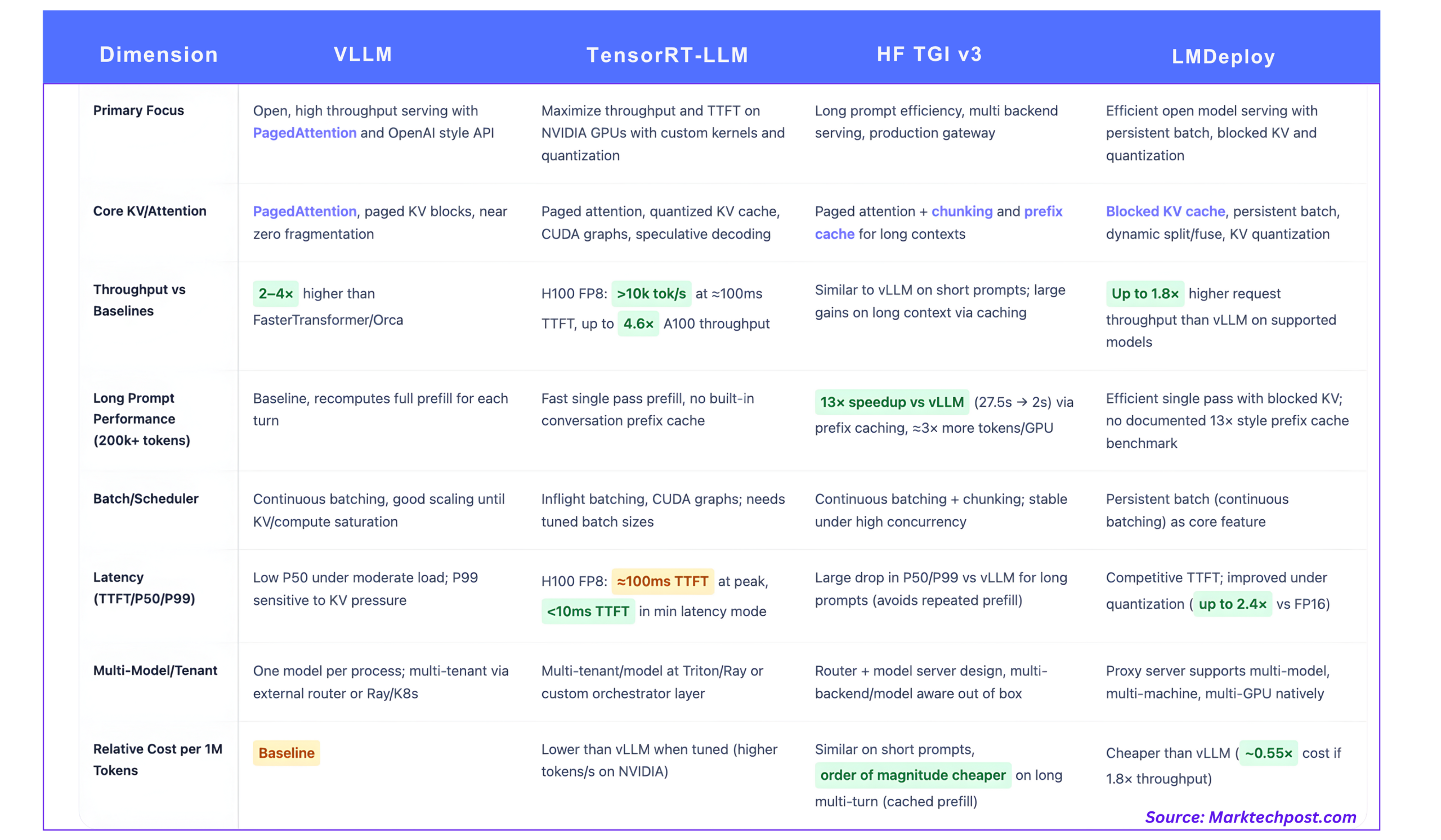
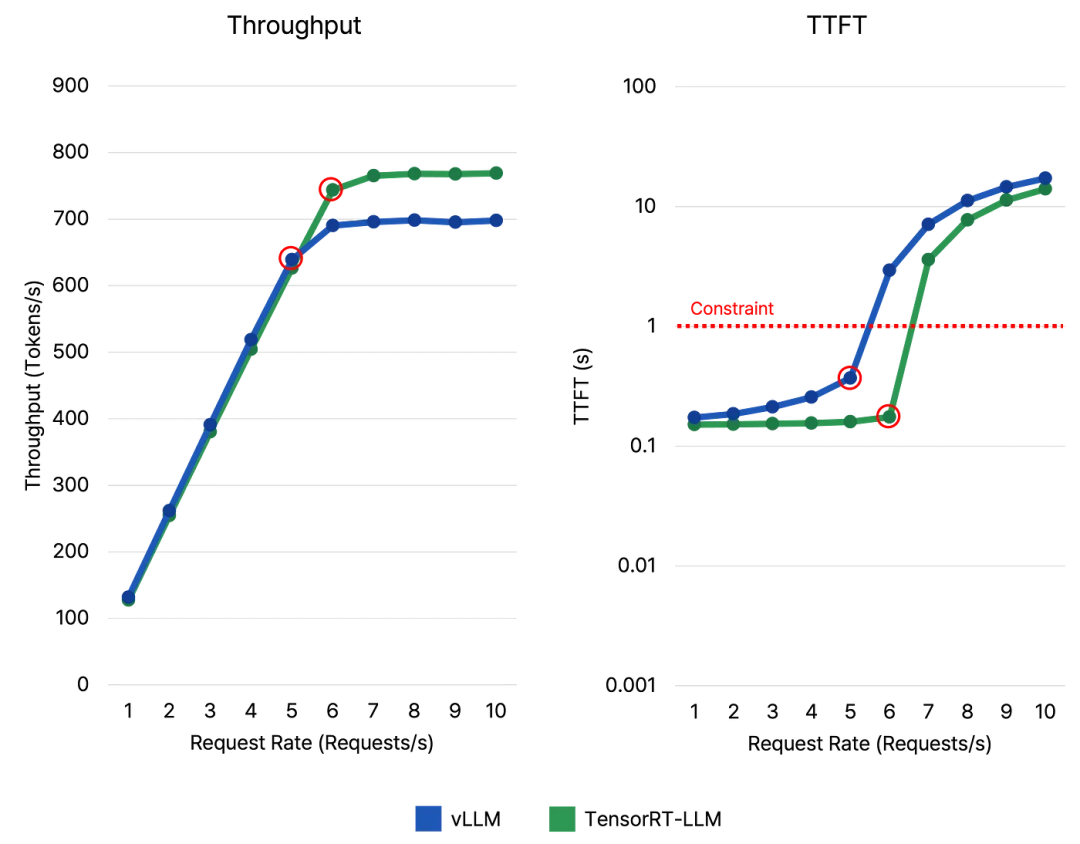
Here's a summary of the trade-offs:
| Feature | vLLM | TensorRT-LLM |
|---|---|---|
| Primary Focus | Ease of use & high general performance | Maximum performance on NVIDIA hardware |
| Setup Complexity | Low. pip install and run. |
High. Requires specific driver/CUDA versions, build step. |
| Flexibility | High. Works dynamically with many models. | Low. Engine is compiled for a specific model, hardware, and configuration. |
| Performance | Very high. PagedAttention is a major win. | Highest possible, especially with FP8 on Hopper GPUs. |
| Best For... | Rapid development, changing models, heterogeneous hardware, and scenarios where ease of use is critical. | Stable, high-volume production models where squeezing every last drop of performance and cost efficiency is the top priority. |
Test your understanding!
You are tasked with deploying a new, experimental translation model for internal testing. The research team will be providing an updated version of the model every few days. Your hardware is a server with several NVIDIA A100 GPUs.
- Which serving framework, vLLM or TensorRT-LLM, would you choose for this initial deployment, and why?
- Six months later, the model is highly successful and is being rolled out to millions of customers. The model architecture is now stable. What framework might you consider migrating to, and what benefits would you expect?
Show answer
-
For the initial deployment, vLLM would be the superior choice. The main reason is its flexibility and ease of use. Since the model is updated frequently, the overhead of re-running the complex
trtllm-buildprocess every few days would be a significant bottleneck for the team. vLLM allows you to simply point the server to the new Hugging Face checkpoint and restart it, a process that takes minutes. -
After six months, with a stable model and a need to serve millions of users, migrating to TensorRT-LLM would be a very strategic move. The high initial setup cost (the build phase) is now a one-time investment. The expected benefits would be lower latency and higher throughput per GPU. This translates directly into a better user experience and lower operational costs, as you could potentially serve the same number of users with fewer GPUs.
Conclusion
Today you've taken a crucial first step into the world of LLM Operations. You've moved beyond the theory of building models to the practical reality of serving them efficiently.
Key Takeaways:
- LLM inference is memory-bandwidth bound due to the large and growing KV cache, making naive serving approaches inefficient.
- vLLM provides a powerful and easy-to-use solution, leveraging PagedAttention and Continuous Batching to dramatically improve memory efficiency and throughput.
- TensorRT-LLM offers peak performance on NVIDIA hardware by compiling models into highly optimized engines, but at the cost of higher complexity and less flexibility.
- Both frameworks can be deployed to provide an OpenAI-compatible API, which has become a de-facto standard, simplifying client-side integration.
- The choice between them is a classic engineering trade-off: ease of use and flexibility (vLLM) versus raw performance and cost efficiency at scale (TensorRT-LLM).
What's Next?
Now that you have a hands-on understanding of how to deploy with vLLM and TensorRT-LLM, our next lesson will broaden the lens. We will conduct a more systematic comparison, bringing in other popular frameworks like Hugging Face's Text Generation Inference (TGI), and analyze their features and trade-offs in different production scenarios. This will equip you to make well-informed architectural decisions for any LLM deployment you face.