Introduction
Welcome back! In our previous lesson, we learned how to architect LLM workflows using prompt chaining, breaking down complex tasks into a sequence of manageable, interconnected steps. This gave us control over the logical flow of our application. However, a key challenge remains: how do we ensure each step in the chain has the most relevant context to perform its task effectively?
Today's lesson addresses this by focusing on the learning outcome: Implement dynamic few-shot example selection using semantic similarity search on embeddings. Instead of using a static, one-size-fits-all list of examples in your prompts, you will learn to dynamically retrieve the most relevant examples for a given user input at runtime. This technique is a cornerstone of building adaptable, efficient, and context-aware AI systems, and it serves as a critical building block for the Retrieval-Augmented Generation (RAG) systems you aim to master.
1. The Problem with Static Context
In few-shot prompting, we provide the LLM with a handful of input-output examples to guide its behavior. The simplest approach is to hardcode these examples directly into the prompt template.
However, this static approach has significant drawbacks, especially as your application needs to handle diverse tasks:
- Information Overload & Irrelevance: If your user asks a billing question, examples about technical support are not just useless—they are noise. This can confuse the model and degrade the quality of its response.
- Inefficiency and Cost: Every example adds tokens to your prompt. A long, static list of examples inflates the prompt size, leading to higher API costs and increased latency, which are critical concerns in production systems.
- Scalability Issues: To cover more scenarios, you would have to keep adding to your static list, making the prompt increasingly bloated and unmanageable.
The solution is to move from a static list to a dynamic selection process.
2. The Dynamic Selection Architecture
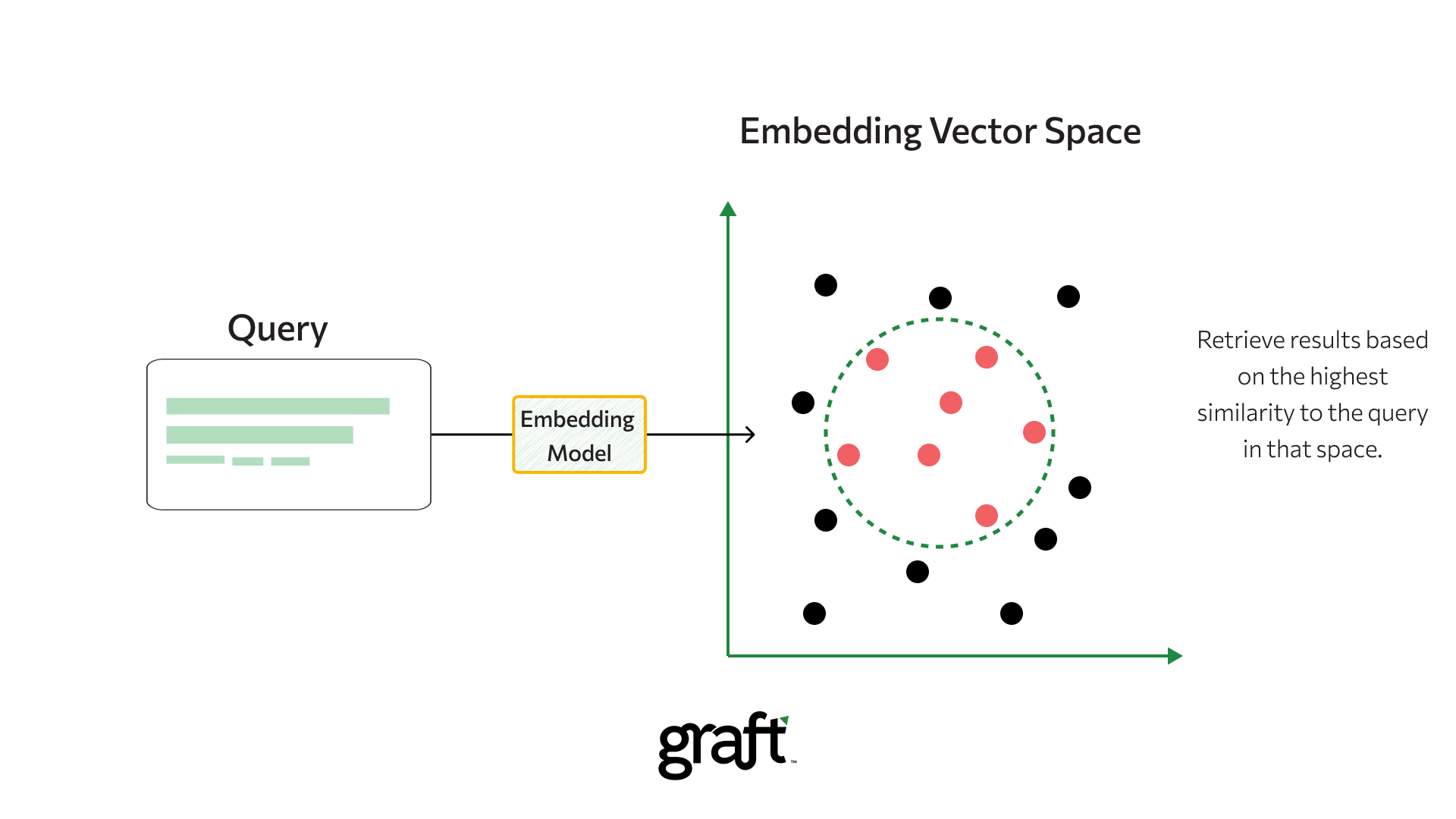
The core idea is simple: for any given user query, we should first find the most relevant examples from a larger pool and then inject only those examples into the prompt. The mechanism that powers this is semantic search.

Let's break down the key components of this architecture:
- Example Pool: This is your comprehensive library of high-quality input-output examples. This is prepared offline.
- Embedding Model: A model (like
all-MiniLM-L6-v2) that converts text into numerical vectors, or embeddings. The crucial property is that semantically similar texts will have vectors that are "close" to each other in the vector space. - Vector Store: A specialized database that stores the embeddings of all your examples and is optimized for fast similarity searches.
- Similarity Search: When a new user query comes in, it's converted to an embedding. The vector store then calculates the similarity (often using cosine similarity) between the query's vector and all the example vectors, returning the "top-k" most similar examples.
To see a fantastic, concise explanation of this process in the context of an agentic system, watch this short clip.
Build Agents that Never Forget: LangMem Semantic Memory Tutorial
The following clip from a LangChain tutorial demonstrates adding an initial search step that scans a memory store based on incoming context before calling the LLM. This is precisely the pattern we are implementing for dynamic few-shot selection.
Watch the segment from 05:54 to 07:20. Pay close attention to how this initial search provides the LLM with relevant information upfront, making the overall process more efficient.
3. Implementing Dynamic Selection with LangChain
While you could build this entire pipeline from scratch—and we'll look at a more manual example later—frameworks like LangChain provide high-level abstractions that streamline this process significantly. The key component for our task is the SemanticSimilarityExampleSelector.
Let's walk through a practical implementation.
Optimizing AI Agents with Dynamic Few-Shot Prompting
The article 'Optimizing AI Agents with Dynamic Few-Shot Prompting' provides an excellent conceptual overview and a clean, step-by-step implementation using LangChain. We'll follow its implementation guide.
Please read the article up to and including the 'Step-by-Step Implementation' section. Focus on understanding the system architecture and the role of each component. Then, carefully review the Python code, as we will be breaking it down next.
Now, let's analyze the implementation from the article.
Step 1: Define Examples and Set Up Models
First, we define our pool of examples and initialize the embedding model and the LLM.
from langchain_community.embeddings import HuggingFaceEmbeddings
from langchain_huggingface import HuggingFaceEndpoint
from langchain_core.vectorstores import InMemoryVectorStore
from langchain_core.example_selectors import SemanticSimilarityExampleSelector
from langchain_core.prompts import FewShotPromptTemplate, PromptTemplate, ChatPromptTemplate

# Our pool of examples
few_shot_examples = [
    {"input": "Why is my bill higher this month?", "output": "Your bill is higher due to international call charges."},
    {"input": "How can I update my payment method?", "output": "Log into your account and go to the billing section."},
    {"input": "How do I reset my password?", "output": "Click 'Forgot Password' on the login page."},
    {"input": "My order hasn't arrived yet.", "output": "Please provide your order number so I can check the status."},
    {"input": "What is your return policy?", "output": "You can return items within 30 days for a full refund."},
]

# Initialize the embedding model (converts text to vectors)
embed_model = HuggingFaceEmbeddings(model_name='sentence-transformers/all-MiniLM-L6-v2')

# Initialize the LLM (you'll need a HuggingFace API token)
# llm = HuggingFaceEndpoint(...)
Step 2: Create the SemanticSimilarityExampleSelector
This is the core component. We instantiate it by providing our examples, the embedding model to use, the vector store class to power the search, and k, the number of examples we want to retrieve. Here, we use a simple InMemoryVectorStore for demonstration purposes.
# Create the selector
example_selector = SemanticSimilarityExampleSelector.from_examples(
    few_shot_examples,          # The full list of examples
    embed_model,                # The embedding model
    InMemoryVectorStore,        # The vector store class
    k=2,                        # The number of examples to select
    input_keys=["input"]
)
Behind the scenes, from_examples does the heavy lifting: it iterates through few_shot_examples, uses embed_model to create an embedding for the input of each one, and stores these embeddings in an instance of InMemoryVectorStore.
Step 3: Build the FewShotPromptTemplate
Now, we create a FewShotPromptTemplate. The key difference from a static template is that instead of passing the examples list directly, we pass our example_selector.
# Define the format for each individual example
example_prompt = PromptTemplate.from_template(
    "User input: {input}\nAssistant output: {output}"
)

# Create the few-shot prompt template
few_shot_prompt = FewShotPromptTemplate(
    example_selector=example_selector,  # Use the dynamic selector
    example_prompt=example_prompt,
    prefix="You are a helpful AI agent. Respond to customer inquiries based on the examples below:",
    suffix="User input: {input}\nAssistant output:",
    input_variables=["input"]
)
Step 4: Test the Dynamic Selection
When we format the prompt with a new user query, the example_selector automatically performs the semantic search and injects only the most relevant examples.
Let's test it with a query about payments.
user_query = "How do I change my billing cycle?"
print(few_shot_prompt.format(input=user_query))
Expected Output:
The formatted prompt will contain the prefix, the suffix, and crucially, the two examples most semantically related to "billing" and "payments"—not the ones about password resets or shipping.
You are a helpful AI agent. Respond to customer inquiries based on the examples below:

User input: How can I update my payment method?
Assistant output: Log into your account and go to the billing section.

User input: Why is my bill higher this month?
Assistant output: Your bill is higher due to international call charges.

User input: How do I change my billing cycle?
Assistant output:
As you can see, the selector correctly identified and retrieved the two most relevant examples, creating a highly contextualized and efficient prompt.
Test your understanding!
You are building a SQL-generating bot. You have a pool of example pairs, where the input is a natural language question (e.g., "Show me all users from Canada") and the output is the corresponding SQL query.
How would you modify the code above to create a dynamic few-shot prompter for this task? What would be the input to the example_selector?
Show answer
You would structure your few_shot_examples list with dictionaries containing "input" (natural language) and "output" (SQL query) keys.
The SemanticSimilarityExampleSelector would be configured to use the input key for generating embeddings and performing the search. When a user provides a new natural language question, the selector would find existing questions that are semantically similar and retrieve their corresponding SQL queries as examples. This guides the LLM to generate syntactically correct and relevant SQL for the new question.
4. A Broader View: Dynamic Selection as a RAG Pattern
The technique we've just implemented is a specific application of a more general architecture: Retrieval-Augmented Generation (RAG). RAG is about retrieving relevant information from an external knowledge source and providing it to the LLM as context to generate a response. In our case, the "knowledge source" was a list of examples.
To see this pattern applied in a larger, more production-like context, the following resource is invaluable. It walks through building a question-answering application over a set of documents from scratch, including creating embeddings, setting up a real vector database, and using the retrieved content to answer questions.
Vector Search RAG Tutorial – Combine Your Data with LLMs with Advanced Search
The 'Vector Search RAG Tutorial' by freeCodeCamp provides a comprehensive walkthrough of building a RAG pipeline. This will give you a deeper appreciation for the end-to-end process that components like SemanticSimilarityExampleSelector abstract away.
Watch the segment from 32:58 to 41:20. This section first explains the limitations of LLMs that RAG solves, and then dives into the implementation of a question-answering app using LangChain, OpenAI, and a vector database. Focus on the overall flow: loading data, creating embeddings, storing them, and then using a retriever to fetch context for a query.
Watching this should solidify the connection in your mind: the retriever in the video and our SemanticSimilarityExampleSelector are performing the same fundamental task—retrieving relevant text based on semantic similarity. The selector is simply a specialized tool for the use case of providing few-shot examples. Understanding both the high-level abstraction and the underlying mechanics is key to becoming a top-tier engineer.
Conclusion
In this lesson, you have moved beyond static prompts to implement a dynamic, context-aware prompting strategy. By leveraging semantic search on embeddings, you can now select the most relevant few-shot examples for any given task, leading to more accurate, efficient, and scalable AI applications.
Key Takeaways:
- Static few-shot prompting is inefficient, leading to high costs, increased latency, and potential model confusion from irrelevant context.
- Dynamic few-shot prompting solves this by selecting the most relevant examples at runtime based on the user's input.
- The core mechanism involves embedding the user query, performing a semantic similarity search against a vector store of pre-embedded examples, and retrieving the top-k results.
- Frameworks like LangChain simplify this with components like
SemanticSimilarityExampleSelector, which automates the retrieval and injection of examples into aFewShotPromptTemplate. - This technique is a specific instance of the broader Retrieval-Augmented Generation (RAG) pattern, a foundational architecture for building knowledge-intensive LLM applications.
What's Next?
So far, we have used dynamic retrieval to guide the LLM's reasoning process by providing relevant examples. But what about controlling the structure of the LLM's output? In many production applications, you need the model to respond in a predictable, machine-readable format like JSON or XML.
In the next lesson, we will tackle this head-on. You will learn to design prompts that reliably produce structured outputs like JSON or XML, including instructions for error handling. This skill is essential for integrating LLMs into larger software systems where predictable data formats are non-negotiable.