Introduction
In our last lesson, we focused on making your prompts more context-aware by implementing dynamic few-shot example selection. You learned to use semantic search to retrieve the most relevant examples for a given query, ensuring the LLM has the best possible guidance for its reasoning process.
However, in many production environments, a well-reasoned, free-text answer is not enough. To integrate an LLM into a larger software application—whether it's to populate a database, feed a UI component, or call another API—you need the output in a predictable, machine-readable format. This is where today's lesson comes in.
This lesson directly addresses the learning outcome: Design prompts that reliably produce structured outputs like JSON or XML, including error handling instructions. We will explore a hierarchy of techniques, from basic prompt instructions to modern, API-native features that guarantee structured data, and finally, how to build robust systems that can handle the inevitable failures.
1. The Need for Structured Output
By default, LLMs generate natural language. This is ideal for chatbots and content creation but creates significant challenges for downstream software components. Attempting to parse free text with regular expressions is brittle, error-prone, and a maintenance nightmare.
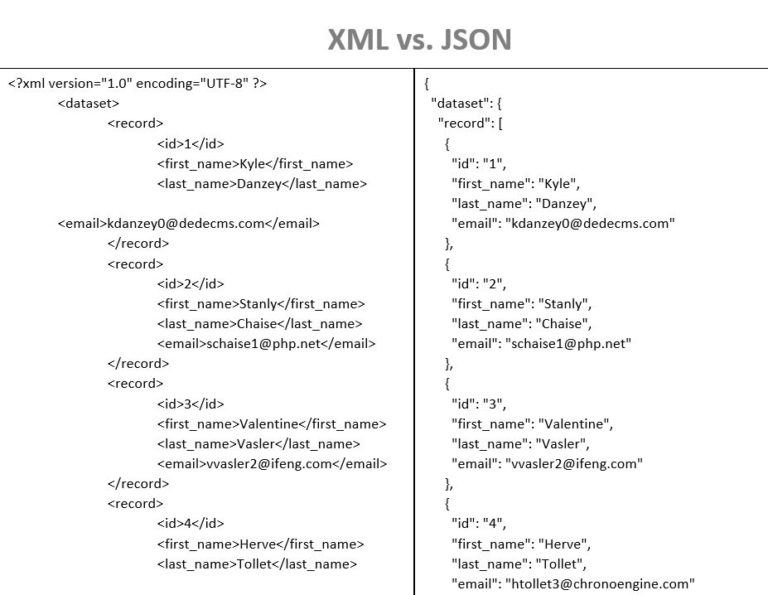
Structured data formats like JSON (JavaScript Object Notation) and XML (eXtensible Markup Language) solve this problem.
Prompting LLMs to Return Clean, Parseable JSON
To understand why this is so critical, let's start with a clear explanation of the problem with natural language outputs and the advantages of using JSON.
Read the first section of this article, up to the heading 'A 4-step pattern for “forced JSON” prompts'. It provides a perfect contrast between human-readable text and machine-parseable JSON.
As the article highlights, JSON provides three key benefits:
- Deterministic Parsing: Its strict syntax (
{}for objects,[]for arrays, quoted keys) means that if the JSON is valid, it can be reliably parsed by standard libraries in any programming language. - Explicit Types: It supports fundamental data types like strings, numbers, booleans, and nulls, preventing ambiguity (e.g., is
123a number or a string?). - Nested Structure: It naturally represents the hierarchical relationships found in real-world data, like a customer with a list of orders.
While XML can also be used, JSON is generally preferred in modern applications due to its more concise syntax and native compatibility with JavaScript environments.
2. Prompt-Based Strategies for Structured Output
The "classic" approach to getting structured output relies entirely on prompt engineering. This involves clearly instructing the model on the desired format. A robust prompt for this purpose generally includes four key components.
Prompting LLMs to Return Clean, Parseable JSON
The same article we just looked at provides an excellent 4-step framework for designing prompts that force JSON output. Let's study this pattern.
Read the section titled 'A 4-step pattern for “forced JSON” prompts'. Pay close attention to the four ingredients: format instructions, a JSON template, validation rules, and few-shot examples.
Let's summarize this powerful 4-step pattern:
-
Strict Format Instructions: Be explicit and firm. Use phrases like "You MUST return ONLY valid JSON," and "Do NOT include any explanations or extra text." Wrapping the output in markers (e.g.,
---BEGIN JSON--- ... ---END JSON---) can also help isolate the structured data. -
Provide a "Fill-in-the-Blanks" Template: Don't make the model guess the structure. Give it the exact JSON object you want, with empty values. Use comments within the template to specify data types and constraints. This transforms the task from creative generation to form-filling.
Example Template:
{ "feedback_analysis": { "sentiment": "", // string: "Positive", "Negative", or "Neutral" "core_demand": "", // string: A 10-30 character summary of the user's request "issue_type": "", // string: "Delivery", "Quality", "Billing", or "Other" "urgency_level": 0, // integer: 1 (low) to 3 (high) "keywords": [] // array of strings: 3-4 key nouns } } -
Add Validation Rules: Explicitly state constraints that aren't obvious from the template structure.
- Type Rules: "
urgency_levelmust be an integer like3, not'3'." - Value Rules: "
sentimentmust be one of the listed values; do not invent a new one." - Handling Nulls: "If a value is not present in the source text, use
null."
- Type Rules: "
-
Use Few-Shot Examples: Just as we saw in the previous lesson, providing a complete input-to-output example is incredibly effective. Show the model a sample text and the corresponding, perfectly formatted JSON output to reinforce the pattern.
Test your understanding!
You are building a system to extract recipe information from unstructured text. You need the output in JSON. Design a prompt template (including instructions and the JSON structure) to extract the recipe name, prep time (in minutes), and a list of ingredients, where each ingredient is an object with a name and quantity (as a string, e.g., "2 cups").
Show answer
Here is a robust prompt incorporating the 4-step pattern:
You MUST return ONLY valid JSON. Do not include any explanations, comments, or extra text outside the JSON object.

Extract the recipe information from the text provided below and format it according to this JSON template.

### JSON Template
{
  "recipe": {
    "name": "",           // string: The full name of the recipe
    "prep_time_min": 0,   // integer: The preparation time in total minutes
    "ingredients": [      // array of objects
      {
        "name": "",       // string: Name of the ingredient
        "quantity": ""    // string: Quantity and unit (e.g., "1 cup", "100g")
      }
    ]
  }
}

### Validation Rules
- `prep_time_min` must be an integer, not a string.
- If the preparation time is not mentioned, use `0`.
- The `ingredients` array should contain one object for each ingredient listed.

### Input Text
{your_recipe_text_here}

### JSON Output
3. API-Level Enforcement: The Modern Approach
While prompt-based methods are powerful, they are not foolproof. The model can still occasionally fail to produce valid JSON. For production systems where reliability is paramount, a better approach is to use API features that guarantee structured output.
OpenAI's API, for example, has evolved from a basic json_mode to a much more powerful structured output feature that integrates with Pydantic models. This is the state-of-the-art method for ensuring reliable, validated data structures from an LLM.
OpenAI Structured Output - All You Need to Know
This video by Dave Ebbelaar provides an excellent overview of OpenAI's structured output capabilities. It explains why this is a major improvement and demonstrates how to use it with Pydantic, which is a best practice for Python-based applications.
Watch the video, focusing on these key segments: Introduction (00:00 - 04:57): Understand the benefits of the new feature (type safety, explicit refusals) and how it improves on older methods like json_mode. When to Use It (04:57 - 07:12): Learn the distinction between using this for structured responses versus using function calling for tool integration. Pydantic Implementation (14:36 - 21:11): This is the most critical part. Pay close attention to how a Pydantic class is defined and passed to the API. Notice how this simplifies the code and provides an already-validated object as the output. Practical Tips (21:11 - 22:23): Absorb the final recommendations for effective use.
The key takeaway is that by defining your desired output as a Pydantic BaseModel, you are not just telling the model what you want; you are giving the API a schema it can enforce.
Here’s a simplified example of the Pydantic approach, inspired by the video:
import os
from openai import OpenAI
from pydantic import BaseModel, Field
from typing import List

# Assumes you have your OPENAI_API_KEY in your environment variables
client = OpenAI()

# 1. Define your data structure using Pydantic
class Ingredient(BaseModel):
    name: str = Field(description="Name of the ingredient")
    quantity: str = Field(description="Quantity and unit, e.g., '2 cups', '100g'")

class Recipe(BaseModel):
    """A model to hold extracted recipe information."""
    name: str = Field(description="The full name of the recipe")
    prep_time_min: int = Field(description="The preparation time in total minutes")
    ingredients: List[Ingredient]

# 2. Call the API with the Pydantic model
recipe_text = "To make a simple pancake, you need 1 cup of flour, 2 eggs, and 200ml of milk. It takes about 15 minutes to prepare."

response = client.chat.completions.create(
    model="gpt-4o",
    messages=[
        {"role": "system", "content": "You are an expert recipe parser. Extract information into the Recipe JSON format."},
        {"role": "user", "content": recipe_text}
    ],
    response_model=Recipe # This is the magic!
)

# 3. The response is already a Pydantic object, fully validated!
print(f"Recipe Name: {response.name}")
print(f"Prep Time: {response.prep_time_min} minutes")
for ingredient in response.ingredients:
    print(f"- {ingredient.quantity} of {ingredient.name}")

# You can also easily convert it to a dictionary
# print(response.model_dump_json(indent=2))
This approach is vastly superior because it shifts the burden of validation from your application code to the API provider, resulting in cleaner, more robust, and easier-to-maintain systems.
4. Designing for Failure: Handling Errors
Even with API-level enforcement, things can go wrong. The model might refuse to answer, the API call might fail, or the generated output (even if valid JSON) might not meet your logical constraints. A production-grade system must anticipate and handle these failures gracefully.
Handling LLM Output Parsing Errors
This article provides a comprehensive guide to handling parsing errors. It covers the common causes of failure and outlines robust strategies for recovery.
Read the sections 'Common Causes of Parsing Failures', 'Strategies for Handling Parsing Errors', and review the 'Implementation Example (Python)'. Focus on the strategy of 'Retry with Corrective Prompting'.
Let's distill the key strategies for building a resilient pipeline:
-
Identify Common Failures: Be aware of what can go wrong. The most common issues are:
- Malformed JSON: Trailing commas, missing brackets, unquoted keys (less of an issue with API
response_model). - Incorrect Data Types:
"price": "19.99"instead of19.99. - Hallucinated Fields: The model adds extra keys not in your template.
- Refusals/Chatter: The model outputs "I cannot help with that" or other text instead of the JSON object.
- Malformed JSON: Trailing commas, missing brackets, unquoted keys (less of an issue with API
-
Implement a Retry Loop: Don't let a single failure crash your application. Wrap your API call and parsing logic in a
try...exceptblock.- Simple Retry: The first attempt at recovery is often to simply retry the request. A transient network issue or model glitch might be resolved on the second try. Use exponential backoff to avoid overwhelming the API.
- Corrective Prompting: This is a more intelligent retry strategy. If parsing fails, you catch the error, then make a new API call. This new call includes the original prompt, the model's failed output, and the specific error message, with an instruction to "fix the error."
Corrective Prompt Example:
Your previous response failed to parse with the error: `JSONDecodeError: Expecting property name enclosed in double quotes`.

Previous response snippet:
`{ 'name': 'Pancakes', ... }`

Please correct the JSON by using double quotes for all keys and provide a valid JSON object.
This turns the LLM into its own debugger, which is a highly efficient pattern for fixing syntax errors without rerunning a potentially expensive initial generation.
-
Define a Fallback: If all retry attempts fail, your system needs a graceful exit. This could mean:
- Returning a default value.
- Logging the error and alerting a developer.
- Notifying the end-user that the request could not be completed.
- Flagging the task for a human review queue.
Conclusion
You have now learned a complete workflow for generating reliable, structured data from LLMs—a critical skill for any applied AI engineer. You can now move beyond simple chat and build LLMs into complex, automated software pipelines.
Key Takeaways:
- Structured output (JSON/XML) is essential for integrating LLMs into software systems, providing predictable and machine-readable data.
- Prompt-based strategies using instructions, templates, validation rules, and few-shot examples are effective but not foolproof.
- Modern API-level features, like OpenAI's
response_modelwith Pydantic, offer guaranteed syntactic validity and are the recommended approach for production systems. - Robust error handling is non-negotiable. Implementing retry loops with corrective prompting and defining clear fallback mechanisms are crucial for building resilient applications.
What's Next?
In this lesson, we focused on ensuring the structure of the model's output is correct and handling failures in that process. However, robustness also depends on how the model handles the input it receives. What if the user's request is ambiguous, contains edge cases, or is intentionally malicious?
In our next lesson, we will address this by learning to design robust prompts that anticipate and handle edge cases and ambiguous user inputs. This will complete your toolkit for building truly production-ready, reliable, and safe LLM-powered applications.